
Partitioning... Trying to create a new simple volume.

FreudianSlap

New member
Local time
9:02 AM
Messages
3
Hi all!

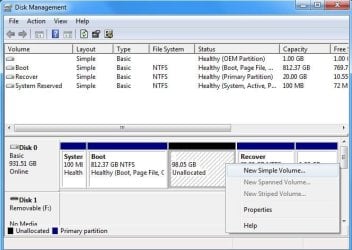
I'm wanting to create a new partition on my drive of about 100GB. I shrank the main partition which left me with 98.05GB unallocated. Fine, but when I try to create a new simple volume in the unallocated space I get the error: "There is not enough space on the available disks to complete the operation."

It does ask me what size I want the new simple volume to be, but I've tried everything from the entire size of the unallocated space, down to 1GB. Am I missing something here?

Any help would be appreciated, Many thanks.
 

Attachments
  • newsimpvo..jpg
    newsimpvo..jpg
    49.2 KB · Views: 244
  • notenough.jpg
    notenough.jpg
    46.1 KB · Views: 198

My Computer My Computer

OS
Windows 7
its giving you the wrong error message, the problem is you have 4 primary partitions, in order to make that new volume in that location using windows, C:\ would need to be converted to an extended partition, i dont know how to do this im afraid, but if you stick around sure someone will help
 

My Computer My Computer

Computer type
PC/Desktop
Computer Manufacturer/Model Number
Medion Erazer (note to self: insert model number) - with custom additions
OS
Windows 10 Pro x64
CPU
Intel Core i5 7400 @ 3.00GHz
Motherboard
OEM supllied with PC
Memory
8GB 2133Mhz DDR4 (OEM supplied)
Graphics Card(s)
Gygabyte Windforce GTX 1050Ti (Factory Overclocked)
Sound Card
Realtek
Monitor(s) Displays
Acer Al1980 + HKC
Screen Resolution
1360*768(HKC) / 1280*1024(Acer)
Hard Drives
1TB Toshiba
1TB WD Caviar Green
120GB Samsung Evo 840
PSU
OEM supplied (no power rating on case)
Case
OEM Supplied
Cooling
Stock
Keyboard
Logitech Wireless
Mouse
Logitect Wireless
Internet Speed
40Mb/s Down 10Mb/s Up
Antivirus
Defender
Browser
Firefox
Is that a windows limitiation, that it won't see more than four partitions, or is it a limitation of the windows disk managament tool, that it wont create more than four?

Could I allocate that space using a different partition program, and if so, would Windows recognise it?
 

My Computer My Computer

OS
Windows 7
No, you cannot have more than four primary partitions. It's an MBR architecture limitation, not Windows limitation nor Disk Management limitation. You can create an extended partition.
 

My Computer My Computer

Computer Manufacturer/Model Number
Custom Build
OS
Windows 7 Ultimate x64 SP1 clean install
CPU
AMD Athlon 64 X2 6400+
Motherboard
Asus M2N-E SLI
Memory
4 GB
Graphics Card(s)
2 x NVidia Geforce 8600 GTS
Sound Card
Trust 5.1 Surround USB
Monitor(s) Displays
Benq FP931 19"
Screen Resolution
1280x1024@32bit@75MHz
Hard Drives
1 x Western Digital 500GB SATA (OS installation), 2 x Seagate 320GB SATA, 1 x Seagate 250GB IDE (in external USB box), 1 x TrekStor 750GB USB
PSU
650W
Keyboard
Logitech Cordless Desktop EX 100
Mouse
Logitech Cordless Optical
Internet Speed
8192 kbps / 640 kbps
Hi, thanks for your replies.

I've resolved this by backing up everything on D, then creating an extended partition, and recreating D, as well as the extra drive I needed. :)
 

My Computer My Computer

OS
Windows 7
Happy you solved :)
 

My Computer My Computer

Computer Manufacturer/Model Number
Custom Build
OS
Windows 7 Ultimate x64 SP1 clean install
CPU
AMD Athlon 64 X2 6400+
Motherboard
Asus M2N-E SLI
Memory
4 GB
Graphics Card(s)
2 x NVidia Geforce 8600 GTS
Sound Card
Trust 5.1 Surround USB
Monitor(s) Displays
Benq FP931 19"
Screen Resolution
1280x1024@32bit@75MHz
Hard Drives
1 x Western Digital 500GB SATA (OS installation), 2 x Seagate 320GB SATA, 1 x Seagate 250GB IDE (in external USB box), 1 x TrekStor 750GB USB
PSU
650W
Keyboard
Logitech Cordless Desktop EX 100
Mouse
Logitech Cordless Optical
Internet Speed
8192 kbps / 640 kbps
Back
Top