Unable to crop in Lview Pro 2.0

tkmops

New member
Member
Local time
1:23 PM
Messages
63
Unable to crop in Lview Pro 2.0

Win 7

I've been using the image program Lview Pro 2.0 for many years without issue, but recently have not been able to properly 'crop' images. While the picture is in Lview, I would select the 'crop tool'...the mouse icon changes to a '+' sign, then select the area to keep, then 'image', and 'crop'.

But, the crop tool no longer drags all the way to the right as far as I want to go. No matter how far I drag the mouse to the right, the dashed line indicating where the crop is to happen doesn't go all the way over.

Attached are two pix...one is my original test image, the other is the most I can crop it.

I've changed my mouse, so that's not it.

Ideas, anyone?
 

Attachments
  • Clip1.jpg
    Clip1.jpg
    264.3 KB · Views: 0
  • Clip2.jpg
    Clip2.jpg
    171.8 KB · Views: 0

My Computer My Computer

At a glance

Win 7 64 bitI56GBNvidia
Computer type
PC/Desktop
Computer Manufacturer/Model Number
Custom
OS
Win 7 64 bit
CPU
I5
Memory
6GB
Graphics Card(s)
Nvidia
I used to use that, is it registered? I was given a reg key by the developer long ago and it opened up all kinds of extra features. But I tried to run that app on Windows 7 and it choked. How did you get it running? I don't even know if I still have the app saved, it was on a floppy disk...

Oh, I see, there is a new 64 bit version, but I used 2.0 for years, it had no x64 support... I could not install the new version. it failed to create a folder for installation.

Ok you have to make a folder manually in Program Files (x86), then it goes right in. I added the reg key, I was able to do a "Simple Crop", no problem. If you are using that old version of 2.0, get the new version

LView Pro
 

My Computer My Computer

At a glance

Windows 10/Windows 7 (My Idea- Virtual PC)Intel(R) Core(TM) i5-3470 CPU @ 3.20GHz16 GBnVidia GeForce GTX 750 Ti (2GB)
Computer type
PC/Desktop
Computer Manufacturer/Model Number
Lenovo Thinkcenter M92p
OS
Windows 10/Windows 7 (My Idea- Virtual PC)
CPU
Intel(R) Core(TM) i5-3470 CPU @ 3.20GHz
Motherboard
Lenovo MahoBay
Memory
16 GB
Graphics Card(s)
nVidia GeForce GTX 750 Ti (2GB)
Sound Card
nVidia HD Audio
Monitor(s) Displays
RCA 4KTV 50"
Screen Resolution
3840p x 2160p
Hard Drives
Onboard:
Seagate ST500DM009-2F110A 500GB
WDC WD4000FYYZ-01UL1B1 (WD-WCC131910831) [3726 GB]

USB 3.0
My Book 1140 (WCAZAD122454) [1862 GB]
Apple MDT MD10EAVS-00D7B0 (0000AB123473) [931 GB]

External:
WD Blue Innostar/Matsunichi (465 GB)
WD
PSU
Stock Thinkcenter M92p
Case
Stock Thinkcenter M92p
Cooling
Active
Keyboard
BYTEC BY-GA-KT-100-AC
Mouse
BYTEC
Internet Speed
1 GHz Down, 40 Mbps Up
Antivirus
Windows Defender
Browser
EDGE
Other Info
Old Other Info:
I finally have an Intel machine that has more than 8GB of Ram.
My ASUS M2N-SE AMD Windows 7 machine is back to Windows 7. Replaced the AMD 4400+ CPU and maxed out the RAM (4GB).
My Core Duo machine is only 2GB of Ram and it is locked to Windows XP in order to run Pro Tools 6.4, which I have been using since 2004.
I have one other Dell OptiPlex 980 tower, Identical to this one,
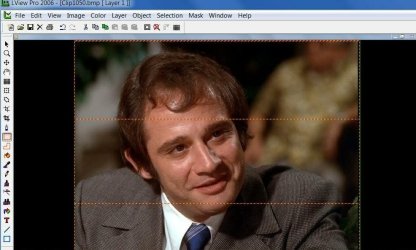
Thanks for the info. I downloaded and installed the Lview Win 7 X64 version(I had 2.0 before). But now after I select the crop area, 2 orange dashed lines appear(see attachment), but after I 'crop' those dashed lines are gone from the final image. How do I make it so I don't see those dashed lines?
 

Attachments

  • Clip1.jpg
    Clip1.jpg
    79.6 KB · Views: 0

My Computer My Computer

At a glance

Win 7 64 bitI56GBNvidia
Computer type
PC/Desktop
Computer Manufacturer/Model Number
Custom
OS
Win 7 64 bit
CPU
I5
Memory
6GB
Graphics Card(s)
Nvidia
How to set Lview Pro 2006 X64 to default 'save as' to .bmp format?
I recently upgraded my Lview Pro 2.0 to the 2006 X64 version, and every time I go to save an image it defaults to .lvp, even though I have checked 'Next time default to the same File Type'.
Anyone know how to do this?
 

My Computer My Computer

At a glance

Win 7 64 bitI56GBNvidia
Computer type
PC/Desktop
Computer Manufacturer/Model Number
Custom
OS
Win 7 64 bit
CPU
I5
Memory
6GB
Graphics Card(s)
Nvidia
It has been a very long time since I used this app, and this version appears to be slightly different than v2.0. Mine was already set to BMP as default, I had to fiddle around a bit to get it to save different formats... As far as the Cropping, there are a few cropping tools in the toolbar. I only used the quick crop tool... There is a lot there. That's what I liked about the program...

As far as the dashed lines, as long as they do not save to the finished file it sound be OK, they appear to act as a guide.
 

My Computer My Computer

At a glance

Windows 10/Windows 7 (My Idea- Virtual PC)Intel(R) Core(TM) i5-3470 CPU @ 3.20GHz16 GBnVidia GeForce GTX 750 Ti (2GB)
Computer type
PC/Desktop
Computer Manufacturer/Model Number
Lenovo Thinkcenter M92p
OS
Windows 10/Windows 7 (My Idea- Virtual PC)
CPU
Intel(R) Core(TM) i5-3470 CPU @ 3.20GHz
Motherboard
Lenovo MahoBay
Memory
16 GB
Graphics Card(s)
nVidia GeForce GTX 750 Ti (2GB)
Sound Card
nVidia HD Audio
Monitor(s) Displays
RCA 4KTV 50"
Screen Resolution
3840p x 2160p
Hard Drives
Onboard:
Seagate ST500DM009-2F110A 500GB
WDC WD4000FYYZ-01UL1B1 (WD-WCC131910831) [3726 GB]

USB 3.0
My Book 1140 (WCAZAD122454) [1862 GB]
Apple MDT MD10EAVS-00D7B0 (0000AB123473) [931 GB]

External:
WD Blue Innostar/Matsunichi (465 GB)
WD
PSU
Stock Thinkcenter M92p
Case
Stock Thinkcenter M92p
Cooling
Active
Keyboard
BYTEC BY-GA-KT-100-AC
Mouse
BYTEC
Internet Speed
1 GHz Down, 40 Mbps Up
Antivirus
Windows Defender
Browser
EDGE
Other Info
Old Other Info:
I finally have an Intel machine that has more than 8GB of Ram.
My ASUS M2N-SE AMD Windows 7 machine is back to Windows 7. Replaced the AMD 4400+ CPU and maxed out the RAM (4GB).
My Core Duo machine is only 2GB of Ram and it is locked to Windows XP in order to run Pro Tools 6.4, which I have been using since 2004.
I have one other Dell OptiPlex 980 tower, Identical to this one,
Whoops, I re-read my last post, where I said 'How to set Lview Pro 2006 X64 to default 'save as' to .bmp format?
I recently upgraded my Lview Pro 2.0 to the 2006 X64 version, and every time I go to save an image it defaults to .lvp, even though I have checked 'Next time default to the same File Type'.
Anyone know how to do this?'
What I meant to say was:
I recently upgraded my Lview Pro 2.0 to the 2006 X64 version, and every time I go to save an image it defaults to .lvp, even though I have changed it to save as .bmp, and checked 'Next time default to the same File Type'. And the next time trying to save an image, it still tries to save as .lvp.
Anyone know how to do this?'
 

My Computer My Computer

At a glance

Win 7 64 bitI56GBNvidia
Computer type
PC/Desktop
Computer Manufacturer/Model Number
Custom
OS
Win 7 64 bit
CPU
I5
Memory
6GB
Graphics Card(s)
Nvidia
Back
Top