Unable to delete video file.

twisted

New member
Local time
2:23 PM
Messages
6
Hello. I have a .MKV file on my computer that I'm unable to delete.

when click on "delete"
it shows "Preparing to Recycle" from Discovering items
Time remaining: Calculating
Items remaining : Calculating
speed: Calculating

Hold shift + delete
Preparing to delete ... the rest are the same as above

1: everytime i rename the file , = Windows Explorer is not responding
2: click on the .MKV properties, nothing happened....
3: try to replace with another file with a same name = doesn't work.
4: boot from safe mode, still won't let me delete it
5: it won't let me move the .MKV to other folders as well
6. Cannot take control of it.
7. tried renaming the .mkv extension to .txt no winrar no luck.
8. tried deleting the file containing it no luck.

I also made a new video file and gave it the same name but with -copy and now that wont delete.

Any clues as how I can get rid of this video file?

Thanks in advance.
 

My Computer

OS
windows 7

My Computer

Computer Manufacturer/Model Number
HP, Dell, Gateway, Toshiba - 4 laptops and 2 desktops
OS
Vista, Windows7, Mint Mate, Zorin, Windows 8
CPU
from 1.6GHz Duo to i7
Monitor(s) Displays
2x HP w2207
Hard Drives
5x HDD, 7x SSD, 12x Externals
Keyboard
with trackball - no mices
Mouse
Trackball mice
Internet Speed
DSL 6000
It's possible a program is using the file and therefore you cannot delete it, if WHS' method doesn't work, then close all of the programs that you can and try to delete it again.
 

My Computer

Computer Manufacturer/Model Number
Apple Macbook Pro (April 2009)
OS
W7 Ult. x64 | OS X
CPU
Intel Mobile Core 2 Duo 2.93Ghz [T9800 Penryn]
Motherboard
NVIDIA nForce 730i Rev. B1 [Mac-F2268EC8 (U2E1)]
Memory
4096MB Samsung DDR3 Dual Channel [PC3-8500F 1066Mhz]
Graphics Card(s)
NVIDIA GeForce 9600M GT 512MB [G96M Rev. C1]
Sound Card
SB X-Fi Surround 5.1 USB | Onboard Realtek (Disabled)
Monitor(s) Displays
Acer x223wbd 22" | Apple Anti-Glare 17" (Disabled)
Screen Resolution
{Current} 1440x900 {Acer} 1680x1050 {Apple} 1920x1200
Hard Drives
{Internal}
Seagate Momentus 320GB 2.5" 7200RPM [ST9320421AS]

{Externals}
LaCie 320GB USB 2.0 HDD [301284UR]
LaCie 750GB USB 2.0 FW400 eSATA HDD [301314U]
LaCie 1TB USB 2.0 HDD [301304UR]
PSU
Magsafe
Case
Aluminum/Unibody (MBP52)
Cooling
2 x 6000 RPM Fans
Keyboard
Logitech G-15v2 [PN 920-000379]
Mouse
Logitech G-9 [PN 910-000338]
Internet Speed
12Mbps/2.5Mbps w/ 24Mbps Speed Boost [Comcast]
Other Info
Logitech X-540 Speakers [PN 970223-0122]
Sennheiser PC-151 Headset
It's possible a program is using the file and therefore you cannot delete it, if WHS' method doesn't work, then close all of the programs that you can and try to delete it again.
Well, he tried in safe mode. That should have taken care of it - or not?
 

My Computer

Computer Manufacturer/Model Number
HP, Dell, Gateway, Toshiba - 4 laptops and 2 desktops
OS
Vista, Windows7, Mint Mate, Zorin, Windows 8
CPU
from 1.6GHz Duo to i7
Monitor(s) Displays
2x HP w2207
Hard Drives
5x HDD, 7x SSD, 12x Externals
Keyboard
with trackball - no mices
Mouse
Trackball mice
Internet Speed
DSL 6000
I have tried that method and this happens.

And I have had the file for a few weeks so I don't think its being used.
 

Attachments

  • this.png
    this.png
    374.3 KB · Views: 520

My Computer

OS
windows 7
If you have that kanokon installed at C: uninstall or remove it. why does it say -copy?


otherwise get unlocker.
 

My Computer

Computer Manufacturer/Model Number
Self
OS
W7, Xp Pro
CPU
AMD Sempron 2600+
Motherboard
K8V-MX
Memory
1GB
Graphics Card(s)
Radeon HD3650
Sound Card
Soundmax
Monitor(s) Displays
17" HP CRT
Screen Resolution
1024x768
Hard Drives
1x WDC WD800BB
1x HDS728080
PSU
? 460W
Case
Coolermaster
Cooling
enough
Keyboard
M$S
Mouse
Optical
Internet Speed
1500kbs
Other Info
OLD!!! does the job i need.
If you have that kanokon installed at C: uninstall or remove it. why does it say -copy?


otherwise get unlocker.
It is in a folder inside of my download folder. It says -copy because for some reason I though copy and paste it maybe it will overwrite and I can delete it. But it failed.
but after doing so I was able to delete the original file and not the copied one.

Tried unlocker and it didn't work.
 

My Computer

OS
windows 7
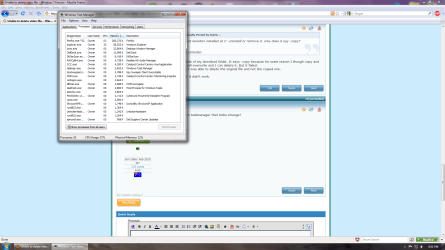
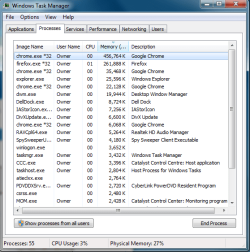
Is there anything in taskmanager that looks strange?
 

My Computer

Computer Manufacturer/Model Number
Self
OS
W7, Xp Pro
CPU
AMD Sempron 2600+
Motherboard
K8V-MX
Memory
1GB
Graphics Card(s)
Radeon HD3650
Sound Card
Soundmax
Monitor(s) Displays
17" HP CRT
Screen Resolution
1024x768
Hard Drives
1x WDC WD800BB
1x HDS728080
PSU
? 460W
Case
Coolermaster
Cooling
enough
Keyboard
M$S
Mouse
Optical
Internet Speed
1500kbs
Other Info
OLD!!! does the job i need.
One method you can try is disabling explorer incase that's the cause for the problem...

Start an Administrative Command Prompt... Leave it open

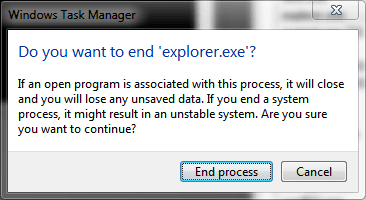
Start Task Manager, Close Explorer.exe

explorerend.png

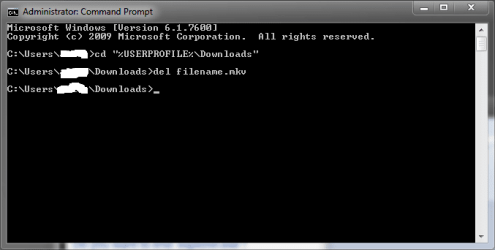
Open the command prompt.

Change to the appropriate directory:
cd "%USERPROFILE%\Downloads" - ENTER

Delete the file:
del filename.mkv - ENTER

commanddelete.png

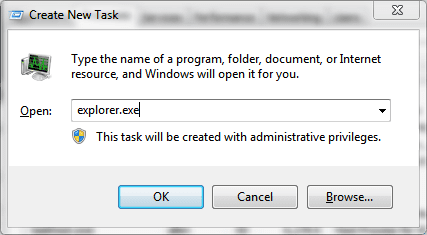
Oh yeah, almost forgot. Re-initialize explorer.exe by going back to Task Manager and clicking the File Menu > Add New Task (Run) and type in explorer.exe

newexp.png

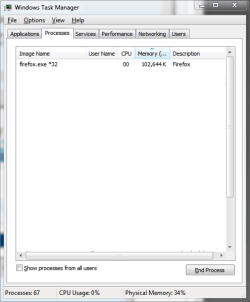
In response to your task manager screenshot:

Holy Mother! How many extensions/add-ons do you have on firefox? It shouldn't be using 285K of memory! The screen shot below is firefox w/ 4 tabs open & a custom theme with 6 add-ons.
 

Attachments

  • taskmgrff.png
    taskmgrff.png
    34.2 KB · Views: 143

My Computer

Computer Manufacturer/Model Number
Apple Macbook Pro (April 2009)
OS
W7 Ult. x64 | OS X
CPU
Intel Mobile Core 2 Duo 2.93Ghz [T9800 Penryn]
Motherboard
NVIDIA nForce 730i Rev. B1 [Mac-F2268EC8 (U2E1)]
Memory
4096MB Samsung DDR3 Dual Channel [PC3-8500F 1066Mhz]
Graphics Card(s)
NVIDIA GeForce 9600M GT 512MB [G96M Rev. C1]
Sound Card
SB X-Fi Surround 5.1 USB | Onboard Realtek (Disabled)
Monitor(s) Displays
Acer x223wbd 22" | Apple Anti-Glare 17" (Disabled)
Screen Resolution
{Current} 1440x900 {Acer} 1680x1050 {Apple} 1920x1200
Hard Drives
{Internal}
Seagate Momentus 320GB 2.5" 7200RPM [ST9320421AS]

{Externals}
LaCie 320GB USB 2.0 HDD [301284UR]
LaCie 750GB USB 2.0 FW400 eSATA HDD [301314U]
LaCie 1TB USB 2.0 HDD [301304UR]
PSU
Magsafe
Case
Aluminum/Unibody (MBP52)
Cooling
2 x 6000 RPM Fans
Keyboard
Logitech G-15v2 [PN 920-000379]
Mouse
Logitech G-9 [PN 910-000338]
Internet Speed
12Mbps/2.5Mbps w/ 24Mbps Speed Boost [Comcast]
Other Info
Logitech X-540 Speakers [PN 970223-0122]
Sennheiser PC-151 Headset
Hello. I have a .MKV file on my computer that I'm unable to delete.

when click on "delete"
it shows "Preparing to Recycle" from Discovering items
Time remaining: Calculating
Items remaining : Calculating
speed: Calculating

Hold shift + delete
Preparing to delete ... the rest are the same as above

1: everytime i rename the file , = Windows Explorer is not responding
2: click on the .MKV properties, nothing happened....
3: try to replace with another file with a same name = doesn't work.
4: boot from safe mode, still won't let me delete it
5: it won't let me move the .MKV to other folders as well
6. Cannot take control of it.
7. tried renaming the .mkv extension to .txt no winrar no luck.
8. tried deleting the file containing it no luck.

I also made a new video file and gave it the same name but with -copy and now that wont delete.

Any clues as how I can get rid of this video file?

Thanks in advance.

Switch to detail view and try it again. It's likely the codec is open to show you the preview and is holding the file.
 

My Computer

Computer Manufacturer/Model Number
Homebrew
OS
XP Pro SP3 X86 / Win7 Pro X86
CPU
Amd 64 x2 4200 (2.4ghz)
Motherboard
Asus M2N-MX SE Plus
Memory
Kingston DDR2 800 2gb
Graphics Card(s)
Nvidia GF-8400
Sound Card
Realtek on Motherboard
Monitor(s) Displays
Acer x-193bw
Screen Resolution
1440 x 900
Hard Drives
Western Digital 500g
PSU
350watt In-Win
Case
In-Win
Cooling
Air
Keyboard
yes
Mouse
yes
Internet Speed
5mpbs
Other Info
Also ASRock ION 330 as HTPC (on XP).
Acer Aspire as GP netbook (on XP).
Stop Cyberlink, untick , try unlocker again (delete), if it says delete on boot,
say yes and then go to msconfig in run, untick cybelink an dreboot.

come back, digits x'sed
 

My Computer

Computer Manufacturer/Model Number
Self
OS
W7, Xp Pro
CPU
AMD Sempron 2600+
Motherboard
K8V-MX
Memory
1GB
Graphics Card(s)
Radeon HD3650
Sound Card
Soundmax
Monitor(s) Displays
17" HP CRT
Screen Resolution
1024x768
Hard Drives
1x WDC WD800BB
1x HDS728080
PSU
? 460W
Case
Coolermaster
Cooling
enough
Keyboard
M$S
Mouse
Optical
Internet Speed
1500kbs
Other Info
OLD!!! does the job i need.
Either using Unlocker during a reboot or using my method should work. I had the same problem with a explorer.exe.bak backup I had made when fooling with custom themes. I finally got it to delete by closing explorer and deleting through the command prompt.
 

My Computer

Computer Manufacturer/Model Number
Apple Macbook Pro (April 2009)
OS
W7 Ult. x64 | OS X
CPU
Intel Mobile Core 2 Duo 2.93Ghz [T9800 Penryn]
Motherboard
NVIDIA nForce 730i Rev. B1 [Mac-F2268EC8 (U2E1)]
Memory
4096MB Samsung DDR3 Dual Channel [PC3-8500F 1066Mhz]
Graphics Card(s)
NVIDIA GeForce 9600M GT 512MB [G96M Rev. C1]
Sound Card
SB X-Fi Surround 5.1 USB | Onboard Realtek (Disabled)
Monitor(s) Displays
Acer x223wbd 22" | Apple Anti-Glare 17" (Disabled)
Screen Resolution
{Current} 1440x900 {Acer} 1680x1050 {Apple} 1920x1200
Hard Drives
{Internal}
Seagate Momentus 320GB 2.5" 7200RPM [ST9320421AS]

{Externals}
LaCie 320GB USB 2.0 HDD [301284UR]
LaCie 750GB USB 2.0 FW400 eSATA HDD [301314U]
LaCie 1TB USB 2.0 HDD [301304UR]
PSU
Magsafe
Case
Aluminum/Unibody (MBP52)
Cooling
2 x 6000 RPM Fans
Keyboard
Logitech G-15v2 [PN 920-000379]
Mouse
Logitech G-9 [PN 910-000338]
Internet Speed
12Mbps/2.5Mbps w/ 24Mbps Speed Boost [Comcast]
Other Info
Logitech X-540 Speakers [PN 970223-0122]
Sennheiser PC-151 Headset
One method you can try is disabling explorer incase that's the cause for the problem...

Start an Administrative Command Prompt... Leave it open

Start Task Manager, Close Explorer.exe

View attachment 68470

Open the command prompt.

Change to the appropriate directory:
cd "%USERPROFILE%\Downloads" - ENTER

Delete the file:
del filename.mkv - ENTER

View attachment 68471

Oh yeah, almost forgot. Re-initialize explorer.exe by going back to Task Manager and clicking the File Menu > Add New Task (Run) and type in explorer.exe

View attachment 68476

In response to your task manager screenshot:

Holy Mother! How many extensions/add-ons do you have on firefox? It shouldn't be using 285K of memory! The screen shot below is firefox w/ 4 tabs open & a custom theme with 6 add-ons.

THANK YOU, this did the trick. And I only have two. Sometimes firefox hits 300k+ with multiple tabs and a youtube video. Mostly 1080p videos.
 

My Computer

OS
windows 7
One method you can try is disabling explorer incase that's the cause for the problem...

Start an Administrative Command Prompt... Leave it open

Start Task Manager, Close Explorer.exe

View attachment 68470

Open the command prompt.

Change to the appropriate directory:
cd "%USERPROFILE%\Downloads" - ENTER

Delete the file:
del filename.mkv - ENTER

View attachment 68471

Oh yeah, almost forgot. Re-initialize explorer.exe by going back to Task Manager and clicking the File Menu > Add New Task (Run) and type in explorer.exe

View attachment 68476

In response to your task manager screenshot:

Holy Mother! How many extensions/add-ons do you have on firefox? It shouldn't be using 285K of memory! The screen shot below is firefox w/ 4 tabs open & a custom theme with 6 add-ons.

THANK YOU, this did the trick. And I only have two. Sometimes firefox hits 300k+ with multiple tabs and a youtube video.

Then you really need to reinstall firefox. It's causing a major memory leak. Or, just switch to chrome or one of those other browsers.
 

My Computer

Computer Manufacturer/Model Number
Apple Macbook Pro (April 2009)
OS
W7 Ult. x64 | OS X
CPU
Intel Mobile Core 2 Duo 2.93Ghz [T9800 Penryn]
Motherboard
NVIDIA nForce 730i Rev. B1 [Mac-F2268EC8 (U2E1)]
Memory
4096MB Samsung DDR3 Dual Channel [PC3-8500F 1066Mhz]
Graphics Card(s)
NVIDIA GeForce 9600M GT 512MB [G96M Rev. C1]
Sound Card
SB X-Fi Surround 5.1 USB | Onboard Realtek (Disabled)
Monitor(s) Displays
Acer x223wbd 22" | Apple Anti-Glare 17" (Disabled)
Screen Resolution
{Current} 1440x900 {Acer} 1680x1050 {Apple} 1920x1200
Hard Drives
{Internal}
Seagate Momentus 320GB 2.5" 7200RPM [ST9320421AS]

{Externals}
LaCie 320GB USB 2.0 HDD [301284UR]
LaCie 750GB USB 2.0 FW400 eSATA HDD [301314U]
LaCie 1TB USB 2.0 HDD [301304UR]
PSU
Magsafe
Case
Aluminum/Unibody (MBP52)
Cooling
2 x 6000 RPM Fans
Keyboard
Logitech G-15v2 [PN 920-000379]
Mouse
Logitech G-9 [PN 910-000338]
Internet Speed
12Mbps/2.5Mbps w/ 24Mbps Speed Boost [Comcast]
Other Info
Logitech X-540 Speakers [PN 970223-0122]
Sennheiser PC-151 Headset
Then you really need to reinstall firefox. It's causing a major memory leak. Or, just switch to chrome or one of those other browsers.

Well its just when I load 720p/1080p videos. When I don't have one its 100k-177k

Edit: I would also like to thank all of you for taking the time to help me out.
I really appreciate it.
 

Attachments

  • chrome.png
    chrome.png
    71.5 KB · Views: 32

My Computer

OS
windows 7
Well, hello from me too!:)

Ok with "Unlocker" utility but there is something easiest and more generic to do, before that.;)

Just turn off the windows explorer options (from a top left button), to not viewing the "Details" and the "Preview" panes.
It works fine for me, with exactly the same "crazy" problem!

Just tell us, if you try it, with success!:rolleyes:
 

My Computer

OS
Windows 7 Ultimate x64
CPU
i7
Motherboard
Asus
Memory
3gb
Monitor(s) Displays
iiyama 24" wide
Screen Resolution
1980x1200
Hard Drives
2x500gb @ raid
Case
Full Tower
Internet Speed
24Mb/1Mb
My solution to the above problem is to use the already installed (at my pc) total commander. It seems that windows explorer locks the file as soon as you click on it to delete or rename it. Total commander has to trouble deleting/renaming or anything.
BTW I am not advertising, any alternative file manager would do the job.
 

My Computer

OS
Windows 7
CPU
[email protected]
Motherboard
Abit IC35Pro
Memory
2x2 gb 1000mhz
Graphics Card(s)
Nvidia 8800gt
Sound Card
Audigy2
Monitor(s) Displays
Samsung 40a656
Screen Resolution
1920x1080
Hard Drives
1x1000gb WD black
1x500 gb WD
1x250 gb WD
PSU
700
Case
Antec 9000
Keyboard
Logitech wireless
Mouse
Logitech wireless
Internet Speed
20/1 mb
Other Info
Greece
It's possible a program is using the file and therefore you cannot delete it, if WHS' method doesn't work, then close all of the programs that you can and try to delete it again.
Well, he tried in safe mode. That should have taken care of it - or not?

Not if it's explorer locking them. I had only luck when I went through an explorer substitute (Q-Dir), and killed explorer through taskmanager.
But I assume that safe mode with command prompt should have done the trick as well

-DG
 

My Computer

Computer Manufacturer/Model Number
HP m8000n
OS
Windows 7 Ultimate x86
CPU
DualCore AMD Athlon 64 X2, 2600 MHz 5200+
Motherboard
Asus M2N68-LA (Narra)
Memory
Samsung 2GB DDR2
Graphics Card(s)
Onboard NVIDIA GeForce 6150SE nForce 430
Sound Card
Onboard nVIDIA nForce 6100-430 (MCP61P)
Monitor(s) Displays
Westinghouse 19" LED
Screen Resolution
1280x1024
Hard Drives
SATA II Seagate Barracuda 500GB
USB II WD Elements 500GB
USB II WD My Book 1TB
USB II WD My Book 2TB
PSU
Stock (HP)
Case
Stock (HP)
Cooling
Stock
Keyboard
Logitech Classic KB 200
Mouse
Standard HP opticle USB mouse
WHS File Deletion

I had the same problem with a .MKV file which was located on my HP home server (WHS). I was able to delete it using the command prompt via a remote desktop session (on my notebook) immediately after rebooting the server and without ever starting windows explorer on the server.

In my case the file name was excessively long and with many symbols so to avoid typing errors I copied the file name from the share which was visible in windows explorer on my notebook and was able to paste it in after the del command.

File unlocker was no help as it said the System had a lock on it.

Thanks for the help given above!
 

My Computer

OS
W7 64
Back
Top