
Unable to find Registry Value on Login

Sunimar

New member
Power User
Local time
6:32 AM
Messages
206
Location
Mumbai
Hey Folks, :)

I get the error: "Unable to find registry value" when i'm logging in my Windows OS everytime since this morning (IST). And there is no wallpaper, taskbar nothing just a blank desktop screen.

So, I have to run the explorer through 'run' command only and then it is back but still I'm not able to launch all the apps from taskbar or from the start menu & while checking in the Task Manager this is how it looks:
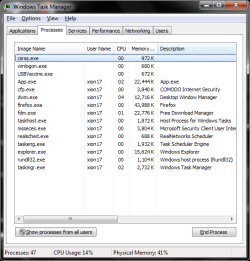
Task Manager.png

Over here as you can see that CCleaner is running in the background but its not showing up on the desktop. So, I can't access CCleaner to fix my registry.

I want to know and understand:

1) What are the possible cause for this issue?
2) How to fix this apart from CCleaner?
 

My Computer My Computer

At a glance

Windows 7 Ultimate
Computer type
Laptop
OS
Windows 7 Ultimate
How often to you use registry cleaners? Registry "cleaners" are actually known to eventually cause problems later on. Which is why I do not suggest them at all in my BSOD analysis.

The only thing I can think of is running a system restore on this:

Run box -> Type in "rstrui.exe"(without quotes). And restore to a previous date.

Honestly, this is the weirdest thing I have ever seen. I hope we can solve this though.

-Justin
 

My Computer My Computer

At a glance

Windows 8.1 Pro x64Intel Core i5-4570 CPU @ 3.20GHz8GB DDR3-1596 - Dual ChannelNVIDIA GeForce GTX 750 Ti SC
Computer type
PC/Desktop
Computer Manufacturer/Model Number
Custom
OS
Windows 8.1 Pro x64
CPU
Intel Core i5-4570 CPU @ 3.20GHz
Motherboard
Gigabyte Z87-D3HP-CF
Memory
8GB DDR3-1596 - Dual Channel
Graphics Card(s)
NVIDIA GeForce GTX 750 Ti SC
Sound Card
Onboard
Monitor(s) Displays
Samsung
Screen Resolution
1920x1080
Hard Drives
SSD - 120GB
Second - 1TB
Antivirus
MSE
Browser
Chrome
How often to you use registry cleaners? Registry "cleaners" are actually known to eventually cause problems later on. Which is why I do not suggest them at all in my BSOD analysis.

The only thing I can think of is running a system restore on this:

Run box -> Type in "rstrui.exe"(without quotes). And restore to a previous date.

Honestly, this is the weirdest thing I have ever seen. I hope we can solve this though.

-Justin

Justin, an honest answer to your above question: "How often to you use registry cleaners?" is more then 25 times a day. But I use CCLeaner only to flush out my temp files & other stuff related with browsers. Registry clean-up is done only when I install a new software or update any existing software.

"Honestly, this is the weirdest thing I have ever seen. I hope we can solve this though."

I know as I always post the most wierd of queries on "sevenforums".;) Thank you for help buddy and going to check the above command but before that I want to know how can I check that there is something wrong with my REGISTRY FILES??
 

My Computer My Computer

At a glance

Windows 7 Ultimate
Computer type
Laptop
OS
Windows 7 Ultimate

My Computer My Computer

At a glance

Windows 8.1 Pro x64Intel Core i5-4570 CPU @ 3.20GHz8GB DDR3-1596 - Dual ChannelNVIDIA GeForce GTX 750 Ti SC
Computer type
PC/Desktop
Computer Manufacturer/Model Number
Custom
OS
Windows 8.1 Pro x64
CPU
Intel Core i5-4570 CPU @ 3.20GHz
Motherboard
Gigabyte Z87-D3HP-CF
Memory
8GB DDR3-1596 - Dual Channel
Graphics Card(s)
NVIDIA GeForce GTX 750 Ti SC
Sound Card
Onboard
Monitor(s) Displays
Samsung
Screen Resolution
1920x1080
Hard Drives
SSD - 120GB
Second - 1TB
Antivirus
MSE
Browser
Chrome
Inspite of restoring my OS to a previous date still I'm getting the same error. Can any member suggest me a solution to this problem?? :confused:
 

My Computer My Computer

At a glance

Windows 7 Ultimate
Computer type
Laptop
OS
Windows 7 Ultimate
Back
Top