
Solved Unable to get fresh install of Windows 7 on SSD

I'm about out of ideas, other than motherboard itself being bogus.

I'd wait for more comments.

Only other things I can think of is stuff like using a single RAM stick or maybe downloading a fresh ISO from mydigitallife.info, rather than using what you think is a Technet ISO. But that's really reaching.

I assume you don't get any farther if you bypass diskpart and just boot into the install disk and stay in the graphical interface? How far do you get if you do that? To the "where do you want to install Windows screen"?
 

My Computer My Computer

At a glance

Windows 7 Home Premium SP1, 64-bitIntel Skylake i5-6600K, not overclocked8 GB HyperX DDR4-2666 (2 x 4 GB)none; graphics are integrated on CPU
Computer type
PC/Desktop
Computer Manufacturer/Model Number
Ignatz Special; 4 speed manual gearbox; factory air conditioning; one of one
OS
Windows 7 Home Premium SP1, 64-bit
CPU
Intel Skylake i5-6600K, not overclocked
Motherboard
AsRock Z170M Extreme 4, micro ATX
Memory
8 GB HyperX DDR4-2666 (2 x 4 GB)
Graphics Card(s)
none; graphics are integrated on CPU
Sound Card
onboard: Realtek ALC1150; external: USB Behringer UF0-202
Monitor(s) Displays
Dell S2340M 23 inch IPS
Screen Resolution
1600 x 900
Hard Drives
System: Crucial MX100 series SSD, 128 GB;
Data: Samsung Spinpoint 103SJ, 1 TB;
Backup: WD Caviar Green WD30EZRX-00D8PB0, 3 TB
PSU
Rosewill SilentNight 500 watt fanless, semi-modular
Case
Antec Solo II
Cooling
Noctua NH-U12S; Noctua F12 intake, Noctua S12A exhaust
Keyboard
Microsoft 200 6JH-00001 USB
Mouse
Dell or Microsoft optical wired; USB
Antivirus
Microsoft Security Essentials and Malwarebytes Premium
Browser
Pale Moon
Other Info
All fans PWM; speeds at idle: CPU circa 500 rpm; intake circa 600 rpm; exhaust circa 600 rpm; CPU temps 27 idle and 47 C load in a warm room (27 C/81 F) when running Intel Extreme Tuning Utility stress test.
SSD works fine in my wifes PC which is ~2 years old. I was able to format the drive and write to it.

I hooked the SSD back up to my PC with it being the only SATA device connected and still received the same errors.

Does the fact that I am running into these errors in Diskpart mean there is something wrong with the mobo?


Have a look at the tutorial linked below for some ideas.


My Computer My Computer

At a glance

W 7 64-bit UltimateIntel Q9550 Yorkfield8GB Dominator 8500C5DATI : XFX 5870
Computer Manufacturer/Model Number
* BFK Customs *
OS
W 7 64-bit Ultimate
CPU
Intel Q9550 Yorkfield
Motherboard
ASUS P5Q Pro
Memory
8GB Dominator 8500C5D
Graphics Card(s)
ATI : XFX 5870
Sound Card
Realtek HD Audio 7-1
Monitor(s) Displays
1x 47" LCD HDMI & 3x 26" LCD HDMI
Screen Resolution
1920x1080P & 1920x1200
Hard Drives
1x 80GB Intel X25-M G2 SSD : 1x 500GB & 1x 640GB WD Caviar Black(s)
PSU
Corsair 620HX
Case
Cooler Master RC-690
Cooling
Tuniq Tower 120, 2x 140mm and 3x 120mm case fans
Keyboard
Microsoft 500
Mouse
Razer Diamondback 3G
Internet Speed
14 Mb/s
Other Info
1x Koutech 3Gb/s SATA HDD Hot Swap Rack
I'm about out of ideas, other than motherboard itself being bogus.

I'd wait for more comments.

Only other things I can think of is stuff like using a single RAM stick or maybe downloading a fresh ISO from mydigitallife.info, rather than using what you think is a Technet ISO. But that's really reaching.

I assume you don't get any farther if you bypass diskpart and just boot into the install disk and stay in the graphical interface? How far do you get if you do that? To the "where do you want to install Windows screen"?

Where do you want to install windows and then no matter which method i go with:

Unallocated Disk 0
Active Partition created in Diskpart

It always fails immediately after that on the next screen when copying system files with the Windows was unable to create partition.

Then brings me back to where do you want to install windows screen and it has 2 partitions 1 for 100mb and a 2 for the rest of the space.

But if i choose the 2nd partition it fails the same way.
 

My Computer My Computer

At a glance

Windows 7 Pro 64
OS
Windows 7 Pro 64

My Computer My Computer

At a glance

W 7 64-bit UltimateIntel Q9550 Yorkfield8GB Dominator 8500C5DATI : XFX 5870
Computer Manufacturer/Model Number
* BFK Customs *
OS
W 7 64-bit Ultimate
CPU
Intel Q9550 Yorkfield
Motherboard
ASUS P5Q Pro
Memory
8GB Dominator 8500C5D
Graphics Card(s)
ATI : XFX 5870
Sound Card
Realtek HD Audio 7-1
Monitor(s) Displays
1x 47" LCD HDMI & 3x 26" LCD HDMI
Screen Resolution
1920x1080P & 1920x1200
Hard Drives
1x 80GB Intel X25-M G2 SSD : 1x 500GB & 1x 640GB WD Caviar Black(s)
PSU
Corsair 620HX
Case
Cooler Master RC-690
Cooling
Tuniq Tower 120, 2x 140mm and 3x 120mm case fans
Keyboard
Microsoft 500
Mouse
Razer Diamondback 3G
Internet Speed
14 Mb/s
Other Info
1x Koutech 3Gb/s SATA HDD Hot Swap Rack
Where do you want to install windows and then no matter which method i go with:

Unallocated Disk 0
Active Partition created in Diskpart

It always fails immediately after that on the next screen when copying system files with the Windows was unable to create partition.

Then brings me back to where do you want to install windows screen and it has 2 partitions 1 for 100mb and a 2 for the rest of the space.

But if i choose the 2nd partition it fails the same way.

And you get the same failures at the same point if you attempt to install Vista from a known good retail disc on to the SSD? I haven't re-read the entire thread, but do I recall that?

I'm just trying to eliminate your install disc as being part of the issue.
 

My Computer My Computer

At a glance

Windows 7 Home Premium SP1, 64-bitIntel Skylake i5-6600K, not overclocked8 GB HyperX DDR4-2666 (2 x 4 GB)none; graphics are integrated on CPU
Computer type
PC/Desktop
Computer Manufacturer/Model Number
Ignatz Special; 4 speed manual gearbox; factory air conditioning; one of one
OS
Windows 7 Home Premium SP1, 64-bit
CPU
Intel Skylake i5-6600K, not overclocked
Motherboard
AsRock Z170M Extreme 4, micro ATX
Memory
8 GB HyperX DDR4-2666 (2 x 4 GB)
Graphics Card(s)
none; graphics are integrated on CPU
Sound Card
onboard: Realtek ALC1150; external: USB Behringer UF0-202
Monitor(s) Displays
Dell S2340M 23 inch IPS
Screen Resolution
1600 x 900
Hard Drives
System: Crucial MX100 series SSD, 128 GB;
Data: Samsung Spinpoint 103SJ, 1 TB;
Backup: WD Caviar Green WD30EZRX-00D8PB0, 3 TB
PSU
Rosewill SilentNight 500 watt fanless, semi-modular
Case
Antec Solo II
Cooling
Noctua NH-U12S; Noctua F12 intake, Noctua S12A exhaust
Keyboard
Microsoft 200 6JH-00001 USB
Mouse
Dell or Microsoft optical wired; USB
Antivirus
Microsoft Security Essentials and Malwarebytes Premium
Browser
Pale Moon
Other Info
All fans PWM; speeds at idle: CPU circa 500 rpm; intake circa 600 rpm; exhaust circa 600 rpm; CPU temps 27 idle and 47 C load in a warm room (27 C/81 F) when running Intel Extreme Tuning Utility stress test.
Barefoot thanks for the links.

I am worried if I use a method like the transfer method that I will run into issues down the road if there truly is a problem with the mobo.

I have read through the step by step threat previously and have done everything said in the thread except I keep running into errors in Diskpart either at the format stage or the clean stage.

Just now i was able to get passed the clean stage successfully but when I tried to format I got the Invalid Parameter error, i tried to clean again and received the I/O device error.

Is there anyway to check the event log from the command prompt?

Ignat when I use my Vista disk it fails at the same spot in the installation. Would the installation media have anything to do with Diskpart throwing out these intermittent errors?
 

My Computer My Computer

At a glance

Windows 7 Pro 64
OS
Windows 7 Pro 64
Can you currently install any operating system to any type of drive on this motherboard? For instance, install Vista to a regular spinning drive?

If you get errors regardless of installation disk, regardless of OS, and regardless of destination disk, what are you left with?
 

My Computer My Computer

At a glance

Windows 7 Home Premium SP1, 64-bitIntel Skylake i5-6600K, not overclocked8 GB HyperX DDR4-2666 (2 x 4 GB)none; graphics are integrated on CPU
Computer type
PC/Desktop
Computer Manufacturer/Model Number
Ignatz Special; 4 speed manual gearbox; factory air conditioning; one of one
OS
Windows 7 Home Premium SP1, 64-bit
CPU
Intel Skylake i5-6600K, not overclocked
Motherboard
AsRock Z170M Extreme 4, micro ATX
Memory
8 GB HyperX DDR4-2666 (2 x 4 GB)
Graphics Card(s)
none; graphics are integrated on CPU
Sound Card
onboard: Realtek ALC1150; external: USB Behringer UF0-202
Monitor(s) Displays
Dell S2340M 23 inch IPS
Screen Resolution
1600 x 900
Hard Drives
System: Crucial MX100 series SSD, 128 GB;
Data: Samsung Spinpoint 103SJ, 1 TB;
Backup: WD Caviar Green WD30EZRX-00D8PB0, 3 TB
PSU
Rosewill SilentNight 500 watt fanless, semi-modular
Case
Antec Solo II
Cooling
Noctua NH-U12S; Noctua F12 intake, Noctua S12A exhaust
Keyboard
Microsoft 200 6JH-00001 USB
Mouse
Dell or Microsoft optical wired; USB
Antivirus
Microsoft Security Essentials and Malwarebytes Premium
Browser
Pale Moon
Other Info
All fans PWM; speeds at idle: CPU circa 500 rpm; intake circa 600 rpm; exhaust circa 600 rpm; CPU temps 27 idle and 47 C load in a warm room (27 C/81 F) when running Intel Extreme Tuning Utility stress test.
I just attempted to format in Diskpart while using the Vista install disk and received a different error

Virtual Disk Service Error:
The file system is incompatible

Ignatz - I could wipe my old HD and try to install to that I suppose.
Wierdly enough when I hook my hard drive up and try to boot into windows I get a Disk Read Error press cntrl alt del to reset message.
 

My Computer My Computer

At a glance

Windows 7 Pro 64
OS
Windows 7 Pro 64
Do you have another DVD drive you could swap in as a test to see if it's DVD-related?

Can you try with only one stick of RAM? If you get the same errors with stick A, repeat with stick B.

I'm just trying to eliminate each piece of hardware by trial and error if necessary.
 

My Computer My Computer

At a glance

Windows 7 Home Premium SP1, 64-bitIntel Skylake i5-6600K, not overclocked8 GB HyperX DDR4-2666 (2 x 4 GB)none; graphics are integrated on CPU
Computer type
PC/Desktop
Computer Manufacturer/Model Number
Ignatz Special; 4 speed manual gearbox; factory air conditioning; one of one
OS
Windows 7 Home Premium SP1, 64-bit
CPU
Intel Skylake i5-6600K, not overclocked
Motherboard
AsRock Z170M Extreme 4, micro ATX
Memory
8 GB HyperX DDR4-2666 (2 x 4 GB)
Graphics Card(s)
none; graphics are integrated on CPU
Sound Card
onboard: Realtek ALC1150; external: USB Behringer UF0-202
Monitor(s) Displays
Dell S2340M 23 inch IPS
Screen Resolution
1600 x 900
Hard Drives
System: Crucial MX100 series SSD, 128 GB;
Data: Samsung Spinpoint 103SJ, 1 TB;
Backup: WD Caviar Green WD30EZRX-00D8PB0, 3 TB
PSU
Rosewill SilentNight 500 watt fanless, semi-modular
Case
Antec Solo II
Cooling
Noctua NH-U12S; Noctua F12 intake, Noctua S12A exhaust
Keyboard
Microsoft 200 6JH-00001 USB
Mouse
Dell or Microsoft optical wired; USB
Antivirus
Microsoft Security Essentials and Malwarebytes Premium
Browser
Pale Moon
Other Info
All fans PWM; speeds at idle: CPU circa 500 rpm; intake circa 600 rpm; exhaust circa 600 rpm; CPU temps 27 idle and 47 C load in a warm room (27 C/81 F) when running Intel Extreme Tuning Utility stress test.
I have grabbed another mobo from a nearby store. Going to put it in tonight and see if i get the same results. If so i will try to troubleshhot components some more.
 

My Computer My Computer

At a glance

Windows 7 Pro 64
OS
Windows 7 Pro 64
You said you have an EFI BIOS. Did you remove EFI BOot Disk from BIOS boot order and set DVD or HD first to boot?

Then did you look for a setting for "Legacy BIOS" or similar to avoid EFI install?

Finally, is the SSD formatted MBR and not GPT? To make sure, run the CLean Command again followed by the command "Convert MBR"

If install fails try again creating, formatting and marking Active partition from Step 2.2 in SSD - HDD Optimize for Windows Reinstallation
 
Your system specs say you have Windows 7 Pro x64.....anything to add?

An SSD, when connected correctly to a compatible system will be recognized in the bios and install without problems.

So, what is not right with compatible or recognized? Does the bios show it as a 128 GB drive (or something close)?

Have your checked for bios updates?

Sorry if I repeat prior suggestions, but I don't feel like reading 30 responses.
 

My Computer My Computer

At a glance

Windows 7 x64i7-2600K8 GGTX 480
Computer Manufacturer/Model Number
Homebuilt
OS
Windows 7 x64
CPU
i7-2600K
Motherboard
Asus P8Z77-v Pro
Memory
8 G
Graphics Card(s)
GTX 480
Sound Card
Onboard
Monitor(s) Displays
LG W2753V
Screen Resolution
1920x1080
Hard Drives
Crucial M4 128 G SSD
You said you have an EFI BIOS. Did you remove EFI BOot Disk from BIOS boot order and set DVD or HD first to boot?

Then did you look for a setting for "Legacy BIOS" or similar to avoid EFI install?

Finally, is the SSD formatted MBR and not GPT? To make sure, run the CLean Command again followed by the command "Convert MBR"

If install fails try again creating, formatting and marking Active partition from Step 2.2 in SSD - HDD Optimize for Windows Reinstallation

The EFI boot disk does not show up everytime I go into BIOS. This I thought was wierd.

When I use my Vista install disc in the DVD drive, I do not see the UEFI icon in the boot setup
When I use the thumbdrive with W7 media in Bios the thumbdrive shows up as UEFI in the boot priority
When I use the Windows 7 burnt disc in the dvd drive it shows a UEFI version of the isntall disk but I have that last in boot priority.

I cannot find a Legacy BIOS or similar setting in the Asus M5A97 BIOS or booklet.

The disk is formatted as MBR I have run the convert is diskpart to ensure this.

I cannot do any of the steps listed in the diskpart walkthroughs.

Sometimes I will receive an error at the clean stage (I/O device error)
I always receive an error at the format stage (Invalid Parameter error)
 

My Computer My Computer

At a glance

Windows 7 Pro 64
OS
Windows 7 Pro 64
Your system specs say you have Windows 7 Pro x64.....anything to add?

An SSD, when connected correctly to a compatible system will be recognized in the bios and install without problems.

So, what is not right with compatible or recognized? Does the bios show it as a 128 GB drive (or something close)?

Have your checked for bios updates?

Sorry if I repeat prior suggestions, but I don't feel like reading 30 responses.

BIOS is at current version and BIOS shows it at 128 GB.
 

My Computer My Computer

At a glance

Windows 7 Pro 64
OS
Windows 7 Pro 64
OK let's go to fundamentals since we're still learning about EFI here, too.

Post back or google the exact verbatim error message you get when you attempt to format using the booted Win7 installer. This will take you to recent posts from others dealing with the same issue, often showing their resolution.

If you'll post it back as well as Google we have some excellent Google Fu here to cut to the best results.
 
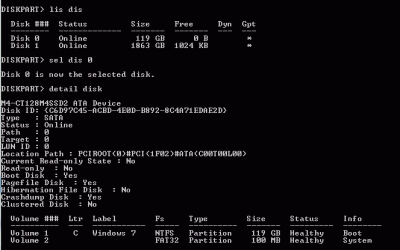
When you run the Diskpart command, and list disk the sel disk 0 (or whatever) the detail disk, what type of info about the disk are you showing?

I have attached a snipping tool picture of my SSD in a UEFI install, of course. But your situation is not related to UEFI.
 

Attachments

  • SSD Detail.GIF
    SSD Detail.GIF
    10.9 KB · Views: 23

My Computer My Computer

At a glance

Windows 7 x64i7-2600K8 GGTX 480
Computer Manufacturer/Model Number
Homebuilt
OS
Windows 7 x64
CPU
i7-2600K
Motherboard
Asus P8Z77-v Pro
Memory
8 G
Graphics Card(s)
GTX 480
Sound Card
Onboard
Monitor(s) Displays
LG W2753V
Screen Resolution
1920x1080
Hard Drives
Crucial M4 128 G SSD
OK let's go to fundamentals since we're still learning about EFI here, too.

Post back or google the exact verbatim error message you get when you attempt to format using the booted Win7 installer. This will take you to recent posts from others dealing with the same issue, often showing their resolution.

If you'll post it back as well as Google we have some excellent Google Fu here to cut to the best results.

I get 2 different errors depending on which install media I use

When using the Windows 7 burnt disc or Thumbdrive (with the disc info on it) install-

In Diskpart when i attempt to format fs=nfts label="Windows 7" as per the tutorials I have found on here I see a 0 percent complete message and then receive the error (usually after some time)

Diskpart encountered an error. Parameters are invalid

Most of the googling I do on this topic seems to point to a bad hard drive.
However, I can format the hard drive on my wifes PC and write to it without issue.

When using the retail Vista Disc I get this error when trying to format:

Virtual Disk Service Error: The file system is incompatible

Also after I attempt to format and it fails, the disk no longer shows up in list disk.
If I make any changes to the disk via the windows install window (delete a partition) and then go into Diskpart to do a clean I get a

Diskpart has encountered an error: the request could not be performed because of a I/O device error

once this error occurs the disk does not show up in the list.


When I hook up my old hard drive a 1tb Samsung that has windows on it and try to boot from the drive I get the error (9 times out of 10):

Disk read error press cntrl + alt +del to reset

One time out of the 10 attempts, I believe it was attempt ~6 I got the windows 7 loading graphic then a quick blue screen flash and the PC reset.


With all these symptoms I am leaning towards a bad SATA controller on the mobo but I don't want to open up a new one I just got from a nearby store and put it in just to have the same issue pop up. But I think I may risk it tonight and do just that. Ideas on these symptoms?
 

My Computer My Computer

At a glance

Windows 7 Pro 64
OS
Windows 7 Pro 64
Your SATA ports 1-4 bottom (or left) of the board and 5-6 (mddle) appear to have some differences and may even have a separate controller. I am not that familiar with AMD products, but the controller can be set differently for each group, to a certain extent.

Have you tried changing from one section to another?

Edit: If you were thinking about using the other motherboard, any chance you could start with a normal HHD that had been cleaned (or new), and use it for testing? But I would not attach the SSD until I had verified the SATA controllers are working. Also, of course, you know not to move the connectors with power on the system.
 

My Computer My Computer

At a glance

Windows 7 x64i7-2600K8 GGTX 480
Computer Manufacturer/Model Number
Homebuilt
OS
Windows 7 x64
CPU
i7-2600K
Motherboard
Asus P8Z77-v Pro
Memory
8 G
Graphics Card(s)
GTX 480
Sound Card
Onboard
Monitor(s) Displays
LG W2753V
Screen Resolution
1920x1080
Hard Drives
Crucial M4 128 G SSD
Back
Top