Unable to initialize external HDD in Disk Management due to I/O error

tommythecat

New member
Local time
8:53 AM
Messages
15
Hi All,

I've recently ran into an almost identical problem that was described (but not resolved) in this thread.

In my case, the drive worked perfectly with my system and only recently stopped appearing in My Computer. Also, my drive is still visible and accessible on Windows XP but is not visible on my Windows 7.

I'd be grateful for any useful advice how to restore the functionlity of this drive on Windows 7.

Please let me know if you require any additional information to help resolve this issue.

Thank you!
 

My Computer My Computer

At a glance

Windows 7 Ultimate x64
OS
Windows 7 Ultimate x64
Hello, tommythecat.
Is the external drive used much? Is it aging? Damaged (from moisture, shock [dropping] or misuse)?
If you can, back-up all the data to another HDD.
Connect the problematic HDD to the troublesome PC.
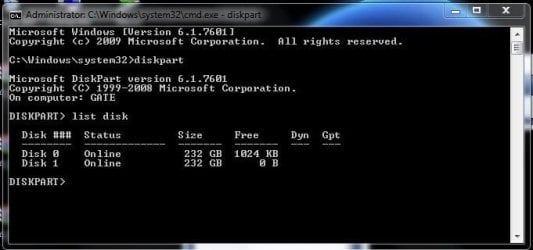
Open an administrative command prompt > type diskpart > type list disk.
Is the drive listed?

Cheers - Happy Holidays.:)
 
Last edited:

My Computer My Computer

At a glance

Windows 7 Pro x86; Pro x64; Home Prem x64; an...Pentium 4 @ 3.42GBATI Mobility Radeon 9700
Computer Manufacturer/Model Number
Old (2004) Gateway laptop
OS
Windows 7 Pro x86; Pro x64; Home Prem x64; and others....
CPU
Pentium 4 @ 3.4
Motherboard
Gateway
Memory
2GB
Graphics Card(s)
ATI Mobility Radeon 9700
Sound Card
SigmaTel C-Major Audio
Monitor(s) Displays
Element 19 in. LCD HD TV
Screen Resolution
1360x768
Hard Drives
Intel SSD 3200 80GB; Seagate Momentus XT (Hybrid) 500GB
PSU
HP monitor PSU - Spliced;lol
Cooling
Coolingpad
Mouse
MS TouchMouse Arc & Mouse
It helps if you can mention the make and capacity of the external HDD.

Western Digital models usually require WD SES driver on windows 7 and sometimes gives problems if the driver is not present.

Depending on your HDD model and make, check on the manufacturer's website whether the external HDD requires any OEM drivers. If so search, download and install the drivers and again try to access the drive.
 

My Computer My Computer

At a glance

MS Windows 7 Ultimate 64-bit SP1i5-2410M 2.3GHz (2.9GHz Turbo-Boost) Sandy Br...4GB+4GB Samsung DDR3 PC3-10700 (1333 MHz)Video Intel(R) HD Graphics Family, 1696MB ava...
Computer Manufacturer/Model Number
Toshiba Satellite P775-S7232
OS
MS Windows 7 Ultimate 64-bit SP1
CPU
i5-2410M 2.3GHz (2.9GHz Turbo-Boost) Sandy Bridge 32nm
Motherboard
Toshiba PHRAA ver. PSBY1U-00F003
Memory
4GB+4GB Samsung DDR3 PC3-10700 (1333 MHz)
Graphics Card(s)
Video Intel(R) HD Graphics Family, 1696MB available memory
Sound Card
Realtek High Definition Audio version=6.0.1.6323
Monitor(s) Displays
17.3 " Trubrite TFT LCD, LED Backlit
Screen Resolution
1600x900 32 bit, Native support for 720P content
Hard Drives
TOSHIBA MK6476GSXN
580.614 [GB] partitioned C: 80GB and D: 500GB with hidden recovery partitons.

Spare bay for 2nd HDD but no SATA connector :-(
PSU
Toshiba AC/DC Adapter
Case
Notebook
Cooling
Built-in Fan
Keyboard
Premium Raised Tile keyboard
Mouse
Logitech M215 wireless mouse
Internet Speed
Not fast enough
Other Info
Built-in Harman Kardon speakers with Dolby Advanced Audio, Waves MaxxAudio® 3. HDMI, 1xUSB3+3xUSB2 ports, WebCam, Battery life 4hrs 11mins, 4GB Readyboost SDHC card, WD My Book Essential Ext HDDs 2 TB, 2x1TB, My Passport SE 1TB and WDTV 1st Gen for Multimedia playing on a Sony Wega 32" LCD.
Recent addition to my toys are Asus Transformer Pad TF300T with 32GB onboard sd card + 32GB microsd card.
Hello, tommythecat.
Is the external drive used much? Is it aging? Damaged (from moisture, shock [dropping] or misuse)?

No, it's not used much and it isn't aging. Also, it certainly wasn't damaged. As I wrote, if I connect it to a different PC, it works fine.

If you can, back-up all the data to another HDD.
Connect the problematic HDD to the troublesome PC.
Open an administrative command prompt > type diskpart > type list disk.
Is the drive listed?

I just did that and the drive is listed there, although I don't see the drive in "My Computer".

Cheers - Happy Holidays.:)

Thanks and happy holidays :)
 
Last edited:

My Computer My Computer

At a glance

Windows 7 Ultimate x64
OS
Windows 7 Ultimate x64
It helps if you can mention the make and capacity of the external HDD.

Seagate FreeAgent Go 500GB

Western Digital models usually require WD SES driver on windows 7 and sometimes gives problems if the driver is not present.

Depending on your HDD model and make, check on the manufacturer's website whether the external HDD requires any OEM drivers. If so search, download and install the drivers and again try to access the drive.

I already did that, but:

1. This drive worked fine for a year now, so why suddenly install the drivers?
2. Installing the drivers still didn't help

Thank you
 

My Computer My Computer

At a glance

Windows 7 Ultimate x64
OS
Windows 7 Ultimate x64

My Computer My Computer

At a glance

Windows 7 Pro x64 -- PCLinuxOS KDE4 FullMonty...i7-875k @ Turbo - 7,6,5,5 - 3.6ghzCorsair CMD8GX3M4A1600C8 8gbAsus EAH5850 DirectCU/2DIS/1GD5
Computer Manufacturer/Model Number
Custom
OS
Windows 7 Pro x64 -- PCLinuxOS KDE4 FullMonty 2011
CPU
i7-875k @ Turbo - 7,6,5,5 - 3.6ghz
Motherboard
Asus P7P55D-E Deluxe
Memory
Corsair CMD8GX3M4A1600C8 8gb
Graphics Card(s)
Asus EAH5850 DirectCU/2DIS/1GD5
Sound Card
On Board
Monitor(s) Displays
Samsung SyncMaster T220 - Panasonic VT30a 50"
Screen Resolution
1680x1050 -
Hard Drives
Corsair Force 3 SSD 120GB x 2 ::
WD VelociRaptor 150GB WD1500HLFS x 2
PSU
Corsair HX-850 Power Supply
Case
Coolmaster HAF 932
Cooling
Corsair H50
Keyboard
Logitech Wireless MK700
Mouse
Logitech Wireless MX620
Internet Speed
Good enough for now
Other Info
Voip. Insanely cheap phone calls.
Copy the data over to xp. Do the diskpart, see if windows 7 see it then then copy the data back. That's the easiest way.
 

My Computer My Computer

At a glance

Windows 7 Pro x64 -- PCLinuxOS KDE4 FullMonty...i7-875k @ Turbo - 7,6,5,5 - 3.6ghzCorsair CMD8GX3M4A1600C8 8gbAsus EAH5850 DirectCU/2DIS/1GD5
Computer Manufacturer/Model Number
Custom
OS
Windows 7 Pro x64 -- PCLinuxOS KDE4 FullMonty 2011
CPU
i7-875k @ Turbo - 7,6,5,5 - 3.6ghz
Motherboard
Asus P7P55D-E Deluxe
Memory
Corsair CMD8GX3M4A1600C8 8gb
Graphics Card(s)
Asus EAH5850 DirectCU/2DIS/1GD5
Sound Card
On Board
Monitor(s) Displays
Samsung SyncMaster T220 - Panasonic VT30a 50"
Screen Resolution
1680x1050 -
Hard Drives
Corsair Force 3 SSD 120GB x 2 ::
WD VelociRaptor 150GB WD1500HLFS x 2
PSU
Corsair HX-850 Power Supply
Case
Coolmaster HAF 932
Cooling
Corsair H50
Keyboard
Logitech Wireless MK700
Mouse
Logitech Wireless MX620
Internet Speed
Good enough for now
Other Info
Voip. Insanely cheap phone calls.
Open an administrative command prompt > type diskpart > type list disk.
Is the drive listed?

I just did that and the drive is listed there, although I don't see the drive in "My Computer".

What exactly is listed in diskpart for that particular drive?
Offline/online? (see pic)


If it shows in diskpart, try running Windows disk checker (Option 2 with the /F switch) with the intent to find/fix file system errors.
diskpart
list disk
select disk (#) > # = actual value the problematic disk
chkdisk /f

Edit: has the drive been plugged into a different USB port on the Win7 machine?
Open Device Manager (Show hidden devices); is there any of these?:warn: or red marks showing?
 

Attachments

  • dskprt.JPG
    dskprt.JPG
    34 KB · Views: 192

My Computer My Computer

At a glance

Windows 7 Pro x86; Pro x64; Home Prem x64; an...Pentium 4 @ 3.42GBATI Mobility Radeon 9700
Computer Manufacturer/Model Number
Old (2004) Gateway laptop
OS
Windows 7 Pro x86; Pro x64; Home Prem x64; and others....
CPU
Pentium 4 @ 3.4
Motherboard
Gateway
Memory
2GB
Graphics Card(s)
ATI Mobility Radeon 9700
Sound Card
SigmaTel C-Major Audio
Monitor(s) Displays
Element 19 in. LCD HD TV
Screen Resolution
1360x768
Hard Drives
Intel SSD 3200 80GB; Seagate Momentus XT (Hybrid) 500GB
PSU
HP monitor PSU - Spliced;lol
Cooling
Coolingpad
Mouse
MS TouchMouse Arc & Mouse
Open an administrative command prompt > type diskpart > type list disk.
Is the drive listed?

I just did that and the drive is listed there, although I don't see the drive in "My Computer".

What exactly is listed in diskpart for that particular drive?
Offline/online? (see pic)

It's listed as Online

If it shows in diskpart, try running Windows disk checker (Option 2 with the /F switch) with the intent to find/fix file system errors.
diskpart
list disk
select disk (#) > # = actual value the problematic disk
chkdisk /f

I tried that and here's what I got:

DISKPART> select disk (3)
The disk you specified is not valid.
There is no disk selected.
DISKPART>

Edit: has the drive been plugged into a different USB port on the Win7 machine?
Open Device Manager (Show hidden devices); is there any of these?:warn: or red marks showing?

I enabled hidden devices but didn't see any devices with the yellow or red markings
 

My Computer My Computer

At a glance

Windows 7 Ultimate x64
OS
Windows 7 Ultimate x64
diskpart
list disk
select disk 3 (without the parentheses)
chkdisk /f
 

My Computer My Computer

At a glance

Windows 7 Pro x86; Pro x64; Home Prem x64; an...Pentium 4 @ 3.42GBATI Mobility Radeon 9700
Computer Manufacturer/Model Number
Old (2004) Gateway laptop
OS
Windows 7 Pro x86; Pro x64; Home Prem x64; and others....
CPU
Pentium 4 @ 3.4
Motherboard
Gateway
Memory
2GB
Graphics Card(s)
ATI Mobility Radeon 9700
Sound Card
SigmaTel C-Major Audio
Monitor(s) Displays
Element 19 in. LCD HD TV
Screen Resolution
1360x768
Hard Drives
Intel SSD 3200 80GB; Seagate Momentus XT (Hybrid) 500GB
PSU
HP monitor PSU - Spliced;lol
Cooling
Coolingpad
Mouse
MS TouchMouse Arc & Mouse
A quick update:

It seems that the behavior I'm experiencing on Windows 7 x64, I'm also experiencing on Windows XP.

Therefore, it seems that I need to:

1. Try and restore any data I can from the drive
2. Format it and make it usable again.

How can I do that if the drive is not visible in "My Computer"?

Thank you again for all your help
 

My Computer My Computer

At a glance

Windows 7 Ultimate x64
OS
Windows 7 Ultimate x64

My Computer My Computer

At a glance

Windows 7 Ultimate x64
OS
Windows 7 Ultimate x64
Does the drive show in disk management? Right click computer, select manage, and select disk management from the left column. If it shows there, right click the drive, select change drive letter and path, then select add. Select a drive letter from the dropdown menu. It should show up in explorer then.
 

My Computers My Computers

  • At a glance

    Windows 11 ProRyzen 9 5900X32GB G Skill DDR4-3600EVGA RTX 3080 FTW 3 Ultra
    Computer type
    PC/Desktop
    Computer Manufacturer/Model Number
    ALWAYS UNDER CONSTRUCTION
    OS
    Windows 11 Pro
    CPU
    Ryzen 9 5900X
    Motherboard
    Asus X570 Crosshair Viii Hero
    Memory
    32GB G Skill DDR4-3600
    Graphics Card(s)
    EVGA RTX 3080 FTW 3 Ultra
    Sound Card
    On Board/Sennheiser PC37X Headset
    Monitor(s) Displays
    3 X Asus 27"
    Screen Resolution
    2560x1440
    Hard Drives
    2 X 1 TB NVME drives
    PSU
    EVGA 850
    Case
    Phanteks Eclipse P400A
    Cooling
    EVGA 280 AIO
    Keyboard
    Logitech G510s/ Logitech G13
    Mouse
    Logitech G502
    Internet Speed
    24/1
    Antivirus
    ESET/MBAM Pro/SAS Pro
    Browser
    Chrome/ Firefox/ Edge
  • At a glance

    Windows 11 ProIntel Ultra 9 288V32 GB LPDDR5X 8533
    Computer type
    Laptop
    System Manufacturer/Model Number
    Dell 16 Plus
    OS
    Windows 11 Pro
    CPU
    Intel Ultra 9 288V
    Memory
    32 GB LPDDR5X 8533
    Monitor(s) Displays
    16" Mini-LED HDR600 Touch 90 Hz
    Screen Resolution
    2560X1600
    Hard Drives
    1 TB NVME
Does the drive show in disk management? Right click computer, select manage, and select disk management from the left column.

When I do that, I immediately get a dialog box saying that "You must initialize a disk before Logical Disk Manager can access it" and it shows me the disk. However, when I try to initalize the disk, it fails with the message "The system cannot find the file specified."

If it shows there, right click the drive, select change drive letter and path, then select add. Select a drive letter from the dropdown menu. It should show up in explorer then.

The disk is shown as "Disk 2 Unknown" and as not initialized. It doesn't appear in the list of volumes so I cannot change the drive letter.
 

My Computer My Computer

At a glance

Windows 7 Ultimate x64
OS
Windows 7 Ultimate x64
Try to access the hard drive with Linux. Mount your external drive and copy the files to the internal drive (if space is available) or to another external drive.

http://www.sevenforums.com/software/198909-lucid-puppy-way-recover-files-non-bootable-computer.html

Thanks Jumanji! I'll give it a try.

Edit: I see that I need to boot from the USB device that has lucid puppy, but my bios doesn't support boot from USB. Will booting from CD-rom work instead?

Yes, booting from CD will work as well. Once you copy your files off, let us know and we will try to help you reformat the drive with Partition Wizard. Look at option 2.
 

My Computers My Computers

  • At a glance

    Windows 11 ProRyzen 9 5900X32GB G Skill DDR4-3600EVGA RTX 3080 FTW 3 Ultra
    Computer type
    PC/Desktop
    Computer Manufacturer/Model Number
    ALWAYS UNDER CONSTRUCTION
    OS
    Windows 11 Pro
    CPU
    Ryzen 9 5900X
    Motherboard
    Asus X570 Crosshair Viii Hero
    Memory
    32GB G Skill DDR4-3600
    Graphics Card(s)
    EVGA RTX 3080 FTW 3 Ultra
    Sound Card
    On Board/Sennheiser PC37X Headset
    Monitor(s) Displays
    3 X Asus 27"
    Screen Resolution
    2560x1440
    Hard Drives
    2 X 1 TB NVME drives
    PSU
    EVGA 850
    Case
    Phanteks Eclipse P400A
    Cooling
    EVGA 280 AIO
    Keyboard
    Logitech G510s/ Logitech G13
    Mouse
    Logitech G502
    Internet Speed
    24/1
    Antivirus
    ESET/MBAM Pro/SAS Pro
    Browser
    Chrome/ Firefox/ Edge
  • At a glance

    Windows 11 ProIntel Ultra 9 288V32 GB LPDDR5X 8533
    Computer type
    Laptop
    System Manufacturer/Model Number
    Dell 16 Plus
    OS
    Windows 11 Pro
    CPU
    Intel Ultra 9 288V
    Memory
    32 GB LPDDR5X 8533
    Monitor(s) Displays
    16" Mini-LED HDR600 Touch 90 Hz
    Screen Resolution
    2560X1600
    Hard Drives
    1 TB NVME
If the drive is visible from Command prompt, you can copy the files from command prompt.
 

My Computer My Computer

At a glance

MS Windows 7 Ultimate 64-bit SP1i5-2410M 2.3GHz (2.9GHz Turbo-Boost) Sandy Br...4GB+4GB Samsung DDR3 PC3-10700 (1333 MHz)Video Intel(R) HD Graphics Family, 1696MB ava...
Computer Manufacturer/Model Number
Toshiba Satellite P775-S7232
OS
MS Windows 7 Ultimate 64-bit SP1
CPU
i5-2410M 2.3GHz (2.9GHz Turbo-Boost) Sandy Bridge 32nm
Motherboard
Toshiba PHRAA ver. PSBY1U-00F003
Memory
4GB+4GB Samsung DDR3 PC3-10700 (1333 MHz)
Graphics Card(s)
Video Intel(R) HD Graphics Family, 1696MB available memory
Sound Card
Realtek High Definition Audio version=6.0.1.6323
Monitor(s) Displays
17.3 " Trubrite TFT LCD, LED Backlit
Screen Resolution
1600x900 32 bit, Native support for 720P content
Hard Drives
TOSHIBA MK6476GSXN
580.614 [GB] partitioned C: 80GB and D: 500GB with hidden recovery partitons.

Spare bay for 2nd HDD but no SATA connector :-(
PSU
Toshiba AC/DC Adapter
Case
Notebook
Cooling
Built-in Fan
Keyboard
Premium Raised Tile keyboard
Mouse
Logitech M215 wireless mouse
Internet Speed
Not fast enough
Other Info
Built-in Harman Kardon speakers with Dolby Advanced Audio, Waves MaxxAudio® 3. HDMI, 1xUSB3+3xUSB2 ports, WebCam, Battery life 4hrs 11mins, 4GB Readyboost SDHC card, WD My Book Essential Ext HDDs 2 TB, 2x1TB, My Passport SE 1TB and WDTV 1st Gen for Multimedia playing on a Sony Wega 32" LCD.
Recent addition to my toys are Asus Transformer Pad TF300T with 32GB onboard sd card + 32GB microsd card.
Try to access the hard drive with Linux. Mount your external drive and copy the files to the internal drive (if space is available) or to another external drive.

http://www.sevenforums.com/software/198909-lucid-puppy-way-recover-files-non-bootable-computer.html

Thanks Jumanji! I'll give it a try.

Edit: I see that I need to boot from the USB device that has lucid puppy, but my bios doesn't support boot from USB. Will booting from CD-rom work instead?

Yes, you can straightaway burn the ISO to a CD and boot Lucid Puppy from it.( I chose to to do it on a pendrive, since it will be useful to those who do not have an optical drive on their machine )
 

My Computer My Computer

At a glance

Windows 7 Home Premium 32 bit
OS
Windows 7 Home Premium 32 bit
diskpart
list disk
select disk 3 (without the parentheses)

That indeed work.

chkdisk /f
This didn't work as there's no chkdisk command in Windows 7's diskpart (I typed "help" and it chkdisk didn't appear in the list of supported commands).
 

My Computer My Computer

At a glance

Windows 7 Ultimate x64
OS
Windows 7 Ultimate x64
Back
Top