
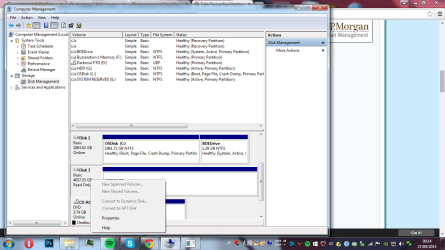
i have recently bought a 5tb seagate external hardrive when i first plugged it in it worked then i plugged it into my laptop thats running windows 8.1 and it also worked fine but when i tried plugging it back into my pc running windows 7 it wont show up. I tried looking at it computer management but it had a black bar saying it was unavailable and that i should initialize it i tried that but it kept comming up with a error message saying unable to initialize Disk - because of an I/O error but after restarting my computer this went away and it now says it is read only with a blue bar but it still wont show up.
Can someone please help it has alot of very important documents on it and i would really hate to lose them
Can someone please help it has alot of very important documents on it and i would really hate to lose them
Attachments
My Computer
At a glance
7 64
- Computer type
- PC/Desktop
- OS
- 7 64


