
Critical Mass
New member
Hi all!
So here's my problem. I never realized it, but my Windows Updates have been turned off for a while. Like, over a year...
Anyway, I've been dabbling in Korean, and wanted to install the Korean language pack so that I could type Korean characters. That's when I realized there were over 100 updates available.
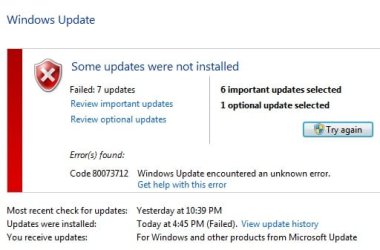
I selected all the important updates, plus the Korean LP, but in the end, there were some that would not install, including the Korean LP.
I searched around, and other people who had the same problem were directed to download and install the updates manually. All except the Korean, which wasn't listed. I tried all that, and they all failed as well.
As a last resort, I did a full System Restore to the days before the update, and tried again. Still no luck.
They are as follows:
Security Update for Windows 7 for x64-based Systems (KB3060716)
Security Update for Windows 7 for x64-based Systems (KB3071756)
Security Update for Windows 7 for x64-based Systems (KB3097966)
Security Update for Windows 7 for x64-based Systems (KB3126587)
Security Update for Windows 7 for x64-based Systems (KB3126593)
Update for Windows 7 for x64-based Systems (KB3080149)
Korean Language Pack - Windows 7 Service Pack 1 for x64-based Systems (KB2483139)
Every time I shut the computer down, it tries to install them, but fails.
I realize that by not updating for a year, I was taking a risk, so therefore I'm comfortable simply hiding the updates so they don't re-attempt each time. However, I really do want that Korean pack. I get an error "80073712".
Thanks in advance.
So here's my problem. I never realized it, but my Windows Updates have been turned off for a while. Like, over a year...
Anyway, I've been dabbling in Korean, and wanted to install the Korean language pack so that I could type Korean characters. That's when I realized there were over 100 updates available.
I selected all the important updates, plus the Korean LP, but in the end, there were some that would not install, including the Korean LP.
I searched around, and other people who had the same problem were directed to download and install the updates manually. All except the Korean, which wasn't listed. I tried all that, and they all failed as well.
As a last resort, I did a full System Restore to the days before the update, and tried again. Still no luck.
They are as follows:
Security Update for Windows 7 for x64-based Systems (KB3060716)
Security Update for Windows 7 for x64-based Systems (KB3071756)
Security Update for Windows 7 for x64-based Systems (KB3097966)
Security Update for Windows 7 for x64-based Systems (KB3126587)
Security Update for Windows 7 for x64-based Systems (KB3126593)
Update for Windows 7 for x64-based Systems (KB3080149)
Korean Language Pack - Windows 7 Service Pack 1 for x64-based Systems (KB2483139)
Every time I shut the computer down, it tries to install them, but fails.
I realize that by not updating for a year, I was taking a risk, so therefore I'm comfortable simply hiding the updates so they don't re-attempt each time. However, I really do want that Korean pack. I get an error "80073712".
Thanks in advance.
My Computer
At a glance
Windows 7 Ultimate 64bitAMD FX(tm)-6300 Six-Core Processor8GBASUS Radeon R7 240 DirectX 11.2 R7240-2GD3-L
- Computer type
- PC/Desktop
- Computer Manufacturer/Model Number
- Custom
- OS
- Windows 7 Ultimate 64bit
- CPU
- AMD FX(tm)-6300 Six-Core Processor
- Motherboard
- GIGABYTE GA-78LMT-USB3
- Memory
- 8GB
- Graphics Card(s)
- ASUS Radeon R7 240 DirectX 11.2 R7240-2GD3-L
- Sound Card
- Std


 , well at least for now.


