Unable to install programs

kimig1

New member
Local time
6:51 AM
Messages
22
I installed three "legacy" programs which will now neither run nor uninstall.

One is Adobe Air, one is Astraslim (drivers for my elderly scanner) and one is DBXconv, which I hoped would capture all the old emails from my old XP machine.
Seems almost as if they are "half" installed, and unable to complete?

Tried everything I know to get these off - even the hitherto failsafe Revo, but I am still stuck with them.
Anyone any ideas, please?
 

My Computer

Computer Manufacturer/Model Number
custom made
OS
windows 7 ultimate
CPU
intel celeron
Memory
4g
Graphics Card(s)
on board Nvidia
Monitor(s) Displays
22inch flat screen
Hard Drives
1 plus external drive
Case
Fancy!!
Keyboard
Philips multimedia
Mouse
Galaxy laser
Internet Speed
1054
I installed three "legacy" programs which will now neither run nor uninstall.

One is Adobe Air, one is Astraslim (drivers for my elderly scanner) and one is DBXconv, which I hoped would capture all the old emails from my old XP machine.
Seems almost as if they are "half" installed, and unable to complete?

Tried everything I know to get these off - even the hitherto failsafe Revo, but I am still stuck with them.
Anyone any ideas, please?
Have you tried running a System Restore point to just before you installed the programs ?
 

My Computer

Computer type
PC/Desktop
Computer Manufacturer/Model Number
Acer Aspire XC-704 x64 bit/ Asus K55A Notebook PC/HP Envy x360 Convertible 15-bq0xx
OS
Windows 10 64bit/Windows 10 64bit/Windows 10 64bit
CPU
Intel Pentium J3710 @ 60GHz/Intel B820,1.7GHz/AMD A9 Radeon
Motherboard
Acer Aspire XC-704 (SOCKET 0)/Asus/HP 8312 (Socket FP4)
Memory
8.00GB DDR3 @ 1599MHz/8GB 2 x 4GB DDR3/8.00GB Dual-Channel
Graphics Card(s)
Intel HD Graphics/Intel/512MB ATI AMD Radeon R5 Graphics (HP
Sound Card
Realtek High Definition Audio/Onboard/AMD High Definition Au
Monitor(s) Displays
Acer LCD K222HQL /Asus 15.6/Generic PnP Monitor (1920x1080@6
Screen Resolution
1920x1080@59Hz/1366 x 768/1920x1080@60Hz
Hard Drives
1863GBWesternn Digital WDC/Asus/119GB SanDisk SD8SN8U-128G-1006 (SSD)
931GB Hitachi HGST HTS721010A9E630 (SATA)
Keyboard
Microsoft Natural Ergonomic Keyboard 4000 (UK)/Inbuilt/Inbui
Mouse
Microsoft Optical Wheel Mouse/Same plus Touchpad/Same + Pad
Internet Speed
Infinity 2 up to 76 Mbps
Antivirus
MSE/MSE/MSE and all 3 have MalwareBytes Premium
Browser
Edge, Firefox/Edge, Firefox/Edge, Firefox, Chrome
Other Info
Seagate Expansion 500GB External Desktop Drive
Seagate Expansion Portable Drives 500GB and 1TB
Epson XP-332 Wireless Printer
I installed three "legacy" programs which will now neither run nor uninstall.

One is Adobe Air, one is Astraslim (drivers for my elderly scanner) and one is DBXconv, which I hoped would capture all the old emails from my old XP machine.
Seems almost as if they are "half" installed, and unable to complete?

Tried everything I know to get these off - even the hitherto failsafe Revo, but I am still stuck with them.
Anyone any ideas, please?
Have you tried running a System Restore point to just before you installed the programs ?


The advice Joan has given is the answer that I usually give, but cant this time, because Joan did (Happy New Year Joan). So, how about this one? There are a lot of free HD cleaners out there, cc cleaner is a good one.
 

My Computer

Computer type
PC/Desktop
Computer Manufacturer/Model Number
Dell XPS 420
OS
Windows 10, Home Clean Install
CPU
Intel Core2 processsor Q8200(2.33Ghz 1333FSB) Quad Core Tech
Motherboard
Dell
Memory
6 gb
Graphics Card(s)
ATI Radeon 256MB HD3650
Sound Card
Intergrated 7.1 Channel Audio
Monitor(s) Displays
Dell SP2009W 20"
Hard Drives
640 GB Serial ATA Hard drive
Cooling
Fan
Keyboard
Dell USB Keyboard
Mouse
Dell Premium Optical USB
Internet Speed
DSL 2.85
I left and now I am back here is the URL for cc cleaner


CCleaner - Home
 

My Computer

Computer type
PC/Desktop
Computer Manufacturer/Model Number
Dell XPS 420
OS
Windows 10, Home Clean Install
CPU
Intel Core2 processsor Q8200(2.33Ghz 1333FSB) Quad Core Tech
Motherboard
Dell
Memory
6 gb
Graphics Card(s)
ATI Radeon 256MB HD3650
Sound Card
Intergrated 7.1 Channel Audio
Monitor(s) Displays
Dell SP2009W 20"
Hard Drives
640 GB Serial ATA Hard drive
Cooling
Fan
Keyboard
Dell USB Keyboard
Mouse
Dell Premium Optical USB
Internet Speed
DSL 2.85
I installed three "legacy" programs which will now neither run nor uninstall.

One is Adobe Air, one is Astraslim (drivers for my elderly scanner) and one is DBXconv, which I hoped would capture all the old emails from my old XP machine.
Seems almost as if they are "half" installed, and unable to complete?

Tried everything I know to get these off - even the hitherto failsafe Revo, but I am still stuck with them.
Anyone any ideas, please?


Hi, install this and follow instructions and see if it will help.

http://support.microsoft.com/kb/290301

http://download.microsoft.com/download/e/9/d/e9d80355-7ab4-45b8-80e8-983a48d5e1bd/msicuu2.exe
 

My Computer

Computer Manufacturer/Model Number
Self Build 64bit
OS
Vista Ult64, Win7600
CPU
Intel Core 2 Quad Q6600 @ 2400 MHz 64bit OS
Motherboard
Asus P5E3 Deluxe WiFi @p 64 bit OS
Memory
4096 MB DDR3-SDRAM
Graphics Card(s)
ATI Radeon HD 3870 Series x2 Crossfired
Sound Card
Realtek on board
Monitor(s) Displays
Samsung SyncMaster - 23 inches
Screen Resolution
1680x1050 pixels at 60 Hz in True Colors
Hard Drives
Hitachi (250 GB)/Samsung 750 GB. /Barracuda 160 GB.
My Book 1 TB external..
PSU
Cooler Master 1000w
Case
Cooler Master Cosmos 1000.
Cooling
Fans and fresh air,
Keyboard
Wireless
Mouse
Wireless
Internet Speed
Never fast enough
Other Info
I use a Magnum.
This is what I get: snip for win Forum.JPG
Getting seriously fed up with Win 7 - probably just me, but there are so many problems that I can't seem to solve! And I'm used to helping other people.....:(
 

Attachments

  • snip for win Forum.JPG
    snip for win Forum.JPG
    18.4 KB · Views: 32

My Computer

Computer Manufacturer/Model Number
custom made
OS
windows 7 ultimate
CPU
intel celeron
Memory
4g
Graphics Card(s)
on board Nvidia
Monitor(s) Displays
22inch flat screen
Hard Drives
1 plus external drive
Case
Fancy!!
Keyboard
Philips multimedia
Mouse
Galaxy laser
Internet Speed
1054
Can you post the text of the VB script?
According to your post it should be in
C:\Users\KIMADMIN\AppData\Local\Temp\IXP000.TMP\StartMsi.vbs
 

My Computer

OS
XP
Regret to tell you that that particular file does not seem to be there anymore.
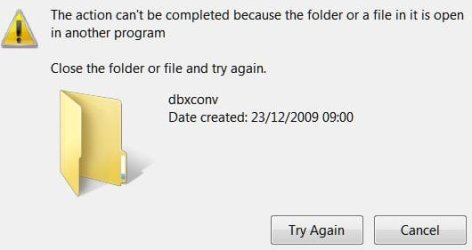
Here is another error message:
Tried to uninstall dbxconv, and it tells me that I can't run or close it, because another instance is still running. If I could find out exactly where it is, I MIGHT be able to stop it, and then uninstall?
 

Attachments

  • error message.JPG
    error message.JPG
    20.9 KB · Views: 26

My Computer

Computer Manufacturer/Model Number
custom made
OS
windows 7 ultimate
CPU
intel celeron
Memory
4g
Graphics Card(s)
on board Nvidia
Monitor(s) Displays
22inch flat screen
Hard Drives
1 plus external drive
Case
Fancy!!
Keyboard
Philips multimedia
Mouse
Galaxy laser
Internet Speed
1054
Back
Top