Hey all,
Been running into this issue the last few days and my search has brought me here:
CheckSur
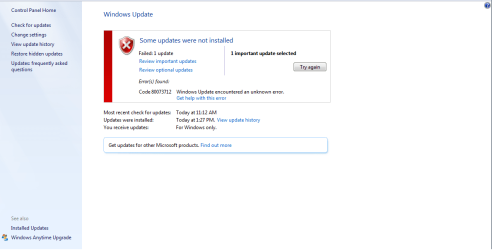
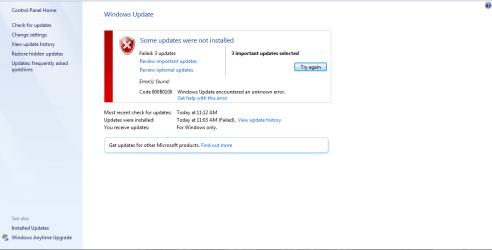
I've used the system update readiness tool and sfc /scannow returned nothing. The three updates that wont install are:
KB3042553, KB3046306 - When trying to install manually it tells me my system is not applicable for them.
KB3046482 - fails to install manually
Also would this updates be the reason why I do not see the Get windows 10 app that should appear for the windows 10 upgrade? I greatly appreciate the help!
Been running into this issue the last few days and my search has brought me here:
CheckSur
Code:
=================================
Checking System Update Readiness.
Binary Version 6.1.7601.22471
Package Version 26.0
2015-06-07 10:59

Checking Windows Servicing Packages

Checking Package Manifests and Catalogs
(f)	CBS MUM Corrupt	0x800F0900	servicing\Packages\Package_1_for_KB3042553~31bf3856ad364e35~amd64~~6.1.1.1.mum		Line 1:
(f)	CBS Catalog Corrupt	0x800B0100	servicing\Packages\Package_1_for_KB3042553~31bf3856ad364e35~amd64~~6.1.1.1.cat
(f)	CBS MUM Corrupt	0x800F0900	servicing\Packages\Package_2_for_KB3046306~31bf3856ad364e35~amd64~~6.1.1.0.mum		Line 1:
(f)	CBS Catalog Corrupt	0x800B0100	servicing\Packages\Package_2_for_KB3046306~31bf3856ad364e35~amd64~~6.1.1.0.cat
(f)	CBS MUM Corrupt	0x800F0900	servicing\Packages\Package_2_for_KB3046482~31bf3856ad364e35~amd64~~6.1.1.0.mum		Line 1:
(f)	CBS Catalog Corrupt	0x800B0100	servicing\Packages\Package_2_for_KB3046482~31bf3856ad364e35~amd64~~6.1.1.0.cat
(f)	CBS MUM Corrupt	0x800F0900	servicing\Packages\Package_3_for_KB3046306~31bf3856ad364e35~amd64~~6.1.1.0.mum		Line 1:
(f)	CBS Catalog Corrupt	0x800B0100	servicing\Packages\Package_3_for_KB3046306~31bf3856ad364e35~amd64~~6.1.1.0.cat
(f)	CBS MUM Corrupt	0x800F0900	servicing\Packages\Package_for_KB3042553_SP1~31bf3856ad364e35~amd64~~6.1.1.1.mum		Line 1:
(f)	CBS Catalog Corrupt	0x800B0100	servicing\Packages\Package_for_KB3042553_SP1~31bf3856ad364e35~amd64~~6.1.1.1.cat
(f)	CBS MUM Corrupt	0x800F0900	servicing\Packages\Package_for_KB3042553~31bf3856ad364e35~amd64~~6.1.1.1.mum		Line 1:
(f)	CBS Catalog Corrupt	0x800B0100	servicing\Packages\Package_for_KB3042553~31bf3856ad364e35~amd64~~6.1.1.1.cat
(f)	CBS MUM Corrupt	0x800F0900	servicing\Packages\Package_for_KB3046306_SP1~31bf3856ad364e35~amd64~~6.1.1.0.mum		Line 1:
(f)	CBS Catalog Corrupt	0x800B0100	servicing\Packages\Package_for_KB3046306_SP1~31bf3856ad364e35~amd64~~6.1.1.0.cat
(f)	CBS MUM Corrupt	0x800F0900	servicing\Packages\Package_for_KB3046306~31bf3856ad364e35~amd64~~6.1.1.0.mum		Line 1:
(f)	CBS Catalog Corrupt	0x800B0100	servicing\Packages\Package_for_KB3046306~31bf3856ad364e35~amd64~~6.1.1.0.cat

Checking Package Watchlist

Checking Component Watchlist

Checking Packages

Checking Component Store
(f)	CSI Manifest All Zeros	0x00000000	winsxs\Manifests\amd64_microsoft-windows-gdi32_31bf3856ad364e35_6.1.7601.18778_none_b767be0f601e369d.manifest	amd64_microsoft-windows-gdi32_31bf3856ad364e35_6.1.7601.18778_none_b767be0f601e369d
(f)	CSI Manifest All Zeros	0x00000000	winsxs\Manifests\amd64_microsoft-windows-http_31bf3856ad364e35_6.1.7601.22976_none_0b31ae7948c7028d.manifest	amd64_microsoft-windows-http_31bf3856ad364e35_6.1.7601.22976_none_0b31ae7948c7028d
(f)	CSI Manifest All Zeros	0x00000000	winsxs\Manifests\wow64_microsoft-windows-gdi32_31bf3856ad364e35_6.1.7601.22982_none_c235356aadaa1970.manifest	wow64_microsoft-windows-gdi32_31bf3856ad364e35_6.1.7601.22982_none_c235356aadaa1970
(f)	CSI Manifest All Zeros	0x00000000	winsxs\Manifests\wow64_microsoft-windows-gdi32_31bf3856ad364e35_6.1.7601.18778_none_c1bc6861947ef898.manifest	wow64_microsoft-windows-gdi32_31bf3856ad364e35_6.1.7601.18778_none_c1bc6861947ef898
(f)	CSI Manifest All Zeros	0x00000000	winsxs\Manifests\amd64_microsoft-windows-http_31bf3856ad364e35_6.1.7601.18772_none_0aa40ea02fad0040.manifest	amd64_microsoft-windows-http_31bf3856ad364e35_6.1.7601.18772_none_0aa40ea02fad0040
(f)	CSI Manifest All Zeros	0x00000000	winsxs\Manifests\amd64_microsoft-windows-gdi32_31bf3856ad364e35_6.1.7601.22982_none_b7e08b1879495775.manifest	amd64_microsoft-windows-gdi32_31bf3856ad364e35_6.1.7601.22982_none_b7e08b1879495775

Summary:
Seconds executed: 215
 Found 22 errors
  CSI Manifest All Zeros Total count: 6
  CBS MUM Corrupt Total count: 8
  CBS Catalog Corrupt Total count: 8

Unavailable repair files:
	winsxs\manifests\amd64_microsoft-windows-gdi32_31bf3856ad364e35_6.1.7601.18778_none_b767be0f601e369d.manifest
	winsxs\manifests\amd64_microsoft-windows-http_31bf3856ad364e35_6.1.7601.22976_none_0b31ae7948c7028d.manifest
	winsxs\manifests\wow64_microsoft-windows-gdi32_31bf3856ad364e35_6.1.7601.22982_none_c235356aadaa1970.manifest
	winsxs\manifests\wow64_microsoft-windows-gdi32_31bf3856ad364e35_6.1.7601.18778_none_c1bc6861947ef898.manifest
	winsxs\manifests\amd64_microsoft-windows-http_31bf3856ad364e35_6.1.7601.18772_none_0aa40ea02fad0040.manifest
	winsxs\manifests\amd64_microsoft-windows-gdi32_31bf3856ad364e35_6.1.7601.22982_none_b7e08b1879495775.manifest
	servicing\packages\Package_1_for_KB3042553~31bf3856ad364e35~amd64~~6.1.1.1.mum
	servicing\packages\Package_1_for_KB3042553~31bf3856ad364e35~amd64~~6.1.1.1.mum
	servicing\packages\Package_2_for_KB3046306~31bf3856ad364e35~amd64~~6.1.1.0.mum
	servicing\packages\Package_2_for_KB3046306~31bf3856ad364e35~amd64~~6.1.1.0.mum
	servicing\packages\Package_2_for_KB3046482~31bf3856ad364e35~amd64~~6.1.1.0.mum
	servicing\packages\Package_2_for_KB3046482~31bf3856ad364e35~amd64~~6.1.1.0.mum
	servicing\packages\Package_3_for_KB3046306~31bf3856ad364e35~amd64~~6.1.1.0.mum
	servicing\packages\Package_3_for_KB3046306~31bf3856ad364e35~amd64~~6.1.1.0.mum
	servicing\packages\Package_for_KB3042553_SP1~31bf3856ad364e35~amd64~~6.1.1.1.mum
	servicing\packages\Package_for_KB3042553_SP1~31bf3856ad364e35~amd64~~6.1.1.1.mum
	servicing\packages\Package_for_KB3042553~31bf3856ad364e35~amd64~~6.1.1.1.mum
	servicing\packages\Package_for_KB3042553~31bf3856ad364e35~amd64~~6.1.1.1.mum
	servicing\packages\Package_for_KB3046306_SP1~31bf3856ad364e35~amd64~~6.1.1.0.mum
	servicing\packages\Package_for_KB3046306_SP1~31bf3856ad364e35~amd64~~6.1.1.0.mum
	servicing\packages\Package_for_KB3046306~31bf3856ad364e35~amd64~~6.1.1.0.mum
	servicing\packages\Package_for_KB3046306~31bf3856ad364e35~amd64~~6.1.1.0.mum
	servicing\packages\Package_1_for_KB3042553~31bf3856ad364e35~amd64~~6.1.1.1.cat
	servicing\packages\Package_1_for_KB3042553~31bf3856ad364e35~amd64~~6.1.1.1.cat
	servicing\packages\Package_2_for_KB3046306~31bf3856ad364e35~amd64~~6.1.1.0.cat
	servicing\packages\Package_2_for_KB3046306~31bf3856ad364e35~amd64~~6.1.1.0.cat
	servicing\packages\Package_2_for_KB3046482~31bf3856ad364e35~amd64~~6.1.1.0.cat
	servicing\packages\Package_2_for_KB3046482~31bf3856ad364e35~amd64~~6.1.1.0.cat
	servicing\packages\Package_3_for_KB3046306~31bf3856ad364e35~amd64~~6.1.1.0.cat
	servicing\packages\Package_3_for_KB3046306~31bf3856ad364e35~amd64~~6.1.1.0.cat
	servicing\packages\Package_for_KB3042553_SP1~31bf3856ad364e35~amd64~~6.1.1.1.cat
	servicing\packages\Package_for_KB3042553_SP1~31bf3856ad364e35~amd64~~6.1.1.1.cat
	servicing\packages\Package_for_KB3042553~31bf3856ad364e35~amd64~~6.1.1.1.cat
	servicing\packages\Package_for_KB3042553~31bf3856ad364e35~amd64~~6.1.1.1.cat
	servicing\packages\Package_for_KB3046306_SP1~31bf3856ad364e35~amd64~~6.1.1.0.cat
	servicing\packages\Package_for_KB3046306_SP1~31bf3856ad364e35~amd64~~6.1.1.0.cat
	servicing\packages\Package_for_KB3046306~31bf3856ad364e35~amd64~~6.1.1.0.cat
	servicing\packages\Package_for_KB3046306~31bf3856ad364e35~amd64~~6.1.1.0.cat
I've used the system update readiness tool and sfc /scannow returned nothing. The three updates that wont install are:
KB3042553, KB3046306 - When trying to install manually it tells me my system is not applicable for them.
KB3046482 - fails to install manually
Also would this updates be the reason why I do not see the Get windows 10 app that should appear for the windows 10 upgrade? I greatly appreciate the help!
Attachments
My Computer
- Computer type
- PC/Desktop
- OS
- Windows 7 Professional