Solved Unable to install Windows 7

sood1992

New member
Local time
6:30 AM
Messages
2
I have uBuntu installed on my Compaq A933tu right now. I want to install Windows 7 but when I boot from a DVD I get a black screen and a blinking cursor.

When I boot from a USB Drive, I'm able to enter the setup and boot properly but when I click Custom Install, I get this error:

No drives were found .Click load driver to provide mass storage

When I browse, I'm unable to locate my hdd, it just show a drive which is the USB, cd rom etc but not my laptop HDD.


How do I install Windows 7. I'm fed up of ubuntu now.

Please help
 

My Computer My Computer

At a glance

ubuntu
OS
ubuntu

My Computer My Computer

At a glance

Windows 7 32 bitAMD 5200+ dual core2 GBNVidia GeForce 6150SE 128 MB
Computer Manufacturer/Model Number
HP Media Center
OS
Windows 7 32 bit
CPU
AMD 5200+ dual core
Memory
2 GB
Graphics Card(s)
NVidia GeForce 6150SE 128 MB
Monitor(s) Displays
CRT
Screen Resolution
1280x1024
Hard Drives
500 GB Sata internal :

SIIG USB 3.0 docking stations w/WD Caviar Black 6 Gb/s drives
Keyboard
PS/2
Mouse
PS/2 Wheel Mouse
Other Info
SIIG USB 3.0 PCIexpress card.
I have uBuntu installed on my Compaq A933tu right now. I want to install Windows 7 but when I boot from a DVD I get a black screen and a blinking cursor.

When I boot from a USB Drive, I'm able to enter the setup and boot properly but when I click Custom Install, I get this error:

No drives were found .Click load driver to provide mass storage

When I browse, I'm unable to locate my hdd, it just show a drive which is the USB, cd rom etc but not my laptop HDD.


How do I install Windows 7. I'm fed up of ubuntu now.

Please help

The reason you get error "no drives were found" is because windows recognizes a NTFS file system. Ubuntu is on an EXT file system. And there is probably no unallocated partition space left since Ubuntu is using it all...

If you just want a Fresh Windows 7 install (wipe ubuntu completely), see GParted to delete existing partitions, create a new NTFS partition on the newly created free space, and then you can install windows on this unallocated partition space.
 

My Computer My Computer

At a glance

Windows 7 Ultimate x32
OS
Windows 7 Ultimate x32
I have uBuntu installed on my Compaq A933tu right now. I want to install Windows 7 but when I boot from a DVD I get a black screen and a blinking cursor.

When I boot from a USB Drive, I'm able to enter the setup and boot properly but when I click Custom Install, I get this error:

No drives were found .Click load driver to provide mass storage

When I browse, I'm unable to locate my hdd, it just show a drive which is the USB, cd rom etc but not my laptop HDD.


How do I install Windows 7. I'm fed up of ubuntu now.

Please help

The reason you get error "no drives were found" is because windows recognizes a NTFS file system. Ubuntu is on an EXT file system. And there is probably no unallocated partition space left since Ubuntu is using it all...

If you just want a Fresh Windows 7 install (wipe ubuntu completely), see GParted to delete existing partitions, create a new NTFS partition on the newly created free space, and then you can install windows on this unallocated partition space.


Do I simply download the ISO ad then burn it to a disc and boot?
 

My Computer My Computer

At a glance

ubuntu
OS
ubuntu
Yea. That's how most boot CDs work. Burn and boot. There are loads of boot tools and ISO images out there for doing stuff like this. :)
 

My Computer My Computer

At a glance

Windows 7 Ultimate x32
OS
Windows 7 Ultimate x32
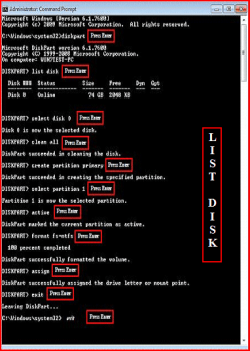
All Linux code must be deleted using the CLEAN ALL command.As you have had linux on the HD you need do a Clean all & full format.

Do a full clean & full format in command prompt.
1) Boot DVD & Press Shift+F10 (for command prompt)
http://www.sevenforums.com/tutorials/119713-diskpart-pc-startup.html
2) Boot DVD, & http://www.sevenforums.com/tutorials/682-command-prompt-startup.html
(for command prompt)

Type in command line
DISKPART
LIST DISK
SELECT DISK # (win HD)
CLEAN ALL
CREATE PARTITION PRIMARY
SELECT PARTITION 1
ACTIVE
FORMAT fs=NTFS
ASSIGN
EXIT
EXIT


List Disk.PNG


http://www.sevenforums.com/tutorials/91339-ssd-hdd-optimize-windows-reinstallation.html
 

My Computer My Computer

At a glance

ME/XP/Vista/Win7
OS
ME/XP/Vista/Win7
Hi,

I am in the same situation and I also did DISKPART instructions but to no avail. My problem is that I don't have a DVD. I am booting from USB flash drive. How do I install Windows from the USB flash drive and sort this problem out ?? Please help. :cry:

Thanks.
 

My Computer My Computer

At a glance

Windows 7 UltimateIntel Centrino Duo3 GBnVidia
Computer Manufacturer/Model Number
HP
OS
Windows 7 Ultimate
CPU
Intel Centrino Duo
Motherboard
IDK
Memory
3 GB
Graphics Card(s)
nVidia
Sound Card
IDK
Monitor(s) Displays
LCD
Hard Drives
80 GB
PSU
IDK
Case
IDK
Cooling
IDK
Back
Top