Glad to hear your computer is almost 100%. 
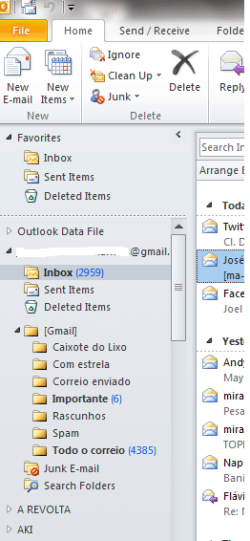
As far as Outlook is concerned, I have very limited knowledge. I only use it at work and that's because I have no choice.
If you open Outlook and go to Tools | Options | Preferences (Tab) | E-mail Options (button) | Advanced E-mail Options (button) | Save messages (section). There should be some options pertaining to how messages are saved.
I also found this article that may provide some info:
How to Restore Missing Folders in Outlook | eHow.com
And I sent a message to one of the Forum experts in all things Microsoft Office. Perhaps she can offer some advice.
As far as Outlook is concerned, I have very limited knowledge. I only use it at work and that's because I have no choice.
If you open Outlook and go to Tools | Options | Preferences (Tab) | E-mail Options (button) | Advanced E-mail Options (button) | Save messages (section). There should be some options pertaining to how messages are saved.
I also found this article that may provide some info:
How to Restore Missing Folders in Outlook | eHow.com
And I sent a message to one of the Forum experts in all things Microsoft Office. Perhaps she can offer some advice.
My Computer
- Computer type
- Laptop
- Computer Manufacturer/Model Number
- Sony Vaio VPCEB47GM Laptop
- OS
- Win 7 Pro 64-bit
- CPU
- Intel i5 2.4 Ghz
- Memory
- 8GB DDR3
- Graphics Card(s)
- Intel HD 3000
- Sound Card
- IDT High Definition
- Monitor(s) Displays
- 15.6 WGXA Anti-Glare LED
- Screen Resolution
- 1280x800
- Hard Drives
- 640Gb 7200rpm
- Antivirus
- MSE
- Browser
- Opera (primary) with IE9 backup