
Solved Unable to open files on USB flash drive

milemarker0

New member
Local time
8:23 AM
Messages
3
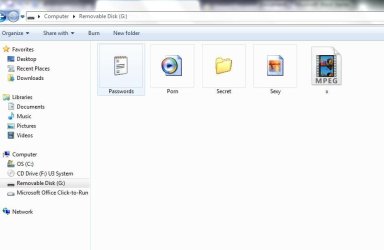
Long story short I recently purchased a moving trailer that had junk inside of it, of which were a couple of old laptops, and inside one was a an SD card. I plugged it and all the files would not open and instead labels them as applications with 124 kb's but have the file icon. I just click on them but nothing happens. The SD card is 16 GB with 6.5 GB free, so there is obviously data on it. I would just throw it away but today I plugged in a USB flash drive that I use regularly, was working properly before I plugged in SD card, and it did the same thing. It won’t let me open my files and the same files that were on the SD card now showed up on this USB flash drive. I reformatted the USB, since I already had all the data saved on my computer, then reinserted it the USB flash drive and those same files from the SD card showed up again. I’m afraid to insert any other of my USB flash drives due to this, especially since these aforementioned files are named in an adult nature . Help!
The pic below is of my now reformatted USB flash drive and these are the same files that show up on the SD card.
 

Attachments
  • Capture.JPG
    Capture.JPG
    36.4 KB · Views: 3

My Computer My Computer

Computer type
Laptop
Computer Manufacturer/Model Number
Dell Inspirion N4010
OS
Windows 7 64bit
Hi milemarker0, welcome to sevenforums,

Why do you want to open it considering what is on it?
I would definitely remove the SD card and run a FULL system virus check.

I hope this helps!
 

My Computer My Computer

Computer type
Laptop
Computer Manufacturer/Model Number
Fujitsu LIFEBOOK
OS
Win 7 HP SP1 64-bit Vista HB SP2 32-bit Linux Mint 18.3
CPU
Intel(R) Pentium(R) CPU P6200 @ 2.13GHz
Motherboard
FUJITSU FJNBB06
Memory
4.00 GB
Graphics Card(s)
Intel(R) Graphics Media Accelerator HD
Sound Card
[1] Realtek High Definition Audio [2] Intel(R) Display Audio
Screen Resolution
1366 x 768 x 32 bits (4294967296 colors) @ 59 Hz
Hard Drives
TOSHIBA MK5076GSX
Antivirus
AVG FREE
I agree with Paul Black -- look at what is on the flash drive! There's probably also malware on the flash drive, which means there is probably now some malware on your computer.

For future reference, DO NOT use a flash drive that you found in a box of junk that you purchased; it's not worth the risk. Flash drives are cheap, so there isn't any benefit in trying to use a flash drive from an unknown source.
 

My Computer My Computer

Computer type
PC/Desktop
Computer Manufacturer/Model Number
Dell
OS
Linux Mint 18.2 xfce 64-bit (VMWare host) / Windows 8.1 Pro 32-bit (VMWare guest)
CPU
Haswell
Memory
4 GB
Monitor(s) Displays
Acer 23"
Screen Resolution
1920 x 1080
Hard Drives
Two hard drives, 1TB each: One for Linux, one for my data.
Keyboard
IBM Model M
Antivirus
Sophos (Linux), Trend Micro (Windows)
Browser
Firefox, Opera
Other Info
I use Samba to share my data drive with the other computers at my house and with my guest session in VMWare Workstation Player.
I guess I should have been a little more clear. I don't want to open the SD card, I want to be able to open my existing USB drives. I can no longer upload or access files on USB drives anymore without the files that were on the SD card showing up on the USB drives. They just appear automatically now. Thanks for the quick responses.
 

My Computer My Computer

Computer type
Laptop
Computer Manufacturer/Model Number
Dell Inspirion N4010
OS
Windows 7 64bit
Hi milemarker0,

I don't want to open the SD card, I want to be able to open my existing USB drives.

Why did you put the SD card in then?
What were the results of the system virus scan?
I would also definitely run a Malware check!
 

My Computer My Computer

Computer type
Laptop
Computer Manufacturer/Model Number
Fujitsu LIFEBOOK
OS
Win 7 HP SP1 64-bit Vista HB SP2 32-bit Linux Mint 18.3
CPU
Intel(R) Pentium(R) CPU P6200 @ 2.13GHz
Motherboard
FUJITSU FJNBB06
Memory
4.00 GB
Graphics Card(s)
Intel(R) Graphics Media Accelerator HD
Sound Card
[1] Realtek High Definition Audio [2] Intel(R) Display Audio
Screen Resolution
1366 x 768 x 32 bits (4294967296 colors) @ 59 Hz
Hard Drives
TOSHIBA MK5076GSX
Antivirus
AVG FREE
I put the SD card because I needed one and wanted to clear it so I could. Thanks for the responses but I figured it out. Every time I attempted to click on a file a hidden file would appear. I then found that file in the processes through task manager and ended it. I was then able to clear it and now the files no longer appear when I reinsert the flash drives. Thanks again.
 

My Computer My Computer

Computer type
Laptop
Computer Manufacturer/Model Number
Dell Inspirion N4010
OS
Windows 7 64bit
You're welcome, I'm glad you got it sorted.
 

My Computer My Computer

Computer type
Laptop
Computer Manufacturer/Model Number
Fujitsu LIFEBOOK
OS
Win 7 HP SP1 64-bit Vista HB SP2 32-bit Linux Mint 18.3
CPU
Intel(R) Pentium(R) CPU P6200 @ 2.13GHz
Motherboard
FUJITSU FJNBB06
Memory
4.00 GB
Graphics Card(s)
Intel(R) Graphics Media Accelerator HD
Sound Card
[1] Realtek High Definition Audio [2] Intel(R) Display Audio
Screen Resolution
1366 x 768 x 32 bits (4294967296 colors) @ 59 Hz
Hard Drives
TOSHIBA MK5076GSX
Antivirus
AVG FREE
Back
Top