Solved Unable to open website shortcuts on desktop

Chatbell

New member
Local time
9:03 AM
Messages
2
When I attempt to open a website shortcut on my desktop i receive a message.."this protocol HTTP does not have a registered program...install program..or create an association in Default Control Panel"...How do I do this? I cannot find HTTP in the default programs.
 

My Computer My Computer

At a glance

windows 7 Home Premium 64bit
OS
windows 7 Home Premium 64bit

My Computer My Computer

At a glance

Win7 Pro x64Koa i5-2550K8 GBSapphire ATI 6870 1GB GDDR5
Computer Manufacturer/Model Number
Self-built rig
OS
Win7 Pro x64
CPU
Koa i5-2550K
Memory
8 GB
Graphics Card(s)
Sapphire ATI 6870 1GB GDDR5
Sound Card
RealTek HD Audio / ATI HDMI Audio
Monitor(s) Displays
Samsung HDTV Monitor T23A350
Screen Resolution
1920 x 1080
Hard Drives
- SSD (C:)
- HDD (D:)
- BD-ROM (E:)
Keyboard
Logitech G110
Internet Speed
Unifi home (5mbps)
Associate Protocols

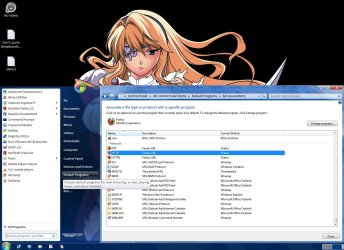
Try this:

  • Go to the "Start Menu".
  • Click on "Default Programs".
  • Click on "Associate a file type or protocol with a program".
  • Scroll to the "Protocols" section (bottom of the list).
Associate Protocols.jpg
 

My Computer My Computer

At a glance

W7 Ultimate SP1, LM19.2 MATE, W10 Home 1703, ...AMD Phenom II x6 1100T, 3.3 GHz12GB DDR3 1333 G-Skill (4GB x 2), G-Skill (2G...NVIDIA GeForce GTX 660
Computer type
PC/Desktop
Computer Manufacturer/Model Number
n/a
OS
W7 Ultimate SP1, LM19.2 MATE, W10 Home 1703, W10 Pro 1703 VM, #All 64 bit
CPU
AMD Phenom II x6 1100T, 3.3 GHz
Motherboard
ASUS M4A88T-M/USB3 (AM3)
Memory
12GB DDR3 1333 G-Skill (4GB x 2), G-Skill (2GB x 2)
Graphics Card(s)
NVIDIA GeForce GTX 660
Sound Card
Realtek?
Monitor(s) Displays
Samsung S23B350
Screen Resolution
1920x1080
Hard Drives
WD Green 2TB (SATA), WD Green 3TB (SATA), WD Blue 4TB (SATA), WD Blue 6TB (SATA)
PSU
Cooler Master
Case
Antec GX300 Tower
Cooling
3x Antec TRICOOL 120mm Fans
Mouse
Wired Optical
Internet Speed
DSL
Antivirus
Avast
Browser
Pale Moon (64 bit)
Other Info
2018-12-27 Upgraded HDDs
2015-12-10 Upgraded case, graphics card, storage
2015-08-15 Upgraded motherboard & RAM
2015-07-15 Upgraded LM17.1 to LM17.2
The default program for HTTP should be a web browser (Internet Explorer, Firefox, Google Chrome, etc).

Try the following links:
Associate http protocol with IE8 instead of Firefox - Microsoft Answers
[SOLVED] Fix default protocol (http…) association in WIndows « RussenReaktor's Weblog

Good luck.

Thanks, I just answered my own question...I hadn't scrolled down far enough in the default programs to find the HTTP protocol. Have associated IE9 and all is well...:D
 

My Computer My Computer

At a glance

windows 7 Home Premium 64bit
OS
windows 7 Home Premium 64bit
Back
Top