Unable to Record with Windows 7

ZeuxisZingara

New member
Local time
5:11 AM
Messages
2
I've tried the recording program included with W7, the Free Sound Recorder program, Audacity, and Adobe Soundbooth and none of them are recording anything (all of them register no audio input). Is it that I'm missing a setting? A driver? Or does my video card just not support that?

Other information:
Windows 7
8 GB Ram
XFX Radeon HD 4850 1G
ASUS Crosshair III Formula AM3
AMD Phenom II X4 955


Thanks!
 
Last edited:

My Computer

OS
Windows 7
I'm not sure about those programs, but the professional ones have you choose which input you want to use directly in the host software itself.

If there are no options for that in those programs, Windows offers a selection screen. Right click the speaker tray icon, click recording tab. Choose the correct input, set it default and you should be set. I highly recommend Cubase 3, Cakewalk Sonar or Sound Forge 9.0e. All of those have detailed selections for the input.
 

Attachments

  • Capture.JPG
    Capture.JPG
    37.3 KB · Views: 133

My Computer

Computer Manufacturer/Model Number
self built
OS
7600.20510 x86
CPU
P4 550 3.4 GHz HT running at 3.5 GHz
Motherboard
MSI PM8M3-V (MS-7211 v1.x) Micro-ATX mainboard
Memory
OCZ 2 GB(2x1GB) DDR400mHz running @ 414 mHz
Graphics Card(s)
HIS Radeon HD 3850 IceQ 3 Turbo HDMI Dual DL-DVI AGP
Sound Card
MOTU Traveler firewire studio interface 192 kHz 24 bit
Monitor(s) Displays
22" widescreen Acer X223W LCD, 17" Compaq P75 CRT
Screen Resolution
1680x1050 and 1280x1024
Hard Drives
SATA I x2 WD, 400 GB and 120 GB, SATA 2 WD Caviar Black 1 TB
PSU
350W generic
Case
Cybertronpc, it glows blue
Cooling
stock cpu fan, Ice-Q 3 gpu and system, many case fans
Keyboard
Logitch Classical Keyboard 200
Mouse
Logitech Mediaplay cordless
Internet Speed
1792/448 kbits/sec
Other Info
SATA II PCI fake RAID adapter, 1 GB Readyboost, original ATI Remote Wonder (even works with WMC perfectly), Logitech Rumblepad 2 game controller x2
did you try the audio troubleshooter?
 

My Computer

Computer Manufacturer/Model Number
Samsung NP530U4B-S02IN
OS
Windows® 8 Pro (64-bit)
CPU
Intel® Core™ i5 Processor 2467M (1.60GHz, 3MB L3 Cache)
Motherboard
Samsung Electronics
Memory
6GB DDR3 System Memory at 1,333MHz (on BD 4GB + 2GB x 1)
Graphics Card(s)
AMD Radeon™ HD7550M 1GB DDR3 (Ext. Graphic)
Sound Card
Realtek High Definition Audio
Monitor(s) Displays
35.56cm (14.0) SuperBright 300nit HD LED Display
Screen Resolution
1366x768
Hard Drives
1TB S-ATA II Hard Drive (5400RPM) with ExpressCache 16GB SSD
Internet Speed
sucks
Antivirus
Microsoft Security Essentials
Browser
Google Chrome (Sync enabled)
Vista had this problem too. It was just XP that allowed it. I think MS are trying to crack down on illegally recording audio.
 

My Computer

Computer Manufacturer/Model Number
Desktop
OS
Windows 7 Professional x64
CPU
Intel i5-2500k @ 3.3Ghz
Motherboard
Gigabyte GA-Z77X-UD5H
Memory
4GB DDR3
Graphics Card(s)
Nvidia GTS250 1GB
Monitor(s) Displays
Sony SDM S95A
Screen Resolution
1280x1024
Hard Drives
1x 1TB, 2x 250GB HDDs
PSU
Corsair HX850W
Case
Cooler Master 690 II
Cooling
Thermalright True Spirit 140mm & 3x 120mm & 3x 140mm Fans
Keyboard
Logitech Media Keyboard
Mouse
Microsoft Intellimouse
Internet Speed
8MB
No, it is easy to record what you hear. On my downstairs pc with nothing fancy only onboard AC'97, I open Sound Forge and record without adjusting anything on 7. Microsoft is not doing anything like that here. There is no problem. Perhaps his system setup is the cause, but definitely not the OS. Here is further help. If you do not have the option for what-you-hear, choose stereo mix instead. Enjoy. http://www.sevenforums.com/tutorials/20595-what-u-hear-recording-enable.html
 

My Computer

Computer Manufacturer/Model Number
self built
OS
7600.20510 x86
CPU
P4 550 3.4 GHz HT running at 3.5 GHz
Motherboard
MSI PM8M3-V (MS-7211 v1.x) Micro-ATX mainboard
Memory
OCZ 2 GB(2x1GB) DDR400mHz running @ 414 mHz
Graphics Card(s)
HIS Radeon HD 3850 IceQ 3 Turbo HDMI Dual DL-DVI AGP
Sound Card
MOTU Traveler firewire studio interface 192 kHz 24 bit
Monitor(s) Displays
22" widescreen Acer X223W LCD, 17" Compaq P75 CRT
Screen Resolution
1680x1050 and 1280x1024
Hard Drives
SATA I x2 WD, 400 GB and 120 GB, SATA 2 WD Caviar Black 1 TB
PSU
350W generic
Case
Cybertronpc, it glows blue
Cooling
stock cpu fan, Ice-Q 3 gpu and system, many case fans
Keyboard
Logitch Classical Keyboard 200
Mouse
Logitech Mediaplay cordless
Internet Speed
1792/448 kbits/sec
Other Info
SATA II PCI fake RAID adapter, 1 GB Readyboost, original ATI Remote Wonder (even works with WMC perfectly), Logitech Rumblepad 2 game controller x2
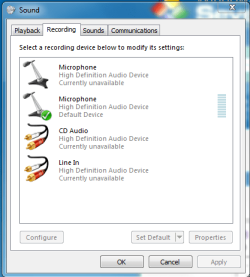
It seems that the problem for me is that I have no Stereo Mix on my machine. Is it possible to fix that? I'm unfortunately not well versed in the audio portion of computers, so I'm not exactly sure what I'm looking for.

I've attached what it's displaying for me currently (with all the disabled/unused portions showing).
 

Attachments

  • Capture.PNG
    Capture.PNG
    15.5 KB · Views: 206

My Computer

OS
Windows 7
Maybe your audio device doesn't support it but I doubt that with a good name like ASUS. Try to get the latest driver if you can and install.

What you definitely can do is get a 1) patch cord with 1/8 inch male connectors at both ends. And also a 2) single stereo 1/8 inch male to dual stereo 1/8 inch female patch cord.

Plug the male end of cord 2 into the audio line out on motherboard. Connect your current speakers to one of the female ends. Connect cord 1 to the other remaining female end of cord 2. Connect the remaining male end from 1 to the motherboard audio line in.

Now set the recording device to line in and now you can record what you hear like this. You'll probably have to mute the playback (listening of) for line in so you don't get the audio rerouted to the speakers creating a loop or delay (echo) effect.
 

My Computer

Computer Manufacturer/Model Number
self built
OS
7600.20510 x86
CPU
P4 550 3.4 GHz HT running at 3.5 GHz
Motherboard
MSI PM8M3-V (MS-7211 v1.x) Micro-ATX mainboard
Memory
OCZ 2 GB(2x1GB) DDR400mHz running @ 414 mHz
Graphics Card(s)
HIS Radeon HD 3850 IceQ 3 Turbo HDMI Dual DL-DVI AGP
Sound Card
MOTU Traveler firewire studio interface 192 kHz 24 bit
Monitor(s) Displays
22" widescreen Acer X223W LCD, 17" Compaq P75 CRT
Screen Resolution
1680x1050 and 1280x1024
Hard Drives
SATA I x2 WD, 400 GB and 120 GB, SATA 2 WD Caviar Black 1 TB
PSU
350W generic
Case
Cybertronpc, it glows blue
Cooling
stock cpu fan, Ice-Q 3 gpu and system, many case fans
Keyboard
Logitch Classical Keyboard 200
Mouse
Logitech Mediaplay cordless
Internet Speed
1792/448 kbits/sec
Other Info
SATA II PCI fake RAID adapter, 1 GB Readyboost, original ATI Remote Wonder (even works with WMC perfectly), Logitech Rumblepad 2 game controller x2
From the looks of that screen shot, it looks like you haven't installed the sound drivers. Seeing as your board has the SupremeFX audio and Asus is severely dragging their feet on updating all the boards that use it (yours is still showing Vista drivers only), go here,

ASUSTeK Computer Inc.

(if the link doesn't work, look up the Rampage II Extreme, click on Download and select Windows 7 from the dropdown list), and grab the SoundMax Windows 7 driver.

Or does my video card just not support that?
It never did. All the audio on the ATI HD series of cards does is allow for audio out over HDMI.
 

My Computer

Computer type
PC/Desktop
Computer Manufacturer/Model Number
Me
OS
Win 7 Ultimate x64
CPU
FX-8350 @ 4.6 GHz so far
Motherboard
Asus M5A97 EVO
Memory
ADATA XPG V1 Series Black 8GB DDR3 1600
Graphics Card(s)
Sapphire R9 270x Dual-X
Sound Card
Xonar DGX w/ Corsair Vengence 1300
Monitor(s) Displays
Acer S232HL Abid
Screen Resolution
1920x1080
Hard Drives
120 GB OCZ Vertex 3
500 GB Seagate 7200.12
PSU
Antec Earthwatts 650W Green
Case
Antec Three Hundred
Cooling
Cooler Master 212 EVO
Keyboard
Logitech G510
Mouse
Logitech G500s
Internet Speed
35000/3000
I had the same problem attempting to record from line in. The sound screen you posted has a check on the microphone tab indicating that it is currently set as your recording device. Uncheck the microphone by disabling it. This will allow your system to move to the next connected input on the list. Apparently there is an internal setting that automatically chooses whichever active input is highest on that list. Once I disabled my mic, Sound Recorder automatically started grabbing input from my line in. Hope this helps.
 

My Computer

OS
Windows 7 Ultimate 64
Back
Top