Unable to reformat/install Windows 7 AND Vista , Blackscreen AND BSOD

az19

New member
Local time
12:18 PM
Messages
10
Hello , iv been trying to build a new comp because my other one blew up ( too much heat and CPU died ) So i bought new CPU (Intel, cant remember the name exactly because its new ) and new motherboard ASUS. Hardrive and DVD rom is already used, no video card/network.

So i set up everything , the computer starts very well.
Since the hardrive is already used, i reformated it using windows 7. The installation is a succes and windows loads. I realize i have no internet connection ( im using the onboard connection ) So i install the onboard connection using the motherboard CD drivers , realtek LAN one, and it works. I have now internet. I do a reboot just to be sure it works fine. And then heres my problem :

Windows will load to Windows Logo screen and reboots by itself. I run it another time and i get the screen where it asks to choose load Windows normally , safe mode or CMD. So i pick normally and the same thing happens BUT that time i got a BSOD but no time to read it. I tried disabling the auto restart on errors in the BIOS to read the BSOD but still doesnt work. Rebooted another time, and now... The logo wont even show up and i get black screen, nothing loading. So i have no idea what the error is.

Im like okai whatever , imma reformat windows and put a fresh install. Heres my 2nd problem :

Windows 7 will not install completly , it will stop at ''Finishing installation'' and i get an error saying files in the windows instllation were damaged, corrupted and cannot complete. Windows 7 wont install now , no matter what i do , delete partitions , create new ones...etc.
Iv tried windows vista too.... exact same thing.

BUT Windows XP works... what the hell?

I believe the motherboard driver updates screwed up my BIOS or something like that. Iv tried changing the RAID and IDE settings in BIOS ( heard on other forums) but still dont work.

Or maybe it is my hardrive? should i use a new one since this one is a used one?
Is it my DVD rom that isnt reading/installing the files well?

What to do :(
plz help
 
Last edited:

My Computer My Computer

At a glance

Windows XP
OS
Windows XP
anyone plz
 

My Computer My Computer

At a glance

Windows XP
OS
Windows XP

My Computer My Computer

At a glance

Windows 7 Ultimate SP1 64-BitIntel Core i7 870 @ 2.93GHz8Gb Dual-Channel DDR3 @ 664MHznVidia GeForce GTX 460 1024MB dedicated RAM
Computer Manufacturer/Model Number
HP Pavilion Elite 495UK
OS
Windows 7 Ultimate SP1 64-Bit
CPU
Intel Core i7 870 @ 2.93GHz
Motherboard
MSI 2A9C (CPU1)
Memory
8Gb Dual-Channel DDR3 @ 664MHz
Graphics Card(s)
nVidia GeForce GTX 460 1024MB dedicated RAM
Sound Card
Realtek HD Audio
Monitor(s) Displays
HP2310i
Screen Resolution
1920 x 1080
Hard Drives
1x1954GB Hitachi HDS22020ALA 330 (RAID), 1x1954GB Hitachi External for backup and storage
PSU
460W
Case
HP Elite
Cooling
Air cooled
Keyboard
Logitech K750 solar-powered keyboard
Mouse
Logitech Wireless M180 mouse
Internet Speed
2Mb
Other Info
Pure Avanti Flow Internet Radio with iPod Dock, 64Gb iPod, HP USB Speakers, Sony MDR-V500 Headphones, Sony Vaio F-Series Laptop
Cant acces to CMD at all. Whatever i pick is black screen right after.
 

My Computer My Computer

At a glance

Windows XP
OS
Windows XP
I'd say it's time to buy a new hard drive by the look of things. :(
 

My Computer My Computer

At a glance

Windows 7 Ultimate SP1 64-BitIntel Core i7 870 @ 2.93GHz8Gb Dual-Channel DDR3 @ 664MHznVidia GeForce GTX 460 1024MB dedicated RAM
Computer Manufacturer/Model Number
HP Pavilion Elite 495UK
OS
Windows 7 Ultimate SP1 64-Bit
CPU
Intel Core i7 870 @ 2.93GHz
Motherboard
MSI 2A9C (CPU1)
Memory
8Gb Dual-Channel DDR3 @ 664MHz
Graphics Card(s)
nVidia GeForce GTX 460 1024MB dedicated RAM
Sound Card
Realtek HD Audio
Monitor(s) Displays
HP2310i
Screen Resolution
1920 x 1080
Hard Drives
1x1954GB Hitachi HDS22020ALA 330 (RAID), 1x1954GB Hitachi External for backup and storage
PSU
460W
Case
HP Elite
Cooling
Air cooled
Keyboard
Logitech K750 solar-powered keyboard
Mouse
Logitech Wireless M180 mouse
Internet Speed
2Mb
Other Info
Pure Avanti Flow Internet Radio with iPod Dock, 64Gb iPod, HP USB Speakers, Sony MDR-V500 Headphones, Sony Vaio F-Series Laptop
Im guessing that will completly fix my problem?
I am really scared if i update the motherboard drivers using the cd, realtek ones , ill get the same problem. Should i also get a network card and install it instead of using the onboard one? same for video card?
 

My Computer My Computer

At a glance

Windows XP
OS
Windows XP
Reset the BIOS to defaults: Clear CMOS - 3 Ways to Clear the CMOS - Reset BIOS

Win7 is driver-complete in the installer with newer arriving quickly via optional Windows Updates. You should only provide the drivers missing in Device Manager. The full chipset apparently was not needed to get the LAN drivers, which would have been picked up by the LAN Device updater in Device manager.

Test your HD with maker's HD Diagnostic extended CD scan and full Disk Check after formatting one large partition using the optimize tutorial SeaVixen linked.http://www.sevenforums.com/tutorials/1649-clean-install-windows-7-a.html
 
Iv used 3 different windows 7 CDs that my step dad gave me. + 2 Windows vista CDs , and one windows XP cd.

windows 7 and vista didnt work but XP did.
 

My Computer My Computer

At a glance

Windows XP
OS
Windows XP
i REALLY do believe the onboard drivers damaged my hardrive or something , bc it only happened when i installed the realtek LAN ones.
 

My Computer My Computer

At a glance

Windows XP
OS
Windows XP
take the battery out,little round one, that will reset bios and clear cmos.Don't use them drivers, Win 7 will have a driver that will work for onboard network realtek LAN. They were probably for 32 bit if thats what the pc was before.Why did you not try "safe mode", or safe mode with networking" then you could of seen if it was the drivers that caused the problem. download your drivers for LAN next time from different PC, put on usb stick, update from there. Is you Win 7 legit? are you using some kind of loader that might be the problem? Don't know if that can be discussed here? doubt it.Good Luck! Dude wasn't the drivers XP drivers?
 

My Computer My Computer

At a glance

windows 7 ultimate 64bit, Win 7 Ul x86, XPPhenom 955BE 3.2 C38GBs corsair DDR3 1600 805mhzATI XFX HD6950
Computer Manufacturer/Model Number
self built and Gateway GM5664, 2 toshiba laptops XP&Win 7
OS
windows 7 ultimate 64bit, Win 7 Ul x86, XP
CPU
Phenom 955BE 3.2 C3
Motherboard
GA-MA790GPT-UD3H
Memory
8GBs corsair DDR3 1600 805mhz
Graphics Card(s)
ATI XFX HD6950
Sound Card
Realtek ALC889A HD Audio ATI HDMI Audio
Monitor(s) Displays
Samsung LN46A650 & LN46C630 & syncMaster 23.5
Screen Resolution
1920 1080
Hard Drives
5 1tb Seagate 7200rpms
PSU
BFG 650
Case
Antec 900II
Cooling
ZalmanLED9900A
Keyboard
logitech , Gateway
Mouse
same
Internet Speed
50.0 Cable service
Why do you only make random statements in reply to carefully thought-out steps which have been given you?
 
Okai

Done, reset the BIOS by using the method 1 in BIOS settings. Then made new partition and installed windows Vista succesfully....But the installation still took a good one hour. The comp was running very slow after the installation too. I would click the start button and it would bug and freeze for a 3 mins. Rebooted once and it took hours to load Windows.... I dont understand using an Intel Pentium CPU g620, 3m Cache, 2.60ghz with 8gb of ram ...
And thats not over.... I still got the same error as previously...asking me to pick run windows normally or safe mode....Both didnt work... Blackscreen and nothings loading.

:(


My Computer My Computer

At a glance

Windows XP
OS
Windows XP
Remove all but 2GB ram for the install. Put it back when done.
 

My Computer My Computer

At a glance

Windows 10 Pro X64Intel Quad Core i7-4770 @ 3.4Ghz16.0GB PC3-12800 DDR3 SDRAM 1600 MHzIntel Integrated HD Graphics
Computer type
PC/Desktop
Computer Manufacturer/Model Number
Lenovo IdeaCenter 450
OS
Windows 10 Pro X64
CPU
Intel Quad Core i7-4770 @ 3.4Ghz
Memory
16.0GB PC3-12800 DDR3 SDRAM 1600 MHz
Graphics Card(s)
Intel Integrated HD Graphics
Sound Card
Realtek HD Audio
Monitor(s) Displays
HP 22" LCD
Screen Resolution
1680 x 1050
Hard Drives
250GB Samsung EVO SATA-3 SSD
2TB Seagate ST2000DM001 SATA-2
1.5TB Seagate ST3150041AS SATA
Keyboard
Dell USB
Mouse
Lenovo USB
Internet Speed
Cable via Road Runner 3MB Upload, 30MB Download
Antivirus
Windows Defender, MBAM Pro, MBAE
Browser
Seamonkey
Other Info
UEFI/GPT
PLDS DVD-RW DH16AERSH
Still waiting for your reply to the steps I gave you earlier so that we can continue working through all of the necessary troubleshooting steps

yes yes the thing is its not letting me do anything. Either i lag hardcore and it takes years to open something or i reboot, get the same error, lose everything and have to reformat.
 

My Computer My Computer

At a glance

Windows XP
OS
Windows XP
hello sorry been busy a little :)

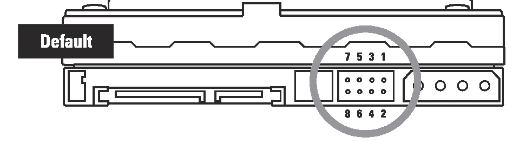
So....havent done the HD scan. But my step dad and me realized, in the computer , I connected 2 power wires, however u spell it ( sorry for bad english ) on the hardrive... And i think that just caused major bug in the hardrive.. ><

Anyway we changed it to a new brand one and its working fine now :)
 

My Computer My Computer

At a glance

Windows XP
OS
Windows XP
How could you connect 2 power wires to a hard drive? Impossible. :shock:
 

My Computer My Computer

At a glance

Windows 10 Pro x64Intel Core i7 6700KGSkill TridentZ RGB 16GB 3600 16-16-16-36EVGA GTX 980 Ti SC x2
Computer type
PC/Desktop
Computer Manufacturer/Model Number
Skylake Special #666
OS
Windows 10 Pro x64
CPU
Intel Core i7 6700K
Motherboard
Asus Sabertooth Z170 Mark 1
Memory
GSkill TridentZ RGB 16GB 3600 16-16-16-36
Graphics Card(s)
EVGA GTX 980 Ti SC x2
Sound Card
Realtek High Definition
Monitor(s) Displays
AOC G2460PG
Screen Resolution
1920 x 1080 144Hz
Hard Drives
Samsung 860 Pro 256GB, Seagate Barracuda 4TB x2
PSU
EVGA 1000 P2, EVGA White Custom Braided Cables
Case
Corsair Vengeance C70 Gunmetal Black
Cooling
Corsair H100i v2, Corsair ML120 x2, Thermal Grizzly Kryonaut
Keyboard
Logitech G910 Orion Spectrum
Mouse
Logitech G700s
Internet Speed
Verizon Fios Quantum Gateway 75/75
Antivirus
Windows Defender, Malwarebytes Free 3.8.3
Browser
Chrome
Other Info
Corsair SP120 x4, LG Blu-ray Drive, Durabrand HT-395 100 Watt Dolby Digital Amp, Corsair H2100 Wireless 7.1 Headset
it is what my step dad said , and im like it makes sense.
the plugs were all different, there was 3 plugs on it. SATA and 2 others, one that looks like power and other i dont know really. but there was 3
 
Last edited:

My Computer My Computer

At a glance

Windows XP
OS
Windows XP
Some older Sata HD Drives have two power sockets.

Capture2.PNG

screenshot from Dell:
Documentation
 

My Computer My Computer

At a glance

ME/XP/Vista/Win7
OS
ME/XP/Vista/Win7
Back
Top