Unable to install Windows 7 on BRAND NEW Asus X540s laptop-BSOD Error

7Freedom

New member
Local time
4:52 PM
Messages
8
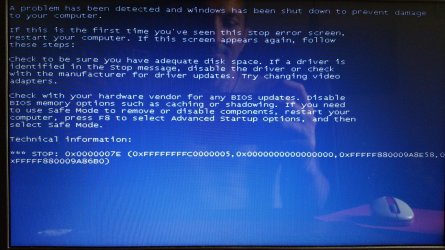
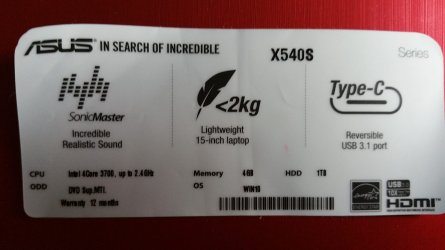
Hello, I have recently bought my daughter her first laptop as a gift and have been racking my brains as to why Windows 7 won't install. We get an error message of which I attach a screenshot (well a photo of the screen).
I am well versed with PC's, after all I am able to get the USB Flash drive recognized and started. It isn't until just after "Starting Windows" does the screen go blue with said verbage.

Now to put things into context my daughter wanted a computer like mine, which is Asus X75VC, of which I have no issues running Windows 7.
Her new Asus X540s struggles with Win10, regardless, we don't want Win 10, but will keep it as the main C partition for now. Am also waiting on Linux Mint 18, but today I need Windows 7 so please help!

Have spent the past few days scouring these forums, but have yet to find a solution to this "modern" problem. Computers these days seem to be going backwards, with less customizeability freely available at our disposal.
 

Attachments

  • 20160604_163656.jpg
    20160604_163656.jpg
    868.8 KB · Views: 1
  • 20160604_163634.jpg
    20160604_163634.jpg
    960.7 KB · Views: 2
  • 20160604_195140.jpg
    20160604_195140.jpg
    336.3 KB · Views: 3

My Computer My Computer

At a glance

7 Home 64bit
Computer type
PC/Desktop
Computer Manufacturer/Model Number
Asus
OS
7 Home 64bit
Have you attempted to completely wipe the drive, including anything related to Windows 10, and start from scratch?

Describe your Windows 7 installation media--disc? USB stick? bought in a store? burned from an ISO? what ISO? etc, etc.

Did this machine come with Windows 10 already installed?
 

My Computer My Computer

At a glance

Windows 7 Home Premium SP1, 64-bitIntel Skylake i5-6600K, not overclocked8 GB HyperX DDR4-2666 (2 x 4 GB)none; graphics are integrated on CPU
Computer type
PC/Desktop
Computer Manufacturer/Model Number
Ignatz Special; 4 speed manual gearbox; factory air conditioning; one of one
OS
Windows 7 Home Premium SP1, 64-bit
CPU
Intel Skylake i5-6600K, not overclocked
Motherboard
AsRock Z170M Extreme 4, micro ATX
Memory
8 GB HyperX DDR4-2666 (2 x 4 GB)
Graphics Card(s)
none; graphics are integrated on CPU
Sound Card
onboard: Realtek ALC1150; external: USB Behringer UF0-202
Monitor(s) Displays
Dell S2340M 23 inch IPS
Screen Resolution
1600 x 900
Hard Drives
System: Crucial MX100 series SSD, 128 GB;
Data: Samsung Spinpoint 103SJ, 1 TB;
Backup: WD Caviar Green WD30EZRX-00D8PB0, 3 TB
PSU
Rosewill SilentNight 500 watt fanless, semi-modular
Case
Antec Solo II
Cooling
Noctua NH-U12S; Noctua F12 intake, Noctua S12A exhaust
Keyboard
Microsoft 200 6JH-00001 USB
Mouse
Dell or Microsoft optical wired; USB
Antivirus
Microsoft Security Essentials and Malwarebytes Premium
Browser
Pale Moon
Other Info
All fans PWM; speeds at idle: CPU circa 500 rpm; intake circa 600 rpm; exhaust circa 600 rpm; CPU temps 27 idle and 47 C load in a warm room (27 C/81 F) when running Intel Extreme Tuning Utility stress test.

My Computer My Computer

At a glance

W7 home premium 32bit/W7HP 64bit/w10 tp insid...E5300 dual core3gbNvidia Geforce 7100 Nforce 630i
Computer type
PC/Desktop
Computer Manufacturer/Model Number
medionl/Aspire 6930G/acer x55a
OS
W7 home premium 32bit/W7HP 64bit/w10 tp insider ring
CPU
E5300 dual core
Motherboard
medion MS7366
Memory
3gb
Graphics Card(s)
Nvidia Geforce 7100 Nforce 630i
Monitor(s) Displays
avixc
Internet Speed
n (isp resticted to 72)
Antivirus
mse/pands
Browser
palemoon
Other Info
Belkin Fd7050 n USB using Railink RT2870 drivers, more upto date
Thanks for your reply. I'll study the provided link in depth asap.
And if absolutely necessary you recommend wiping the Hard Drive? I did this on my Asus x75vc, but if I do this on my daughter's X540s will everything that came pre-installed be lost forever?

It is an ISO burned with Rufus to USB, if all goes well I will activate it.
 

My Computer My Computer

At a glance

7 Home 64bit
Computer type
PC/Desktop
Computer Manufacturer/Model Number
Asus
OS
7 Home 64bit
Thanks for your reply. I'll study the provided link in depth asap.
And if absolutely necessary you recommend wiping the Hard Drive? I did this on my Asus x75vc, but if I do this on my daughter's X540s will everything that came pre-installed be lost forever?

It is an ISO burned with Rufus to USB, if all goes well I will activate it.

If you wipe the drive, everything will be lost unless you make an image of the drive beforehand.

We don't know where you got the ISO, so it could be bogus in some way.

Or it might be a good ISO, but you burned it with the wrong settings in Rufus. Or you may have used the right settings, and there was nonetheless an error in the burning process. It's hard to say.

You could try burning to a DVD. Or re-downloading the ISO.

Weird things can happen--I had an install fail 3 weeks ago, using Rufus and a known good ISO.

I had to make my own ISO from a previously burned DVD install disk, and then use that ISO with Rufus. It worked, where the known good ISO download did not. I have no idea why.
 

My Computer My Computer

At a glance

Windows 7 Home Premium SP1, 64-bitIntel Skylake i5-6600K, not overclocked8 GB HyperX DDR4-2666 (2 x 4 GB)none; graphics are integrated on CPU
Computer type
PC/Desktop
Computer Manufacturer/Model Number
Ignatz Special; 4 speed manual gearbox; factory air conditioning; one of one
OS
Windows 7 Home Premium SP1, 64-bit
CPU
Intel Skylake i5-6600K, not overclocked
Motherboard
AsRock Z170M Extreme 4, micro ATX
Memory
8 GB HyperX DDR4-2666 (2 x 4 GB)
Graphics Card(s)
none; graphics are integrated on CPU
Sound Card
onboard: Realtek ALC1150; external: USB Behringer UF0-202
Monitor(s) Displays
Dell S2340M 23 inch IPS
Screen Resolution
1600 x 900
Hard Drives
System: Crucial MX100 series SSD, 128 GB;
Data: Samsung Spinpoint 103SJ, 1 TB;
Backup: WD Caviar Green WD30EZRX-00D8PB0, 3 TB
PSU
Rosewill SilentNight 500 watt fanless, semi-modular
Case
Antec Solo II
Cooling
Noctua NH-U12S; Noctua F12 intake, Noctua S12A exhaust
Keyboard
Microsoft 200 6JH-00001 USB
Mouse
Dell or Microsoft optical wired; USB
Antivirus
Microsoft Security Essentials and Malwarebytes Premium
Browser
Pale Moon
Other Info
All fans PWM; speeds at idle: CPU circa 500 rpm; intake circa 600 rpm; exhaust circa 600 rpm; CPU temps 27 idle and 47 C load in a warm room (27 C/81 F) when running Intel Extreme Tuning Utility stress test.
Well hey, that worked. Simply burned to DVD, and immediately upon closing the tray was asked, "Run setup.exe"
No need to reboot even!
Thank you so much for all the suggestions, if necessary will keep you posted…
 

My Computer My Computer

At a glance

7 Home 64bit
Computer type
PC/Desktop
Computer Manufacturer/Model Number
Asus
OS
7 Home 64bit
Ooops!! Spoke too soon, the installation was expanding files and forewarning of several reboots. Upon first reboot Windows Boot gave the 2 options of "Setup" and "Windows 10". Before I could even select "Setup" it automatically went through, screen turned black temporarily and the up came the same BSOD with exact error messages.

P.S. I should mention that with the DVD installer, while still in Win 10 was able to select newly created Partition, something I was unable to achieve via USB
 

My Computer My Computer

At a glance

7 Home 64bit
Computer type
PC/Desktop
Computer Manufacturer/Model Number
Asus
OS
7 Home 64bit
I have since tried using a genuine Windows 7 DVD Install Disk and am still getting the BSOD.
I tried loading it in Safe Mode, it lists drivers up to disk.sys and then the same BSOD.
Is it possible this hardware will just not run Windows 7.
Shall I take the Laptop back to PC World for a refund?
 

My Computer My Computer

At a glance

7 Home 64bit
Computer type
PC/Desktop
Computer Manufacturer/Model Number
Asus
OS
7 Home 64bit

My Computer My Computer

At a glance

Windows 10 Pro X64Intel Quad Core i7-4770 @ 3.4Ghz16.0GB PC3-12800 DDR3 SDRAM 1600 MHzIntel Integrated HD Graphics
Computer type
PC/Desktop
Computer Manufacturer/Model Number
Lenovo IdeaCenter 450
OS
Windows 10 Pro X64
CPU
Intel Quad Core i7-4770 @ 3.4Ghz
Memory
16.0GB PC3-12800 DDR3 SDRAM 1600 MHz
Graphics Card(s)
Intel Integrated HD Graphics
Sound Card
Realtek HD Audio
Monitor(s) Displays
HP 22" LCD
Screen Resolution
1680 x 1050
Hard Drives
250GB Samsung EVO SATA-3 SSD
2TB Seagate ST2000DM001 SATA-2
1.5TB Seagate ST3150041AS SATA
Keyboard
Dell USB
Mouse
Lenovo USB
Internet Speed
Cable via Road Runner 3MB Upload, 30MB Download
Antivirus
Windows Defender, MBAM Pro, MBAE
Browser
Seamonkey
Other Info
UEFI/GPT
PLDS DVD-RW DH16AERSH
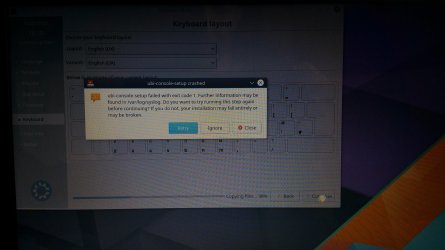
This is insane, tried installing Kubuntu (Linux) and Fedora (Linux) and Mint (Linux) ALL of which gave me errors!
I had previously used diskpart to clean and convert to mbr and back to gpt and now mbr, trying all possible combinations

As a last ditch attempt I am now running DBAN ( as per this thread: https://forums.linuxmint.com/viewtopic.php?t=81637 )

This is so time consuming, considering. Non of these issues ever occurred on my own ASUS X75VC, what gives, brand new ASUS X540S
 

Attachments

  • 20160608_095334.jpg
    20160608_095334.jpg
    461.7 KB · Views: 0
  • 20160608_131715.jpg
    20160608_131715.jpg
    600.7 KB · Views: 0

My Computer My Computer

At a glance

7 Home 64bit
Computer type
PC/Desktop
Computer Manufacturer/Model Number
Asus
OS
7 Home 64bit
Are you trying to install Windows 7 from inside Windows 10?

I don't believe that will work if you are. You should boot to the install DVD. However, this will require that you create a new partition, if dual booting is desired.

Not wanting to disturb the original drive, when I purchased a new laptop, I replaced the existing disk drive with a unused one.
 

My Computer My Computer

At a glance

Windows 10 Pro x64, Windows 8.1 Pro x64, Wind...INTEL i9-7920X LGA 206664 GB (4 X 16 GB) G-Skill V Series DDR4 3200 ...EVGA GTX 1060 SC 3 GB
Computer type
PC/Desktop
Computer Manufacturer/Model Number
Custom Built
OS
Windows 10 Pro x64, Windows 8.1 Pro x64, Windows 7 Ultimate x64 SP1,
CPU
INTEL i9-7920X LGA 2066
Motherboard
Gigabyte X299-WU8 F3
Memory
64 GB (4 X 16 GB) G-Skill V Series DDR4 3200 Quad Channel
Graphics Card(s)
EVGA GTX 1060 SC 3 GB
Sound Card
Realtek Onboard ALC1220
Monitor(s) Displays
2 x Samsung S27E310
Screen Resolution
1920x1080
Hard Drives
Samsung 2 x 970 EVO Plus 500 GB NVMe
1 x 6TB WD 6003FZBX SATA
1 x 6TB WD 60EFRX SATA
12 x 3TB WD 30EFRX SATA
PSU
Seasonic X-1050
Case
Thermaltake Armor+
Cooling
Corsair H80i V2 Liquid AOI Cooler
Keyboard
Logitech G510s
Mouse
Logitech MX Master 2S
Internet Speed
200 Mb/s
Antivirus
ESET NOD32 13.1
Browser
EDGE (Dev, Canary, Beta), Chrome
Other Info
ASUS RT-AC68U router
Malwarebytes 4.0.4
:ditto: x 5

It`s best to pull the drive and install a new ssd to install Windows 7 on.

It is not worth the risk of ruining the laptop over, Windows 10 is just an operating system, once you learn it, it`s a snap, only the interface is different, it`s still windows :)

And what do you mean her new Asus struggles with 10, if you have an issue with it, return it.

And I have not yet read once where you have called Asus about it and told them what you wanted to do.
 

My Computer My Computer

At a glance

Windows 10 Pro x64Intel Core i7 6700KGSkill TridentZ RGB 16GB 3600 16-16-16-36EVGA GTX 980 Ti SC x2
Computer type
PC/Desktop
Computer Manufacturer/Model Number
Skylake Special #666
OS
Windows 10 Pro x64
CPU
Intel Core i7 6700K
Motherboard
Asus Sabertooth Z170 Mark 1
Memory
GSkill TridentZ RGB 16GB 3600 16-16-16-36
Graphics Card(s)
EVGA GTX 980 Ti SC x2
Sound Card
Realtek High Definition
Monitor(s) Displays
AOC G2460PG
Screen Resolution
1920 x 1080 144Hz
Hard Drives
Samsung 860 Pro 256GB, Seagate Barracuda 4TB x2
PSU
EVGA 1000 P2, EVGA White Custom Braided Cables
Case
Corsair Vengeance C70 Gunmetal Black
Cooling
Corsair H100i v2, Corsair ML120 x2, Thermal Grizzly Kryonaut
Keyboard
Logitech G910 Orion Spectrum
Mouse
Logitech G700s
Internet Speed
Verizon Fios Quantum Gateway 75/75
Antivirus
Windows Defender, Malwarebytes Free 3.8.3
Browser
Chrome
Other Info
Corsair SP120 x4, LG Blu-ray Drive, Durabrand HT-395 100 Watt Dolby Digital Amp, Corsair H2100 Wireless 7.1 Headset
Back
Top