Solved Unable to remove from Start Menu list, the last installed program

glennc

New member
Power User
VIP
Local time
11:34 AM
Messages
1,024
Hello,
This has been a continuing problem, but of low enough importance that I have waited until now to get some advice. If I install a program it automatically put a startup icon in the start menu. Not pinned in. When I hit remove from list, nothing happens. Eventually, and I can't say how many reboots it goes away. Am i doing something wrong? Thanks for any help!
Glenn
 

My Computer My Computer

Computer type
PC/Desktop
Computer Manufacturer/Model Number
Self-Built
OS
Windows 7 Ultimate
CPU
AMD Phenom-II X4 965
Motherboard
Gigabyte GA-MA785GM-US2H
Memory
8192 MB DDR2-SDRAM
Graphics Card(s)
ATI Radeon HD 4200
Sound Card
ATI Radeon HD 4200 High Definition Audo
Monitor(s) Displays
LG Electronics W1943
Screen Resolution
1360 X 768
Hard Drives
C: 500 GB Caviar Black SATA
E: 500 GB Caviar Black SATA
PSU
Ultra LSP 750
Case
Ultra XBlaster
Cooling
2 Fans, CPU Fan, PS Fan
Keyboard
Acer
Mouse
Logitech
Internet Speed
6 MB
Hello Glenn,

If you mean the bottom half of the Start Menu under the "Pin to" area (not in "All Programs"), then this would be the recent programs area.

Since the usual "Remove from list" didn't work to remove the program from the recent programs list, you could turn off and on recent programs to remove it. This will remove all the other recent programs as well though.

Hope this helps,
Shawn
 

My Computer My Computer

Computer type
PC/Desktop
Computer Manufacturer/Model Number
Self built custom
OS
64-bit Windows 11 Pro for Workstations
CPU
Intel i7-8700K OC'd to 5 GHz
Motherboard
ASUS ROG Maximus XI Formula Z390
Memory
64 GB (4x16GB) G.SKILL TridentZ RGB DDR4 3600 MHz
Graphics Card(s)
ASUS ROG-STRIX-GTX1080TI-O11G-GAMING
Sound Card
Integrated
Monitor(s) Displays
2 x Samsung Odyssey G7 27"
Screen Resolution
2560x1440
Hard Drives
1TB Samsung 990 PRO M.2,
4TB Samsung 990 PRO PRO M.2,
TerraMaster F8 SSD Plus NAS
PSU
Seasonic Prime Titanium 850W
Case
Thermaltake Core P3
Cooling
Corsair Hydro H115i
Keyboard
Logitech wireless K800
Mouse
Logitech MX Master 4
Internet Speed
2 Gb/s Download and 100 Mb/s Upload
Antivirus
Malwarebyte Anti-Malware Premium
Browser
Google Chrome
Other Info
Logitech Z625 speaker system,
Logitech BRIO 4K Pro webcam,
HP Color LaserJet Pro MFP M477fdn,
APC SMART-UPS RT 1000 XL - SURT1000XLI,
Galaxy S23 Plus phone
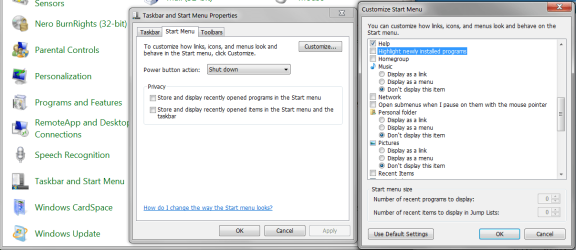
Try these settings:


  1. Control Panel > All Control Panel Items > Taskbar and Start Menu - the Taskbar and Start Menu Properties window opens.
  2. Click on the Start Menu tab.
  3. Click the Customize... button - the Customize Start Menu window opens.
  4. Scroll down and locate Highlight newly installed programs and deselect (uncheck) the box.
  5. Scroll down and locate Recent Items and deselct (uncheck) the box.
  6. Click OK, click OK.
StartMenu2.PNG

StartMenu.PNG


Regards,
GEWB
 

My Computer My Computer

Computer type
PC/Desktop
Computer Manufacturer/Model Number
(7 different computers booting up to 10 systems)
OS
Linux Mint / XP / Win7 Home, Pro, Ultimate / Win8.1 / Win10
Other Info
Four desktops, two laptops, one notebook and one tablet
Darn it Brink, you're too fast for me!

Regards,
GEWB
 

My Computer My Computer

Computer type
PC/Desktop
Computer Manufacturer/Model Number
(7 different computers booting up to 10 systems)
OS
Linux Mint / XP / Win7 Home, Pro, Ultimate / Win8.1 / Win10
Other Info
Four desktops, two laptops, one notebook and one tablet
Hello Glenn,

If you mean the bottom half of the Start Menu under the "Pin to" area (not in "All Programs"), then this would be the recent programs area.

Since the usual "Remove from list" didn't work to remove the program from the recent programs list, you could turn off and on recent programs to remove it. This will remove all the other recent programs as well though.

Hope this helps,
Shawn

Hellooo Shawn,
Thanks for the response. Two further questions, first is I followed the link's instructions and my properties shows that the store and display*** on menu and taskbar is turned on. It has never shown recent programs on the taskbar. The second is why does the recent program start menu item not get removed with the remove from list command? I mean it seems to work most of the time except what IIRC is a shutdown and startup...
Thanks
Glenn
 

My Computer My Computer

Computer type
PC/Desktop
Computer Manufacturer/Model Number
Self-Built
OS
Windows 7 Ultimate
CPU
AMD Phenom-II X4 965
Motherboard
Gigabyte GA-MA785GM-US2H
Memory
8192 MB DDR2-SDRAM
Graphics Card(s)
ATI Radeon HD 4200
Sound Card
ATI Radeon HD 4200 High Definition Audo
Monitor(s) Displays
LG Electronics W1943
Screen Resolution
1360 X 768
Hard Drives
C: 500 GB Caviar Black SATA
E: 500 GB Caviar Black SATA
PSU
Ultra LSP 750
Case
Ultra XBlaster
Cooling
2 Fans, CPU Fan, PS Fan
Keyboard
Acer
Mouse
Logitech
Internet Speed
6 MB
Try these settings:


  1. Control Panel > All Control Panel Items > Taskbar and Start Menu - the Taskbar and Start Menu Properties window opens.
  2. Click on the Start Menu tab.
  3. Click the Customize... button - the Customize Start Menu window opens.
  4. Scroll down and locate Highlight newly installed programs and deselect (uncheck) the box.
  5. Scroll down and locate Recent Items and deselct (uncheck) the box.
  6. Click OK, click OK.
View attachment 200048

View attachment 200049


Regards,
GEWB

Howdy GEWB,
I understand the first part, but am not sure what the part in the customize menu
uncheck highlight newly installed programs will do? Where I think I am getting confused is that I don't mind it showing recently used or newly installed programs, I just want it to be deleted when I hit the remove from list submenu. Thanks for any assistance you can supply!
Glenn
 

My Computer My Computer

Computer type
PC/Desktop
Computer Manufacturer/Model Number
Self-Built
OS
Windows 7 Ultimate
CPU
AMD Phenom-II X4 965
Motherboard
Gigabyte GA-MA785GM-US2H
Memory
8192 MB DDR2-SDRAM
Graphics Card(s)
ATI Radeon HD 4200
Sound Card
ATI Radeon HD 4200 High Definition Audo
Monitor(s) Displays
LG Electronics W1943
Screen Resolution
1360 X 768
Hard Drives
C: 500 GB Caviar Black SATA
E: 500 GB Caviar Black SATA
PSU
Ultra LSP 750
Case
Ultra XBlaster
Cooling
2 Fans, CPU Fan, PS Fan
Keyboard
Acer
Mouse
Logitech
Internet Speed
6 MB
Hello Glenn,

If you mean the bottom half of the Start Menu under the "Pin to" area (not in "All Programs"), then this would be the recent programs area.

Since the usual "Remove from list" didn't work to remove the program from the recent programs list, you could turn off and on recent programs to remove it. This will remove all the other recent programs as well though.

Hope this helps,
Shawn

Hellooo Shawn,
Thanks for the response. Two further questions, first is I followed the link's instructions and my properties shows that the store and display*** on menu and taskbar is turned on. It has never shown recent programs on the taskbar. The second is why does the recent program start menu item not get removed with the remove from list command? I mean it seems to work most of the time except what IIRC is a shutdown and startup...
Thanks
Glenn

To clear and reset recent programs, you would want to uncheck the Store and display recently opened programs in the Start Menu box, click on Apply, check the box again, and click on OK.

It would be "Recent" items instead of recent programs for the taskbar that are in the Jump List of any pinned/opened program icon (ex: Internet Explorer) when you right click on the taskbar icon.
 

My Computer My Computer

Computer type
PC/Desktop
Computer Manufacturer/Model Number
Self built custom
OS
64-bit Windows 11 Pro for Workstations
CPU
Intel i7-8700K OC'd to 5 GHz
Motherboard
ASUS ROG Maximus XI Formula Z390
Memory
64 GB (4x16GB) G.SKILL TridentZ RGB DDR4 3600 MHz
Graphics Card(s)
ASUS ROG-STRIX-GTX1080TI-O11G-GAMING
Sound Card
Integrated
Monitor(s) Displays
2 x Samsung Odyssey G7 27"
Screen Resolution
2560x1440
Hard Drives
1TB Samsung 990 PRO M.2,
4TB Samsung 990 PRO PRO M.2,
TerraMaster F8 SSD Plus NAS
PSU
Seasonic Prime Titanium 850W
Case
Thermaltake Core P3
Cooling
Corsair Hydro H115i
Keyboard
Logitech wireless K800
Mouse
Logitech MX Master 4
Internet Speed
2 Gb/s Download and 100 Mb/s Upload
Antivirus
Malwarebyte Anti-Malware Premium
Browser
Google Chrome
Other Info
Logitech Z625 speaker system,
Logitech BRIO 4K Pro webcam,
HP Color LaserJet Pro MFP M477fdn,
APC SMART-UPS RT 1000 XL - SURT1000XLI,
Galaxy S23 Plus phone
Darn it Brink, you're too fast for me!

Regards,
GEWB

Nar, that would be a good option to not have them highlighted as well. :)
 

My Computer My Computer

Computer type
PC/Desktop
Computer Manufacturer/Model Number
Self built custom
OS
64-bit Windows 11 Pro for Workstations
CPU
Intel i7-8700K OC'd to 5 GHz
Motherboard
ASUS ROG Maximus XI Formula Z390
Memory
64 GB (4x16GB) G.SKILL TridentZ RGB DDR4 3600 MHz
Graphics Card(s)
ASUS ROG-STRIX-GTX1080TI-O11G-GAMING
Sound Card
Integrated
Monitor(s) Displays
2 x Samsung Odyssey G7 27"
Screen Resolution
2560x1440
Hard Drives
1TB Samsung 990 PRO M.2,
4TB Samsung 990 PRO PRO M.2,
TerraMaster F8 SSD Plus NAS
PSU
Seasonic Prime Titanium 850W
Case
Thermaltake Core P3
Cooling
Corsair Hydro H115i
Keyboard
Logitech wireless K800
Mouse
Logitech MX Master 4
Internet Speed
2 Gb/s Download and 100 Mb/s Upload
Antivirus
Malwarebyte Anti-Malware Premium
Browser
Google Chrome
Other Info
Logitech Z625 speaker system,
Logitech BRIO 4K Pro webcam,
HP Color LaserJet Pro MFP M477fdn,
APC SMART-UPS RT 1000 XL - SURT1000XLI,
Galaxy S23 Plus phone
Hello Glenn,

If you mean the bottom half of the Start Menu under the "Pin to" area (not in "All Programs"), then this would be the recent programs area.

Since the usual "Remove from list" didn't work to remove the program from the recent programs list, you could turn off and on recent programs to remove it. This will remove all the other recent programs as well though.

Hope this helps,
Shawn

Hellooo Shawn,
Thanks for the response. Two further questions, first is I followed the link's instructions and my properties shows that the store and display*** on menu and taskbar is turned on. It has never shown recent programs on the taskbar. The second is why does the recent program start menu item not get removed with the remove from list command? I mean it seems to work most of the time except what IIRC is a shutdown and startup...
Thanks
Glenn

To clear and reset recent programs, you would want to uncheck the Store and display recently opened programs in the Start Menu box, click on Apply, check the box again, and click on OK.

It would be "Recent" items instead of recent programs for the taskbar that are in the Jump List of any pinned/opened program icon (ex: Internet Explorer) when you right click on the taskbar icon.

Thanks,
Got rid of the most recently installed program!! Yah!
Glenn
 

My Computer My Computer

Computer type
PC/Desktop
Computer Manufacturer/Model Number
Self-Built
OS
Windows 7 Ultimate
CPU
AMD Phenom-II X4 965
Motherboard
Gigabyte GA-MA785GM-US2H
Memory
8192 MB DDR2-SDRAM
Graphics Card(s)
ATI Radeon HD 4200
Sound Card
ATI Radeon HD 4200 High Definition Audo
Monitor(s) Displays
LG Electronics W1943
Screen Resolution
1360 X 768
Hard Drives
C: 500 GB Caviar Black SATA
E: 500 GB Caviar Black SATA
PSU
Ultra LSP 750
Case
Ultra XBlaster
Cooling
2 Fans, CPU Fan, PS Fan
Keyboard
Acer
Mouse
Logitech
Internet Speed
6 MB
Fantastic news. I'm glad that we could help. :)
 

My Computer My Computer

Computer type
PC/Desktop
Computer Manufacturer/Model Number
Self built custom
OS
64-bit Windows 11 Pro for Workstations
CPU
Intel i7-8700K OC'd to 5 GHz
Motherboard
ASUS ROG Maximus XI Formula Z390
Memory
64 GB (4x16GB) G.SKILL TridentZ RGB DDR4 3600 MHz
Graphics Card(s)
ASUS ROG-STRIX-GTX1080TI-O11G-GAMING
Sound Card
Integrated
Monitor(s) Displays
2 x Samsung Odyssey G7 27"
Screen Resolution
2560x1440
Hard Drives
1TB Samsung 990 PRO M.2,
4TB Samsung 990 PRO PRO M.2,
TerraMaster F8 SSD Plus NAS
PSU
Seasonic Prime Titanium 850W
Case
Thermaltake Core P3
Cooling
Corsair Hydro H115i
Keyboard
Logitech wireless K800
Mouse
Logitech MX Master 4
Internet Speed
2 Gb/s Download and 100 Mb/s Upload
Antivirus
Malwarebyte Anti-Malware Premium
Browser
Google Chrome
Other Info
Logitech Z625 speaker system,
Logitech BRIO 4K Pro webcam,
HP Color LaserJet Pro MFP M477fdn,
APC SMART-UPS RT 1000 XL - SURT1000XLI,
Galaxy S23 Plus phone
Back
Top