Unable to restore file (error code 0x8100001A)

eezacque

New member
Local time
8:51 AM
Messages
7
Weeks ago I tried to restart backups after reconfiguring my hard drives. Now backups finish (with some files skipped) but I cannot restore, due to problems validating a zip archive. However, the zip archive mentioned is one that was deleted weeks ago, and it did not exist when the backup was made.

Also, the dialog for restoring files lets me choose from backups that no longer exist. Somehow, the system kept its backup history, while I really want to make a fresh start. How can I sort this out?
 

My Computer My Computer

Computer type
PC/Desktop
OS
Windows 7 Home Premium 64bit
Where is backup history stored?

On restore, I can choose from a number of backups which no longer exist. However, when trying to delete old backups, the list only shows me the backups that should be there, and nothing else.

Does anyone know where the system stores settings like the drive used for backups, and a list of backups previously made?
 

My Computer My Computer

Computer type
PC/Desktop
OS
Windows 7 Home Premium 64bit
Hello eezacque, and welcome to Seven Forums.

The link below can help better explain the 0x8100001A error code. It basically means you have backup files missing.
If you like, the tutorial below will help show you how to reset Windows Backup back to default. This way any old manually deleted backups will no longer be referenced either.
Hope this helps, :)
Shawn
 

My Computer My Computer

Computer type
PC/Desktop
Computer Manufacturer/Model Number
Self built custom
OS
64-bit Windows 11 Pro for Workstations
CPU
Intel i7-8700K OC'd to 5 GHz
Motherboard
ASUS ROG Maximus XI Formula Z390
Memory
64 GB (4x16GB) G.SKILL TridentZ RGB DDR4 3600 MHz
Graphics Card(s)
ASUS ROG-STRIX-GTX1080TI-O11G-GAMING
Sound Card
Integrated
Monitor(s) Displays
2 x Samsung Odyssey G7 27"
Screen Resolution
2560x1440
Hard Drives
1TB Samsung 990 PRO M.2,
4TB Samsung 990 PRO PRO M.2,
TerraMaster F8 SSD Plus NAS
PSU
Seasonic Prime Titanium 850W
Case
Thermaltake Core P3
Cooling
Corsair Hydro H115i
Keyboard
Logitech wireless K800
Mouse
Logitech MX Master 4
Internet Speed
2 Gb/s Download and 100 Mb/s Upload
Antivirus
Malwarebyte Anti-Malware Premium
Browser
Google Chrome
Other Info
Logitech Z625 speaker system,
Logitech BRIO 4K Pro webcam,
HP Color LaserJet Pro MFP M477fdn,
APC SMART-UPS RT 1000 XL - SURT1000XLI,
Galaxy S23 Plus phone
Hello eezacque, and welcome to Seven Forums.

The link below can help better explain the 0x8100001A error code. It basically means you have backup files missing.

If backup files are missing, that is because windows didn't create these when I tried to restart backup. As I don't have any files to copy back, all I can do is follow the suggestion to contact MCSS, which is not a very practical way to proceed, I'm afraid.

If you like, the tutorial below will help show you how to reset Windows Backup back to default. This way any old manually deleted backups will no longer be referenced either.

I had already followed the suggestions in How to remove the backup setting of windows 7? - Microsoft Community to reset settings, but it didn't work. I see your tutorial is more extensive, so I will give it a try and come back to you later.
 

My Computer My Computer

Computer type
PC/Desktop
OS
Windows 7 Home Premium 64bit
If you like, the tutorial below will help show you how to reset Windows Backup back to default. This way any old manually deleted backups will no longer be referenced either.

http://www.sevenforums.com/tutorials/632-backup-user-system-files-reset-default-configuration.html

I reset the backup to default using the script given, but old backups are still referenced. I discovered that this is the only problem: I can restore files from a recent backup, but I can still select old, manually deleted backups, and files from these old backups. As expected, these old files cannot be restored, because the relevant backup files are no longer existent.

Somewhere, the system keeps an index of old backups and their contents...
 

My Computer My Computer

Computer type
PC/Desktop
OS
Windows 7 Home Premium 64bit
When you used OPTION ONE to reset Windows Backup to default, did you see this below in Windows Backup afterwards to show it as being reset?
160574d1308502542-backup-user-system-files-reset-default-configuration-default.jpg

If so, then please go ahead and post some screenshots showing where you are able to still select old backups to restore, and which ones are the olds backups that you previously manually deleted. Maybe something will stand out to help.
 

My Computer My Computer

Computer type
PC/Desktop
Computer Manufacturer/Model Number
Self built custom
OS
64-bit Windows 11 Pro for Workstations
CPU
Intel i7-8700K OC'd to 5 GHz
Motherboard
ASUS ROG Maximus XI Formula Z390
Memory
64 GB (4x16GB) G.SKILL TridentZ RGB DDR4 3600 MHz
Graphics Card(s)
ASUS ROG-STRIX-GTX1080TI-O11G-GAMING
Sound Card
Integrated
Monitor(s) Displays
2 x Samsung Odyssey G7 27"
Screen Resolution
2560x1440
Hard Drives
1TB Samsung 990 PRO M.2,
4TB Samsung 990 PRO PRO M.2,
TerraMaster F8 SSD Plus NAS
PSU
Seasonic Prime Titanium 850W
Case
Thermaltake Core P3
Cooling
Corsair Hydro H115i
Keyboard
Logitech wireless K800
Mouse
Logitech MX Master 4
Internet Speed
2 Gb/s Download and 100 Mb/s Upload
Antivirus
Malwarebyte Anti-Malware Premium
Browser
Google Chrome
Other Info
Logitech Z625 speaker system,
Logitech BRIO 4K Pro webcam,
HP Color LaserJet Pro MFP M477fdn,
APC SMART-UPS RT 1000 XL - SURT1000XLI,
Galaxy S23 Plus phone
When you used OPTION ONE to reset Windows Backup to default, did you see this below in Windows Backup afterwards to show it as being reset?
160574d1308502542-backup-user-system-files-reset-default-configuration-default.jpg
Yes, I saw this.

If so, then please go ahead and post some screenshots showing where you are able to still select old backups to restore, and which ones are the olds backups that you previously manually deleted. Maybe something will stand out to help.

I will, although it will take a few weeks before I can reach the relevant pc.
 

My Computer My Computer

Computer type
PC/Desktop
OS
Windows 7 Home Premium 64bit
Ok. I'll be here.
 

My Computer My Computer

Computer type
PC/Desktop
Computer Manufacturer/Model Number
Self built custom
OS
64-bit Windows 11 Pro for Workstations
CPU
Intel i7-8700K OC'd to 5 GHz
Motherboard
ASUS ROG Maximus XI Formula Z390
Memory
64 GB (4x16GB) G.SKILL TridentZ RGB DDR4 3600 MHz
Graphics Card(s)
ASUS ROG-STRIX-GTX1080TI-O11G-GAMING
Sound Card
Integrated
Monitor(s) Displays
2 x Samsung Odyssey G7 27"
Screen Resolution
2560x1440
Hard Drives
1TB Samsung 990 PRO M.2,
4TB Samsung 990 PRO PRO M.2,
TerraMaster F8 SSD Plus NAS
PSU
Seasonic Prime Titanium 850W
Case
Thermaltake Core P3
Cooling
Corsair Hydro H115i
Keyboard
Logitech wireless K800
Mouse
Logitech MX Master 4
Internet Speed
2 Gb/s Download and 100 Mb/s Upload
Antivirus
Malwarebyte Anti-Malware Premium
Browser
Google Chrome
Other Info
Logitech Z625 speaker system,
Logitech BRIO 4K Pro webcam,
HP Color LaserJet Pro MFP M477fdn,
APC SMART-UPS RT 1000 XL - SURT1000XLI,
Galaxy S23 Plus phone
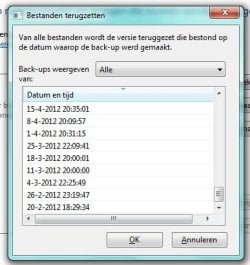
When restoring a file, I can select from a wide range of dates, from periods that I am sure of that no backups exist:

24-7-2013 15-24-04.jpg


However, when managing my disk space, I can only select those backups that really exist.

24-7-2013 15-26-42.jpg

Is there any way to remove all references to non-existent backups?
 

My Computer My Computer

Computer type
PC/Desktop
OS
Windows 7 Home Premium 64bit
If you have not already, delete all drive letter:\computer name\Backup Set folders to delete all of your backups, reset Windows Backup again, set up and create a new backup, and check to see if the old entries are still there.
 

My Computer My Computer

Computer type
PC/Desktop
Computer Manufacturer/Model Number
Self built custom
OS
64-bit Windows 11 Pro for Workstations
CPU
Intel i7-8700K OC'd to 5 GHz
Motherboard
ASUS ROG Maximus XI Formula Z390
Memory
64 GB (4x16GB) G.SKILL TridentZ RGB DDR4 3600 MHz
Graphics Card(s)
ASUS ROG-STRIX-GTX1080TI-O11G-GAMING
Sound Card
Integrated
Monitor(s) Displays
2 x Samsung Odyssey G7 27"
Screen Resolution
2560x1440
Hard Drives
1TB Samsung 990 PRO M.2,
4TB Samsung 990 PRO PRO M.2,
TerraMaster F8 SSD Plus NAS
PSU
Seasonic Prime Titanium 850W
Case
Thermaltake Core P3
Cooling
Corsair Hydro H115i
Keyboard
Logitech wireless K800
Mouse
Logitech MX Master 4
Internet Speed
2 Gb/s Download and 100 Mb/s Upload
Antivirus
Malwarebyte Anti-Malware Premium
Browser
Google Chrome
Other Info
Logitech Z625 speaker system,
Logitech BRIO 4K Pro webcam,
HP Color LaserJet Pro MFP M477fdn,
APC SMART-UPS RT 1000 XL - SURT1000XLI,
Galaxy S23 Plus phone
If you have not already, delete all drive letter:\computer name\Backup Set folders to delete all of your backups, reset Windows Backup again, set up and create a new backup, and check to see if the old entries are still there.

Been there, done that. This is what caused the problem in the first place, and a retry didn't solve it.
 

My Computer My Computer

Computer type
PC/Desktop
OS
Windows 7 Home Premium 64bit

My Computer My Computer

Computer type
PC/Desktop
Computer Manufacturer/Model Number
Self built custom
OS
64-bit Windows 11 Pro for Workstations
CPU
Intel i7-8700K OC'd to 5 GHz
Motherboard
ASUS ROG Maximus XI Formula Z390
Memory
64 GB (4x16GB) G.SKILL TridentZ RGB DDR4 3600 MHz
Graphics Card(s)
ASUS ROG-STRIX-GTX1080TI-O11G-GAMING
Sound Card
Integrated
Monitor(s) Displays
2 x Samsung Odyssey G7 27"
Screen Resolution
2560x1440
Hard Drives
1TB Samsung 990 PRO M.2,
4TB Samsung 990 PRO PRO M.2,
TerraMaster F8 SSD Plus NAS
PSU
Seasonic Prime Titanium 850W
Case
Thermaltake Core P3
Cooling
Corsair Hydro H115i
Keyboard
Logitech wireless K800
Mouse
Logitech MX Master 4
Internet Speed
2 Gb/s Download and 100 Mb/s Upload
Antivirus
Malwarebyte Anti-Malware Premium
Browser
Google Chrome
Other Info
Logitech Z625 speaker system,
Logitech BRIO 4K Pro webcam,
HP Color LaserJet Pro MFP M477fdn,
APC SMART-UPS RT 1000 XL - SURT1000XLI,
Galaxy S23 Plus phone
Back
Top