Unable to save to root of network drive

hertelpa

New member
Local time
6:52 AM
Messages
7
Location
Denver, Colorado
Each user has their personal folder on the network P:\. Users can save into any folder in this directory but cannot save directly to the root of their P:. If they go to a Windows XP PC they can save to the root of the P:\ but cannot do it on a Windows 7 PC. They get the error message "You can't save here. Please choose another locations."
 

My Computer My Computer

At a glance

Windows 7Dual Core 3.0 Ghz4 GB
Computer Manufacturer/Model Number
Dell - Optiplex 755
OS
Windows 7
CPU
Dual Core 3.0 Ghz
Memory
4 GB
Monitor(s) Displays
dual
Hard Drives
250 GB
For security reasons this is true on both Vista and Windows 7. You can save to my documents and other file locations in C but the root is protected and for good reasons. Although you can probably take ownership and make it work it's not advised. Take Ownership Shortcut
 

My Computer My Computer

At a glance

Windows 7 Ult, Windows 8.1 Pro,Q9650-4.275GHz, E8600 4.5GHz, E6750-3.8GHzG.Skill PC2 9600 1200Mhz 5 5 5 15 2TGTX480
Computer type
PC/Desktop
Computer Manufacturer/Model Number
Home built
OS
Windows 7 Ult, Windows 8.1 Pro,
CPU
Q9650-4.275GHz, E8600 4.5GHz, E6750-3.8GHz
Motherboard
Evga 780i FTW
Memory
G.Skill PC2 9600 1200Mhz 5 5 5 15 2T
Graphics Card(s)
GTX480
Sound Card
Asus Xonar D2
Monitor(s) Displays
HannsG
Screen Resolution
1680X1050
Hard Drives
GSkill Phoenix Pro 120GB SSD
PSU
ThermalTake Toughpower 1000Watt modular
Case
ThermalTake XaserV
Cooling
Xigmatek S1283
Keyboard
Logitech G15
Mouse
Logitech G9
Internet Speed
T1
I agree that is true for the root of the C:\, However, on a network share where they are given permission to a folder and we create a mapped drive to that share, then they should be allowed to save to the root of the share.

Example

\\server-name\Department\Admin and we create a drve letter
net use s: \\server-name\Department\Admin

The person should be able to save files directley to the root of the Admin folder. That is now blocked on some PCs.
 

My Computer My Computer

At a glance

Windows 7Dual Core 3.0 Ghz4 GB
Computer Manufacturer/Model Number
Dell - Optiplex 755
OS
Windows 7
CPU
Dual Core 3.0 Ghz
Memory
4 GB
Monitor(s) Displays
dual
Hard Drives
250 GB
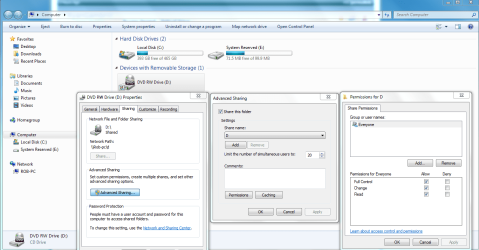
You may need to set permissions to give access to those new drives from those machines. Although it's a bit more difficult to share an entire drive it can be done.
 

Attachments

  • Sharing D  drive and permissions.PNG
    Sharing D drive and permissions.PNG
    65.4 KB · Views: 652

My Computer My Computer

At a glance

Windows 7 Ult, Windows 8.1 Pro,Q9650-4.275GHz, E8600 4.5GHz, E6750-3.8GHzG.Skill PC2 9600 1200Mhz 5 5 5 15 2TGTX480
Computer type
PC/Desktop
Computer Manufacturer/Model Number
Home built
OS
Windows 7 Ult, Windows 8.1 Pro,
CPU
Q9650-4.275GHz, E8600 4.5GHz, E6750-3.8GHz
Motherboard
Evga 780i FTW
Memory
G.Skill PC2 9600 1200Mhz 5 5 5 15 2T
Graphics Card(s)
GTX480
Sound Card
Asus Xonar D2
Monitor(s) Displays
HannsG
Screen Resolution
1680X1050
Hard Drives
GSkill Phoenix Pro 120GB SSD
PSU
ThermalTake Toughpower 1000Watt modular
Case
ThermalTake XaserV
Cooling
Xigmatek S1283
Keyboard
Logitech G15
Mouse
Logitech G9
Internet Speed
T1
I am still learning Windows 7. How do you give access to those new drives from those machines? I have looked in the properties tab and am unable to find any options.
 

My Computer My Computer

At a glance

Windows 7Dual Core 3.0 Ghz4 GB
Computer Manufacturer/Model Number
Dell - Optiplex 755
OS
Windows 7
CPU
Dual Core 3.0 Ghz
Memory
4 GB
Monitor(s) Displays
dual
Hard Drives
250 GB
I can access my drives from "Computer" right click the drive then choose "share with" then advanced sharing, then advanced sharing again then choose "Add" and Everyone put in the check marks like in the pictures. You can also use a share name by choosing that.
 

My Computer My Computer

At a glance

Windows 7 Ult, Windows 8.1 Pro,Q9650-4.275GHz, E8600 4.5GHz, E6750-3.8GHzG.Skill PC2 9600 1200Mhz 5 5 5 15 2TGTX480
Computer type
PC/Desktop
Computer Manufacturer/Model Number
Home built
OS
Windows 7 Ult, Windows 8.1 Pro,
CPU
Q9650-4.275GHz, E8600 4.5GHz, E6750-3.8GHz
Motherboard
Evga 780i FTW
Memory
G.Skill PC2 9600 1200Mhz 5 5 5 15 2T
Graphics Card(s)
GTX480
Sound Card
Asus Xonar D2
Monitor(s) Displays
HannsG
Screen Resolution
1680X1050
Hard Drives
GSkill Phoenix Pro 120GB SSD
PSU
ThermalTake Toughpower 1000Watt modular
Case
ThermalTake XaserV
Cooling
Xigmatek S1283
Keyboard
Logitech G15
Mouse
Logitech G9
Internet Speed
T1
There are a couple of problems with this.
1. There is not a share with for a network share.
2. Network shares are locked down by the server not the PC and these permissions are not being passed down to the PC.
 

My Computer My Computer

At a glance

Windows 7Dual Core 3.0 Ghz4 GB
Computer Manufacturer/Model Number
Dell - Optiplex 755
OS
Windows 7
CPU
Dual Core 3.0 Ghz
Memory
4 GB
Monitor(s) Displays
dual
Hard Drives
250 GB
What are you using for the server?
 

My Computer My Computer

At a glance

Windows 7 Ult, Windows 8.1 Pro,Q9650-4.275GHz, E8600 4.5GHz, E6750-3.8GHzG.Skill PC2 9600 1200Mhz 5 5 5 15 2TGTX480
Computer type
PC/Desktop
Computer Manufacturer/Model Number
Home built
OS
Windows 7 Ult, Windows 8.1 Pro,
CPU
Q9650-4.275GHz, E8600 4.5GHz, E6750-3.8GHz
Motherboard
Evga 780i FTW
Memory
G.Skill PC2 9600 1200Mhz 5 5 5 15 2T
Graphics Card(s)
GTX480
Sound Card
Asus Xonar D2
Monitor(s) Displays
HannsG
Screen Resolution
1680X1050
Hard Drives
GSkill Phoenix Pro 120GB SSD
PSU
ThermalTake Toughpower 1000Watt modular
Case
ThermalTake XaserV
Cooling
Xigmatek S1283
Keyboard
Logitech G15
Mouse
Logitech G9
Internet Speed
T1
Server 2008. Interesting enought this is a spotty issue. On some Windows 7 PCs they can save directly to the root of a network share an on other PCs we can't.
 

My Computer My Computer

At a glance

Windows 7Dual Core 3.0 Ghz4 GB
Computer Manufacturer/Model Number
Dell - Optiplex 755
OS
Windows 7
CPU
Dual Core 3.0 Ghz
Memory
4 GB
Monitor(s) Displays
dual
Hard Drives
250 GB
Is this a standard setup you've done for this "home" drive? What I am really asking, is... This standard home drive setup works for Xp users but NOT 7 users?
 

My Computer My Computer

At a glance

7 Pro
OS
7 Pro
To share a drive or folder from Windows server 08 try this link. I'm not too sure about the spotty issue where it's working for some Win 7 machines and not others.
Share a Folder or Drive
 

My Computer My Computer

At a glance

Windows 7 Ult, Windows 8.1 Pro,Q9650-4.275GHz, E8600 4.5GHz, E6750-3.8GHzG.Skill PC2 9600 1200Mhz 5 5 5 15 2TGTX480
Computer type
PC/Desktop
Computer Manufacturer/Model Number
Home built
OS
Windows 7 Ult, Windows 8.1 Pro,
CPU
Q9650-4.275GHz, E8600 4.5GHz, E6750-3.8GHz
Motherboard
Evga 780i FTW
Memory
G.Skill PC2 9600 1200Mhz 5 5 5 15 2T
Graphics Card(s)
GTX480
Sound Card
Asus Xonar D2
Monitor(s) Displays
HannsG
Screen Resolution
1680X1050
Hard Drives
GSkill Phoenix Pro 120GB SSD
PSU
ThermalTake Toughpower 1000Watt modular
Case
ThermalTake XaserV
Cooling
Xigmatek S1283
Keyboard
Logitech G15
Mouse
Logitech G9
Internet Speed
T1
These PCs are joined to a domain server. Windows 7 entraprise is installed.
 

My Computer My Computer

At a glance

Windows 7Dual Core 3.0 Ghz4 GB
Computer Manufacturer/Model Number
Dell - Optiplex 755
OS
Windows 7
CPU
Dual Core 3.0 Ghz
Memory
4 GB
Monitor(s) Displays
dual
Hard Drives
250 GB
Check to make sure that the permissions on the "P" folder aren't inheriting from parent "drive".
 

My Computer My Computer

At a glance

7 Pro
OS
7 Pro
This explains the inherited permissions process between server 08 and Windows 7.
Inherited Permissions
 

My Computer My Computer

At a glance

Windows 7 Ult, Windows 8.1 Pro,Q9650-4.275GHz, E8600 4.5GHz, E6750-3.8GHzG.Skill PC2 9600 1200Mhz 5 5 5 15 2TGTX480
Computer type
PC/Desktop
Computer Manufacturer/Model Number
Home built
OS
Windows 7 Ult, Windows 8.1 Pro,
CPU
Q9650-4.275GHz, E8600 4.5GHz, E6750-3.8GHz
Motherboard
Evga 780i FTW
Memory
G.Skill PC2 9600 1200Mhz 5 5 5 15 2T
Graphics Card(s)
GTX480
Sound Card
Asus Xonar D2
Monitor(s) Displays
HannsG
Screen Resolution
1680X1050
Hard Drives
GSkill Phoenix Pro 120GB SSD
PSU
ThermalTake Toughpower 1000Watt modular
Case
ThermalTake XaserV
Cooling
Xigmatek S1283
Keyboard
Logitech G15
Mouse
Logitech G9
Internet Speed
T1
Steve logged into his Windows 7 PC and was able to save a file to the root of his P:, then he logged into my Widnows 7 PC and was not able to save to the root of his P:. Steve notieced that this PC was still on the Beta version.

I upgraded the PC to the entraprise version and All is OK..... Thanks for the suggestions and help.

\
 

My Computer My Computer

At a glance

Windows 7Dual Core 3.0 Ghz4 GB
Computer Manufacturer/Model Number
Dell - Optiplex 755
OS
Windows 7
CPU
Dual Core 3.0 Ghz
Memory
4 GB
Monitor(s) Displays
dual
Hard Drives
250 GB
Beta version, oh man, only one month left for those to be active. Probably wasn't updating correctly or had a beta bug. Glad you got it sorted out hertelpa, thanks for reporting back in.
 

My Computer My Computer

At a glance

Windows 7 Ult, Windows 8.1 Pro,Q9650-4.275GHz, E8600 4.5GHz, E6750-3.8GHzG.Skill PC2 9600 1200Mhz 5 5 5 15 2TGTX480
Computer type
PC/Desktop
Computer Manufacturer/Model Number
Home built
OS
Windows 7 Ult, Windows 8.1 Pro,
CPU
Q9650-4.275GHz, E8600 4.5GHz, E6750-3.8GHz
Motherboard
Evga 780i FTW
Memory
G.Skill PC2 9600 1200Mhz 5 5 5 15 2T
Graphics Card(s)
GTX480
Sound Card
Asus Xonar D2
Monitor(s) Displays
HannsG
Screen Resolution
1680X1050
Hard Drives
GSkill Phoenix Pro 120GB SSD
PSU
ThermalTake Toughpower 1000Watt modular
Case
ThermalTake XaserV
Cooling
Xigmatek S1283
Keyboard
Logitech G15
Mouse
Logitech G9
Internet Speed
T1
Back
Top