Solved Unable to see empty drives in Explorer

julio99

New member
Member
Local time
5:28 PM
Messages
83
Location
Canada
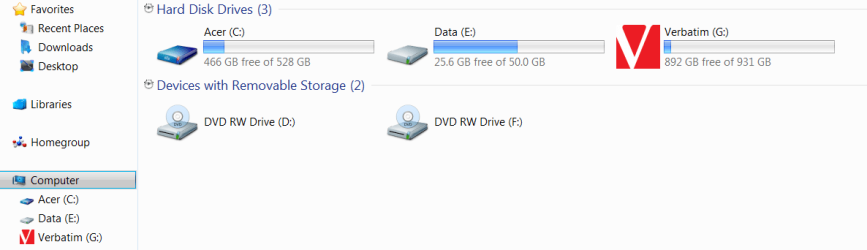
I have tried every conceivable way to get Explorer to let me view my empty drives under Computer. They show when there's a disk in them. They show in the reading pane, they just won't show up as empty drives in the Nav pane. I have tried deleting the upper and lower filters in the registry. Un checking the "Hide empty drives" in Folder options, adding a (1) to the registry settting "Hide drives with no Media". That setting seems to change itself back to (0) all the time. I am totally at a loss getting the empty drives to show themselves in the Nav pane.
 

My Computer My Computer

Computer type
Laptop
Computer Manufacturer/Model Number
Acer 8943g
OS
Windows 7 home premium x64
CPU
Core i5-430M
Motherboard
Acer SM83-CP
Memory
8gb
Graphics Card(s)
Mobility Radeo 5650
Monitor(s) Displays
Generic
Screen Resolution
1920x1080
Hard Drives
Samsung HM641jI
Corsair SSD
Antivirus
ESET AV V7
Bit confused with what you are trying to say. DVD rom or hard drives?

Hard drives: Have the drives been formatted? Control Panel/Admin Tools/Computer Management/Storage/Disc Management. You should see them in there. Right click/format.
 

My Computer My Computer

Computer Manufacturer/Model Number
Custom
OS
Windows 7 Pro x64 -- PCLinuxOS KDE4 FullMonty 2011
CPU
i7-875k @ Turbo - 7,6,5,5 - 3.6ghz
Motherboard
Asus P7P55D-E Deluxe
Memory
Corsair CMD8GX3M4A1600C8 8gb
Graphics Card(s)
Asus EAH5850 DirectCU/2DIS/1GD5
Sound Card
On Board
Monitor(s) Displays
Samsung SyncMaster T220 - Panasonic VT30a 50"
Screen Resolution
1680x1050 -
Hard Drives
Corsair Force 3 SSD 120GB x 2 ::
WD VelociRaptor 150GB WD1500HLFS x 2
PSU
Corsair HX-850 Power Supply
Case
Coolmaster HAF 932
Cooling
Corsair H50
Keyboard
Logitech Wireless MK700
Mouse
Logitech Wireless MX620
Internet Speed
Good enough for now
Other Info
Voip. Insanely cheap phone calls.
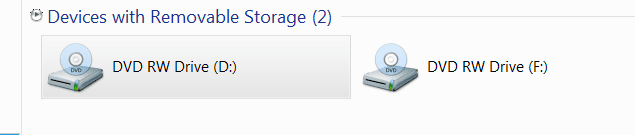
They are cd/dvd rom drives. One is the built in burner the other one is an external burner that I use for copying. The drives both show in the reading pane. They just won't show in the Navigation pane when they are empty. They show when they have a disk in them under Computer in the Nav pane, but the minute I remove the disk the letter goes with it like it doesn't exist.Do you see that both burners don't show up under computer when they are empty.
 

Attachments

  • Capture.PNG
    Capture.PNG
    5 KB · Views: 26
  • Capture1.PNG
    Capture1.PNG
    15.6 KB · Views: 16

My Computer My Computer

Computer type
Laptop
Computer Manufacturer/Model Number
Acer 8943g
OS
Windows 7 home premium x64
CPU
Core i5-430M
Motherboard
Acer SM83-CP
Memory
8gb
Graphics Card(s)
Mobility Radeo 5650
Monitor(s) Displays
Generic
Screen Resolution
1920x1080
Hard Drives
Samsung HM641jI
Corsair SSD
Antivirus
ESET AV V7
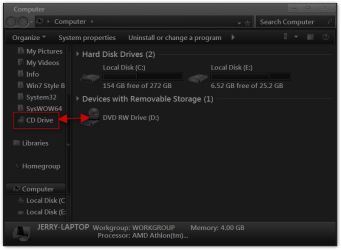
I was able to drag my DVD Drive over to the favorites menu it shows up as CD Drive but I could not get it to drag anywhere else.
Jerry
Computer.png
 

My Computer My Computer

Computer type
Laptop
Computer Manufacturer/Model Number
Sager NP9170
OS
Win 7 Pro x64 / Win 10 Pro
CPU
Intel(R) Core(TM) i7-3630QM CPU @ 2.40GHz
Motherboard
CLEVO P170EM
Memory
12 GB
Graphics Card(s)
(1) Intel(R) HD Graphics 4000 (2) NVIDIA GeForce GTX 675M
Sound Card
(1) Realtek High Definition Audio (2) Intel(R) Display Aud
Monitor(s) Displays
17.3
Screen Resolution
1920x1080
Hard Drives
(1) Samsung 860 EVO 500GB(OS) (1) Samsung 860 EVO 500GB(Data)
Keyboard
Backlite
Antivirus
MSE, Malwarebytes Pro
Browser
Firefox
Other Info
DESKTOP: Custom-built.
OS: Win 10 Pro x64.
CASE: Rosewill R5.
CPU: Intel I5 4670K CPU @ 3.40GHz.
CPU COOLER: Cool Master Hyper 212 EVO.
MOTHERBOARD: Asus Z87-A.
MEMORY: Kingston HyperX 2x4 GB.
GPU: Nvidia Geforce 650 TI.
PSU: Corsair TX750.
DRIVES: (1) Samsung 840 120 GB SSD (2) Western Digital blue 500 GB 7200 RPM.
Mine does the same thing. There might be a tweak to do what you want.
 

My Computer My Computer

Computer Manufacturer/Model Number
Custom
OS
Windows 7 Pro x64 -- PCLinuxOS KDE4 FullMonty 2011
CPU
i7-875k @ Turbo - 7,6,5,5 - 3.6ghz
Motherboard
Asus P7P55D-E Deluxe
Memory
Corsair CMD8GX3M4A1600C8 8gb
Graphics Card(s)
Asus EAH5850 DirectCU/2DIS/1GD5
Sound Card
On Board
Monitor(s) Displays
Samsung SyncMaster T220 - Panasonic VT30a 50"
Screen Resolution
1680x1050 -
Hard Drives
Corsair Force 3 SSD 120GB x 2 ::
WD VelociRaptor 150GB WD1500HLFS x 2
PSU
Corsair HX-850 Power Supply
Case
Coolmaster HAF 932
Cooling
Corsair H50
Keyboard
Logitech Wireless MK700
Mouse
Logitech Wireless MX620
Internet Speed
Good enough for now
Other Info
Voip. Insanely cheap phone calls.
Thanx guys. Not really what I had in mind, but good to know that it does work like that. I tried and they both went over and labeled as cd drives. Thanks to both of you.
 

My Computer My Computer

Computer type
Laptop
Computer Manufacturer/Model Number
Acer 8943g
OS
Windows 7 home premium x64
CPU
Core i5-430M
Motherboard
Acer SM83-CP
Memory
8gb
Graphics Card(s)
Mobility Radeo 5650
Monitor(s) Displays
Generic
Screen Resolution
1920x1080
Hard Drives
Samsung HM641jI
Corsair SSD
Antivirus
ESET AV V7
You're Welcome Sorry I Could Not Have Been of More Help.
Jerry
 

My Computer My Computer

Computer type
Laptop
Computer Manufacturer/Model Number
Sager NP9170
OS
Win 7 Pro x64 / Win 10 Pro
CPU
Intel(R) Core(TM) i7-3630QM CPU @ 2.40GHz
Motherboard
CLEVO P170EM
Memory
12 GB
Graphics Card(s)
(1) Intel(R) HD Graphics 4000 (2) NVIDIA GeForce GTX 675M
Sound Card
(1) Realtek High Definition Audio (2) Intel(R) Display Aud
Monitor(s) Displays
17.3
Screen Resolution
1920x1080
Hard Drives
(1) Samsung 860 EVO 500GB(OS) (1) Samsung 860 EVO 500GB(Data)
Keyboard
Backlite
Antivirus
MSE, Malwarebytes Pro
Browser
Firefox
Other Info
DESKTOP: Custom-built.
OS: Win 10 Pro x64.
CASE: Rosewill R5.
CPU: Intel I5 4670K CPU @ 3.40GHz.
CPU COOLER: Cool Master Hyper 212 EVO.
MOTHERBOARD: Asus Z87-A.
MEMORY: Kingston HyperX 2x4 GB.
GPU: Nvidia Geforce 650 TI.
PSU: Corsair TX750.
DRIVES: (1) Samsung 840 120 GB SSD (2) Western Digital blue 500 GB 7200 RPM.
In the folder options menu, tab "View", is an option to hide empty drives. I think it's enabled by default, maybe that is what you are looking for?
 

My Computer My Computer

Computer Manufacturer/Model Number
Self-configured / ASUS Eee PC 1005HA
OS
Windows 7 Pro x64 / Pro x86 (Netbook)
CPU
AMD Athlon 64 X2 2GHz / Intel Atom 1600 MHz
Motherboard
Abit AT8-32X / ?
Memory
2 GB / 2 GB
Graphics Card(s)
ATI Radeon X1900XT / on-Board
In the folder options menu, tab "View", is an option to hide empty drives. I think it's enabled by default, maybe that is what you are looking for?
That was one of the first things I did was to uncheck that box. Needless to say it didn't work and I 'm totally baffled as to why it doesn't.:cry: There was even a registry setting that I modified called something like "No Media Empty Drive" and it didn't work either. Very strange. It's like Windows is just ignoring these commands.
 

My Computer My Computer

Computer type
Laptop
Computer Manufacturer/Model Number
Acer 8943g
OS
Windows 7 home premium x64
CPU
Core i5-430M
Motherboard
Acer SM83-CP
Memory
8gb
Graphics Card(s)
Mobility Radeo 5650
Monitor(s) Displays
Generic
Screen Resolution
1920x1080
Hard Drives
Samsung HM641jI
Corsair SSD
Antivirus
ESET AV V7
Google is my friend.. :D I was having the same exact problem tonight on a fresh install of W7 HP. I found your question asked several times right here in this forum and a few such as you and I had even done ALL the fixes and tweaks listed.. to no avail.

Found the ''simple'' answer right here:

http://www.sevenforums.com/tutorials/6969-drives-hide-show-empty-drives-computer-folder.html

Rt click on the far left navigation pane.. and click ''Show all folders''..

after you've chosen NOT to hide empty drives.. and also NOT to hidhidden stuff.. my DVD drives popped right up!

BTW.. I AM the only user/admin.. so I don't know how that got ''unset'' but I'm glad it's fixed.. was driving me nuts!
 
Last edited by a moderator:

My Computer My Computer

OS
Windows 7 Home Premium 64bit
Explorer not showing empty drives

Emdeesee - you have saved my sanity!:)
 

My Computer My Computer

Computer type
PC/Desktop
Computer Manufacturer/Model Number
Custom
OS
64 bit Windows Professional
CPU
Unknown
Motherboard
Asus
Memory
4gb
Graphics Card(s)
nvidia
Hard Drives
Western Digital
Browser
Firefox
Back
Top