Unable to setup share printer in Windows 7

smash123

New member
Local time
12:33 PM
Messages
7
I have two windows 7 computers. computer-A is connecting EPSON printer and I have enabled the file and printer sharing function. The file sharing function is working fine. Then I tried to add the printer in control panel on computer-B, it sees the epson printer but when I try to install the driver (download from computer-A) then it say unable to connect. I have try it on different computer-C it is saying the same thing. What should I do?

I have installed the EPSON driver in computer-B (hoping it would work)but still after the install the driver (download from computer-A) by itself then it says unable to connect the printer.

I have setup all the computers with the group name of WORKFROUP. You may wonder why I don't use the win7 Homegroup, it is because I have some XP computers need to use that computer-A's printer.

Please help me on how to make the printer sharing works.

Please check the video on too:

printer.avi - YouTube
 

My Computer My Computer

OS
windows 7 64bit
Go to :orb:
> type services in search
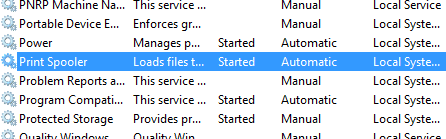
> scroll down to alphabet P till you find "Print Spooler"
What status do you see there? Automatic, Automatic (delayed start), Manual or Disabled?

Set it to Automatic.

Also, have you restarted after installing the printer drivers? Let us know.
 

Attachments

  • Capture.PNG
    Capture.PNG
    4.2 KB · Views: 8
  • Untitled.png
    Untitled.png
    7.7 KB · Views: 9

My Computer My Computer

Computer type
PC/Desktop
Computer Manufacturer/Model Number
Self assembled
OS
Windows 10 Home 64Bit
CPU
Intel Core i5 10400 @ 2.90GHz
Motherboard
Intel Corporation DG41WV (PROCESSOR)
Memory
8.00GB Single-Channel Unknown @ 1329MHz (16-20-20-38)
Sound Card
Realtek High Definition Audio
Monitor(s) Displays
DELL E170S
Screen Resolution
1280x1024 pixels
Hard Drives
931GB TOSHIBA DT01ACA100 (SATA)
238GB TEAM TM8PS7256G (SATA SSD)
Case
Nothing Fancy
Cooling
Fans
Keyboard
A4 Tech Co LTD
Mouse
A4 Tech Co Ltd/Logitech
Internet Speed
25 Mbps

My Computer My Computer

Computer type
PC/Desktop
Computer Manufacturer/Model Number
Self assembled
OS
Windows 10 Home 64Bit
CPU
Intel Core i5 10400 @ 2.90GHz
Motherboard
Intel Corporation DG41WV (PROCESSOR)
Memory
8.00GB Single-Channel Unknown @ 1329MHz (16-20-20-38)
Sound Card
Realtek High Definition Audio
Monitor(s) Displays
DELL E170S
Screen Resolution
1280x1024 pixels
Hard Drives
931GB TOSHIBA DT01ACA100 (SATA)
238GB TEAM TM8PS7256G (SATA SSD)
Case
Nothing Fancy
Cooling
Fans
Keyboard
A4 Tech Co LTD
Mouse
A4 Tech Co Ltd/Logitech
Internet Speed
25 Mbps
koolkat77: Thanks so much for your help!!!!!!!

My print spooler status is: started automatic

then I have tried the "Print Spooler Queue - Clear and Reset" I did both manual and batch file method and reboot.

Then try to connect the printer by using computer-B. But still the same thing happening. Just like the youtube video. After the driver downloaded from computer-A, it shows can not connect to the printer.

I have tried to use computer-B with win 7 and computer-C with XP. They all shows the same issue. Something wrong on the computer-A. thanks
 

My Computer My Computer

OS
windows 7 64bit
c:\Windows\system32\spool\PRINTERS is empty now
 

My Computer My Computer

OS
windows 7 64bit

My Computer My Computer

Computer type
PC/Desktop
Computer Manufacturer/Model Number
Self assembled
OS
Windows 10 Home 64Bit
CPU
Intel Core i5 10400 @ 2.90GHz
Motherboard
Intel Corporation DG41WV (PROCESSOR)
Memory
8.00GB Single-Channel Unknown @ 1329MHz (16-20-20-38)
Sound Card
Realtek High Definition Audio
Monitor(s) Displays
DELL E170S
Screen Resolution
1280x1024 pixels
Hard Drives
931GB TOSHIBA DT01ACA100 (SATA)
238GB TEAM TM8PS7256G (SATA SSD)
Case
Nothing Fancy
Cooling
Fans
Keyboard
A4 Tech Co LTD
Mouse
A4 Tech Co Ltd/Logitech
Internet Speed
25 Mbps
koolkat77: Yes, I have tried uninstall before asking here. Your link shows the regular procedure which I already tried. I don't want to spend hours and hours to get it fix. So, I just purchased a parallel port printer server. I hope this will work for the easiest way. Thanks so much for your help. :) You are making people's life easy. Keep it up thanks
 

My Computer My Computer

OS
windows 7 64bit

My Computer My Computer

Computer type
PC/Desktop
Computer Manufacturer/Model Number
Self assembled
OS
Windows 10 Home 64Bit
CPU
Intel Core i5 10400 @ 2.90GHz
Motherboard
Intel Corporation DG41WV (PROCESSOR)
Memory
8.00GB Single-Channel Unknown @ 1329MHz (16-20-20-38)
Sound Card
Realtek High Definition Audio
Monitor(s) Displays
DELL E170S
Screen Resolution
1280x1024 pixels
Hard Drives
931GB TOSHIBA DT01ACA100 (SATA)
238GB TEAM TM8PS7256G (SATA SSD)
Case
Nothing Fancy
Cooling
Fans
Keyboard
A4 Tech Co LTD
Mouse
A4 Tech Co Ltd/Logitech
Internet Speed
25 Mbps
Back
Top