
Unable to start windows firewall

archz2

New member
Member
Local time
10:55 PM
Messages
55
I am using windows 7 – 64 bit ultimate. My firewall has not been running for a long while. I am using Kaspersky internet security 2016. I tried uninstalling it. But still my firewall doesn’t run.

I went to services.msc using the Run command and tried to start my firewall but I got this error.

"windows could not start the windows firewall"
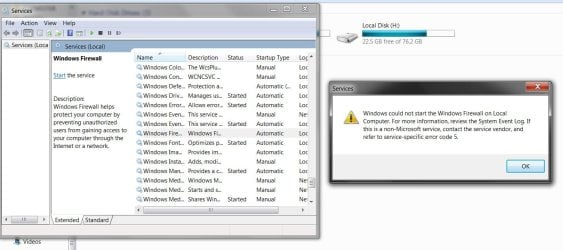

frew.jpg

When I go to windows firewall and press the button of recommended settings, the waiting blue circle spins for some seconds but after that nothing happens.


recommned settings.jpg

What should I do so that my firewall is able to run successfully?

I have installed all updates of my windows 7.
 

My Computer

Computer type
PC/Desktop
OS
Windows 7 64 bit Ultimate
CPU
i3( Pc), i5 (lappy)
Memory
4Gb
Graphics Card(s)
Intel hd graphics (PC), Ati sunpro (lappy)
Hard Drives
500GB SATA
Antivirus
Kaspersky Internet Security
Browser
Chrome and firefox
Hello:

If you are using KIS or KTS (not KAV), then there is already a firewall as part of Kaspersky.

KIS and KTS would have automatically disabled the native Windows firewall.
And, if they had not (as occasionally happens), it would be very important to do so manually from the Windows Control Panel.
That's because it's very bad to have 2 active firewalls running on the system.

So, unless you are going to uninstall KIS or KTS, I would NOT try to enable the Windows firewall.
Enabling it will only cause system performance and stability problems if the KIS/KTS firewall is already running.

Cheers,
MM
 

My Computer

Computer type
PC/Desktop
Computer Manufacturer/Model Number
Dell Studio XPS 8500
OS
OEM Windows 7 Ult (x64) SP1
CPU
Intel Core-i7 3770 @ 3.4 GHz
Motherboard
"Dell" branded
Memory
16 GB DDR3 SDRAM @ 1333 MHz
Graphics Card(s)
NVidia GeForce GT620 1 GB
Sound Card
THX TruStudio PC
Monitor(s) Displays
Dell U2410 Full HD
Hard Drives
2.0 TB SATA2 @ 7200 RPM
PSU
350W
Keyboard
MS 4000 Ergon - Wired
Mouse
Logitech Anywhere MX
Internet Speed
Cable HSI w/Turbo (router)
Antivirus
KIS-MBAM Premium-MBAE Premium
Browser
Fx (current version); IE
Other Info
And a Win7/64 Pro laptop; And a Win10/64 Pro desktop.
Hello:

If you are using KIS or KTS (not KAV), then there is already a firewall as part of Kaspersky.

KIS and KTS would have automatically disabled the native Windows firewall.
And, if they had not (as occasionally happens), it would be very important to do so manually from the Windows Control Panel.
That's because it's very bad to have 2 active firewalls running on the system.

So, unless you are going to uninstall KIS or KTS, I would NOT try to enable the Windows firewall.
Enabling it will only cause system performance and stability problems if the KIS/KTS firewall is already running.

Cheers,
MM
I want to setup remote desktop connection. It wants that Windows firewall must be enabled.
 

My Computer

Computer type
PC/Desktop
OS
Windows 7 64 bit Ultimate
CPU
i3( Pc), i5 (lappy)
Memory
4Gb
Graphics Card(s)
Intel hd graphics (PC), Ati sunpro (lappy)
Hard Drives
500GB SATA
Antivirus
Kaspersky Internet Security
Browser
Chrome and firefox
I want to setup remote desktop connection. It wants that Windows firewall must be enabled.

Oh, I see.
Well, I don't think you'll be able to enable the Windows Firewall as long as the KIS or KTS firewall is running.

I do NOT suggest doing this and I don't know if it would even work, but I suppose one workaround might be to temporarily disable the KIS or KTS firewall, reboot and then see if you can re-enable the Windows firewall? I would be sure to re-enable the KIS/KTS firewall and to disable the Windows firewall when you are done.
The only other suggestion would be to (temporarily) uninstall KIS/KTS, and (temporarily) install ANOTHER AV (free or paid or trial) that does not include a firewall, and use that with the native Windows firewall.

Having said that:
I'm not sure what sort of "remote desktop connection" you are trying to set up -- so it might help to have a bit more detail about that.

And I have never had to disable the KIS firewall or to enable the Windows firewall on my Win7 system in order to screen-share with remote tech support using a number of different screen-share applications, or to log-in to a number of cloud collaborative services and web portals.

Bottom line:

I do not think KIS/KTS running with its own firewall will allow you to enable the Windows firewall without creating problems.
And I'm not sure about the necessity of enabling the Windows firewall in order to set up a remote desktop connection -- perhaps someone more expert will have some advice about this.

Sorry I could not help.

MM
 

My Computer

Computer type
PC/Desktop
Computer Manufacturer/Model Number
Dell Studio XPS 8500
OS
OEM Windows 7 Ult (x64) SP1
CPU
Intel Core-i7 3770 @ 3.4 GHz
Motherboard
"Dell" branded
Memory
16 GB DDR3 SDRAM @ 1333 MHz
Graphics Card(s)
NVidia GeForce GT620 1 GB
Sound Card
THX TruStudio PC
Monitor(s) Displays
Dell U2410 Full HD
Hard Drives
2.0 TB SATA2 @ 7200 RPM
PSU
350W
Keyboard
MS 4000 Ergon - Wired
Mouse
Logitech Anywhere MX
Internet Speed
Cable HSI w/Turbo (router)
Antivirus
KIS-MBAM Premium-MBAE Premium
Browser
Fx (current version); IE
Other Info
And a Win7/64 Pro laptop; And a Win10/64 Pro desktop.
Back
Top