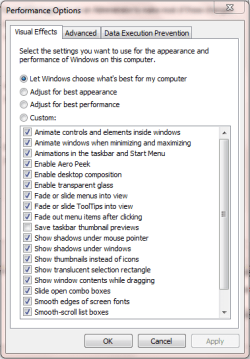
Unable to turn off Taskbar Thumbnail

Sorry if I wasnt being clear, I mean if there are enough pictures that the combined width of them is wider than my screen is, it becomes text instead of images.

Oh ok. Yes, that would be normal for Windows 7 to condense it down like that when that happens. LOL, another workaround I suppose. ;)
 

My Computer My Computer

Computer type
PC/Desktop
Computer Manufacturer/Model Number
Self built custom
OS
64-bit Windows 11 Pro for Workstations
CPU
Intel i7-8700K OC'd to 5 GHz
Motherboard
ASUS ROG Maximus XI Formula Z390
Memory
64 GB (4x16GB) G.SKILL TridentZ RGB DDR4 3600 MHz
Graphics Card(s)
ASUS ROG-STRIX-GTX1080TI-O11G-GAMING
Sound Card
Integrated
Monitor(s) Displays
2 x Samsung Odyssey G7 27"
Screen Resolution
2560x1440
Hard Drives
1TB Samsung 990 PRO M.2,
4TB Samsung 990 PRO PRO M.2,
TerraMaster F8 SSD Plus NAS
PSU
Seasonic Prime Titanium 850W
Case
Thermaltake Core P3
Cooling
Corsair Hydro H115i
Keyboard
Logitech wireless K800
Mouse
Logitech MX Master 4
Internet Speed
2 Gb/s Download and 100 Mb/s Upload
Antivirus
Malwarebyte Anti-Malware Premium
Browser
Google Chrome
Other Info
Logitech Z625 speaker system,
Logitech BRIO 4K Pro webcam,
HP Color LaserJet Pro MFP M477fdn,
APC SMART-UPS RT 1000 XL - SURT1000XLI,
Galaxy S23 Plus phone
I'm not on a 7 box right now, but if you go to apperance and performance section(not sure where that is) there's a whole list of items you can check/uncheck. One of them there allows you to turn off the thumbnails.

(I'm pretty sure I saw it on my 7077 build at home, recently)

Yes I have it, trouble is that it doesnt work in 7077 :/
 

My Computer My Computer

Computer Manufacturer/Model Number
Myself ;D
OS
Windows 7 7600 x64
CPU
[email protected]
Motherboard
Asus P5Q
Memory
6GB
Graphics Card(s)
8800GTS 512MB
Sound Card
Onboard
Monitor(s) Displays
Iiyama E2403WS
Screen Resolution
1920x1200
Hard Drives
200gb maxtor
250gb samsung
400gb samsung
500gb samsung
640gb samsung
750gb samsung
1TB samsung
PSU
Corsair HX620W
Case
Antec P182b
Cooling
Tuniq Tower 120
Keyboard
Razer Tarantula
Mouse
Razer Deathadder
Internet Speed
10Mbit DSL
Oh ok. Yes, that would be normal for Windows 7 to condense it down like that when that happens. LOL, another workaround I suppose. ;)
Yeah, guess I'll just have to have 15 of everything open :)
 

My Computer My Computer

Computer Manufacturer/Model Number
Myself ;D
OS
Windows 7 7600 x64
CPU
[email protected]
Motherboard
Asus P5Q
Memory
6GB
Graphics Card(s)
8800GTS 512MB
Sound Card
Onboard
Monitor(s) Displays
Iiyama E2403WS
Screen Resolution
1920x1200
Hard Drives
200gb maxtor
250gb samsung
400gb samsung
500gb samsung
640gb samsung
750gb samsung
1TB samsung
PSU
Corsair HX620W
Case
Antec P182b
Cooling
Tuniq Tower 120
Keyboard
Razer Tarantula
Mouse
Razer Deathadder
Internet Speed
10Mbit DSL
I must have been thinking of my 7068 build that turned it off. I tried it last night, and you're right it doesn't work, the option is there, it just does nothing. =/
 

My Computer My Computer

OS
7264x64/7260x86
Tried Windows 7 Basic theme, but it just looks horrible. :/
 

My Computer My Computer

Computer Manufacturer/Model Number
Myself ;D
OS
Windows 7 7600 x64
CPU
[email protected]
Motherboard
Asus P5Q
Memory
6GB
Graphics Card(s)
8800GTS 512MB
Sound Card
Onboard
Monitor(s) Displays
Iiyama E2403WS
Screen Resolution
1920x1200
Hard Drives
200gb maxtor
250gb samsung
400gb samsung
500gb samsung
640gb samsung
750gb samsung
1TB samsung
PSU
Corsair HX620W
Case
Antec P182b
Cooling
Tuniq Tower 120
Keyboard
Razer Tarantula
Mouse
Razer Deathadder
Internet Speed
10Mbit DSL
I must have been thinking of my 7068 build that turned it off. I tried it last night, and you're right it doesn't work, the option is there, it just does nothing. =/

The option your referring to is to turn of the saving of thumbnails. This is only a space-saving option :p

Pity, as it's a very valid idea
 

Attachments

  • Capture.PNG
    Capture.PNG
    15.6 KB · Views: 45

My Computer My Computer

Computer Manufacturer/Model Number
Compaq Desktop
OS
Windows 7 Ultimate x64
CPU
AMD Sempron Dual Core
Memory
3GB
Graphics Card(s)
NVIDIA GeForce 6150SE nForce 430
Screen Resolution
1024x768
Hard Drives
150GB Sata
Nope, I'm talking about the "aero peek" potion, which in build 7077 does nothing, but does actually work in earlier builds (not sure which though).

edit: ignore that, aero peek is for the alt+tab, and it does work.

Guess I'm just losing my mind, I could have sworn I managed to get the thumbnails to go away without getting rid of aero completely.

one more edit: Yea, I'm insane, I just checked a 7000 build and there's no option for that, short of turning off the visual styles. the "Enable Aero peek" isn't even there on 7k. lol
 
Last edited:

My Computer My Computer

OS
7264x64/7260x86
Sorry, must have misunderstood :p

Strange, i'm sure i've had it working on 7077. Not any more though, and i'm running the cleanest install due to a virus that i mentioned in the chillout zone under the 4gb thread.
 

My Computer My Computer

Computer Manufacturer/Model Number
Compaq Desktop
OS
Windows 7 Ultimate x64
CPU
AMD Sempron Dual Core
Memory
3GB
Graphics Card(s)
NVIDIA GeForce 6150SE nForce 430
Screen Resolution
1024x768
Hard Drives
150GB Sata
Just thought i'd confirm that this doesnt work on 7100 either..
 

My Computer My Computer

Computer Manufacturer/Model Number
Myself ;D
OS
Windows 7 7600 x64
CPU
[email protected]
Motherboard
Asus P5Q
Memory
6GB
Graphics Card(s)
8800GTS 512MB
Sound Card
Onboard
Monitor(s) Displays
Iiyama E2403WS
Screen Resolution
1920x1200
Hard Drives
200gb maxtor
250gb samsung
400gb samsung
500gb samsung
640gb samsung
750gb samsung
1TB samsung
PSU
Corsair HX620W
Case
Antec P182b
Cooling
Tuniq Tower 120
Keyboard
Razer Tarantula
Mouse
Razer Deathadder
Internet Speed
10Mbit DSL
I've had a bit of a play (and new install of 7100) and can confirm that the Aero peek feature does work, you just need to hover the mouse over the taskbar thumbnail to see it in action.

So, hover over icon, then hover over thumbnail. Works best if you have multiple IE sessions open at once.

Hope this help :)
 

My Computer My Computer

Computer Manufacturer/Model Number
Compaq Desktop
OS
Windows 7 Ultimate x64
CPU
AMD Sempron Dual Core
Memory
3GB
Graphics Card(s)
NVIDIA GeForce 6150SE nForce 430
Screen Resolution
1024x768
Hard Drives
150GB Sata
Back
Top