
dont know when this happened.. havent used bluetooth for a bit.. running windows 7 pro, 64 bit, on an HP all in one 200.
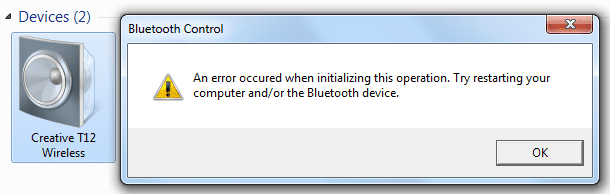
purchased a set of bluetooth speakers (creative)... and tried to hook it up. strange thing is, i can find the speakers when pairing, and they show up under Devices and Printers... but when i double click on the Creative speaker icon, i get the following error message:
An error occurred when initializing this operation. Try restarting your computer and/or your bluetooth adapter.
i have uninstalled and reinstalled via device manager my bluetooth radio...
another odd thing is, that i am unable to turn adapter on, if i right click on the BT icon in the taskbar and choose, Turn Adapter On, and click somewhere else, and right click it again, it still says Turn adapter on (not off).. .so when i open up settings... i see it checked by "Turn off the bluetooth adapter"... i uncheck it, hit apply/ok.. come back, and it is still checked....
strange. how was i able to pair up my BT speakers with my pc if in fact the radio is off?
someone help please, i have scoured the net... but no love
thanks
pj
purchased a set of bluetooth speakers (creative)... and tried to hook it up. strange thing is, i can find the speakers when pairing, and they show up under Devices and Printers... but when i double click on the Creative speaker icon, i get the following error message:
An error occurred when initializing this operation. Try restarting your computer and/or your bluetooth adapter.
i have uninstalled and reinstalled via device manager my bluetooth radio...
another odd thing is, that i am unable to turn adapter on, if i right click on the BT icon in the taskbar and choose, Turn Adapter On, and click somewhere else, and right click it again, it still says Turn adapter on (not off).. .so when i open up settings... i see it checked by "Turn off the bluetooth adapter"... i uncheck it, hit apply/ok.. come back, and it is still checked....
strange. how was i able to pair up my BT speakers with my pc if in fact the radio is off?
someone help please, i have scoured the net... but no love
thanks
pj
Attachments


My Computer
- Computer type
- PC/Desktop
- Computer Manufacturer/Model Number
- hp
- OS
- windows 7 pro, 32 bit


