Unallocated Space - Is It Inaccessible Without a "Letter"?

baumgrenze

New member
Member
VIP
Local time
2:19 AM
Messages
300
Location
Charlottesville, VA
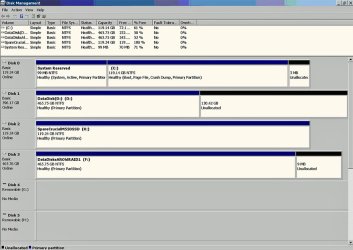
I just partitioned and formatted "Disk 2" or "Drive K: on my system. While Drive Management was opened, I noticed that each of the other disks, 0, 1, and 3, all have Unallocated Space. For 0 and 3 the space is 'insignificant' in today's terms, 3 Mb and 9Mb respectively, but for disk 1 the amount is 130.42 Gb.

I don't believe I did this deliberately. Disks 1 and 3 were once part of a RAID1 created under Intel's Rapid Storage Technology. Since 1 was larger than 3 (640 Gb vs 500 Gb in nominal terms) does this perhaps explain what I am seeing?

On Tuesday I should take delivery of a 1 Tb WD Caviar black SATA drive. I will use this as my primary data drive and once I am comfortable that everything is where it should be I will reformat 1 and 3 to use as devices for backup storage. Disk 1 is about 50% full (and could stand some 'housekeeping'.) CrystalDiskInfo 6.1.14 reports Power On Hours : 18929 hours and Power On Count : 1896 count for this drive. For Disk 3 the values are Power On Hours : 28065 hours and Power On Count : 2729 count.

Is it reasonable to trust them for a while yet or should they each be given a 'gold watch' and retired?

Am I correct that each time Windows 7 'hibernates' I save in terms of "Power on Hours" but I accumulate another "power on Count?" Is there reliable evidence that this is a better strategy for prolonging HDD life than a single, overnight shutdown. The system would otherwise normally run a 16 - 18 hour day, 7 days a week.

thanks,

baumgrenze
 

My Computer My Computer

At a glance

Win 7 Pro 64Intel Core 2 Quad Q6600 (2.4 GHz) Quad Core2 x Crucial 4GB Kit (2GBx2) DDR2 CT2KIT25664A...Sapphire Radeon HD 3870 PCIe 512 Mb
Computer type
PC/Desktop
Computer Manufacturer/Model Number
Custom built by GamePC/Solid Electric - Palo Alto - on 03/10/08
OS
Win 7 Pro 64
CPU
Intel Core 2 Quad Q6600 (2.4 GHz) Quad Core
Motherboard
Gigabyte GA-P35-DS3P Intel P35 ATX (rev. 2.1)
Memory
2 x Crucial 4GB Kit (2GBx2) DDR2 CT2KIT25664AA800
Graphics Card(s)
Sapphire Radeon HD 3870 PCIe 512 Mb
Sound Card
RealTek audio on MOBO + EDIROL UA-1EX
Monitor(s) Displays
Samsung S24A450BW 24" LED monitor
Screen Resolution
1600 x 1200 at 75 Hz
Hard Drives
2 Crucial 128 Gb SSD (CT128M550SSD1)
one mounted and running Win7/Pro x64
one disconnected containing only Win10/Pro upgrade - in process
1 1TB WD Caviar Black (WD1003FZEX-00MK2A0) (Data drive)
1 2TB Seagate 2TB (PN/ 9JB1N3-576 - ST2000DM001-1ER
PSU
Seasonic S12-HT 650W 80% Efficiency Power Supply
Case
Lian Li PC-B25B
Cooling
Gigabyte Silent-Pipe
Keyboard
Dell MS Comfort
Mouse
HP x4000 wireless
Internet Speed
Sonic FTTN @ 23 Mbps
Antivirus
Avast
Browser
SeaMonkey
Other Info
BIOS: Award Software International, Inc. F6 06/18/2009

System Specs - Updated on 09//16/19

My Computer My Computer

At a glance

Win 10 Pro x64Intel I5-2500K @3.3GHz16GB G.Skill Ripjaws X (4x4GB)EVGA GeForce 750 Ti SC 2GB
Computer type
PC/Desktop
Computer Manufacturer/Model Number
Self Built
OS
Win 10 Pro x64
CPU
Intel I5-2500K @3.3GHz
Motherboard
Asrock P67 Extreme4
Memory
16GB G.Skill Ripjaws X (4x4GB)
Graphics Card(s)
EVGA GeForce 750 Ti SC 2GB
Sound Card
ASUS Xonar DG 5.1 Channels 24-bit 96KHz PCI Interface Sound
Monitor(s) Displays
auria eq2367
Screen Resolution
1920 x 1080
Hard Drives
250GB Samsung 850 EVO SSD
1TB WD Blue
1TB Hitachi
PSU
SeaSonic X 650W 80 Plus Gold
Case
Corsair Obsidian 750D
Cooling
Corsair H60, Three 140mm case fans
Keyboard
Logitech Wireless Keyboard K520
Mouse
Logitech Wireless Mouse M310
Internet Speed
Wave Broadband ~ 100 dn 5 up
Antivirus
Windows Defender, Malwarebytes Premium
Browser
Edge, IE11, Chrome
Other Info
Laptop specs: HP g7-1365dx /
CPU: AMD A6-3420M APU with Radeon(tm) HD Graphics /
RAM: Crucial 8Gb (2x4Gb) /
SSD: Crucial M4-CT128M4SSD2 ATA Device/ FW 000F /
GFX: AMD Radeon HD 6520G /
OS: Windows 10 Pro x64
I just partitioned and formatted "Disk 2" or "Drive K: on my system. While Drive Management was opened, I noticed that each of the other disks, 0, 1, and 3, all have Unallocated Space. For 0 and 3 the space is 'insignificant' in today's terms, 3 Mb and 9Mb respectively, but for disk 1 the amount is 130.42 Gb.

I don't believe I did this deliberately. Disks 1 and 3 were once part of a RAID1 created under Intel's Rapid Storage Technology. Since 1 was larger than 3 (640 Gb vs 500 Gb in nominal terms) does this perhaps explain what I am seeing?

On Tuesday I should take delivery of a 1 Tb WD Caviar black SATA drive. I will use this as my primary data drive and once I am comfortable that everything is where it should be I will reformat 1 and 3 to use as devices for backup storage. Disk 1 is about 50% full (and could stand some 'housekeeping'.) CrystalDiskInfo 6.1.14 reports Power On Hours : 18929 hours and Power On Count : 1896 count for this drive. For Disk 3 the values are Power On Hours : 28065 hours and Power On Count : 2729 count.

Is it reasonable to trust them for a while yet or should they each be given a 'gold watch' and retired?

Am I correct that each time Windows 7 'hibernates' I save in terms of "Power on Hours" but I accumulate another "power on Count?" Is there reliable evidence that this is a better strategy for prolonging HDD life than a single, overnight shutdown. The system would otherwise normally run a 16 - 18 hour day, 7 days a week.

thanks,

baumgrenze

Unallocated space won't have a drive letter. Drive letters are reserved for formatted space.

Hard drive longevity is pretty much a random proposition. Some drives last 15 years and more. If you believe the current reviews on places like Newegg, many are dead on arrival.

I wouldn't worry about it or take any even semi-heroic measures to try to prolong life. Use them as the tools they are. Back up your stuff. If and when drives fail, replace them. Don't agonize in the interim.

There is something to the idea of a "bathtub curve" of longevity---disproportionate percentages fail early, with a high percentage of the remainder having a relatively low failure rate. Then at some point, the failure rate of the remainder rises. Humans have the same curve--early mortality followed by a typical life span, but all eventually failing.

28065 hours is over 6 years at 12 hours a day. No way of knowing if it dies tomorrow. Any replacement you buy could drop dead in the second week. Just ride the horse you have. If it starts to develop bad sectors or has any obvious problems, then buy something new.
 

My Computer My Computer

At a glance

Windows 7 Home Premium SP1, 64-bitIntel Skylake i5-6600K, not overclocked8 GB HyperX DDR4-2666 (2 x 4 GB)none; graphics are integrated on CPU
Computer type
PC/Desktop
Computer Manufacturer/Model Number
Ignatz Special; 4 speed manual gearbox; factory air conditioning; one of one
OS
Windows 7 Home Premium SP1, 64-bit
CPU
Intel Skylake i5-6600K, not overclocked
Motherboard
AsRock Z170M Extreme 4, micro ATX
Memory
8 GB HyperX DDR4-2666 (2 x 4 GB)
Graphics Card(s)
none; graphics are integrated on CPU
Sound Card
onboard: Realtek ALC1150; external: USB Behringer UF0-202
Monitor(s) Displays
Dell S2340M 23 inch IPS
Screen Resolution
1600 x 900
Hard Drives
System: Crucial MX100 series SSD, 128 GB;
Data: Samsung Spinpoint 103SJ, 1 TB;
Backup: WD Caviar Green WD30EZRX-00D8PB0, 3 TB
PSU
Rosewill SilentNight 500 watt fanless, semi-modular
Case
Antec Solo II
Cooling
Noctua NH-U12S; Noctua F12 intake, Noctua S12A exhaust
Keyboard
Microsoft 200 6JH-00001 USB
Mouse
Dell or Microsoft optical wired; USB
Antivirus
Microsoft Security Essentials and Malwarebytes Premium
Browser
Pale Moon
Other Info
All fans PWM; speeds at idle: CPU circa 500 rpm; intake circa 600 rpm; exhaust circa 600 rpm; CPU temps 27 idle and 47 C load in a warm room (27 C/81 F) when running Intel Extreme Tuning Utility stress test.
My Apologies - I Had the Image

My apologies for not attaching the image.

At the time I posted I was fighting a very slow connection and trying to manage email, a food related thread, and this post and I unwittingly forgot to include it.

I took time to preview this post carefully and I saw it.

The more I look at the numbers and remember that a RAID1 mirror pair can only be as large as the smaller disk, the large unallocated partition on drive 1 was probably created to make this 'feature' work properly.

In reply to ignatzatsonic, in the last few days I saw a post that suggested careless packing by some vendors being a prime cause of DOA hard drives.

FWIW I also put the more detailed numbers from CrystalDiskInfo on the two 'data disks' into a Word document and attached it. I also saw the Wikipedia entry with the bathtub curve and the Google paper from 2007.

Not only does the bathtub curve apply to humans, it becomes increasingly apparent. Part way through my 75th year it is also very clear that as the remaining apparent possibly available time becomes smaller it goes by a hell of a lot faster. Also, a whole lot more needs to be spent on maintenance, e.g., physical therapy exercises and walking to keep what's left running as effectively as possible. That's why I want to get back out among my fig trees, setting cuttings and grafting new varieties in the hope I'll last long enough to taste some of them.

You've been most kind and patient.

thanks

baumgrenze
 

Attachments

My Computer My Computer

At a glance

Win 7 Pro 64Intel Core 2 Quad Q6600 (2.4 GHz) Quad Core2 x Crucial 4GB Kit (2GBx2) DDR2 CT2KIT25664A...Sapphire Radeon HD 3870 PCIe 512 Mb
Computer type
PC/Desktop
Computer Manufacturer/Model Number
Custom built by GamePC/Solid Electric - Palo Alto - on 03/10/08
OS
Win 7 Pro 64
CPU
Intel Core 2 Quad Q6600 (2.4 GHz) Quad Core
Motherboard
Gigabyte GA-P35-DS3P Intel P35 ATX (rev. 2.1)
Memory
2 x Crucial 4GB Kit (2GBx2) DDR2 CT2KIT25664AA800
Graphics Card(s)
Sapphire Radeon HD 3870 PCIe 512 Mb
Sound Card
RealTek audio on MOBO + EDIROL UA-1EX
Monitor(s) Displays
Samsung S24A450BW 24" LED monitor
Screen Resolution
1600 x 1200 at 75 Hz
Hard Drives
2 Crucial 128 Gb SSD (CT128M550SSD1)
one mounted and running Win7/Pro x64
one disconnected containing only Win10/Pro upgrade - in process
1 1TB WD Caviar Black (WD1003FZEX-00MK2A0) (Data drive)
1 2TB Seagate 2TB (PN/ 9JB1N3-576 - ST2000DM001-1ER
PSU
Seasonic S12-HT 650W 80% Efficiency Power Supply
Case
Lian Li PC-B25B
Cooling
Gigabyte Silent-Pipe
Keyboard
Dell MS Comfort
Mouse
HP x4000 wireless
Internet Speed
Sonic FTTN @ 23 Mbps
Antivirus
Avast
Browser
SeaMonkey
Other Info
BIOS: Award Software International, Inc. F6 06/18/2009

System Specs - Updated on 09//16/19
My thought: Sometimes just reformatting a previously used disk doesn't remove everything, I prefer deleting any partitions on them first. Disk Management does a pretty good job of that but if there was sensitive information I'll mount the drive and boot to a GPARTED disc for the deletion of old and creation of new. It also works if there's space set aside by an OEM [or Windows] for their purpose and Disk Management can't remove it.
 

My Computer My Computer

At a glance

Windows 7 Ultimate 64-bit, Windows 8.1 64-bit...
Computer type
PC/Desktop
Computer Manufacturer/Model Number
Customs, Dell, Gateway, HP, Toshiba, Acer, ASUS
OS
Windows 7 Ultimate 64-bit, Windows 8.1 64-bit, Mac OS X 10.10, Linux Mint 17, Windows 10 Pro TP
Keyboard
Microsoft
Mouse
Microsoft
very clear that as the remaining apparent possibly available time becomes smaller it goes by a hell of a lot faster
Very true indeed.

Take a look at Free Partition Magic alternative, partition manager freeware, partition magic server, partition magic Windows 7 and free Partition Manager software for Windows 7/8/VISTA/XP/2000 and Windows Server 2003/2008/2000., lots's of info about it on this forum, good program. & am recommending a full backup before doing any partition work on any disk. Good luck
 

My Computer My Computer

At a glance

W7, W8.1
Computer type
Laptop
Computer Manufacturer/Model Number
Dell \ Lenovo\ HP \ Toshiba
OS
W7, W8.1
Antivirus
MSE, Malwarebytes
Browser
FF
Back
Top