Undeletable File - Delete

How to Delete an "Undeletable" File

   Information
This tutorial shows you how to delete undeletable files and folders. There are times when explorer.exe somehow locks files into place and won't allow them to be deleted. In order to delete them you must close explorer.exe and use a command prompt to delete the file.


   Tip
Be very careful when deleting files through command prompt, it's possible you could accidently delete the wrong file.


1. - Open an elevated command prompt
Start > Search "cmd" > Right Click cmd.exe > Run as Administrator
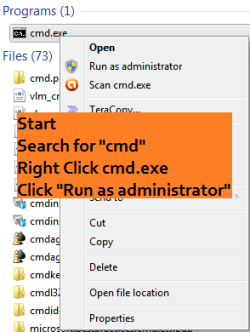
opencmd.png
2. - Leave Command prompt open; Open task manager
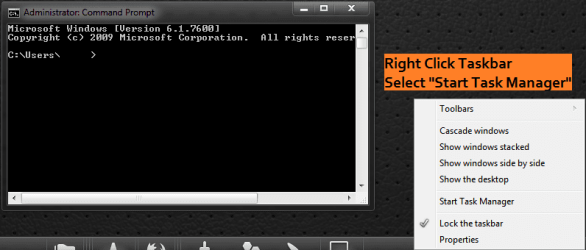
opentm.png
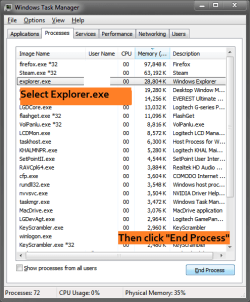
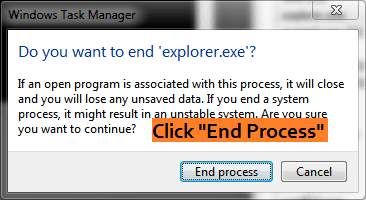
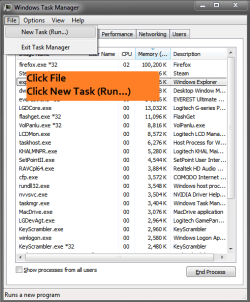
3. - End process "explorer.exe"
endexphowto.png

explorerend.png
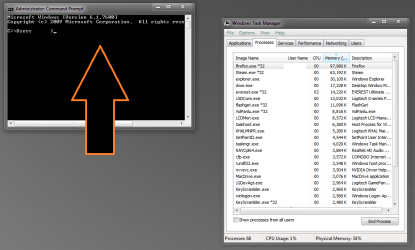
4. - Switch back to command prompt
switchcmd.png
5A. - FILE - Change to the directory of your file and delete it.
First run this line: cd "PATH OF YOUR FILE"
i.e. cd "%USERPROFILE%"\Downloads"
Now run this line: del filename.extension
i.e. del filename.mkv

commanddelete.png
5B. - FOLDER - Delete the folder.
Enter Command: RD /S /Q [DRIVE:]\PATH\TO\FOLDER
i.e
RD /S /Q C:\Users\[username]\Downloads\FOLDERNAME
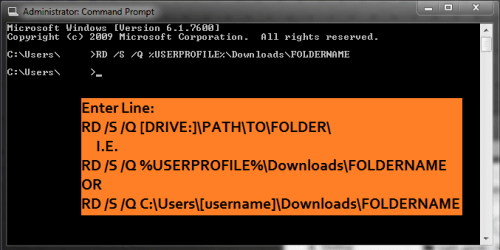
removefolder.png
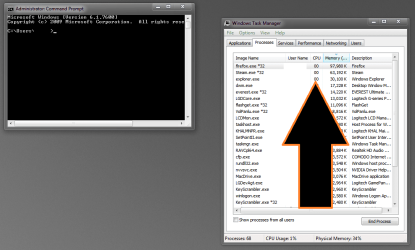
6. - Switch back to task manager
switchtask.png
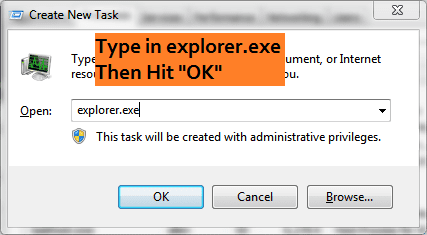
7. - Restart "explorer.exe"
newexphowto.png

newexp.png


Last edited by a moderator:
thank you very much.it was a real sick for me. thanx again
 

My Computer

Computer Manufacturer/Model Number
DELL
OS
windows 7
CPU
Intel® Core™ i3-330M (3M Cache, 2.13 GHz)
Motherboard
dell inc .03C6YH
Memory
4Gb DDR3
Graphics Card(s)
ATI Mobility Radeon HD 5470
Sound Card
onboard
Monitor(s) Displays
pnp moniter
Hard Drives
samsun 300gb
Internet Speed
512kpbs
men..!! thanks for this wonderful tweaks it took me 7hours just finding for the right solution!
this works with me, now my undeletable file is gone forever..
i have registered myself here just to give you my thanks.. :D
 

My Computer

OS
windows 7 32bit
Thanks notsograymatter,

Excellent solution to a problem that had troubled me for a few days. It worked for me deleting files from an external USB drive, on Windows Server 2008R2. Much appreciated.
:)
 
Last edited:

My Computer

Computer Manufacturer/Model Number
HP Compaq Pro 6300 MT
OS
Windows 7 Professional 64bit
CPU
Intel Core i3-212
Memory
8GB
Monitor(s) Displays
2 x Philips 244E
Thanks, this was a great help. Worked perfectly.
 

My Computer

OS
Windows 7 x64
Good god, THANK YOU! I had this url link i couldnt delete and thanks to your technique i finally got rid of the little *******. XD
 

My Computer

Computer type
PC/Desktop
Computer Manufacturer/Model Number
Compaq
OS
Windows XP Service Pack 3 32bit
CPU
Intel Celeron 2.53Hz
Memory
1Gb
Graphics Card(s)
N/A
Sound Card
N/A
Hard Drives
Compaq Presario 33.3Gb
Keyboard
Compaq
Mouse
Logitech Wireless
Antivirus
Norton Antivirus
Thanks for the solution.

Something is wrong with explorer in Windows 7 (apart from the annoying copy/calculating etc. while copy/del)

I also thought it had something todo with with ownership, but it hasn't. My trick was always:

takeown.exe /F "*" /a /r /d y (with elevated cmd box) and it worked. But only after a wait.

This owner unknown trouble always start with a explorer map move, an update of a program, or another file operation.
What happens I think is that the file is marked for deletion, ownership already removed, and waits for explorer to remove it from memory(?), so that it can be removed from disk. I have (super-)(pre-)fetch disabled btw.

I hope someone finds the cause of this.
 

My Computer

OS
win7
Help....this doesn't work!

:mad: I have tried all these tricks and Assassin etc. and still have 6 .m4a files hanging out on my desktop. More ideas?!

Thanks
 

My Computer

Computer type
PC/Desktop
Computer Manufacturer/Model Number
Toshiba
OS
Windows 7
CPU
i7
Graphics Card(s)
nVidia 300 series

My Computer

Computer type
PC/Desktop
Computer Manufacturer/Model Number
Self built custom
OS
64-bit Windows 11 Pro for Workstations
CPU
Intel i7-8700K OC'd to 5 GHz
Motherboard
ASUS ROG Maximus XI Formula Z390
Memory
64 GB (4x16GB) G.SKILL TridentZ RGB DDR4 3600 MHz
Graphics Card(s)
ASUS ROG-STRIX-GTX1080TI-O11G-GAMING
Sound Card
Integrated
Monitor(s) Displays
2 x Samsung Odyssey G7 27"
Screen Resolution
2560x1440
Hard Drives
1TB Samsung 990 PRO M.2,
4TB Samsung 990 PRO PRO M.2,
TerraMaster F8 SSD Plus NAS
PSU
Seasonic Prime Titanium 850W
Case
Thermaltake Core P3
Cooling
Corsair Hydro H115i
Keyboard
Logitech wireless K800
Mouse
Logitech MX Master 4
Internet Speed
2 Gb/s Download and 100 Mb/s Upload
Antivirus
Malwarebyte Anti-Malware Premium
Browser
Google Chrome
Other Info
Logitech Z625 speaker system,
Logitech BRIO 4K Pro webcam,
HP Color LaserJet Pro MFP M477fdn,
APC SMART-UPS RT 1000 XL - SURT1000XLI,
Galaxy S23 Plus phone
I had this same problem with a desktop folder w/subfolders on WIN 8 64bit machine....Could not delete a couple of 0 byte files no matter what I tried but listed below did the trick.

DOS Command RMDIR - If you have a directory file that cannot be deleted. If trying to delete and you receive an error message that the file cannot be found and you have tried changing permissions and that fails. Usually the file type shows as "file" and size = 0 Make sure there are no existing file(s) you want to keep In the target directory or any sub-directory.

In this case I am using stuff as the target directory
1) Open command prompt as administrator
2) Change to the parent directory ex. C:\Users\bullwinkle\Desktop
3) Type the following RMDIR stuff /s /q
/S Removes all directories and files in the specified directory in addition to the directory itself. Used to remove a directory tree.
/Q Quiet mode, do not ask if ok to remove a directory tree with /S

This can also be done in an elevated command prompt with the del command to target an individual file as well. For help and list of
switches type del /?
 

My Computer

Computer type
PC/Desktop
Computer Manufacturer/Model Number
HP
OS
Win 8 64bit
Thank you

That's a great solution for me...
 

My Computer

Computer type
Laptop
Computer Manufacturer/Model Number
Acer
OS
Windows 7 Professional x64
CPU
Intel core i3 2330M
Motherboard
Acer
Memory
6 gb
Graphics Card(s)
nVidia GeFORCE GT 630M
Hard Drives
Hitachi
Antivirus
Avast free
Browser
ie, chrome
Solution worked! But, besides an English file, I had one in Russian and another in Arabic. All 3 files showed the extension name "eastobuy" in explorer window but no (dot)extension. All were downloaded from Youtube using clipconverter.cc website. I created a second temp folder Download 2 and moved all files except undeletable files. Then instead of naming each file to delete inside the Download folder I entered del *.* and BAM... GONE! Thanks for the solution!
 

My Computer

Computer type
Laptop
Computer Manufacturer/Model Number
Dell
OS
Windows 7 Pro (64)
CPU
Intel i5 M450 2.40GHz
Memory
8 GB
Graphics Card(s)
Intel HD Graphics
Hard Drives
Samsung 840 Pro SSD 128GB
Antivirus
Ad-Aware
Browser
Chrome
thanks man g8 ,,, keep going
 

My Computer

Computer type
PC/Desktop
OS
Windows 7 Ultimate x86
This look like the solution for me. It is a very undocumented registry entry. I use this for 6 months now and I haven't had the problem anymore.

[HKEY_LOCAL_MACHINE\SOFTWARE\Microsoft\Windows\CurrentVersion\Explorer\ShellTaskScheduler]
"MaxWorkerThreadsPerScheduler"=dword:000000ff

I found that the same value is also queried in HKCU first.

It might be to high, the default value looks to be 5.

Cheers
 
Last edited:

My Computer

OS
win7
I have had the undeletable file problem when I end up with a file name that is reserved by windows. In my case, it has been "NUL".

The solution I found to this problem, from Del - Delete Files | Windows CMD | SS64.com is this:

Files are sometimes created with the very long filenames or reserved names: CON, AUX, COM1, COM2, COM3, COM4, LPT1, LPT2, LPT3, PRN, NUL
To delete these use the syntax:
Code:
DEL \\.\C:\somedir\LPT1
Alternatively SUBST a drive letter to the folder containing the file.
 

My Computer

Computer type
Laptop
Computer Manufacturer/Model Number
Lenovo T61p
OS
win 7 pro x64
CPU
T7700 Intel
Memory
4GB
Thank you, Not So Gray Matter! I have Windows 8.1 and the command prompt instructions that you posted, along with the brilliant graphic instructions worked very well. I have never had this problem (folder on desktop would not delete) and I have almost never had to search so long for a solution that applied to my issue. I joined the Seven Forums especially to thank you!
 

My Computer

Computer type
Laptop
Computer Manufacturer/Model Number
DELL INSPIRON 3521
OS
WINDOWS 8.1 64-BIT
CPU
Processor Intel(R) Core(TM) i3-3217U CPU @ 1.80GHz, 1801 Mhz
Memory
Installed Physical Memory (RAM) 6.00 GB
Antivirus
MALWAREBYTES
Browser
CHROME - ALWAYS THE LATEST VERSION
I've been using the utility Unlocker for years. It works in Windows mode.
 

My Computer

Computer type
PC/Desktop
Computer Manufacturer/Model Number
HP p6-2020t
OS
Win 7 Ult 64-bit
CPU
G620 2.6GHZ Pentium R
Memory
6 GB
Monitor(s) Displays
25" HPLV2311
Screen Resolution
1920 x 1200
Hard Drives
1 SATA, 1 exterior SATA
Case
HP
Cooling
PSU
Antivirus
Glasswire
Browser
Waterfox; Firefox; Chrome for work
Other Info
Firewall--Glasswire
Similar specs in Gateway DX4200
Verizon FIOS Wired network

1 other Win7 computer-- has SSD
Hi,

I've got a huge problem. I tried this trick because I can't delete one folder which was downloaded from Google drive. I have this folder on D:. Just D, no additional path. So, when i tried to erase it like it was described here, I mistakenly erased many other very important folders (the problematic one is of course still there). Please help me bring my folders on D back, some very important stuff for me are there!

Thanky you!
 

My Computer

Computer type
PC/Desktop
OS
7

My Computer

Computer type
PC/Desktop
Computer Manufacturer/Model Number
Self built custom
OS
64-bit Windows 11 Pro for Workstations
CPU
Intel i7-8700K OC'd to 5 GHz
Motherboard
ASUS ROG Maximus XI Formula Z390
Memory
64 GB (4x16GB) G.SKILL TridentZ RGB DDR4 3600 MHz
Graphics Card(s)
ASUS ROG-STRIX-GTX1080TI-O11G-GAMING
Sound Card
Integrated
Monitor(s) Displays
2 x Samsung Odyssey G7 27"
Screen Resolution
2560x1440
Hard Drives
1TB Samsung 990 PRO M.2,
4TB Samsung 990 PRO PRO M.2,
TerraMaster F8 SSD Plus NAS
PSU
Seasonic Prime Titanium 850W
Case
Thermaltake Core P3
Cooling
Corsair Hydro H115i
Keyboard
Logitech wireless K800
Mouse
Logitech MX Master 4
Internet Speed
2 Gb/s Download and 100 Mb/s Upload
Antivirus
Malwarebyte Anti-Malware Premium
Browser
Google Chrome
Other Info
Logitech Z625 speaker system,
Logitech BRIO 4K Pro webcam,
HP Color LaserJet Pro MFP M477fdn,
APC SMART-UPS RT 1000 XL - SURT1000XLI,
Galaxy S23 Plus phone
Hi,

Please help me bring my folders on D back, some very important stuff for me are there!

Thanky you!

Stop using the D drive - don't write any new files to it. Then, download and install Recuva from Priform, on the C drive, and use it to try to recover the folders and their contents. Run a "deep scan" in Recuva if it doesn't find everything. As long as you didn't overwrite the free space where your files were, you should be able to recover them. Be aware that they may not be organized in the folders they were originally in.

Recuva: Download Recuva | Recover deleted files, free!
 

My Computer

OS
Windows 7 x64
Back
Top