
Solved under the hood of Win7 libraries

drpepper

New member
Member
VIP
Local time
1:36 PM
Messages
233
I'm looking for someone who understands what happens under the hood. After reading numerous articles on the Win7 libraries, I think I understand what happens under the hood. I would like to receive confirmation or correction of my perception of the details. I am not 100% sure I have the jargon right; so please correct that also if necessary.

If I connect the dots right, the libraries are pointers to the folders included the library. The actual files are located elsewhere: my documents, my pictures, etc. This saves HDD space by eliminating the need to create copies of the folders. Modifications to the folders/files in a library also modifies the source folder/file. Deleting a library or any of its files does not alter the source files. However, deleting the source files will remove the file from both the library and its source location.

Am I missing anything here? Is there anything else which is important for me to know?

Thanks for your replies.

drpepper
 

My Computer My Computer

At a glance

Windows 7 Home Premium SP1 64bitIntel Core i38GB DDR3Intel HD graphics family
Computer type
PC/Desktop
Computer Manufacturer/Model Number
Lenovo 1068AHU B570 (laptop)
OS
Windows 7 Home Premium SP1 64bit
CPU
Intel Core i3
Motherboard
Lenovo Emerald Lake
Memory
8GB DDR3
Graphics Card(s)
Intel HD graphics family
Sound Card
Realtek HD audio
Monitor(s) Displays
ThinkPad Display 1366x768 (15.6")
Hard Drives
WD 320GB WDC WD3200BPVT
Internet Speed
80Kbs maximum -->speed is a misnomer
Other Info
Logitech MK550 wireless mouse/keyboard combo used when at home.

My Computer My Computer

At a glance

Microsoft Windows 8.1 Pro 64-bitIntel(R) Core(TM) i3-4130 CPU @ 3.40GHz8.00 GBNone
Computer type
PC/Desktop
Computer Manufacturer/Model Number
Custom Asus Build
OS
Microsoft Windows 8.1 Pro 64-bit
CPU
Intel(R) Core(TM) i3-4130 CPU @ 3.40GHz
Motherboard
B85M-E
Memory
8.00 GB
Graphics Card(s)
None
Sound Card
Realtek High Definition Audio
Monitor(s) Displays
Asus 23.6" Monitor
Screen Resolution
1920 x 1080 x 32 bits (4294967296 colors) @ 60 Hz
Hard Drives
INTEL SSDSC2BW180A4
Samsung SSD 840 PRO Series
PSU
Seasonic S12II-380Bronze
Case
Lian Li
Cooling
Fan, Passive
Keyboard
Logitech K120
Mouse
Microsoft Touch Mouse
Internet Speed
4ms Ping, 19.0 Mbps Download, 19.0 Mbps Upload
Antivirus
Eset Endpoint
Browser
Internet Explorer, Chrome
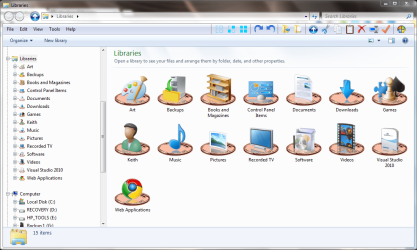
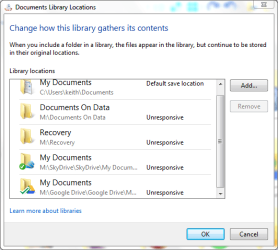
Libraries are not just limited to the four standard ones and their included folders. You can create new libraries for your own purposes and include as many folders in them as you need. I have a total of 15 libraries and as an example my documents library includes 5 locations.

screenshot171_2012-05-26.png

screenshot172_2012-05-26.png
 

My Computer My Computer

At a glance

Microsoft Windows 7 Home Premium 64-bit Servi...Intel(R) Core(TM) i3 CPU M 330 @ 2.13GHz8 GB DDR3Intel(R) HD Graphics
Computer type
Laptop
Computer Manufacturer/Model Number
Hewlett-Packard/G62-107SA Notebook
OS
Microsoft Windows 7 Home Premium 64-bit Service Pack 1
CPU
Intel(R) Core(TM) i3 CPU M 330 @ 2.13GHz
Motherboard
Hewlett-Packard 1425
Memory
8 GB DDR3
Graphics Card(s)
Intel(R) HD Graphics
Sound Card
Realtek High Definition Audio
Monitor(s) Displays
Builtin
Screen Resolution
1366 x 768 x 32 bits (4294967296 colors) @ 60 Hz
Hard Drives
250 GB SATA Hard Disk Drive 7200 rpm
2TB Seagate GoFlex USB 2 Drive
1TB Iomega Prestige USB 2 Drive
1.5TB Iomega Prestige USB 2 Drive (Samsung)
2TB WD MyBook Live NAS.
Mouse
Logitech Anywhere MX
Internet Speed
152 Mbs download 10 Mbs upload
Antivirus
Norton 360
Browser
Chrome
good info... I have added a little more understanding via the linked articles.

Kado's second attached image appears to address my base question (not how to use libraries, but what is going on under the hood - the nuts and bolts of what Windows is doing to provide the view in the user interface). The explanation in the image which says, "When you include a folder in a library, the files appear in the library, but continue to be stored in their original location." seems to address the question. I f I am reading between the lines right, libraries provide a view of another memory location without duplicating the data in a different location. This would make the library view of the library a collection of pointers (in programming language) to the actual memory location where the files are stored.

Did I get that right?

There is a reason for my line of questioning here. I have a friend who has a 500GB HDD with less than 10% free space. She came to me for help because the system crashes when she tries to manipulate large files, and she cannot defrag due to lack of unused space. Likewise she cannot back up the HDD. Quite a few of the large files (some of them over 3GB in size) are duplicated in several folders because she does not know how to use libraries. Instead she uses the type of file/folder organization from the days before libraries were introduced. I recommended copying the bulk of the folders/files to an external drive, but she wants to keep everything on the internal drive.

If my analysis of how libraries work, as presented in this thread is sound, I believe I can help her free up some HDD space. My tentative plan is to guide her through a process to copy enought folders to an external drive to begin the task of creating libraries and to systematically build more libraries to preserve the type of organization she finds to be useful for her purposes. I believe that if we leave the default libraires (documents, pictures, videos, etc.) intact, we can build the custom libraries. Once she has the concept down, I will turn here loose to complete the process on her own.

Now... Using the perspective of the full HDD and my analysis of how libraries work under the hood, is my reasoning sound enough to attempt to proceed with the project?

drpepper
 

My Computer My Computer

At a glance

Windows 7 Home Premium SP1 64bitIntel Core i38GB DDR3Intel HD graphics family
Computer type
PC/Desktop
Computer Manufacturer/Model Number
Lenovo 1068AHU B570 (laptop)
OS
Windows 7 Home Premium SP1 64bit
CPU
Intel Core i3
Motherboard
Lenovo Emerald Lake
Memory
8GB DDR3
Graphics Card(s)
Intel HD graphics family
Sound Card
Realtek HD audio
Monitor(s) Displays
ThinkPad Display 1366x768 (15.6")
Hard Drives
WD 320GB WDC WD3200BPVT
Internet Speed
80Kbs maximum -->speed is a misnomer
Other Info
Logitech MK550 wireless mouse/keyboard combo used when at home.
in short, libraries are a collection of shortcuts to other files and folders.
 

My Computer My Computer

At a glance

Microsoft Windows 7 Home Premium 64-bit 7600IIx4 amd athelon 635 processor2x2gbati radeon HD 5450
Computer Manufacturer/Model Number
Hewlett packard/p6512uk
OS
Microsoft Windows 7 Home Premium 64-bit 7600
CPU
IIx4 amd athelon 635 processor
Motherboard
FOXCONN 2AA9
Memory
2x2gb
Graphics Card(s)
ati radeon HD 5450
Sound Card
(1) Realtek High Definition Audio (2) AMD High Definition
Monitor(s) Displays
samsung lcd tv 32"
Screen Resolution
1360x 768
Hard Drives
(1) WDC WD10 01FAES-60Z2A0 SATA Disk Device (2) Maxtor OneTouch USB Device (3) ST310003 33AS USB Device (4) WD My Book 1111 USB Device
PSU
?
Cooling
air!
Keyboard
wireless hp
Mouse
wireless Hp,optical
Internet Speed
1.10mb/s
Antivirus
MSE
Browser
Firefox
Yes you are correct about the collection of pointers. It is actually an XML file but you have the right idea. I don't have a second internal drive and a fairly small HD in my laptop so virtually all my data is on external USB attached drives. This of course limits speed and portability but it does the job as I use my laptop more like a desktop. Anything I might need when away from base is either temporarily moved to the internal disk or is synced to the cloud.
 

My Computer My Computer

At a glance

Microsoft Windows 7 Home Premium 64-bit Servi...Intel(R) Core(TM) i3 CPU M 330 @ 2.13GHz8 GB DDR3Intel(R) HD Graphics
Computer type
Laptop
Computer Manufacturer/Model Number
Hewlett-Packard/G62-107SA Notebook
OS
Microsoft Windows 7 Home Premium 64-bit Service Pack 1
CPU
Intel(R) Core(TM) i3 CPU M 330 @ 2.13GHz
Motherboard
Hewlett-Packard 1425
Memory
8 GB DDR3
Graphics Card(s)
Intel(R) HD Graphics
Sound Card
Realtek High Definition Audio
Monitor(s) Displays
Builtin
Screen Resolution
1366 x 768 x 32 bits (4294967296 colors) @ 60 Hz
Hard Drives
250 GB SATA Hard Disk Drive 7200 rpm
2TB Seagate GoFlex USB 2 Drive
1TB Iomega Prestige USB 2 Drive
1.5TB Iomega Prestige USB 2 Drive (Samsung)
2TB WD MyBook Live NAS.
Mouse
Logitech Anywhere MX
Internet Speed
152 Mbs download 10 Mbs upload
Antivirus
Norton 360
Browser
Chrome
Thanks Kado,

It sounds like I am good to go with my tentative plan. My friend has two 500GB external drives we can use for transferring files off the HDD to get started. I am hopeful that she will find several gigabytes of files she no longer needs while we are at it. I am happy that she is savvy enough to pick up on the idea; so I won't have to do the entire job. (I wonder how many weeks that is going to take.)

drpepper
 

My Computer My Computer

At a glance

Windows 7 Home Premium SP1 64bitIntel Core i38GB DDR3Intel HD graphics family
Computer type
PC/Desktop
Computer Manufacturer/Model Number
Lenovo 1068AHU B570 (laptop)
OS
Windows 7 Home Premium SP1 64bit
CPU
Intel Core i3
Motherboard
Lenovo Emerald Lake
Memory
8GB DDR3
Graphics Card(s)
Intel HD graphics family
Sound Card
Realtek HD audio
Monitor(s) Displays
ThinkPad Display 1366x768 (15.6")
Hard Drives
WD 320GB WDC WD3200BPVT
Internet Speed
80Kbs maximum -->speed is a misnomer
Other Info
Logitech MK550 wireless mouse/keyboard combo used when at home.
I can now mark this thread as solved.

Initial work on the full HDD has freed up a little over 15GB by simply deleting duplicates of one video and leaving one copy in My Videos. The first custom library has been created with that video and a few other items relating to the same subject. My friend is ready to finish up on her own.

Thanks for all the input.
drpepper
 

My Computer My Computer

At a glance

Windows 7 Home Premium SP1 64bitIntel Core i38GB DDR3Intel HD graphics family
Computer type
PC/Desktop
Computer Manufacturer/Model Number
Lenovo 1068AHU B570 (laptop)
OS
Windows 7 Home Premium SP1 64bit
CPU
Intel Core i3
Motherboard
Lenovo Emerald Lake
Memory
8GB DDR3
Graphics Card(s)
Intel HD graphics family
Sound Card
Realtek HD audio
Monitor(s) Displays
ThinkPad Display 1366x768 (15.6")
Hard Drives
WD 320GB WDC WD3200BPVT
Internet Speed
80Kbs maximum -->speed is a misnomer
Other Info
Logitech MK550 wireless mouse/keyboard combo used when at home.
Good news drpepper.
 

My Computer My Computer

At a glance

Microsoft Windows 7 Home Premium 64-bit Servi...Intel(R) Core(TM) i3 CPU M 330 @ 2.13GHz8 GB DDR3Intel(R) HD Graphics
Computer type
Laptop
Computer Manufacturer/Model Number
Hewlett-Packard/G62-107SA Notebook
OS
Microsoft Windows 7 Home Premium 64-bit Service Pack 1
CPU
Intel(R) Core(TM) i3 CPU M 330 @ 2.13GHz
Motherboard
Hewlett-Packard 1425
Memory
8 GB DDR3
Graphics Card(s)
Intel(R) HD Graphics
Sound Card
Realtek High Definition Audio
Monitor(s) Displays
Builtin
Screen Resolution
1366 x 768 x 32 bits (4294967296 colors) @ 60 Hz
Hard Drives
250 GB SATA Hard Disk Drive 7200 rpm
2TB Seagate GoFlex USB 2 Drive
1TB Iomega Prestige USB 2 Drive
1.5TB Iomega Prestige USB 2 Drive (Samsung)
2TB WD MyBook Live NAS.
Mouse
Logitech Anywhere MX
Internet Speed
152 Mbs download 10 Mbs upload
Antivirus
Norton 360
Browser
Chrome
Back
Top