
Hi,
I'll post my network setup, as it may make more sense when I explain the issue
Router: D-Link 270B
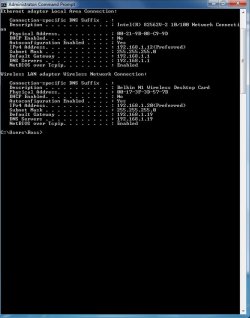
Desktop connected to the router by a Homeplug (ethernet) for the internet, using the following settings:
IP: 192.168.1.12
Subnet Mask: 255.255.255.0
Default Gateway: 192.168.1.1
Preferred DNS Server: 192.168.1.1
Desktop wireless card (Belkin Wireless N1 Card) for connecting to my Apple TV for syncing:
IP: 192.168.1.20
Subnet Mask: 255.255.255.0
Default Gateway: 192.168.1.19
Preferred DNS Server: 192.168.1.19
Apple TV Media Centre
IP: 192.168.1.19
Subnet Mask: 255.255.255.0
Default Gateway: 192.168.1.1
Preferred DNS Server: 192.168.1.1
This may sound like a strange setup, but iTunes doesn't detect my Apple TV, if I use my Homeplug for it, but if I use the Wireless Network Card for it, it is fine.
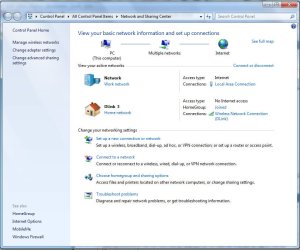
The issue I have is, sometimes this setup works fine, but sometimes I can turn the Desktop on and have "Unidentified Network" and a Park Bench displayed for the Homeplug connection and for the Wireless Connection, it will say "Dlink, No Network Access" (or something similar, I cannot remember the exact wording). To get the Homeplug connection to connect to the network again, I have to disable the wireless card and then turn off the homeplug and turn it back on and reconfigure the IP.
Is there anything I could of possibly set wrong? I am hoping to keep the internet connection and the apple TV syncing separate, as my downloads from iTunes on the wireless connection are too slow but on the Homeplugs I get full speed from my connection. Also having the Wireless connection syncing the Apple TV only, seems to speed up transfers.
Thanks in advance.
Cheers,
Ross
I'll post my network setup, as it may make more sense when I explain the issue
Router: D-Link 270B
Desktop connected to the router by a Homeplug (ethernet) for the internet, using the following settings:
IP: 192.168.1.12
Subnet Mask: 255.255.255.0
Default Gateway: 192.168.1.1
Preferred DNS Server: 192.168.1.1
Desktop wireless card (Belkin Wireless N1 Card) for connecting to my Apple TV for syncing:
IP: 192.168.1.20
Subnet Mask: 255.255.255.0
Default Gateway: 192.168.1.19
Preferred DNS Server: 192.168.1.19
Apple TV Media Centre
IP: 192.168.1.19
Subnet Mask: 255.255.255.0
Default Gateway: 192.168.1.1
Preferred DNS Server: 192.168.1.1
This may sound like a strange setup, but iTunes doesn't detect my Apple TV, if I use my Homeplug for it, but if I use the Wireless Network Card for it, it is fine.
The issue I have is, sometimes this setup works fine, but sometimes I can turn the Desktop on and have "Unidentified Network" and a Park Bench displayed for the Homeplug connection and for the Wireless Connection, it will say "Dlink, No Network Access" (or something similar, I cannot remember the exact wording). To get the Homeplug connection to connect to the network again, I have to disable the wireless card and then turn off the homeplug and turn it back on and reconfigure the IP.
Is there anything I could of possibly set wrong? I am hoping to keep the internet connection and the apple TV syncing separate, as my downloads from iTunes on the wireless connection are too slow but on the Homeplugs I get full speed from my connection. Also having the Wireless connection syncing the Apple TV only, seems to speed up transfers.
Thanks in advance.
Cheers,
Ross
My Computer
- Computer Manufacturer/Model Number
- Custom / Laptop - Dell Studio 1558
- OS
- Windows 7 Professional / Windows 7 Professional
- CPU
- Intel Core i7-2600K 3.40GHz / Intel Core i7 720QM
- Motherboard
- Asus P67 Sabertooth **B3 Revision**
- Memory
- 16GB Kingston HyperX XMP 1600MHz / 8GB Samsung DDR3 1333mhz
- Graphics Card(s)
- MSI ATI Radeon HD6870 1GB Twin Frozr III / Ati Radeon HD5450
- Sound Card
- Onboard 5.1
- Monitor(s) Displays
- Dell 24" FULL HD LED / Full HD WLED 15.4"
- Screen Resolution
- 1920 x 1080 / 1920 x 1080
- Hard Drives
- Crucial C300 + 4 x Samsung F3 1TB + 2 x External WD 1TB 7200RPM / OCZ Vertex 2e 240gb + External WD 500GB 7200RPM
- PSU
- Corsair TX 750W
- Case
- Fractal Design Define XL Full Tower Case - Black Pearl
- Cooling
- 2 x Fractal 120mm and 2 x Fractal 80mm Fans
- Keyboard
- Microsoft Digital Media Pro / Backlit
- Mouse
- Logitech MX Revolution / Logitech VX Revolution
- Internet Speed
- Sky Unlimited 20mb
- Other Info
- Samsung Blu-Ray Player and Billion 7800N Router



 .
.