
Unidentified Network issue

Ross

New member
Member
Local time
7:35 PM
Messages
61
Hi,


I'll post my network setup, as it may make more sense when I explain the issue

Router: D-Link 270B

Desktop connected to the router by a Homeplug (ethernet) for the internet, using the following settings:

IP: 192.168.1.12
Subnet Mask: 255.255.255.0
Default Gateway: 192.168.1.1
Preferred DNS Server: 192.168.1.1

Desktop wireless card (Belkin Wireless N1 Card) for connecting to my Apple TV for syncing:

IP: 192.168.1.20
Subnet Mask: 255.255.255.0
Default Gateway: 192.168.1.19
Preferred DNS Server: 192.168.1.19

Apple TV Media Centre

IP: 192.168.1.19
Subnet Mask: 255.255.255.0
Default Gateway: 192.168.1.1
Preferred DNS Server: 192.168.1.1

This may sound like a strange setup, but iTunes doesn't detect my Apple TV, if I use my Homeplug for it, but if I use the Wireless Network Card for it, it is fine.

The issue I have is, sometimes this setup works fine, but sometimes I can turn the Desktop on and have "Unidentified Network" and a Park Bench displayed for the Homeplug connection and for the Wireless Connection, it will say "Dlink, No Network Access" (or something similar, I cannot remember the exact wording). To get the Homeplug connection to connect to the network again, I have to disable the wireless card and then turn off the homeplug and turn it back on and reconfigure the IP.

Is there anything I could of possibly set wrong? I am hoping to keep the internet connection and the apple TV syncing separate, as my downloads from iTunes on the wireless connection are too slow but on the Homeplugs I get full speed from my connection. Also having the Wireless connection syncing the Apple TV only, seems to speed up transfers.

Thanks in advance.

Cheers,

Ross
 

My Computer

Computer Manufacturer/Model Number
Custom / Laptop - Dell Studio 1558
OS
Windows 7 Professional / Windows 7 Professional
CPU
Intel Core i7-2600K 3.40GHz / Intel Core i7 720QM
Motherboard
Asus P67 Sabertooth **B3 Revision**
Memory
16GB Kingston HyperX XMP 1600MHz / 8GB Samsung DDR3 1333mhz
Graphics Card(s)
MSI ATI Radeon HD6870 1GB Twin Frozr III / Ati Radeon HD5450
Sound Card
Onboard 5.1
Monitor(s) Displays
Dell 24" FULL HD LED / Full HD WLED 15.4"
Screen Resolution
1920 x 1080 / 1920 x 1080
Hard Drives
Crucial C300 + 4 x Samsung F3 1TB + 2 x External WD 1TB 7200RPM / OCZ Vertex 2e 240gb + External WD 500GB 7200RPM
PSU
Corsair TX 750W
Case
Fractal Design Define XL Full Tower Case - Black Pearl
Cooling
2 x Fractal 120mm and 2 x Fractal 80mm Fans
Keyboard
Microsoft Digital Media Pro / Backlit
Mouse
Logitech MX Revolution / Logitech VX Revolution
Internet Speed
Sky Unlimited 20mb
Other Info
Samsung Blu-Ray Player and Billion 7800N Router
Hi,


I'll post my network setup, as it may make more sense when I explain the issue

Router: D-Link 270B

Desktop connected to the router by a Homeplug (ethernet) for the internet, using the following settings:

IP: 192.168.1.12
Subnet Mask: 255.255.255.0
Default Gateway: 192.168.1.1
Preferred DNS Server: 192.168.1.1

Desktop wireless card (Belkin Wireless N1 Card) for connecting to my Apple TV for syncing:

IP: 192.168.1.20
Subnet Mask: 255.255.255.0
Default Gateway: 192.168.1.19
Preferred DNS Server: 192.168.1.19

Apple TV Media Centre

IP: 192.168.1.19
Subnet Mask: 255.255.255.0
Default Gateway: 192.168.1.1
Preferred DNS Server: 192.168.1.1

This may sound like a strange setup, but iTunes doesn't detect my Apple TV, if I use my Homeplug for it, but if I use the Wireless Network Card for it, it is fine.

The issue I have is, sometimes this setup works fine, but sometimes I can turn the Desktop on and have "Unidentified Network" and a Park Bench displayed for the Homeplug connection and for the Wireless Connection, it will say "Dlink, No Network Access" (or something similar, I cannot remember the exact wording). To get the Homeplug connection to connect to the network again, I have to disable the wireless card and then turn off the homeplug and turn it back on and reconfigure the IP.

Is there anything I could of possibly set wrong? I am hoping to keep the internet connection and the apple TV syncing separate, as my downloads from iTunes on the wireless connection are too slow but on the Homeplugs I get full speed from my connection. Also having the Wireless connection syncing the Apple TV only, seems to speed up transfers.

Thanks in advance.

Cheers,

Ross


Ros Hi and welcome


I have a bunch of questions.

Are you using homegroup, or workgroup for networking?

Are you manually assigning IP?

Can you type cmd in search>then>ipconfig /all and make a screenshot of the output?


Ken
 

My Computer

Computer Manufacturer/Model Number
HP Pavillion dv-7 1005 Tx
OS
Win 8 Release candidate 8400
CPU
[email protected]
Memory
4 gigs
Graphics Card(s)
Nvidia 9600M
Sound Card
HD built-in
Monitor(s) Displays
17" Wxga
Screen Resolution
1440x900
Cooling
none
Internet Speed
45Mb down 5Mb up
Hi Ken,

Thanks for the reply.

Currently everything is running fine, but when I turn the PC off later and turn it back on, it will all go wrong again. I have attached the screenprint as per your request. The IP's are manually configured.

I have just checked in "Networking and Sharing Centre" and the Homeplug (ethernet) connection is setup as a "Work Network" and the Wireless is setup as a "Home Network" (homegroup: joined). I have attached a screenprint of this also (they were both Home Network before I screenshot the "Networking and Sharing Centre", just changed the internet to work to see if it made any difference).

Thanks,
Ross
 

Attachments

  • Untitled-2.jpg
    Untitled-2.jpg
    71.1 KB · Views: 106
  • Untitled-4.jpg
    Untitled-4.jpg
    117.9 KB · Views: 127
Last edited:

My Computer

Computer Manufacturer/Model Number
Custom / Laptop - Dell Studio 1558
OS
Windows 7 Professional / Windows 7 Professional
CPU
Intel Core i7-2600K 3.40GHz / Intel Core i7 720QM
Motherboard
Asus P67 Sabertooth **B3 Revision**
Memory
16GB Kingston HyperX XMP 1600MHz / 8GB Samsung DDR3 1333mhz
Graphics Card(s)
MSI ATI Radeon HD6870 1GB Twin Frozr III / Ati Radeon HD5450
Sound Card
Onboard 5.1
Monitor(s) Displays
Dell 24" FULL HD LED / Full HD WLED 15.4"
Screen Resolution
1920 x 1080 / 1920 x 1080
Hard Drives
Crucial C300 + 4 x Samsung F3 1TB + 2 x External WD 1TB 7200RPM / OCZ Vertex 2e 240gb + External WD 500GB 7200RPM
PSU
Corsair TX 750W
Case
Fractal Design Define XL Full Tower Case - Black Pearl
Cooling
2 x Fractal 120mm and 2 x Fractal 80mm Fans
Keyboard
Microsoft Digital Media Pro / Backlit
Mouse
Logitech MX Revolution / Logitech VX Revolution
Internet Speed
Sky Unlimited 20mb
Other Info
Samsung Blu-Ray Player and Billion 7800N Router
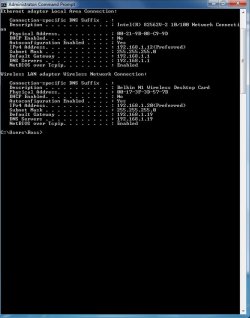
From my point of view the wireless connections default gateway and the DNS aren't showing up as they should, when you manually inputted the gateway and DNS it wasn't done correctly I'm guessing. The IPv4 default gateway and DNS of the wireless connection needs to be 192.168.1.1 .

It also looks like you may have both a wireless connection and also a wired connection on the same machine, this configuration confuses Windows 7 so you should be using one or the other.

You might try going into the IPv4 properties of the wireless connection and manually inputting the default gateway and DNS of 192.168.1.1, you can still probably use the same IP of 192.168.1.20 . Although simply resetting the router using DHCP would probably fix this problem just as easily.
 

My Computer

Computer type
PC/Desktop
Computer Manufacturer/Model Number
Home built
OS
Windows 7 Ult, Windows 8.1 Pro,
CPU
Q9650-4.275GHz, E8600 4.5GHz, E6750-3.8GHz
Motherboard
Evga 780i FTW
Memory
G.Skill PC2 9600 1200Mhz 5 5 5 15 2T
Graphics Card(s)
GTX480
Sound Card
Asus Xonar D2
Monitor(s) Displays
HannsG
Screen Resolution
1680X1050
Hard Drives
GSkill Phoenix Pro 120GB SSD
PSU
ThermalTake Toughpower 1000Watt modular
Case
ThermalTake XaserV
Cooling
Xigmatek S1283
Keyboard
Logitech G15
Mouse
Logitech G9
Internet Speed
T1
Hi,

Thanks for the reply.

Yes both connections are on the one PC. I am having to use 192.168.1.19 on my wireless adapter for the gateway and the DNS because when I use my homeplugs, iTunes can't see my Apple TV. I don't want the wireless to be used for the net though (as it is unreliable for the internet). The only way I could see it not connecting to the net was by using 192.168.1.19. When they decide to work together, they work perfectly but if I switch off the PC and turn it back on, neither work :(
 

My Computer

Computer Manufacturer/Model Number
Custom / Laptop - Dell Studio 1558
OS
Windows 7 Professional / Windows 7 Professional
CPU
Intel Core i7-2600K 3.40GHz / Intel Core i7 720QM
Motherboard
Asus P67 Sabertooth **B3 Revision**
Memory
16GB Kingston HyperX XMP 1600MHz / 8GB Samsung DDR3 1333mhz
Graphics Card(s)
MSI ATI Radeon HD6870 1GB Twin Frozr III / Ati Radeon HD5450
Sound Card
Onboard 5.1
Monitor(s) Displays
Dell 24" FULL HD LED / Full HD WLED 15.4"
Screen Resolution
1920 x 1080 / 1920 x 1080
Hard Drives
Crucial C300 + 4 x Samsung F3 1TB + 2 x External WD 1TB 7200RPM / OCZ Vertex 2e 240gb + External WD 500GB 7200RPM
PSU
Corsair TX 750W
Case
Fractal Design Define XL Full Tower Case - Black Pearl
Cooling
2 x Fractal 120mm and 2 x Fractal 80mm Fans
Keyboard
Microsoft Digital Media Pro / Backlit
Mouse
Logitech MX Revolution / Logitech VX Revolution
Internet Speed
Sky Unlimited 20mb
Other Info
Samsung Blu-Ray Player and Billion 7800N Router
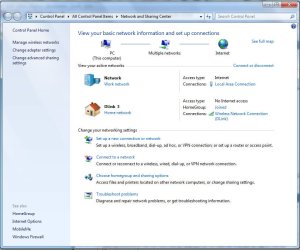
You can try doing that but it's not a normal way of doing things.

The reason it's not working correctly is because your not using the correct default gateway and DNS. Not to mention that Windows 7 doesn't like having two networks. You should be using one or the other with the same gateway and DNS if you want it to work right.

I don't mess with anything apple so I can't help you with the itunes problem, not sure what is up with that.

Your network won't work right like you have it though unfortunately.
 

My Computer

Computer type
PC/Desktop
Computer Manufacturer/Model Number
Home built
OS
Windows 7 Ult, Windows 8.1 Pro,
CPU
Q9650-4.275GHz, E8600 4.5GHz, E6750-3.8GHz
Motherboard
Evga 780i FTW
Memory
G.Skill PC2 9600 1200Mhz 5 5 5 15 2T
Graphics Card(s)
GTX480
Sound Card
Asus Xonar D2
Monitor(s) Displays
HannsG
Screen Resolution
1680X1050
Hard Drives
GSkill Phoenix Pro 120GB SSD
PSU
ThermalTake Toughpower 1000Watt modular
Case
ThermalTake XaserV
Cooling
Xigmatek S1283
Keyboard
Logitech G15
Mouse
Logitech G9
Internet Speed
T1
I would set the system up as described above and then use the the iTunes software and/or the Apple TV to set up the required connections.

If the Apple TV is on the same network and connected by Ethernet then you should get the best possible throughput.

If you only have a wireless connection on the apple TV you can run a wireless connection in parallel with the power-line Ethernet, but you would probably be best running a completely different subnet

I am another one without the specific Apple knowledge to provide explicit instructions, but there should be controls within the software/hardware to link iTunes and the apple TV
 

My Computers

System One System Two

  • Computer type
    PC/Desktop
    Computer Manufacturer/Model Number
    ChillBlast - Custom to my design
    OS
    Windows 11 Pro x64 [Latest Release and Release Preview]
    CPU
    Ryzen 9 5950X, 3.8 - 5.2 MHz
    Motherboard
    Asus Prime X570-Pro
    Memory
    64GB [2 x 32GB] DDR4 3200MHz
    Graphics Card(s)
    4GB NVIDIA GEFORCE GTX 1650 Ti
    Sound Card
    On-board SPDIF to 5.1 System + HDMI [5.1 system]
    Monitor(s) Displays
    32" UHD 32 Bit HDR Monitor + 43" UHD 4K 32Bit HDR TV
    Screen Resolution
    2 x 3840 x 2160 @60Hz
    Hard Drives
    1TB M2 SSD OS, 500GB Fast Access SSD, 2 x 8TB Data + Various Externals from 1TB to 4TB, 10TB NAS
    PSU
    NZXT C750 80 PLUS Gold 750W Modular PSU
    Case
    Workstation Case [Matt Black]
    Cooling
    NZXT Kraken X63 280mm CPU Cooler +2x Quiet Case fans
    Keyboard
    Logitech Wireless MX Keys & K400 + others
    Mouse
    Logitech Wireless MX Master 3S
    Internet Speed
    920 MB Down 50 MB Up
    Antivirus
    BitDefender Total Security Pro
    Browser
    Chrome (always run latest Non-Beta)
    Other Info
    Also run ...
    Laptop - Quad 8GB - Windows 10 Pro x64
    Nexus 7 Android tablet x2
    Samsung 10.2" tablet
    Blackview TAB 8 4G Android Tablet c/w Keyboard
    Wacom Intuos Pro Medium Pen Pad
    Wacom Intuos Pro Small Pen Pad
    Wacom Expresskeys Remote
    Loopdeck+ Graphics Controller
    Shuttle Pro v2 Control
  • Computer type
    Laptop
    System Manufacturer/Model Number
    Dell XPS 17 10750H
    OS
    Windows 11 Pro x64 Latest RP
    CPU
    Intel I7 10750H 5.0GHz
    Motherboard
    Dell XPS
    Memory
    32GB [2x16GB] DDR4 2933 MHz
    Graphics Card(s)
    nVidia GTX1650Ti 4 GB GDDR6
    Sound Card
    Stock [Realtek] 4 Speaker
    Monitor(s) Displays
    17" IPS UHD+ Infinity Edge Touchscreen
    Screen Resolution
    3840 x 2400
    Hard Drives
    2TB M2 NVMe, 4TB External + various 500GB & 1TB External NVMe (also have access to spinner HDD from
    PSU
    Stock
    Case
    Stock XPS Aluminium & Carbon Fibre
    Cooling
    Stock - Active Fan Control
    Keyboard
    Backlit + Various Logitech
    Mouse
    Stock Track Pad + Logitech MX Trackball
    Internet Speed
    72 MB Down 18MB Up
    Browser
    Chrome
    Other Info
    Also run ...
    Laptop - Quad 8GB - Windows 10 Pro x64
    Nexus 7 Android tablet x2
    10.2" tablet
    Sony Z3 Android Smartphone
    Wacom Intuos Pro Medium Pen Pad
    Wacom Intuos Pro Small Pen Pad
    Wacom Expresskeys Remote
    Loopdeck+ Graphics Controller
    Shuttle Pro v2 Control Pad
    10TB NAS
Thanks for the help :D.

I may just get rid of the Apple TV and get a small Windows 7 box, as it is more hassle than it's worth (deleting purchases, then syncing with my PC and deleting them from there and many other issues).
 

My Computer

Computer Manufacturer/Model Number
Custom / Laptop - Dell Studio 1558
OS
Windows 7 Professional / Windows 7 Professional
CPU
Intel Core i7-2600K 3.40GHz / Intel Core i7 720QM
Motherboard
Asus P67 Sabertooth **B3 Revision**
Memory
16GB Kingston HyperX XMP 1600MHz / 8GB Samsung DDR3 1333mhz
Graphics Card(s)
MSI ATI Radeon HD6870 1GB Twin Frozr III / Ati Radeon HD5450
Sound Card
Onboard 5.1
Monitor(s) Displays
Dell 24" FULL HD LED / Full HD WLED 15.4"
Screen Resolution
1920 x 1080 / 1920 x 1080
Hard Drives
Crucial C300 + 4 x Samsung F3 1TB + 2 x External WD 1TB 7200RPM / OCZ Vertex 2e 240gb + External WD 500GB 7200RPM
PSU
Corsair TX 750W
Case
Fractal Design Define XL Full Tower Case - Black Pearl
Cooling
2 x Fractal 120mm and 2 x Fractal 80mm Fans
Keyboard
Microsoft Digital Media Pro / Backlit
Mouse
Logitech MX Revolution / Logitech VX Revolution
Internet Speed
Sky Unlimited 20mb
Other Info
Samsung Blu-Ray Player and Billion 7800N Router
I think the issue with my 2 network cards is now fixed. I set them both up as normal (using the gateway and DNS as 192.168.1.1) but it kept using the Wireless connection for the internet (which meant slow download speeds from iTunes). I changed the priority of the network cards, so that my homeplugs (ethernet) connection took priority over my Wireless connection and it all now works perfectly :D

Thanks for all your help :D
 

My Computer

Computer Manufacturer/Model Number
Custom / Laptop - Dell Studio 1558
OS
Windows 7 Professional / Windows 7 Professional
CPU
Intel Core i7-2600K 3.40GHz / Intel Core i7 720QM
Motherboard
Asus P67 Sabertooth **B3 Revision**
Memory
16GB Kingston HyperX XMP 1600MHz / 8GB Samsung DDR3 1333mhz
Graphics Card(s)
MSI ATI Radeon HD6870 1GB Twin Frozr III / Ati Radeon HD5450
Sound Card
Onboard 5.1
Monitor(s) Displays
Dell 24" FULL HD LED / Full HD WLED 15.4"
Screen Resolution
1920 x 1080 / 1920 x 1080
Hard Drives
Crucial C300 + 4 x Samsung F3 1TB + 2 x External WD 1TB 7200RPM / OCZ Vertex 2e 240gb + External WD 500GB 7200RPM
PSU
Corsair TX 750W
Case
Fractal Design Define XL Full Tower Case - Black Pearl
Cooling
2 x Fractal 120mm and 2 x Fractal 80mm Fans
Keyboard
Microsoft Digital Media Pro / Backlit
Mouse
Logitech MX Revolution / Logitech VX Revolution
Internet Speed
Sky Unlimited 20mb
Other Info
Samsung Blu-Ray Player and Billion 7800N Router
Glad to hear it Ross, I can't really see what you are doing from here but getting the DNS and gateway correct was a good call on your part. Thanks for reporting back in.
 

My Computer

Computer type
PC/Desktop
Computer Manufacturer/Model Number
Home built
OS
Windows 7 Ult, Windows 8.1 Pro,
CPU
Q9650-4.275GHz, E8600 4.5GHz, E6750-3.8GHz
Motherboard
Evga 780i FTW
Memory
G.Skill PC2 9600 1200Mhz 5 5 5 15 2T
Graphics Card(s)
GTX480
Sound Card
Asus Xonar D2
Monitor(s) Displays
HannsG
Screen Resolution
1680X1050
Hard Drives
GSkill Phoenix Pro 120GB SSD
PSU
ThermalTake Toughpower 1000Watt modular
Case
ThermalTake XaserV
Cooling
Xigmatek S1283
Keyboard
Logitech G15
Mouse
Logitech G9
Internet Speed
T1
Back
Top