Unidentified Network Issue

arren

New member
Local time
4:48 PM
Messages
13
I recently reformatted my Win XP 32bit to Win 7 64 bit.

The first thing that I did was check internet connectivity (wired to a linksys tmobile hotspot router) and it kept telling me that the network was unidentified. I'm currently using my onboard ethernet port, and I have the most up to date drivers installed. I've tried a different NIC card but that gave the same results.

I've tried giving my computer a static ip, but that hasn't worked. Sometimes the router will give my computer a wrong ip address (169.254.x.x) instead of a 192.168.x.x one. Either way, it still doesn't work.

I've looked around the forums and did not have the bonjour service running, I've tried connecting directly to the modem but it still gives me the same issue.

If anyone has any suggestions it would be greatly appreciated.

Thank you
 

My Computer My Computer

OS
Windows 7 Professional 64 bit
Motherboard
nforce 570 sli intel
Memory
4 gb
Graphics Card(s)
nvidia 8800 gt
Monitor(s) Displays
2
Did you try disabling and then re-enabling the network adapter? Or check to make sure the settings are correct in the router and that the router is windows 7 compatable.

It sounds like something with dns.
 

My Computer My Computer

Computer Manufacturer/Model Number
Self Build
OS
Vista Business x64
CPU
AMD Phenom II x3 720be @3.15ghz
Motherboard
Asus M4A77D
Memory
2x2GB A-Data DDR2 pc6400
Graphics Card(s)
Nvidia EVGA 8800gts (640MB,320bit)
Sound Card
Creative Sound Blaster
Monitor(s) Displays
Samsung 226bw
Screen Resolution
1680x1050
Hard Drives
Seagate 320gig, WD 80gig
PSU
Rosewill 500watt
Case
Dynex
Cooling
Thermaltake V1
Keyboard
G15
Mouse
Razor DeathAdder
Internet Speed
10.0Mb/896Kb
I've tried disabling and enabling the network adapter, and I've also manually set the DNS servers. Both did not solve anything. I'm not sure if it is the router or not, but I couldn't get internet even when connecting directly to the modem (bypassing the router completely).
 

My Computer My Computer

OS
Windows 7 Professional 64 bit
Motherboard
nforce 570 sli intel
Memory
4 gb
Graphics Card(s)
nvidia 8800 gt
Monitor(s) Displays
2
I recently reformatted my Win XP 32bit to Win 7 64 bit.

The first thing that I did was check internet connectivity (wired to a linksys tmobile hotspot router) and it kept telling me that the network was unidentified. I'm currently using my onboard ethernet port, and I have the most up to date drivers installed. I've tried a different NIC card but that gave the same results.

I've tried giving my computer a static ip, but that hasn't worked. Sometimes the router will give my computer a wrong ip address (169.254.x.x) instead of a 192.168.x.x one. Either way, it still doesn't work.

I've looked around the forums and did not have the bonjour service running, I've tried connecting directly to the modem but it still gives me the same issue.

If anyone has any suggestions it would be greatly appreciated.

Thank you

1st off... Welcome to SevenForums! Also, NIC is an acronym for Network Interface Card, so no need to say NIC card! That's redundant LOL!

Since you said that sometimes you get an IP of 169.254.x.x and other times you get a 192.168.x.x... sounds like the issue is your router. A 169.254.x.x address is Windows autoconfig address (meaning it didnt get an IP from your routers DHCP server) and it will never get an Internet connection with that IP... . Have you tried resetting the router?

To get more specific on help...

What is the model of your router?

Also, where did you get your version of Win7?
 

My Computer My Computer

Computer Manufacturer/Model Number
Homebrew PC - "Alpha_Dawg"
OS
Windows 7 Ultimate 64 bit Steve Ballmer Signature Edition
CPU
Intel Core 2 Quad - Q9550 - 2.83GHz stock - OC'd to 3.6GHz
Motherboard
Gigabyte EP45-UD3P
Memory
4GB DDR2 800MHz (PC6400) OCZ Reaper
Graphics Card(s)
Nvidia GE Force 8800 GTS
Sound Card
Asus Xonar DX
Monitor(s) Displays
Samsung SyncMaster 2333HD
Screen Resolution
1920 x 1080
Hard Drives
WD Caviar Black 750GB - 7200RPM - 32MB cache
WD Caviar Green 1.5TB - 5400RPM - 64MB cache
WD Caviar Green 2.0TB - 5400RPM - 64MB cache
PSU
PC Power & Cooling Silencer 750
Case
Gigabyte 3D Aurora
Cooling
Case is Air - 5ea. 120mm fans (mix of Arctic and Xigmatec)
Keyboard
MS Natural Wireless KB
Mouse
MS Wireless Mouse
Internet Speed
50 mbps down/5 mbps up
Other Info
AVerMedia - AVerTVHD G2 Dual Tuner Card
Yep ... gotta agree with Darryl "Router" and "Nic" make/model might help.

You could also go have a looky here to check that your router is compatible

windows-7 / router compatibility

Ps. check that you have the latest "Firmware" for your router
 

My Computer My Computer

Computer type
PC/Desktop
Computer Manufacturer/Model Number
Self Built
OS
Windows 7 Ultimate 64bit
CPU
AMD Phenom Quad core 9950 black edition
Motherboard
Gigabyte
Memory
16Gb
Graphics Card(s)
2x XFX Radeon 5850
Sound Card
PCI Express X-Fi Titanium / Logitech G35
Monitor(s) Displays
2x HP 2410i
Screen Resolution
1920x1080
Hard Drives
2x 500Gb Seagate
1x 300Gb Seagate
1x 1Tb Seagate
2x 1Tb Hitatchi
PSU
Jean Tech Storm 700W
Case
Cooler Master COSMOS S
Cooling
Akasa Evo Blue Pro
Keyboard
Logitech G15
Mouse
Mad Catz M.M.O. 7
Internet Speed
12mb
I got my version of Windows 7 through a student discount deal.
 

My Computer My Computer

OS
Windows 7 Professional 64 bit
Motherboard
nforce 570 sli intel
Memory
4 gb
Graphics Card(s)
nvidia 8800 gt
Monitor(s) Displays
2
I got my version of Windows 7 through a student discount deal.

Had to make sure its not a hacked/cracked/pirated torrent etc...

How about your router model #???
 

My Computer My Computer

Computer Manufacturer/Model Number
Homebrew PC - "Alpha_Dawg"
OS
Windows 7 Ultimate 64 bit Steve Ballmer Signature Edition
CPU
Intel Core 2 Quad - Q9550 - 2.83GHz stock - OC'd to 3.6GHz
Motherboard
Gigabyte EP45-UD3P
Memory
4GB DDR2 800MHz (PC6400) OCZ Reaper
Graphics Card(s)
Nvidia GE Force 8800 GTS
Sound Card
Asus Xonar DX
Monitor(s) Displays
Samsung SyncMaster 2333HD
Screen Resolution
1920 x 1080
Hard Drives
WD Caviar Black 750GB - 7200RPM - 32MB cache
WD Caviar Green 1.5TB - 5400RPM - 64MB cache
WD Caviar Green 2.0TB - 5400RPM - 64MB cache
PSU
PC Power & Cooling Silencer 750
Case
Gigabyte 3D Aurora
Cooling
Case is Air - 5ea. 120mm fans (mix of Arctic and Xigmatec)
Keyboard
MS Natural Wireless KB
Mouse
MS Wireless Mouse
Internet Speed
50 mbps down/5 mbps up
Other Info
AVerMedia - AVerTVHD G2 Dual Tuner Card
Have you tried release and new, flushing the dns?

C:\ipconfig /release
C:\ipconfig /renew
C:\ipconfig /flushddn

After you do this, cna you provide details of your ipconfig /all
 

My Computer My Computer

Computer Manufacturer/Model Number
Lenovo ThinkPad T60
OS
Windows 7 Ultimate 64Bit
CPU
GenuineIntel Intel(R) Core(TM) DuoCore T2400 @ 1.83GHz
Motherboard
Intel(R) 82801G (ICH7 Family)
Memory
2.00 GB
Graphics Card(s)
Mobile Intel(R) 945 Express Chipset
Sound Card
SoundMAX Integrated Digital HD Audio
Monitor(s) Displays
ThinkPad Display
Screen Resolution
1400x1050
Hard Drives
100Gb SATA
Keyboard
Standard Keyboard
Mouse
HID-compliant Mouse
Internet Speed
Cable Broadband - 54Mbps
Other Info
Intel(R) PRO/1000 PL Network Connection
11a/b/g Wireless LAN Mini PCI Express Adapter
The model number is WRTU54G-TM.
 

My Computer My Computer

OS
Windows 7 Professional 64 bit
Motherboard
nforce 570 sli intel
Memory
4 gb
Graphics Card(s)
nvidia 8800 gt
Monitor(s) Displays
2
I'm still going to point my fault finger in the direction of your Linksys WRTU54G-TM router... as you sometimes get an IP and sometimes dont.

Do you have the latest firmware installed on that router? Latest version is 1.00.21 dated 6/29/09
You can DL here: Linksys by Cisco - WRTU54G-TM Support

Another thing to try... have a friend try with his or her lappy and see what results they get.

ANd I am assuming that you have the latest drivers for your NIC???
 

My Computer My Computer

Computer Manufacturer/Model Number
Homebrew PC - "Alpha_Dawg"
OS
Windows 7 Ultimate 64 bit Steve Ballmer Signature Edition
CPU
Intel Core 2 Quad - Q9550 - 2.83GHz stock - OC'd to 3.6GHz
Motherboard
Gigabyte EP45-UD3P
Memory
4GB DDR2 800MHz (PC6400) OCZ Reaper
Graphics Card(s)
Nvidia GE Force 8800 GTS
Sound Card
Asus Xonar DX
Monitor(s) Displays
Samsung SyncMaster 2333HD
Screen Resolution
1920 x 1080
Hard Drives
WD Caviar Black 750GB - 7200RPM - 32MB cache
WD Caviar Green 1.5TB - 5400RPM - 64MB cache
WD Caviar Green 2.0TB - 5400RPM - 64MB cache
PSU
PC Power & Cooling Silencer 750
Case
Gigabyte 3D Aurora
Cooling
Case is Air - 5ea. 120mm fans (mix of Arctic and Xigmatec)
Keyboard
MS Natural Wireless KB
Mouse
MS Wireless Mouse
Internet Speed
50 mbps down/5 mbps up
Other Info
AVerMedia - AVerTVHD G2 Dual Tuner Card
If I do a ipconfig/release it says:
An error occured while releasing interface Loopback Psuedo-Interface 1 : The system cannot find the file specified.

The operation failed as no adapter is in the state permissible for this operation.
 

My Computer My Computer

OS
Windows 7 Professional 64 bit
Motherboard
nforce 570 sli intel
Memory
4 gb
Graphics Card(s)
nvidia 8800 gt
Monitor(s) Displays
2
I have a 2 other laptops and one other desktop connected to this router, the laptop I'm currently on is a windows xp 32 bit and is connected wirelessly. The other laptop is a windows 7 32bit and also wireless. The desktop is windows 7 (I believe it's 32 bit) and connected through an ethernet cable.

I have updated both the firmware for the router, and the driver for the network card.
 

My Computer My Computer

OS
Windows 7 Professional 64 bit
Motherboard
nforce 570 sli intel
Memory
4 gb
Graphics Card(s)
nvidia 8800 gt
Monitor(s) Displays
2
The other desktop is windows 7 64 bit.
 

My Computer My Computer

OS
Windows 7 Professional 64 bit
Motherboard
nforce 570 sli intel
Memory
4 gb
Graphics Card(s)
nvidia 8800 gt
Monitor(s) Displays
2
Can u give details if ipconfig /all of machine that work and of the one that doesn't. I'm thinking it might be a MAC issue.
 

My Computer My Computer

Computer Manufacturer/Model Number
Lenovo ThinkPad T60
OS
Windows 7 Ultimate 64Bit
CPU
GenuineIntel Intel(R) Core(TM) DuoCore T2400 @ 1.83GHz
Motherboard
Intel(R) 82801G (ICH7 Family)
Memory
2.00 GB
Graphics Card(s)
Mobile Intel(R) 945 Express Chipset
Sound Card
SoundMAX Integrated Digital HD Audio
Monitor(s) Displays
ThinkPad Display
Screen Resolution
1400x1050
Hard Drives
100Gb SATA
Keyboard
Standard Keyboard
Mouse
HID-compliant Mouse
Internet Speed
Cable Broadband - 54Mbps
Other Info
Intel(R) PRO/1000 PL Network Connection
11a/b/g Wireless LAN Mini PCI Express Adapter
This is the log from the working computer:

Windows IP Configuration

Host Name . . . . . . . . . . . . : Majaiku
Primary Dns Suffix . . . . . . . :
Node Type . . . . . . . . . . . . : Hybrid
IP Routing Enabled. . . . . . . . : No
WINS Proxy Enabled. . . . . . . . : No

Ethernet adapter Local Area Connection:

Connection-specific DNS Suffix . :
Description . . . . . . . . . . . : Realtek PCIe GBE Family Controller
Physical Address. . . . . . . . . : 6C-F0-49-07-EA-D8
DHCP Enabled. . . . . . . . . . . : Yes
Autoconfiguration Enabled . . . . : Yes
Link-local IPv6 Address . . . . . : fe80::f4f2:f59e:ae60:75b9%11(Preferred)
IPv4 Address. . . . . . . . . . . : 192.168.1.102(Preferred)
Subnet Mask . . . . . . . . . . . : 255.255.255.0
Lease Obtained. . . . . . . . . . : Friday, February 19, 2010 4:02:30 PM
Lease Expires . . . . . . . . . . : Friday, February 26, 2010 4:02:30 PM
Default Gateway . . . . . . . . . : 192.168.1.1
DHCP Server . . . . . . . . . . . : 192.168.1.1
DHCPv6 IAID . . . . . . . . . . . : 242020425
DHCPv6 Client DUID. . . . . . . . : 00-01-00-01-12-B3-82-84-6C-F0-49-07-EA-D8

DNS Servers . . . . . . . . . . . : 209.18.47.61
209.18.47.62
0.0.0.0
NetBIOS over Tcpip. . . . . . . . : Enabled

Tunnel adapter isatap.{0E9FDCFD-1AFA-431F-A966-23800D3AF0CD}:

Media State . . . . . . . . . . . : Media disconnected
Connection-specific DNS Suffix . :
Description . . . . . . . . . . . : Microsoft ISATAP Adapter
Physical Address. . . . . . . . . : 00-00-00-00-00-00-00-E0
DHCP Enabled. . . . . . . . . . . : No
Autoconfiguration Enabled . . . . : Yes

Tunnel adapter Local Area Connection* 11:

Connection-specific DNS Suffix . :
Description . . . . . . . . . . . : Teredo Tunneling Pseudo-Interface
Physical Address. . . . . . . . . : 00-00-00-00-00-00-00-E0
DHCP Enabled. . . . . . . . . . . : No
Autoconfiguration Enabled . . . . : Yes
IPv6 Address. . . . . . . . . . . : 2001:0:4137:9e76:1027:2808:b77d:fb2a(Pref
erred)
Link-local IPv6 Address . . . . . : fe80::1027:2808:b77d:fb2a%13(Preferred)
Default Gateway . . . . . . . . . : ::
NetBIOS over Tcpip. . . . . . . . : Disabled

Here is the log from the non working one:


Windows IP Configuration

Host Name . . . . . . . . . . . . : Beef
Primary Dns Suffix . . . . . . . :
Node Type . . . . . . . . . . . . : Hybrid
IP Routing Enabled. . . . . . . . : No
WINS Proxy Enabled. . . . . . . . : No

Ethernet adapter Local Area Connection:

Connection-specific DNS Suffix . :
Description . . . . . . . . . . . : Marvell Yukon 88E8001/8003/8010 PCI Gigab
it Ethernet Controller
Physical Address. . . . . . . . . : 00-18-F3-5A-60-8E
DHCP Enabled. . . . . . . . . . . : Yes
Autoconfiguration Enabled . . . . : Yes
Link-local IPv6 Address . . . . . : fe80::ec09:6ac6:c6c7:d721%13(Preferred)
Autoconfiguration IPv4 Address. . : 169.254.215.33(Preferred)
Subnet Mask . . . . . . . . . . . : 255.255.0.0
Default Gateway . . . . . . . . . :
DHCPv6 IAID . . . . . . . . . . . : 268441843
DHCPv6 Client DUID. . . . . . . . : 00-01-00-01-13-10-0C-B1-00-18-F3-5A-60-8E

DNS Servers . . . . . . . . . . . : fec0:0:0:ffff::1%1
fec0:0:0:ffff::2%1
fec0:0:0:ffff::3%1
NetBIOS over Tcpip. . . . . . . . : Enabled

Tunnel adapter isatap.{C6573033-A204-434D-BE9A-170F643CAFB5}:

Media State . . . . . . . . . . . : Media disconnected
Connection-specific DNS Suffix . :
Description . . . . . . . . . . . : Microsoft ISATAP Adapter
Physical Address. . . . . . . . . : 00-00-00-00-00-00-00-E0
DHCP Enabled. . . . . . . . . . . : No
Autoconfiguration Enabled . . . . : Yes

Tunnel adapter Teredo Tunneling Pseudo-Interface:

Media State . . . . . . . . . . . : Media disconnected
Connection-specific DNS Suffix . :
Description . . . . . . . . . . . : Teredo Tunneling Pseudo-Interface
Physical Address. . . . . . . . . : 00-00-00-00-00-00-00-E0
DHCP Enabled. . . . . . . . . . . : No
Autoconfiguration Enabled . . . . : Yes
 

My Computer My Computer

OS
Windows 7 Professional 64 bit
Motherboard
nforce 570 sli intel
Memory
4 gb
Graphics Card(s)
nvidia 8800 gt
Monitor(s) Displays
2
If I do a ipconfig/release it says:
An error occured while releasing interface Loopback Psuedo-Interface 1 : The system cannot find the file specified.

The operation failed as no adapter is in the state permissible for this operation.

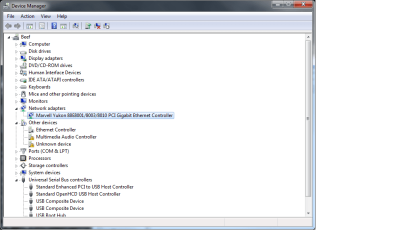
This indicates that you may not have the proper wireless nic drivers installed... can you attach a screenshot of your device manager?

Now you just posted the info above this post and I see no wireless nic listed...
 

My Computer My Computer

Computer Manufacturer/Model Number
Homebrew PC - "Alpha_Dawg"
OS
Windows 7 Ultimate 64 bit Steve Ballmer Signature Edition
CPU
Intel Core 2 Quad - Q9550 - 2.83GHz stock - OC'd to 3.6GHz
Motherboard
Gigabyte EP45-UD3P
Memory
4GB DDR2 800MHz (PC6400) OCZ Reaper
Graphics Card(s)
Nvidia GE Force 8800 GTS
Sound Card
Asus Xonar DX
Monitor(s) Displays
Samsung SyncMaster 2333HD
Screen Resolution
1920 x 1080
Hard Drives
WD Caviar Black 750GB - 7200RPM - 32MB cache
WD Caviar Green 1.5TB - 5400RPM - 64MB cache
WD Caviar Green 2.0TB - 5400RPM - 64MB cache
PSU
PC Power & Cooling Silencer 750
Case
Gigabyte 3D Aurora
Cooling
Case is Air - 5ea. 120mm fans (mix of Arctic and Xigmatec)
Keyboard
MS Natural Wireless KB
Mouse
MS Wireless Mouse
Internet Speed
50 mbps down/5 mbps up
Other Info
AVerMedia - AVerTVHD G2 Dual Tuner Card
Attached is a picture of my device manager.

The drivers should be correct, I went to the manufacturer website and downloaded the latest version for windows 7 64 bit as well as trying the one that windows automatically gave me.

I'm not trying to connect wirelessly.
 

Attachments

  • device manager.png
    device manager.png
    24.7 KB · Views: 200

My Computer My Computer

OS
Windows 7 Professional 64 bit
Motherboard
nforce 570 sli intel
Memory
4 gb
Graphics Card(s)
nvidia 8800 gt
Monitor(s) Displays
2
Attached is a picture of my device manager.

The drivers should be correct, I went to the manufacturer website and downloaded the latest version for windows 7 64 bit as well as trying the one that windows automatically gave me.

I'm not trying to connect wirelessly.

That's your issues! Notice the 3 items that are not properly identified under Other Devices? One of them is your wireless NIC...

What is the make and model # of your PC? I will try and find the drivers for you!
 

My Computer My Computer

Computer Manufacturer/Model Number
Homebrew PC - "Alpha_Dawg"
OS
Windows 7 Ultimate 64 bit Steve Ballmer Signature Edition
CPU
Intel Core 2 Quad - Q9550 - 2.83GHz stock - OC'd to 3.6GHz
Motherboard
Gigabyte EP45-UD3P
Memory
4GB DDR2 800MHz (PC6400) OCZ Reaper
Graphics Card(s)
Nvidia GE Force 8800 GTS
Sound Card
Asus Xonar DX
Monitor(s) Displays
Samsung SyncMaster 2333HD
Screen Resolution
1920 x 1080
Hard Drives
WD Caviar Black 750GB - 7200RPM - 32MB cache
WD Caviar Green 1.5TB - 5400RPM - 64MB cache
WD Caviar Green 2.0TB - 5400RPM - 64MB cache
PSU
PC Power & Cooling Silencer 750
Case
Gigabyte 3D Aurora
Cooling
Case is Air - 5ea. 120mm fans (mix of Arctic and Xigmatec)
Keyboard
MS Natural Wireless KB
Mouse
MS Wireless Mouse
Internet Speed
50 mbps down/5 mbps up
Other Info
AVerMedia - AVerTVHD G2 Dual Tuner Card
I'm not trying to connect wirelessly. I want to connect via ethernet, there is no wireless NIC on this computer. I tested the motherboard network adapter and a PCI one, both did not work.
 

My Computer My Computer

OS
Windows 7 Professional 64 bit
Motherboard
nforce 570 sli intel
Memory
4 gb
Graphics Card(s)
nvidia 8800 gt
Monitor(s) Displays
2
OK sorry, but you still have a network controller that isnt properly identified and is probably related to your issue.

Your drivers should all be here: http://www.nvidia.com/Download/index5.aspx?lang=en-us

Once all of the unidentified devices are ID'd you should be up and working!
 

My Computer My Computer

Computer Manufacturer/Model Number
Homebrew PC - "Alpha_Dawg"
OS
Windows 7 Ultimate 64 bit Steve Ballmer Signature Edition
CPU
Intel Core 2 Quad - Q9550 - 2.83GHz stock - OC'd to 3.6GHz
Motherboard
Gigabyte EP45-UD3P
Memory
4GB DDR2 800MHz (PC6400) OCZ Reaper
Graphics Card(s)
Nvidia GE Force 8800 GTS
Sound Card
Asus Xonar DX
Monitor(s) Displays
Samsung SyncMaster 2333HD
Screen Resolution
1920 x 1080
Hard Drives
WD Caviar Black 750GB - 7200RPM - 32MB cache
WD Caviar Green 1.5TB - 5400RPM - 64MB cache
WD Caviar Green 2.0TB - 5400RPM - 64MB cache
PSU
PC Power & Cooling Silencer 750
Case
Gigabyte 3D Aurora
Cooling
Case is Air - 5ea. 120mm fans (mix of Arctic and Xigmatec)
Keyboard
MS Natural Wireless KB
Mouse
MS Wireless Mouse
Internet Speed
50 mbps down/5 mbps up
Other Info
AVerMedia - AVerTVHD G2 Dual Tuner Card
Back
Top