
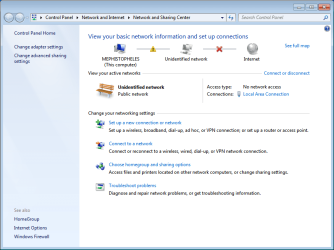
I'm using Windows 7 64 bit. My computer came out of sleep mode on friday without internet access. I immediately placed a support request with my network provider (I live at a university) but they have yet to respond. In the meantime, I'm treating the issue as though it's originating with my hardware and not theirs.
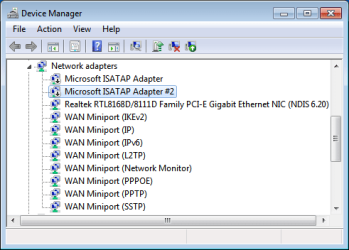
I've tried updating my network adapter driver, reinstalling the adapter, disabling services like Bonjour, restoring my system, entering safe-mode, releasing/renewing my ip, malware detection, disabling tunneling adapters, disabling IPv6. Finally, I lost my mind and tried a full reinstall of windows. The problem persists, unchanged.
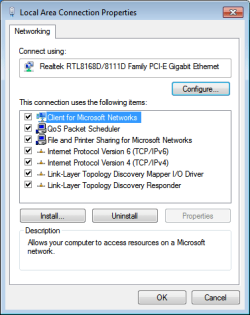
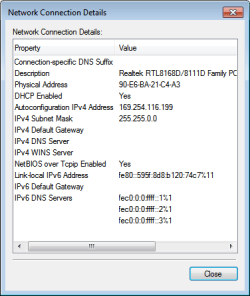
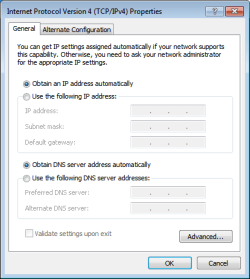
After looking at the attached information, is there anything else that you would suggest I try?
I've tried updating my network adapter driver, reinstalling the adapter, disabling services like Bonjour, restoring my system, entering safe-mode, releasing/renewing my ip, malware detection, disabling tunneling adapters, disabling IPv6. Finally, I lost my mind and tried a full reinstall of windows. The problem persists, unchanged.
After looking at the attached information, is there anything else that you would suggest I try?
PHP:
Windows IP Configuration
Host Name . . . . . . . . . . . . : Mephistopheles
Primary Dns Suffix . . . . . . . :
Node Type . . . . . . . . . . . . : Hybrid
IP Routing Enabled. . . . . . . . : No
WINS Proxy Enabled. . . . . . . . : No
Ethernet adapter Local Area Connection:
Connection-specific DNS Suffix . :
Description . . . . . . . . . . . : Realtek RTL8168D/8111D Family PCI-E Gigabit Ethernet NIC (NDIS 6.20)
Physical Address. . . . . . . . . : 90-E6-BA-21-C4-A3
DHCP Enabled. . . . . . . . . . . : Yes
Autoconfiguration Enabled . . . . : Yes
Link-local IPv6 Address . . . . . : fe80::595f:8d8:b120:74c7%11(Preferred)
Autoconfiguration IPv4 Address. . : 169.254.116.199(Preferred)
Subnet Mask . . . . . . . . . . . : 255.255.0.0
Default Gateway . . . . . . . . . :
DHCPv6 IAID . . . . . . . . . . . : 244377274
DHCPv6 Client DUID. . . . . . . . : 00-01-00-01-16-00-AD-F6-90-E6-BA-21-C4-A3
DNS Servers . . . . . . . . . . . : fec0:0:0:ffff::1%1
fec0:0:0:ffff::2%1
fec0:0:0:ffff::3%1
NetBIOS over Tcpip. . . . . . . . : Enabled
PHP:
===========================================================================
Interface List
 11...90 e6 ba 21 c4 a3 ......Realtek RTL8168D/8111D Family PCI-E Gigabit Ethernet NIC (NDIS 6.20)
  1...........................Software Loopback Interface 1
===========================================================================
IPv4 Route Table
===========================================================================
Active Routes:
Network Destination        Netmask          Gateway       Interface  Metric
        127.0.0.0        255.0.0.0         On-link         127.0.0.1    306
        127.0.0.1  255.255.255.255         On-link         127.0.0.1    306
  127.255.255.255  255.255.255.255         On-link         127.0.0.1    306
      169.254.0.0      255.255.0.0         On-link   169.254.116.199    276
  169.254.116.199  255.255.255.255         On-link   169.254.116.199    276
  169.254.255.255  255.255.255.255         On-link   169.254.116.199    276
        224.0.0.0        240.0.0.0         On-link         127.0.0.1    306
        224.0.0.0        240.0.0.0         On-link   169.254.116.199    276
  255.255.255.255  255.255.255.255         On-link         127.0.0.1    306
  255.255.255.255  255.255.255.255         On-link   169.254.116.199    276
===========================================================================
Persistent Routes:
  None
IPv6 Route Table
===========================================================================
Active Routes:
 If Metric Network Destination      Gateway
  1    306 ::1/128                  On-link
 11    276 fe80::/64                On-link
 11    276 fe80::595f:8d8:b120:74c7/128
                                    On-link
  1    306 ff00::/8                 On-link
 11    276 ff00::/8                 On-link
===========================================================================
Persistent Routes:
  None
Attachments
Last edited:
My Computer
- OS
- Windows 7 64 bit
- CPU
- Intel i5
- Motherboard
- Asus
- Memory
- 4 GB Corsair
- Graphics Card(s)
- 5870 Radeon ATI

