Unidentified Network - No Network Access

Harblkips

New member
Local time
8:40 PM
Messages
21
Location
Toronto, Ontario, Canada
For boxing day, I bought myself a new Computer case, a Cooler Master HAF 932. After setting it up and booting my computer, without any problems, my Internet would not work.

I attached the Network & Sharing Centre screen to show you what it says. I've tried many things, switching cables, direct input from modem (I use a router), and all sorts of guides that have similar problems.

If I could get any insight it would be greatly appreciated. Thanks in advance!
 

Attachments

  • Untitled.png
    Untitled.png
    3.2 KB · Views: 34

My Computer

Computer Manufacturer/Model Number
HP A6602f
OS
Windows 7 x64
CPU
AMD Phenom x3 8550
Motherboard
ECS Nettle3
Memory
4 GB Kingston PC2-6400
Graphics Card(s)
NVIDIA GeForce 9800 GTX+
PSU
Antec 550W
Case
Cooler Master haf 932
Open Command Promt (Windows Key + R, then type CMD)
Then type IPCONFIG/ALL>Enter
Then copy the info to here:)
 

My Computer

Computer Manufacturer/Model Number
Blue Shards 1.0
OS
Windows 7 Ultimate 64bit
CPU
AMD Phenom II 555 Black Edition Quad Core OC'd to 4.0GHz
Motherboard
ASUS M4A88T-M
Memory
G Skill RipJaw 1333MHz 4GB
Graphics Card(s)
ATI raideon 4250 HD/XFX ATI Radeon 1GB HD4650
Sound Card
Realteck HD Audio
Monitor(s) Displays
2x 22" Widescreen HD Monitors
Hard Drives
500GB Sata 7500RPM
80GB IDE
PSU
850W OCUK Modular
Case
Antec Dark Fleet DF-30
Cooling
Titan Fenrir Pro (CPU)
Keyboard
Logitech Wireless
Mouse
Logitech Wireless
Internet Speed
24Meg
Other Info
Getting soon-
2TB 7200RPM HDD
+8GB RAM
30GB SSD
HD6950/70
You get this type of network becos w was unable to fully id your network setup, an ipconfig might tell u what's wrong.
 

My Computer

Computer Manufacturer/Model Number
Lenovo ThinkPad T60
OS
Windows 7 Ultimate 64Bit
CPU
GenuineIntel Intel(R) Core(TM) DuoCore T2400 @ 1.83GHz
Motherboard
Intel(R) 82801G (ICH7 Family)
Memory
2.00 GB
Graphics Card(s)
Mobile Intel(R) 945 Express Chipset
Sound Card
SoundMAX Integrated Digital HD Audio
Monitor(s) Displays
ThinkPad Display
Screen Resolution
1400x1050
Hard Drives
100Gb SATA
Keyboard
Standard Keyboard
Mouse
HID-compliant Mouse
Internet Speed
Cable Broadband - 54Mbps
Other Info
Intel(R) PRO/1000 PL Network Connection
11a/b/g Wireless LAN Mini PCI Express Adapter
Windows IP Configuration

Host Name . . . . . . . . . . . . : Harblkips-PC
Primary Dns Suffix . . . . . . . :
Node Type . . . . . . . . . . . . : Hybrid
IP Routing Enabled. . . . . . . . : No
WINS Proxy Enabled. . . . . . . . : No
DNS Suffix Search List. . . . . . : phub.net.cable.rogers.com

Wireless LAN adapter Wireless Network Connection:

Connection-specific DNS Suffix . : phub.net.cable.rogers.com
Description . . . . . . . . . . . : D-Link DWA-130 Wireless N USB Adapter(rev.C)
Physical Address. . . . . . . . . : 00-22-B0-74-01-73
DHCP Enabled. . . . . . . . . . . : Yes
Autoconfiguration Enabled . . . . : Yes
Link-local IPv6 Address . . . . . : fe80::b8cf:2727:cd4a:411c%16(Preferred)
IPv4 Address. . . . . . . . . . . : 192.168.0.12(Preferred)
Subnet Mask . . . . . . . . . . . : 255.255.255.0
Lease Obtained. . . . . . . . . . : December-26-09 9:03:43 PM
Lease Expires . . . . . . . . . . : December-29-09 9:03:43 PM
Default Gateway . . . . . . . . . : 192.168.0.1
DHCP Server . . . . . . . . . . . : 192.168.0.1
DHCPv6 IAID . . . . . . . . . . . : 369107632
DHCPv6 Client DUID. . . . . . . . : 00-01-00-01-12-8D-04-6D-00-21-97-1C-18-B9

DNS Servers . . . . . . . . . . . : 192.168.0.1
NetBIOS over Tcpip. . . . . . . . : Enabled

Ethernet adapter Local Area Connection:

Connection-specific DNS Suffix . :
Description . . . . . . . . . . . : NVIDIA nForce 10/100 Mbps Ethernet
Physical Address. . . . . . . . . : 00-21-97-1C-18-B9
DHCP Enabled. . . . . . . . . . . : Yes
Autoconfiguration Enabled . . . . : Yes
Link-local IPv6 Address . . . . . : fe80::4dd1:db6a:8e88:1eb6%11(Preferred)
Autoconfiguration IPv4 Address. . : 169.254.30.182(Preferred)
Subnet Mask . . . . . . . . . . . : 255.255.0.0
Default Gateway . . . . . . . . . :
DHCPv6 IAID . . . . . . . . . . . : 234889623
DHCPv6 Client DUID. . . . . . . . : 00-01-00-01-12-8D-04-6D-00-21-97-1C-18-B9

DNS Servers . . . . . . . . . . . : fec0:0:0:ffff::1%1
fec0:0:0:ffff::2%1
fec0:0:0:ffff::3%1
NetBIOS over Tcpip. . . . . . . . : Enabled

Tunnel adapter isatap.{44BA74B4-1F49-4850-BC6B-4890DF0C1608}:

Media State . . . . . . . . . . . : Media disconnected
Connection-specific DNS Suffix . :
Description . . . . . . . . . . . : Microsoft ISATAP Adapter
Physical Address. . . . . . . . . : 00-00-00-00-00-00-00-E0
DHCP Enabled. . . . . . . . . . . : No
Autoconfiguration Enabled . . . . : Yes

Tunnel adapter Local Area Connection* 9:

Media State . . . . . . . . . . . : Media disconnected
Connection-specific DNS Suffix . :
Description . . . . . . . . . . . : Teredo Tunneling Pseudo-Interface
Physical Address. . . . . . . . . : 00-00-00-00-00-00-00-E0
DHCP Enabled. . . . . . . . . . . : No
Autoconfiguration Enabled . . . . : Yes

Tunnel adapter isatap.phub.net.cable.rogers.com:

Media State . . . . . . . . . . . : Media disconnected
Connection-specific DNS Suffix . : phub.net.cable.rogers.com
Description . . . . . . . . . . . : Microsoft ISATAP Adapter #2
Physical Address. . . . . . . . . : 00-00-00-00-00-00-00-E0
DHCP Enabled. . . . . . . . . . . : No
Autoconfiguration Enabled . . . . : Yes


Ignore the wireless part, I'm borrowing it from a friend untill mine is fixed.
 

My Computer

Computer Manufacturer/Model Number
HP A6602f
OS
Windows 7 x64
CPU
AMD Phenom x3 8550
Motherboard
ECS Nettle3
Memory
4 GB Kingston PC2-6400
Graphics Card(s)
NVIDIA GeForce 9800 GTX+
PSU
Antec 550W
Case
Cooler Master haf 932
From that it doesnt look like much wrong with your wireless connection, however I'm not a fan of a 0 in an IP address. I'm not sure if 255.255.255.0 can go with that IP. If someone else can confirm that they have similar setting than i rest my case.
 

My Computer

Computer Manufacturer/Model Number
Lenovo ThinkPad T60
OS
Windows 7 Ultimate 64Bit
CPU
GenuineIntel Intel(R) Core(TM) DuoCore T2400 @ 1.83GHz
Motherboard
Intel(R) 82801G (ICH7 Family)
Memory
2.00 GB
Graphics Card(s)
Mobile Intel(R) 945 Express Chipset
Sound Card
SoundMAX Integrated Digital HD Audio
Monitor(s) Displays
ThinkPad Display
Screen Resolution
1400x1050
Hard Drives
100Gb SATA
Keyboard
Standard Keyboard
Mouse
HID-compliant Mouse
Internet Speed
Cable Broadband - 54Mbps
Other Info
Intel(R) PRO/1000 PL Network Connection
11a/b/g Wireless LAN Mini PCI Express Adapter
Ignore the wireless part, I'm borrowing it from a friend untill mine is fixed.

Just thought I'd point this out again, I don't mean to come off as a dick. I probably will.
 

My Computer

Computer Manufacturer/Model Number
HP A6602f
OS
Windows 7 x64
CPU
AMD Phenom x3 8550
Motherboard
ECS Nettle3
Memory
4 GB Kingston PC2-6400
Graphics Card(s)
NVIDIA GeForce 9800 GTX+
PSU
Antec 550W
Case
Cooler Master haf 932
Well then your LAN connection says alot. No Degault gateway, matter of fact you don't even have tcp/ip setup for ipv4. Can i get you to disabled Ipv6.
Is your setup set to auto detect IP?
 

My Computer

Computer Manufacturer/Model Number
Lenovo ThinkPad T60
OS
Windows 7 Ultimate 64Bit
CPU
GenuineIntel Intel(R) Core(TM) DuoCore T2400 @ 1.83GHz
Motherboard
Intel(R) 82801G (ICH7 Family)
Memory
2.00 GB
Graphics Card(s)
Mobile Intel(R) 945 Express Chipset
Sound Card
SoundMAX Integrated Digital HD Audio
Monitor(s) Displays
ThinkPad Display
Screen Resolution
1400x1050
Hard Drives
100Gb SATA
Keyboard
Standard Keyboard
Mouse
HID-compliant Mouse
Internet Speed
Cable Broadband - 54Mbps
Other Info
Intel(R) PRO/1000 PL Network Connection
11a/b/g Wireless LAN Mini PCI Express Adapter
I'm pretty sure its set up to auto-connect, and to disable IPv6 I go to Local Area Connection Properties and uncheck the box, right?
 

My Computer

Computer Manufacturer/Model Number
HP A6602f
OS
Windows 7 x64
CPU
AMD Phenom x3 8550
Motherboard
ECS Nettle3
Memory
4 GB Kingston PC2-6400
Graphics Card(s)
NVIDIA GeForce 9800 GTX+
PSU
Antec 550W
Case
Cooler Master haf 932
I'm pretty sure its set up to auto-connect, and to disable IPv6 I go to Local Area Connection Properties and uncheck the box, right?
Correct.
Or go to the Change Adaptor Settings in the top right of the Network and Sharing Centre>RT Click Adaptor >properties.

Go to Control panel>Large Icon View>admin Tools (Top)> Component Services>Local Services(top right) and disable bonjour,this helped others:)
 

My Computer

Computer Manufacturer/Model Number
Blue Shards 1.0
OS
Windows 7 Ultimate 64bit
CPU
AMD Phenom II 555 Black Edition Quad Core OC'd to 4.0GHz
Motherboard
ASUS M4A88T-M
Memory
G Skill RipJaw 1333MHz 4GB
Graphics Card(s)
ATI raideon 4250 HD/XFX ATI Radeon 1GB HD4650
Sound Card
Realteck HD Audio
Monitor(s) Displays
2x 22" Widescreen HD Monitors
Hard Drives
500GB Sata 7500RPM
80GB IDE
PSU
850W OCUK Modular
Case
Antec Dark Fleet DF-30
Cooling
Titan Fenrir Pro (CPU)
Keyboard
Logitech Wireless
Mouse
Logitech Wireless
Internet Speed
24Meg
Other Info
Getting soon-
2TB 7200RPM HDD
+8GB RAM
30GB SSD
HD6950/70
I read the bonjour thing on a few threads, and I removed it all together. But still nothing. :(
 

My Computer

Computer Manufacturer/Model Number
HP A6602f
OS
Windows 7 x64
CPU
AMD Phenom x3 8550
Motherboard
ECS Nettle3
Memory
4 GB Kingston PC2-6400
Graphics Card(s)
NVIDIA GeForce 9800 GTX+
PSU
Antec 550W
Case
Cooler Master haf 932
I read the bonjour thing on a few threads, and I removed it all together. But still nothing. :(
I thought so,it really has to be hardware related considering all you done was to change the PC Case,either that or its the drivers for your Ethernet Card,i take it you tried to update these?
Uninstall via the Device manager then reinstall?
Unplug it and plug it back in manually?
 

My Computer

Computer Manufacturer/Model Number
Blue Shards 1.0
OS
Windows 7 Ultimate 64bit
CPU
AMD Phenom II 555 Black Edition Quad Core OC'd to 4.0GHz
Motherboard
ASUS M4A88T-M
Memory
G Skill RipJaw 1333MHz 4GB
Graphics Card(s)
ATI raideon 4250 HD/XFX ATI Radeon 1GB HD4650
Sound Card
Realteck HD Audio
Monitor(s) Displays
2x 22" Widescreen HD Monitors
Hard Drives
500GB Sata 7500RPM
80GB IDE
PSU
850W OCUK Modular
Case
Antec Dark Fleet DF-30
Cooling
Titan Fenrir Pro (CPU)
Keyboard
Logitech Wireless
Mouse
Logitech Wireless
Internet Speed
24Meg
Other Info
Getting soon-
2TB 7200RPM HDD
+8GB RAM
30GB SSD
HD6950/70
I'm pretty sure its set up to auto-connect, and to disable IPv6 I go to Local Area Connection Properties and uncheck the box, right?

Hmmm if you are only pretty sure, can you make sure.

Lets do it together.

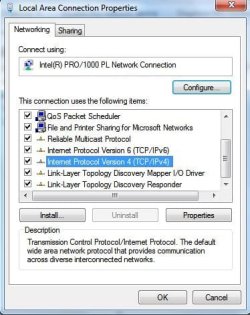
Right Click on your Local Area Connection, Properties. "TCP/IPv4" which i have highlighted here.

See first image

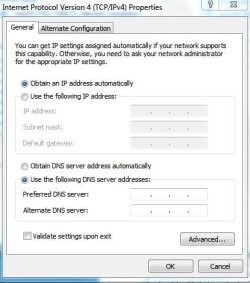
Then click the Properties icon. Is this what it look like for u?

See second image
 

Attachments

  • Noname.jpg
    Noname.jpg
    35 KB · Views: 16
  • Noname1.jpg
    Noname1.jpg
    28 KB · Views: 13

My Computer

Computer Manufacturer/Model Number
Lenovo ThinkPad T60
OS
Windows 7 Ultimate 64Bit
CPU
GenuineIntel Intel(R) Core(TM) DuoCore T2400 @ 1.83GHz
Motherboard
Intel(R) 82801G (ICH7 Family)
Memory
2.00 GB
Graphics Card(s)
Mobile Intel(R) 945 Express Chipset
Sound Card
SoundMAX Integrated Digital HD Audio
Monitor(s) Displays
ThinkPad Display
Screen Resolution
1400x1050
Hard Drives
100Gb SATA
Keyboard
Standard Keyboard
Mouse
HID-compliant Mouse
Internet Speed
Cable Broadband - 54Mbps
Other Info
Intel(R) PRO/1000 PL Network Connection
11a/b/g Wireless LAN Mini PCI Express Adapter
I tried to update the drivers, but the NVidia site was acting weird as well, I'll keep on trying. My Ethernet port is on my motherboard.

When I switched my case I switched one of the fans powered from the motherboard from a small one to a large one, would it be drawing power out and making other components (like my ethernet port) act differently? Just a thought.

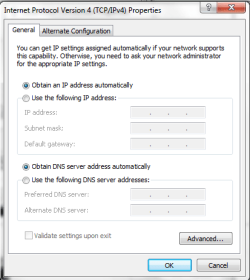
And here's my properties.
 

Attachments

  • Untitled.png
    Untitled.png
    13.5 KB · Views: 12

My Computer

Computer Manufacturer/Model Number
HP A6602f
OS
Windows 7 x64
CPU
AMD Phenom x3 8550
Motherboard
ECS Nettle3
Memory
4 GB Kingston PC2-6400
Graphics Card(s)
NVIDIA GeForce 9800 GTX+
PSU
Antec 550W
Case
Cooler Master haf 932
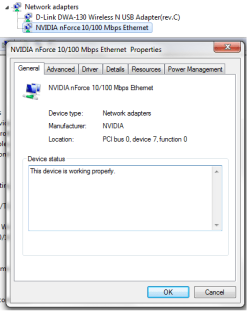
Was that tcp/ipv4 from your wireless or LAN? in your ipconfig, there is no ipv4 or the LAN. Is there any issue that you can see in your Device Manager?
 

My Computer

Computer Manufacturer/Model Number
Lenovo ThinkPad T60
OS
Windows 7 Ultimate 64Bit
CPU
GenuineIntel Intel(R) Core(TM) DuoCore T2400 @ 1.83GHz
Motherboard
Intel(R) 82801G (ICH7 Family)
Memory
2.00 GB
Graphics Card(s)
Mobile Intel(R) 945 Express Chipset
Sound Card
SoundMAX Integrated Digital HD Audio
Monitor(s) Displays
ThinkPad Display
Screen Resolution
1400x1050
Hard Drives
100Gb SATA
Keyboard
Standard Keyboard
Mouse
HID-compliant Mouse
Internet Speed
Cable Broadband - 54Mbps
Other Info
Intel(R) PRO/1000 PL Network Connection
11a/b/g Wireless LAN Mini PCI Express Adapter
That was from the LAN, and in my Device Manager, it all seems fine.
 

Attachments

  • Untitled.png
    Untitled.png
    15.1 KB · Views: 8

My Computer

Computer Manufacturer/Model Number
HP A6602f
OS
Windows 7 x64
CPU
AMD Phenom x3 8550
Motherboard
ECS Nettle3
Memory
4 GB Kingston PC2-6400
Graphics Card(s)
NVIDIA GeForce 9800 GTX+
PSU
Antec 550W
Case
Cooler Master haf 932
So you have disabled ipv6, what is should in your ipconfig now?
 

My Computer

Computer Manufacturer/Model Number
Lenovo ThinkPad T60
OS
Windows 7 Ultimate 64Bit
CPU
GenuineIntel Intel(R) Core(TM) DuoCore T2400 @ 1.83GHz
Motherboard
Intel(R) 82801G (ICH7 Family)
Memory
2.00 GB
Graphics Card(s)
Mobile Intel(R) 945 Express Chipset
Sound Card
SoundMAX Integrated Digital HD Audio
Monitor(s) Displays
ThinkPad Display
Screen Resolution
1400x1050
Hard Drives
100Gb SATA
Keyboard
Standard Keyboard
Mouse
HID-compliant Mouse
Internet Speed
Cable Broadband - 54Mbps
Other Info
Intel(R) PRO/1000 PL Network Connection
11a/b/g Wireless LAN Mini PCI Express Adapter
Windows IP Configuration

Host Name . . . . . . . . . . . . : Harblkips-PC
Primary Dns Suffix . . . . . . . :
Node Type . . . . . . . . . . . . : Hybrid
IP Routing Enabled. . . . . . . . : No
WINS Proxy Enabled. . . . . . . . : No
DNS Suffix Search List. . . . . . : phub.net.cable.rogers.com

Ethernet adapter Local Area Connection:

Connection-specific DNS Suffix . :
Description . . . . . . . . . . . : NVIDIA nForce 10/100 Mbps Ethernet
Physical Address. . . . . . . . . : 00-21-97-1C-18-B9
DHCP Enabled. . . . . . . . . . . : Yes
Autoconfiguration Enabled . . . . : Yes
Autoconfiguration IPv4 Address. . : 169.254.197.246(Preferred)
Subnet Mask . . . . . . . . . . . : 255.255.0.0
Default Gateway . . . . . . . . . :
NetBIOS over Tcpip. . . . . . . . : Enabled

Wireless LAN adapter Wireless Network Connection:

Connection-specific DNS Suffix . : phub.net.cable.rogers.com
Description . . . . . . . . . . . : D-Link DWA-130 Wireless N USB Adapter(rev
.C)
Physical Address. . . . . . . . . : 00-22-B0-74-01-73
DHCP Enabled. . . . . . . . . . . : Yes
Autoconfiguration Enabled . . . . : Yes
Link-local IPv6 Address . . . . . : fe80::b8cf:2727:cd4a:411c%12(Preferred)
IPv4 Address. . . . . . . . . . . : 192.168.0.12(Preferred)
Subnet Mask . . . . . . . . . . . : 255.255.255.0
Lease Obtained. . . . . . . . . . : December-27-09 9:36:39 PM
Lease Expires . . . . . . . . . . : December-30-09 9:36:38 PM
Default Gateway . . . . . . . . . : 192.168.0.1
DHCP Server . . . . . . . . . . . : 192.168.0.1
DHCPv6 IAID . . . . . . . . . . . : 369107632
DHCPv6 Client DUID. . . . . . . . : 00-01-00-01-12-8D-04-6D-00-21-97-1C-18-B9

DNS Servers . . . . . . . . . . . : 192.168.0.1
NetBIOS over Tcpip. . . . . . . . : Enabled

Tunnel adapter Local Area Connection* 9:

Connection-specific DNS Suffix . :
Description . . . . . . . . . . . : Teredo Tunneling Pseudo-Interface
Physical Address. . . . . . . . . : 00-00-00-00-00-00-00-E0
DHCP Enabled. . . . . . . . . . . : No
Autoconfiguration Enabled . . . . : Yes
IPv6 Address. . . . . . . . . . . : 2001:0:4137:9e50:1882:1b3a:9c05:7a02(Pref
erred)
Link-local IPv6 Address . . . . . : fe80::1882:1b3a:9c05:7a02%11(Preferred)
Default Gateway . . . . . . . . . : ::
NetBIOS over Tcpip. . . . . . . . : Disabled

Tunnel adapter isatap.{342225C1-84F4-4A2E-81CF-399F3278202C}:

Media State . . . . . . . . . . . : Media disconnected
Connection-specific DNS Suffix . :
Description . . . . . . . . . . . : Microsoft ISATAP Adapter #2
Physical Address. . . . . . . . . : 00-00-00-00-00-00-00-E0
DHCP Enabled. . . . . . . . . . . : No
Autoconfiguration Enabled . . . . : Yes

Tunnel adapter isatap.phub.net.cable.rogers.com:

Media State . . . . . . . . . . . : Media disconnected
Connection-specific DNS Suffix . : phub.net.cable.rogers.com
Description . . . . . . . . . . . : Microsoft ISATAP Adapter #3
Physical Address. . . . . . . . . : 00-00-00-00-00-00-00-E0
DHCP Enabled. . . . . . . . . . . : No
Autoconfiguration Enabled . . . . : Yes
 

My Computer

Computer Manufacturer/Model Number
HP A6602f
OS
Windows 7 x64
CPU
AMD Phenom x3 8550
Motherboard
ECS Nettle3
Memory
4 GB Kingston PC2-6400
Graphics Card(s)
NVIDIA GeForce 9800 GTX+
PSU
Antec 550W
Case
Cooler Master haf 932
From the looks of thing you might not have gotten the correct driver for your nforce LAN adapter.
Retry download the correct driver and install.

Drivers - Download NVIDIA Drivers

If issue, what error did u get?
 

My Computer

Computer Manufacturer/Model Number
Lenovo ThinkPad T60
OS
Windows 7 Ultimate 64Bit
CPU
GenuineIntel Intel(R) Core(TM) DuoCore T2400 @ 1.83GHz
Motherboard
Intel(R) 82801G (ICH7 Family)
Memory
2.00 GB
Graphics Card(s)
Mobile Intel(R) 945 Express Chipset
Sound Card
SoundMAX Integrated Digital HD Audio
Monitor(s) Displays
ThinkPad Display
Screen Resolution
1400x1050
Hard Drives
100Gb SATA
Keyboard
Standard Keyboard
Mouse
HID-compliant Mouse
Internet Speed
Cable Broadband - 54Mbps
Other Info
Intel(R) PRO/1000 PL Network Connection
11a/b/g Wireless LAN Mini PCI Express Adapter
After a gruelling search, I finally found a driver! But alas, it gave me false hope and failed me.

I tried out a Linux Live Cd (a little out dated version, but i'd imagine it would still work) and I STILL couldn't connect through LAN. So I assume this is a hardware issue, or some software paradox. I'm going to buy a Network card and see if that works. I'll let you know how it goes.

Something weird that happened as well: I couldn't connect to my OWN wireless network during this whole endeavour. It would just not accept the connection. Quite odd, thank god for my neighbours.

I would also like to thank you both for all your help, especially aem, your efforts to help this aspiring computer expert are very appreciated.
 

My Computer

Computer Manufacturer/Model Number
HP A6602f
OS
Windows 7 x64
CPU
AMD Phenom x3 8550
Motherboard
ECS Nettle3
Memory
4 GB Kingston PC2-6400
Graphics Card(s)
NVIDIA GeForce 9800 GTX+
PSU
Antec 550W
Case
Cooler Master haf 932
After a gruelling search, I finally found a driver! But alas, it gave me false hope and failed me.

I tried out a Linux Live Cd (a little out dated version, but i'd imagine it would still work) and I STILL couldn't connect through LAN. So I assume this is a hardware issue, or some software paradox. I'm going to buy a Network card and see if that works. I'll let you know how it goes.

Something weird that happened as well: I couldn't connect to my OWN wireless network during this whole endeavour. It would just not accept the connection. Quite odd, thank god for my neighbours.

I would also like to thank you both for all your help, especially aem, your efforts to help this aspiring computer expert are very appreciated.

You colud see your neighbours network but not yours?

Did you set it to private network?
 

My Computer

Computer Manufacturer/Model Number
Blue Shards 1.0
OS
Windows 7 Ultimate 64bit
CPU
AMD Phenom II 555 Black Edition Quad Core OC'd to 4.0GHz
Motherboard
ASUS M4A88T-M
Memory
G Skill RipJaw 1333MHz 4GB
Graphics Card(s)
ATI raideon 4250 HD/XFX ATI Radeon 1GB HD4650
Sound Card
Realteck HD Audio
Monitor(s) Displays
2x 22" Widescreen HD Monitors
Hard Drives
500GB Sata 7500RPM
80GB IDE
PSU
850W OCUK Modular
Case
Antec Dark Fleet DF-30
Cooling
Titan Fenrir Pro (CPU)
Keyboard
Logitech Wireless
Mouse
Logitech Wireless
Internet Speed
24Meg
Other Info
Getting soon-
2TB 7200RPM HDD
+8GB RAM
30GB SSD
HD6950/70
Back
Top