I don't know if it's needed but will post my VEW results then go flush Event Viewer.
Vino's Event Viewer v01c run on Windows 2008 in English
Report run at 25/11/2012 3:57:06 PM
Note: All dates below are in the format dd/mm/yyyy
~~~~~~~~~~~~~~~~~~~~~~~~~~~~~~~~~~
'Application' Log - Critical Type
~~~~~~~~~~~~~~~~~~~~~~~~~~~~~~~~~~
~~~~~~~~~~~~~~~~~~~~~~~~~~~~~~~~~~
'Application' Log - Error Type
~~~~~~~~~~~~~~~~~~~~~~~~~~~~~~~~~~
Log: 'Application' Date/Time: 25/11/2012 10:40:25 PM
Type: Error Category: 100
Event: 1000 Source: Application Error
Faulting application name: iexplore.exe, version: 9.0.8112.16455, time stamp: 0x507284ba Faulting module name: WOT.dll, version: 12.8.2.0, time stamp: 0x501a9905 Exception code: 0xc0000005 Fault offset: 0x000163e2 Faulting process id: 0xbd0 Faulting application start time: 0x01cdcb5dda511b70 Faulting application path: C:\Program Files (x86)\Internet Explorer\iexplore.exe Faulting module path: C:\Program Files (x86)\WOT\WOT.dll Report Id: 1a2f3808-3751-11e2-8d5d-f80f413bc60f
Log: 'Application' Date/Time: 25/11/2012 10:31:49 PM
Type: Error Category: 100
Event: 1000 Source: Application Error
Faulting application name: iexplore.exe, version: 9.0.8112.16455, time stamp: 0x507284ba Faulting module name: WOT.dll, version: 12.8.2.0, time stamp: 0x501a9905 Exception code: 0xc0000005 Fault offset: 0x000163e2 Faulting process id: 0xe14 Faulting application start time: 0x01cdcb5ca7643360 Faulting application path: C:\Program Files (x86)\Internet Explorer\iexplore.exe Faulting module path: C:\Program Files (x86)\WOT\WOT.dll Report Id: e69b36a0-374f-11e2-8d5d-f80f413bc60f
Log: 'Application' Date/Time: 25/11/2012 10:29:19 PM
Type: Error Category: 100
Event: 1000 Source: Application Error
Faulting application name: iexplore.exe, version: 9.0.8112.16455, time stamp: 0x507284ba Faulting module name: WOT.dll, version: 12.8.2.0, time stamp: 0x501a9905 Exception code: 0xc0000005 Fault offset: 0x000163e2 Faulting process id: 0xfa8 Faulting application start time: 0x01cdcb5c4dad9e10 Faulting application path: C:\Program Files (x86)\Internet Explorer\iexplore.exe Faulting module path: C:\Program Files (x86)\WOT\WOT.dll Report Id: 8d3dd928-374f-11e2-8d5d-f80f413bc60f
Log: 'Application' Date/Time: 25/11/2012 9:02:45 PM
Type: Error Category: 100
Event: 1000 Source: Application Error
Faulting application name: iexplore.exe, version: 9.0.8112.16455, time stamp: 0x507284ba Faulting module name: WOT.dll, version: 12.8.2.0, time stamp: 0x501a9905 Exception code: 0xc0000005 Fault offset: 0x000163e2 Faulting process id: 0xfc0 Faulting application start time: 0x01cdcb4ff32bf6a0 Faulting application path: C:\Program Files (x86)\Internet Explorer\iexplore.exe Faulting module path: C:\Program Files (x86)\WOT\WOT.dll Report Id: 755abe90-3743-11e2-8d5d-f80f413bc60f
Log: 'Application' Date/Time: 25/11/2012 8:57:37 PM
Type: Error Category: 100
Event: 1000 Source: Application Error
Faulting application name: iexplore.exe, version: 9.0.8112.16455, time stamp: 0x507284ba Faulting module name: WOT.dll, version: 12.8.2.0, time stamp: 0x501a9905 Exception code: 0xc0000005 Fault offset: 0x000163e2 Faulting process id: 0x504 Faulting application start time: 0x01cdcb4f7e6ba860 Faulting application path: C:\Program Files (x86)\Internet Explorer\iexplore.exe Faulting module path: C:\Program Files (x86)\WOT\WOT.dll Report Id: bdc045c0-3742-11e2-8d5d-f80f413bc60f
Log: 'Application' Date/Time: 25/11/2012 8:52:01 PM
Type: Error Category: 100
Event: 1000 Source: Application Error
Faulting application name: iexplore.exe, version: 9.0.8112.16455, time stamp: 0x507284ba Faulting module name: WOT.dll, version: 12.8.2.0, time stamp: 0x501a9905 Exception code: 0xc0000005 Fault offset: 0x000163e2 Faulting process id: 0x824 Faulting application start time: 0x01cdcb4eb69e55d0 Faulting application path: C:\Program Files (x86)\Internet Explorer\iexplore.exe Faulting module path: C:\Program Files (x86)\WOT\WOT.dll Report Id: f582b4d0-3741-11e2-8d5d-f80f413bc60f
Log: 'Application' Date/Time: 25/11/2012 8:47:31 PM
Type: Error Category: 100
Event: 1000 Source: Application Error
Faulting application name: iexplore.exe, version: 9.0.8112.16455, time stamp: 0x507284ba Faulting module name: WOT.dll, version: 12.8.2.0, time stamp: 0x501a9905 Exception code: 0xc0000005 Fault offset: 0x000163e2 Faulting process id: 0x11a0 Faulting application start time: 0x01cdcb4e149750e8 Faulting application path: C:\Program Files (x86)\Internet Explorer\iexplore.exe Faulting module path: C:\Program Files (x86)\WOT\WOT.dll Report Id: 54b50aa8-3741-11e2-8d5d-f80f413bc60f
Log: 'Application' Date/Time: 25/11/2012 4:58:56 PM
Type: Error Category: 101
Event: 1002 Source: Application Hang
The program iexplore.exe version 9.0.8112.16455 stopped interacting with Windows and was closed. To see if more information about the problem is available, check the problem history in the Action Center control panel. Process ID: 364 Start Time: 01cdcb2cf62edf98 Termination Time: 0 Application Path: C:\Program Files (x86)\Internet Explorer\iexplore.exe Report Id:
Log: 'Application' Date/Time: 19/11/2012 8:39:56 PM
Type: Error Category: 101
Event: 1002 Source: Application Hang
The program iexplore.exe version 9.0.8112.16455 stopped interacting with Windows and was closed. To see if more information about the problem is available, check the problem history in the Action Center control panel. Process ID: e40 Start Time: 01cdc691f1ce7b38 Termination Time: 5 Application Path: C:\Program Files (x86)\Internet Explorer\iexplore.exe Report Id:
Log: 'Application' Date/Time: 17/11/2012 4:25:01 PM
Type: Error Category: 1
Event: 100 Source: CVHSVC
Information only. Click-2-Run package registration failure.
Log: 'Application' Date/Time: 01/11/2012 8:56:08 PM
Type: Error Category: 1
Event: 100 Source: CVHSVC
Information only. Click-2-Run package registration failure.
Log: 'Application' Date/Time: 31/10/2012 12:55:28 PM
Type: Error Category: 1
Event: 100 Source: CVHSVC
Information only. Click-2-Run package registration failure.
Log: 'Application' Date/Time: 31/10/2012 12:31:41 PM
Type: Error Category: 1
Event: 100 Source: CVHSVC
Information only. The action cannot be completed. Try the action again. If the problem continues, contact Microsoft Product Support.
Log: 'Application' Date/Time: 26/10/2012 9:33:31 PM
Type: Error Category: 100
Event: 1000 Source: Application Error
Faulting application name: iexplore.exe, version: 9.0.8112.16450, time stamp: 0x503723f6 Faulting module name: WOT.dll, version: 12.8.2.0, time stamp: 0x501a9905 Exception code: 0xc0000005 Fault offset: 0x000163e2 Faulting process id: 0xfa8 Faulting application start time: 0x01cdb3c189f55c58 Faulting application path: C:\Program Files (x86)\Internet Explorer\iexplore.exe Faulting module path: C:\Program Files (x86)\WOT\WOT.dll Report Id: c941fad8-1fb4-11e2-8a81-f80f413bc60f
Log: 'Application' Date/Time: 25/10/2012 2:15:25 PM
Type: Error Category: 100
Event: 1000 Source: Application Error
Faulting application name: iexplore.exe, version: 9.0.8112.16450, time stamp: 0x503723f6 Faulting module name: WOT.dll, version: 12.8.2.0, time stamp: 0x501a9905 Exception code: 0xc0000005 Fault offset: 0x000163e2 Faulting process id: 0xe48 Faulting application start time: 0x01cdb2ba839e4020 Faulting application path: C:\Program Files (x86)\Internet Explorer\iexplore.exe Faulting module path: C:\Program Files (x86)\WOT\WOT.dll Report Id: 6ad8a188-1eae-11e2-8a81-f80f413bc60f
~~~~~~~~~~~~~~~~~~~~~~~~~~~~~~~~~~
'Application' Log - Warning Type
~~~~~~~~~~~~~~~~~~~~~~~~~~~~~~~~~~
Log: 'Application' Date/Time: 25/11/2012 1:47:58 PM
Type: Warning Category: 1
Event: 100 Source: CVHSVC
Information only. CurrentSoftGridPrereq: Click2Run installation (version = 14.0.4763.1000) is found on the machine; skipping installation...
Log: 'Application' Date/Time: 25/11/2012 1:47:58 PM
Type: Warning Category: 1
Event: 100 Source: CVHSVC
Information only. C:\Program Files (x86)\Common Files\Microsoft Shared\Virtualization Handler\CVHSVC.EXE is trusted.
Log: 'Application' Date/Time: 23/11/2012 1:15:59 PM
Type: Warning Category: 1
Event: 100 Source: CVHSVC
Information only. CurrentSoftGridPrereq: Click2Run installation (version = 14.0.4763.1000) is found on the machine; skipping installation...
Log: 'Application' Date/Time: 23/11/2012 1:15:59 PM
Type: Warning Category: 1
Event: 100 Source: CVHSVC
Information only. C:\Program Files (x86)\Common Files\Microsoft Shared\Virtualization Handler\CVHSVC.EXE is trusted.
Log: 'Application' Date/Time: 23/11/2012 1:05:54 PM
Type: Warning Category: 6
Event: 3057 Source: Application Virtualization Client
{tid=B44}
The Application Virtualization Client Core initialized correctly. Installed Product: Version: 4.6.0.1523 Install Path: C:\Program Files (x86)\Microsoft Application Virtualization Client Global Data Directory: C:\ProgramData\Microsoft\Application Virtualization Client\ Machine Name: SUZEQ-PC Operating System: Windows 7 64-bit Service Pack 1.0 Build 7601 OSD Command:
Log: 'Application' Date/Time: 23/11/2012 1:05:51 PM
Type: Warning Category: 3
Event: 3191 Source: Application Virtualization Client
{tid=B44}
-------------------------------------------------------- Initialized client log (C:\ProgramData\Microsoft\Application Virtualization Client\sftlog.txt)
Log: 'Application' Date/Time: 23/11/2012 12:39:37 AM
Type: Warning Category: 3
Event: 3219 Source: Application Virtualization Client
{tid=F70}
Failed unregistering callback tracking connected process termination (error: 997).
Log: 'Application' Date/Time: 22/11/2012 9:50:00 PM
Type: Warning Category: 1
Event: 100 Source: CVHSVC
Information only. CurrentSoftGridPrereq: Click2Run installation (version = 14.0.4763.1000) is found on the machine; skipping installation...
Log: 'Application' Date/Time: 22/11/2012 9:50:00 PM
Type: Warning Category: 1
Event: 100 Source: CVHSVC
Information only. C:\Program Files (x86)\Common Files\Microsoft Shared\Virtualization Handler\CVHSVC.EXE is trusted.
Log: 'Application' Date/Time: 22/11/2012 3:44:49 PM
Type: Warning Category: 0
Event: 12348 Source: VSS
Volume Shadow Copy Service warning: VSS was denied access to the root of volume
\\?\Volume{3e9c0b14-2209-11e2-82c8-f80f413bc60f}\. Denying administrators from accessing volume roots can cause many unexpected failures, and will prevent VSS from functioning properly. Check security on the volume, and try the operation again.
Operation:
Removing auto-release shadow copies
Loading provider
Context:
Execution Context: System Provider
Log: 'Application' Date/Time: 21/11/2012 1:40:13 PM
Type: Warning Category: 1
Event: 100 Source: CVHSVC
Information only. CurrentSoftGridPrereq: Click2Run installation (version = 14.0.4763.1000) is found on the machine; skipping installation...
Log: 'Application' Date/Time: 21/11/2012 1:40:13 PM
Type: Warning Category: 1
Event: 100 Source: CVHSVC
Information only. C:\Program Files (x86)\Common Files\Microsoft Shared\Virtualization Handler\CVHSVC.EXE is trusted.
Log: 'Application' Date/Time: 19/11/2012 1:25:44 AM
Type: Warning Category: 1
Event: 100 Source: CVHSVC
Information only. CurrentSoftGridPrereq: Click2Run installation (version = 14.0.4763.1000) is found on the machine; skipping installation...
Log: 'Application' Date/Time: 19/11/2012 1:25:44 AM
Type: Warning Category: 1
Event: 100 Source: CVHSVC
Information only. C:\Program Files (x86)\Common Files\Microsoft Shared\Virtualization Handler\CVHSVC.EXE is trusted.
Log: 'Application' Date/Time: 19/11/2012 1:15:40 AM
Type: Warning Category: 6
Event: 3057 Source: Application Virtualization Client
{tid=8AC}
The Application Virtualization Client Core initialized correctly. Installed Product: Version: 4.6.0.1523 Install Path: C:\Program Files (x86)\Microsoft Application Virtualization Client Global Data Directory: C:\ProgramData\Microsoft\Application Virtualization Client\ Machine Name: SUZEQ-PC Operating System: Windows 7 64-bit Service Pack 1.0 Build 7601 OSD Command:
Log: 'Application' Date/Time: 19/11/2012 1:15:32 AM
Type: Warning Category: 3
Event: 3191 Source: Application Virtualization Client
{tid=8AC}
-------------------------------------------------------- Initialized client log (C:\ProgramData\Microsoft\Application Virtualization Client\sftlog.txt)
Log: 'Application' Date/Time: 19/11/2012 1:03:26 AM
Type: Warning Category: 0
Event: 12348 Source: VSS
Volume Shadow Copy Service warning: VSS was denied access to the root of volume
\\?\Volume{3e9c0b14-2209-11e2-82c8-f80f413bc60f}\. Denying administrators from accessing volume roots can cause many unexpected failures, and will prevent VSS from functioning properly. Check security on the volume, and try the operation again.
Operation:
Removing auto-release shadow copies
Loading provider
Context:
Execution Context: System Provider
Log: 'Application' Date/Time: 19/11/2012 12:55:09 AM
Type: Warning Category: 0
Event: 12348 Source: VSS
Volume Shadow Copy Service warning: VSS was denied access to the root of volume
\\?\Volume{3e9c0b14-2209-11e2-82c8-f80f413bc60f}\. Denying administrators from accessing volume roots can cause many unexpected failures, and will prevent VSS from functioning properly. Check security on the volume, and try the operation again.
Operation:
Removing auto-release shadow copies
Loading provider
Context:
Execution Context: System Provider
Log: 'Application' Date/Time: 18/11/2012 5:33:50 PM
Type: Warning Category: 1
Event: 100 Source: CVHSVC
Information only. CurrentSoftGridPrereq: Click2Run installation (version = 14.0.4763.1000) is found on the machine; skipping installation...
Log: 'Application' Date/Time: 18/11/2012 5:33:50 PM
Type: Warning Category: 1
Event: 100 Source: CVHSVC
Information only. C:\Program Files (x86)\Common Files\Microsoft Shared\Virtualization Handler\CVHSVC.EXE is trusted.
~~~~~~~~~~~~~~~~~~~~~~~~~~~~~~~~~~
'System' Log - Critical Type
~~~~~~~~~~~~~~~~~~~~~~~~~~~~~~~~~~
~~~~~~~~~~~~~~~~~~~~~~~~~~~~~~~~~~
'System' Log - Error Type
~~~~~~~~~~~~~~~~~~~~~~~~~~~~~~~~~~
Log: 'System' Date/Time: 23/11/2012 1:05:55 PM
Type: Error Category: 0
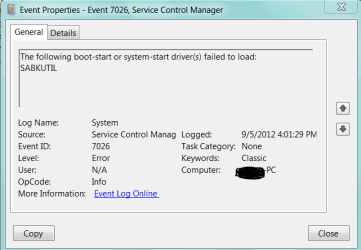
Event: 7026 Source: Service Control Manager
The following boot-start or system-start driver(s) failed to load: SABKUTIL
Log: 'System' Date/Time: 19/11/2012 1:15:40 AM
Type: Error Category: 0
Event: 7026 Source: Service Control Manager
The following boot-start or system-start driver(s) failed to load: SABKUTIL
Log: 'System' Date/Time: 18/11/2012 5:23:44 PM
Type: Error Category: 0
Event: 7026 Source: Service Control Manager
The following boot-start or system-start driver(s) failed to load: SABKUTIL
Log: 'System' Date/Time: 18/11/2012 4:55:50 PM
Type: Error Category: 0
Event: 7026 Source: Service Control Manager
The following boot-start or system-start driver(s) failed to load: SABKUTIL
Log: 'System' Date/Time: 17/11/2012 4:17:01 PM
Type: Error Category: 0
Event: 7026 Source: Service Control Manager
The following boot-start or system-start driver(s) failed to load: SABKUTIL
Log: 'System' Date/Time: 01/11/2012 8:38:54 PM
Type: Error Category: 0
Event: 7026 Source: Service Control Manager
The following boot-start or system-start driver(s) failed to load: SABKUTIL
Log: 'System' Date/Time: 31/10/2012 12:31:41 PM
Type: Error Category: 0
Event: 7026 Source: Service Control Manager
The following boot-start or system-start driver(s) failed to load: SABKUTIL
Log: 'System' Date/Time: 29/10/2012 8:43:31 PM
Type: Error Category: 0
Event: 7026 Source: Service Control Manager
The following boot-start or system-start driver(s) failed to load: SABKUTIL
Log: 'System' Date/Time: 25/10/2012 2:00:20 PM
Type: Error Category: 0
Event: 7026 Source: Service Control Manager
The following boot-start or system-start driver(s) failed to load: SABKUTIL
Log: 'System' Date/Time: 24/10/2012 12:34:30 PM
Type: Error Category: 0
Event: 7026 Source: Service Control Manager
The following boot-start or system-start driver(s) failed to load: SABKUTIL
Log: 'System' Date/Time: 23/10/2012 6:14:57 PM
Type: Error Category: 0
Event: 7026 Source: Service Control Manager
The following boot-start or system-start driver(s) failed to load: SABKUTIL
Log: 'System' Date/Time: 22/10/2012 10:29:46 PM
Type: Error Category: 0
Event: 7026 Source: Service Control Manager
The following boot-start or system-start driver(s) failed to load: SABKUTIL
Log: 'System' Date/Time: 22/10/2012 10:29:45 PM
Type: Error Category: 0
Event: 7000 Source: Service Control Manager
The SAS Core Service service failed to start due to the following error: The system cannot find the file specified.
~~~~~~~~~~~~~~~~~~~~~~~~~~~~~~~~~~
'System' Log - Warning Type
~~~~~~~~~~~~~~~~~~~~~~~~~~~~~~~~~~
Log: 'System' Date/Time: 25/11/2012 1:47:36 PM
Type: Warning Category: 0
Event: 20 Source: i8042prt
Could not set the keyboard indicator lights.
Log: 'System' Date/Time: 25/11/2012 1:47:36 PM
Type: Warning Category: 0
Event: 19 Source: i8042prt
Could not set the keyboard typematic rate and delay.
Log: 'System' Date/Time: 25/11/2012 1:47:36 PM
Type: Warning Category: 0
Event: 17 Source: i8042prt
The device sent an incorrect response(s) following a keyboard reset.
Log: 'System' Date/Time: 23/11/2012 1:38:23 PM
Type: Warning Category: 0
Event: 19 Source: i8042prt
Could not set the keyboard typematic rate and delay.
Log: 'System' Date/Time: 23/11/2012 1:38:23 PM
Type: Warning Category: 0
Event: 17 Source: i8042prt
The device sent an incorrect response(s) following a keyboard reset.
Log: 'System' Date/Time: 23/11/2012 1:05:17 PM
Type: Warning Category: 0
Event: 20 Source: i8042prt
Could not set the keyboard indicator lights.
Log: 'System' Date/Time: 23/11/2012 1:05:17 PM
Type: Warning Category: 0
Event: 19 Source: i8042prt
Could not set the keyboard typematic rate and delay.
Log: 'System' Date/Time: 21/11/2012 11:15:52 PM
Type: Warning Category: 0
Event: 1014 Source: Microsoft-Windows-DNS-Client
Name resolution for the name cdn.w55c.net timed out after none of the configured DNS servers responded.
Log: 'System' Date/Time: 20/11/2012 1:35:35 PM
Type: Warning Category: 0
Event: 20 Source: i8042prt
Could not set the keyboard indicator lights.
Log: 'System' Date/Time: 20/11/2012 1:35:35 PM
Type: Warning Category: 0
Event: 19 Source: i8042prt
Could not set the keyboard typematic rate and delay.
Log: 'System' Date/Time: 20/11/2012 1:35:35 PM
Type: Warning Category: 0
Event: 17 Source: i8042prt
The device sent an incorrect response(s) following a keyboard reset.
Log: 'System' Date/Time: 19/11/2012 10:23:31 PM
Type: Warning Category: 0
Event: 1014 Source: Microsoft-Windows-DNS-Client
Name resolution for the name
www.msftncsi.com timed out after none of the configured DNS servers responded.
Log: 'System' Date/Time: 19/11/2012 1:14:44 AM
Type: Warning Category: 0
Event: 20 Source: i8042prt
Could not set the keyboard indicator lights.
Log: 'System' Date/Time: 19/11/2012 1:14:44 AM
Type: Warning Category: 0
Event: 19 Source: i8042prt
Could not set the keyboard typematic rate and delay.
Log: 'System' Date/Time: 19/11/2012 12:34:21 AM
Type: Warning Category: 0
Event: 20 Source: i8042prt
Could not set the keyboard indicator lights.
Log: 'System' Date/Time: 19/11/2012 12:34:21 AM
Type: Warning Category: 0
Event: 19 Source: i8042prt
Could not set the keyboard typematic rate and delay.
Log: 'System' Date/Time: 19/11/2012 12:34:21 AM
Type: Warning Category: 0
Event: 17 Source: i8042prt
The device sent an incorrect response(s) following a keyboard reset.
Log: 'System' Date/Time: 18/11/2012 4:55:22 PM
Type: Warning Category: 0
Event: 19 Source: i8042prt
Could not set the keyboard typematic rate and delay.
Log: 'System' Date/Time: 02/11/2012 12:39:43 AM
Type: Warning Category: 0
Event: 1014 Source: Microsoft-Windows-DNS-Client
Name resolution for the name ping.avast.com timed out after none of the configured DNS servers responded.
Log: 'System' Date/Time: 01/11/2012 8:38:24 PM
Type: Warning Category: 0
Event: 20 Source: i8042prt
Could not set the keyboard indicator lights.



 so you'd realize what I meant?

