Solved Uninstall Old Java Version - Cannot Find

MourningStar

(_x_)
Power User
VIP
Local time
4:29 AM
Messages
1,308
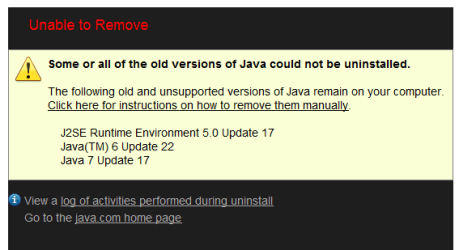
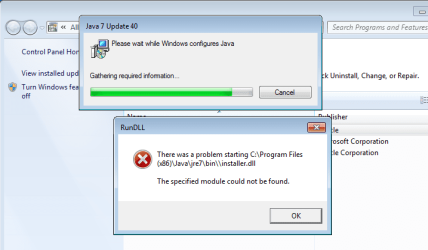
per this tutorial : http://www.sevenforums.com/tutorials/181981-secunia-online-software-inspector.html I run a check for/uninstall older Java versions. The tool listed 3 items and was unable to uninstall. The attached screen capture is result. I follow the instructions to remove manually but these 3 I cannot find in Control Panel's list. Where they be?

-thnx

p.s. fwiw, log contents :
9/26/13 6:55 PM: J2SE Runtime Environment 5.0 Update 17 wasn't uninstalled because of the following error: This action is only valid for products that are currently installed. (error code is 1605)

9/26/13 6:55 PM: Java(TM) 6 Update 22 wasn't uninstalled because of the following error: This action is only valid for products that are currently installed. (error code is 1605)

9/26/13 6:55 PM: Java 7 Update 17 wasn't uninstalled because of the following error: This action is only valid for products that are currently installed. (error code is 1605)
 

Attachments
  • JvUnIns.PNG
    JvUnIns.PNG
    6.8 KB · Views: 70

My Computer

Computer type
PC/Desktop
Computer Manufacturer/Model Number
HP (HP-P6212F)
OS
Microsoft Windows 7 Home Premium 64-bit 7601 Multiprocessor Free Service Pack 1
CPU
Pentium(R) Dual-Core CPU E5300 @ 2.60GHz
Motherboard
PEGATRON CORPORATION Benicia
Memory
6.00 GB
Graphics Card(s)
Intel(R) G33/G31 Express Chipset Family
Sound Card
Realtek High Definition Audio
Monitor(s) Displays
24'' HP WS LCD
Screen Resolution
1920 x 1080 x 32 bits (4294967296 colors) @ 60 Hz
Hard Drives
(1) ATA Hitachi HDT72106 SCSI Disk Device (2) Generic- Compact Flash USB Device (3) Generic- MS/MS-Pro USB Device (4) Generic- SD/MMC USB Device (5) Generic- SM/xD-Picture USB Device (6) Verbatim STORE N GO USB Device
Keyboard
Logitech G510s
Mouse
Logitech Trackball M570
Antivirus
Microsoft Security Essentials / Malwarebytes
Browser
IE / Firefox / Chrome
My Computer

Computer type
Laptop
Computer Manufacturer/Model Number
Employer provided Dell Latitude
OS
W7 Pro SP1 64bit
CPU
i7
Memory
8GB
Graphics Card(s)
Intel HD Graphics
Hard Drives
crappy SSD
Antivirus
Employer mandated Symantec Endpoint Protection
Browser
Pale Moon 64bit, IE11 64bit & Chrome 64bit
^
thnx - tried it, went back to java test site and re-run. No change.
 

My Computer

Computer type
PC/Desktop
Computer Manufacturer/Model Number
HP (HP-P6212F)
OS
Microsoft Windows 7 Home Premium 64-bit 7601 Multiprocessor Free Service Pack 1
CPU
Pentium(R) Dual-Core CPU E5300 @ 2.60GHz
Motherboard
PEGATRON CORPORATION Benicia
Memory
6.00 GB
Graphics Card(s)
Intel(R) G33/G31 Express Chipset Family
Sound Card
Realtek High Definition Audio
Monitor(s) Displays
24'' HP WS LCD
Screen Resolution
1920 x 1080 x 32 bits (4294967296 colors) @ 60 Hz
Hard Drives
(1) ATA Hitachi HDT72106 SCSI Disk Device (2) Generic- Compact Flash USB Device (3) Generic- MS/MS-Pro USB Device (4) Generic- SD/MMC USB Device (5) Generic- SM/xD-Picture USB Device (6) Verbatim STORE N GO USB Device
Keyboard
Logitech G510s
Mouse
Logitech Trackball M570
Antivirus
Microsoft Security Essentials / Malwarebytes
Browser
IE / Firefox / Chrome
Did the JavaRa tool find any remnants of Java?
 

My Computer

Computer type
Laptop
Computer Manufacturer/Model Number
Employer provided Dell Latitude
OS
W7 Pro SP1 64bit
CPU
i7
Memory
8GB
Graphics Card(s)
Intel HD Graphics
Hard Drives
crappy SSD
Antivirus
Employer mandated Symantec Endpoint Protection
Browser
Pale Moon 64bit, IE11 64bit & Chrome 64bit

My Computer

Computer type
PC/Desktop
Computer Manufacturer/Model Number
HP (HP-P6212F)
OS
Microsoft Windows 7 Home Premium 64-bit 7601 Multiprocessor Free Service Pack 1
CPU
Pentium(R) Dual-Core CPU E5300 @ 2.60GHz
Motherboard
PEGATRON CORPORATION Benicia
Memory
6.00 GB
Graphics Card(s)
Intel(R) G33/G31 Express Chipset Family
Sound Card
Realtek High Definition Audio
Monitor(s) Displays
24'' HP WS LCD
Screen Resolution
1920 x 1080 x 32 bits (4294967296 colors) @ 60 Hz
Hard Drives
(1) ATA Hitachi HDT72106 SCSI Disk Device (2) Generic- Compact Flash USB Device (3) Generic- MS/MS-Pro USB Device (4) Generic- SD/MMC USB Device (5) Generic- SM/xD-Picture USB Device (6) Verbatim STORE N GO USB Device
Keyboard
Logitech G510s
Mouse
Logitech Trackball M570
Antivirus
Microsoft Security Essentials / Malwarebytes
Browser
IE / Firefox / Chrome
My Computer

Computer type
Laptop
Computer Manufacturer/Model Number
HP Pavilion dv6-6c10us
OS
x64 (6.3.9600) Win8.1 Pro & soon dual boot x64 (6.1.7601) Win7_SP1 HomePrem
CPU
AMD A6-3420M APU with Radeon(tm) HD Graphics
Motherboard
Hewlett-Packard 1805
Memory
6.00 GB
Graphics Card(s)
AMD Radeon(TM) HD 6520G
Sound Card
(1) AMD High Definition Audio Device (2) IDT High Definiti
Monitor(s) Displays
HP W2072a 20" LCD (1600 x 900) @ 60 Hz
Screen Resolution
1366 x 768 x 32 bits (4294967296 colors) @ 60 Hz
Hard Drives
ST640LM0 00 HM641JI SATA Disk Device
Keyboard
Logitech k520 wireless KB
Mouse
Logitech m320 wireless mouse (bundled with KB)
Internet Speed
15/5 | 54 MB Wireless 'n'
Antivirus
Realtime: Defender or Avast | On-demand: Malwarebytes, ESET
Browser
IE 11 on Win8, IE 10 on win 7
Other Info
Media: [Gimp, Audacity, VLC] || Comm: [WEmail 2012, Skype] || Productivity: [OpenOffice,| Textpad] || Utils: [Sysinternals, cCleaner, Speccy, Defraggler]
Did the JavaRa tool find any remnants of Java?
I'm not sure if I operated it correctly. Can you provide a step-by-step or link to a guide?
I'll try - but first let me issue a warning to others finding this thread: If possible, it is best to use the normal uninstall method. Sometimes that normal method cannot be used (as in the case of MourningStar). So there are tools out there that try to clean up barfed/broken installations of Java.


The screenshots below are from a Virtual Machine running W7 pro 64bit.
Java 6 Update 3 (32bit) was installed first, followed by 6 Update 22 (32bit) and 7 Update 40 (32bit).


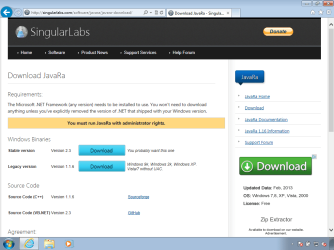
Download JavaRa 2.3
Download JavaRa - SingularLabs
javara-01.png

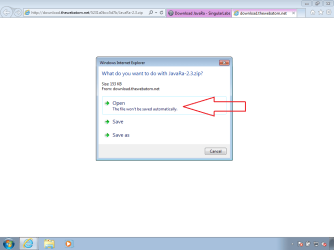
Open the ZIP file.
javara-02.png

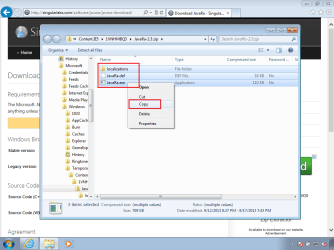
Select/copy all of the files.
javara-03.png

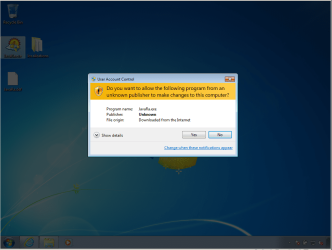
Paste them somewhere & double click on JavaRa.exe.
javara-04.png

Say yes to the UAC warning - if needed.
javara-05.png


My steps below include a few more images than this document shows.

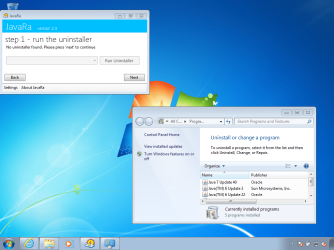
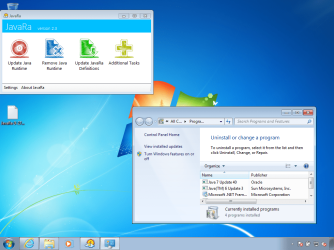
Start with "Remove Java Runtime".
(Because we are removing all versions of Java.)
javara-06.png

Again, it is best to try the normal uninstaller first. I'm not sure why JavaRa did not find any uninstallers. If they had been found, you could select the version that you want to uninstall from the drop down menu, then click on "Run Uninstaller". Then repeat this for each uninstaller that JavaRa finds.

In my case, I'll just click on Next. (I manually opened the list of installed programs. All were valid installs and I could - if possible - have removed them via that normal method.)
javara-07.png

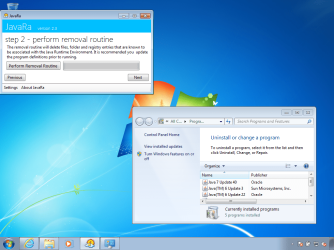
Click on Perform Removal Routine.
javara-08.png

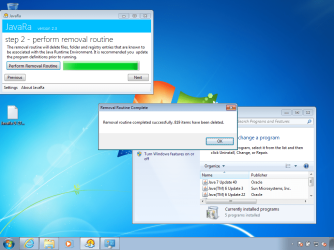
Wait for the "Complete" popup.
javara-09.png

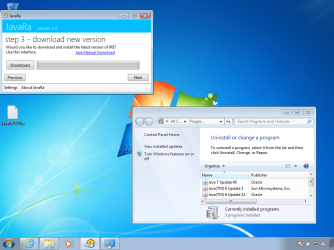
Click OK on that popup (shown above) and click Next on the JavaRa app (shown below).
javara-10.png

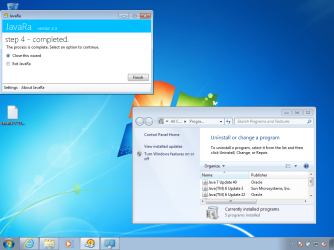
Click Finish on the JavaRa app.
javara-11.png

Refreshing the list of installed programs shows that JavaRa 2.3 only removed one out of three versions :-(
javara-12.png
Repeating the steps above claims to remove 116 more items.


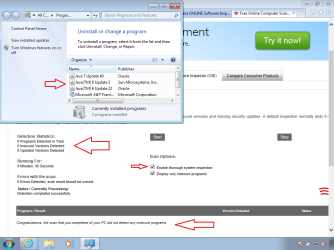
The Virtual Machine was reset and the same 3 Java installs were made. The Secunia scanner found nothing :-(
Secunia.png
 

My Computer

Computer type
Laptop
Computer Manufacturer/Model Number
Employer provided Dell Latitude
OS
W7 Pro SP1 64bit
CPU
i7
Memory
8GB
Graphics Card(s)
Intel HD Graphics
Hard Drives
crappy SSD
Antivirus
Employer mandated Symantec Endpoint Protection
Browser
Pale Moon 64bit, IE11 64bit & Chrome 64bit
Installing the same versions of Java into the same VM mentioned above gave these results for Oracle's tool:


I figured that the Oracle tool was just using the normal uninstall method - so I broke that method by manually deleting the installer. As I figured, Oracle's tool failed.


MourningStar has 3 barfed installs/remnants of Java.
These 3 do not show in the list of installed programs.
Secunia failed to remove them.
JavaRa 2.3 seems to have failed too.
My guess is that Oracle's tool will also fail.

Maybe the old version of JavaRa will work for MourningStar.

I cannot tell from the info in the original post if the 3 versions are 32bit - but they most likely are. The OP might want to re-install the old versions and then try to remove them normally:

Download Java Runtime Environment 1.7.0.17 (32-bit) - FileHippo.com

Download Java Runtime Environment 1.6.0.22 (32-bit) - FileHippo.com

I could not find Java 5 Update 17...
Java Runtime Environment 1.7.0.40 (32-bit) - History - FileHippo.com
...maybe someone else can ferret that out for MourningStar.
 

My Computer

Computer type
Laptop
Computer Manufacturer/Model Number
Employer provided Dell Latitude
OS
W7 Pro SP1 64bit
CPU
i7
Memory
8GB
Graphics Card(s)
Intel HD Graphics
Hard Drives
crappy SSD
Antivirus
Employer mandated Symantec Endpoint Protection
Browser
Pale Moon 64bit, IE11 64bit & Chrome 64bit
@UsernameIssues

I noticed you did not update java ra's definitions before starting. That should always be done first. This is most likely why it did not work as expected. I use this program fairy often and know from experience if you do not update the definitions it doesn't work.

Great tut though :)

Sometimes Microsoft's troubleshooter works for me for removing stubborn programs.

http://support.microsoft.com/mats/program_install_and_uninstall/
 

My Computer

Computer type
PC/Desktop
Computer Manufacturer/Model Number
Custom Built
OS
Windows 10 Pro
CPU
AMD Ryzen 5 2400G Processor with Radeon RX Vega 11 Graphics
Motherboard
ASRock X470 Master SLI/AC AM4 AMD Promontory X470 SATA 6Gb/s
Memory
G.SKILL Ripjaws V Series 16GB (2 x 8GB) 288-Pin DDR4 SDRAM D
Graphics Card(s)
2047MB NVIDIA GeForce GTX 1060 6GB (EVGA)
Sound Card
Motherboard Built in
Monitor(s) Displays
Acer R240HY bidx 23.8-Inch IPS HDMI DVI VGA (1920 x 1080) Wi
Screen Resolution
1920 x 1080
Hard Drives
1TB Sandisk SSD PLUS (Main drive)
500 GB Seagate 7200 RPM (Games)
500 GB Western Digital 7200 RPM (Virtual Machines)
PSU
CORSAIR TX Series TX650M 650W 80+ Gold Modular Power Supply
Case
CORSAIR CARBIDE SPEC-02 Mid-Tower Gaming Case, Red LED Fan
Cooling
220mm, two 120mm, and four 60mm fans
Keyboard
Wired Dell keyboard
Mouse
Wireless Logitech mouse
Internet Speed
250mb down, 30mb up
Antivirus
Panda Cloud Antivirus
Browser
Chrome-ish x64
Other Info
Your awesome for reading this.
@Usernameissues

Very thorough expalantion

I wonder.... would disabling the old Java be sufficient

How do I disable Java in my web browser?

If Morningstar simply wants to clean out the old java, then brute force is a last option. I'll wait to see if the OP wants a step by step involving folder rename & CCleaner.

@ andrew129260,

good advice & Nice tool re: MSfixit
 

My Computer

Computer type
Laptop
Computer Manufacturer/Model Number
HP Pavilion dv6-6c10us
OS
x64 (6.3.9600) Win8.1 Pro & soon dual boot x64 (6.1.7601) Win7_SP1 HomePrem
CPU
AMD A6-3420M APU with Radeon(tm) HD Graphics
Motherboard
Hewlett-Packard 1805
Memory
6.00 GB
Graphics Card(s)
AMD Radeon(TM) HD 6520G
Sound Card
(1) AMD High Definition Audio Device (2) IDT High Definiti
Monitor(s) Displays
HP W2072a 20" LCD (1600 x 900) @ 60 Hz
Screen Resolution
1366 x 768 x 32 bits (4294967296 colors) @ 60 Hz
Hard Drives
ST640LM0 00 HM641JI SATA Disk Device
Keyboard
Logitech k520 wireless KB
Mouse
Logitech m320 wireless mouse (bundled with KB)
Internet Speed
15/5 | 54 MB Wireless 'n'
Antivirus
Realtime: Defender or Avast | On-demand: Malwarebytes, ESET
Browser
IE 11 on Win8, IE 10 on win 7
Other Info
Media: [Gimp, Audacity, VLC] || Comm: [WEmail 2012, Skype] || Productivity: [OpenOffice,| Textpad] || Utils: [Sysinternals, cCleaner, Speccy, Defraggler]
... Secunia failed to remove them.
...
Actually, when the Java site's uninstaller failed to remove those 3, I went ahead and ran Secunia 'anyway' (before the tutorial post). FWIW, a screen of the results is attached (no 3 java issues listed). I will re-visit this post later today. thank you all.
 

Attachments

  • SecuniaCapture.PNG
    SecuniaCapture.PNG
    50 KB · Views: 3

My Computer

Computer type
PC/Desktop
Computer Manufacturer/Model Number
HP (HP-P6212F)
OS
Microsoft Windows 7 Home Premium 64-bit 7601 Multiprocessor Free Service Pack 1
CPU
Pentium(R) Dual-Core CPU E5300 @ 2.60GHz
Motherboard
PEGATRON CORPORATION Benicia
Memory
6.00 GB
Graphics Card(s)
Intel(R) G33/G31 Express Chipset Family
Sound Card
Realtek High Definition Audio
Monitor(s) Displays
24'' HP WS LCD
Screen Resolution
1920 x 1080 x 32 bits (4294967296 colors) @ 60 Hz
Hard Drives
(1) ATA Hitachi HDT72106 SCSI Disk Device (2) Generic- Compact Flash USB Device (3) Generic- MS/MS-Pro USB Device (4) Generic- SD/MMC USB Device (5) Generic- SM/xD-Picture USB Device (6) Verbatim STORE N GO USB Device
Keyboard
Logitech G510s
Mouse
Logitech Trackball M570
Antivirus
Microsoft Security Essentials / Malwarebytes
Browser
IE / Firefox / Chrome
I'm a bit confused. As I understand the issue
1) Secunia identified 3 old java versions but failed to remove them (post #1)
2) OP could not use CP->Features to manually remove becuase they didn't appear in the list
3) Usernameissues suggested JavaRa tool, but that didn't resolve the issue
4) I suggested the Java removal tool from java.com
5) Usernameissue wrote a "tutorial" for JavaRa and also tested the java removal tool - great dedication!
+rep for you!
6) andrew129260 sugessted updating JavaRa before runing.
7) OP states that the java removal tool failed, but the probelem is gone

This is where I'm confused. Something resolved the issue or I misunderstand and the issue still exists. (Secunia can't remove older java installations). Something did!

What makes you say that the "Java site's uninstaller failed to remove those 3"? Perhaps the java removal tool fixed registry settings, even if it didn't report finding or removing older versions.

edit: please also clear this up for me: which java site uninstaller? JavaRA-SingularLabs or java.com
Thanks

Actually, when the Java site's uninstaller failed to remove those 3, I went ahead and ran Secunia 'anyway' (before the tutorial post). FWIW, a screen of the results is attached (no 3 java issues listed). I will re-visit this post later today. thank you all.
 
Last edited:

My Computer

Computer type
Laptop
Computer Manufacturer/Model Number
HP Pavilion dv6-6c10us
OS
x64 (6.3.9600) Win8.1 Pro & soon dual boot x64 (6.1.7601) Win7_SP1 HomePrem
CPU
AMD A6-3420M APU with Radeon(tm) HD Graphics
Motherboard
Hewlett-Packard 1805
Memory
6.00 GB
Graphics Card(s)
AMD Radeon(TM) HD 6520G
Sound Card
(1) AMD High Definition Audio Device (2) IDT High Definiti
Monitor(s) Displays
HP W2072a 20" LCD (1600 x 900) @ 60 Hz
Screen Resolution
1366 x 768 x 32 bits (4294967296 colors) @ 60 Hz
Hard Drives
ST640LM0 00 HM641JI SATA Disk Device
Keyboard
Logitech k520 wireless KB
Mouse
Logitech m320 wireless mouse (bundled with KB)
Internet Speed
15/5 | 54 MB Wireless 'n'
Antivirus
Realtime: Defender or Avast | On-demand: Malwarebytes, ESET
Browser
IE 11 on Win8, IE 10 on win 7
Other Info
Media: [Gimp, Audacity, VLC] || Comm: [WEmail 2012, Skype] || Productivity: [OpenOffice,| Textpad] || Utils: [Sysinternals, cCleaner, Speccy, Defraggler]
In post #1 is a screen capture of the 3 items reported by java as unable to uninstall. These 3 are not in the CP list for manual uninstall as instructed by the java site.
 

My Computer

Computer type
PC/Desktop
Computer Manufacturer/Model Number
HP (HP-P6212F)
OS
Microsoft Windows 7 Home Premium 64-bit 7601 Multiprocessor Free Service Pack 1
CPU
Pentium(R) Dual-Core CPU E5300 @ 2.60GHz
Motherboard
PEGATRON CORPORATION Benicia
Memory
6.00 GB
Graphics Card(s)
Intel(R) G33/G31 Express Chipset Family
Sound Card
Realtek High Definition Audio
Monitor(s) Displays
24'' HP WS LCD
Screen Resolution
1920 x 1080 x 32 bits (4294967296 colors) @ 60 Hz
Hard Drives
(1) ATA Hitachi HDT72106 SCSI Disk Device (2) Generic- Compact Flash USB Device (3) Generic- MS/MS-Pro USB Device (4) Generic- SD/MMC USB Device (5) Generic- SM/xD-Picture USB Device (6) Verbatim STORE N GO USB Device
Keyboard
Logitech G510s
Mouse
Logitech Trackball M570
Antivirus
Microsoft Security Essentials / Malwarebytes
Browser
IE / Firefox / Chrome
@UsernameIssues

I noticed you did not update java ra's definitions before starting. That should always be done first. This is most likely why it did not work as expected. I use this program fairy often and know from experience if you do not update the definitions it doesn't work.

Great tut though :)

Sometimes Microsoft's troubleshooter works for me for removing stubborn programs.

Fix problems with programs that can't be installed or uninstalled
I did not update JavaRa's definitions because these instructions "Completely Remove Java Using SingularLabs’ JavaRa" do not mention that step. I tested updating the definitions first, the results were exactly the same: 819 items were deleted and two versions are still listed as being installed. The JavaRa app did not locate/use the normal uninstallers that were present for each version even after updating JavaRa's definitions. However, using the JavaRa app (with or without updated definitions) did break the normal uninstall process for Java 7 Update 40.

javara-13.png


I find the user interface for JavaRa to be confusing and inconsistent. This is why I spent 3 or 4 hours with it attempting to understand/document stuff for the OP. For instance, when you update the definitions, you see a green progress bar. This bar seems to go to 100% and the bar's animation stops. Once I worked my way to the button named Perform Removal Routine, I saw a green progress bar (and animation) that never reaches the end. A popup says it has completed, but the green bar in the background window has not reached 100% and the animation continues. I closed the "completed popup" and left JavaRa like this for a while in case there were more actions it was taking. Checking Task Manager showed no IO traffic for the JavaRa app - so I guess it was done.

Then - out of curiosity - while the progress bar was still not at 100% and it was still animated, I clicked on the Perform Removal Routine button again. The green progress bar started over. It never reached 100%. The animation continued. A popup said it was complete- but that it had now deleted 935 items. Hmmm, is that 935 more items? Should I just keep clicking on the button named Perform Removal Routine until all versions of Java are gone? The answer is no. Repeatedly clicking the Perform Removal Routine button will repeatedly give me a progress bar that never stops and a "completed popup"informing me of 935 items having been deleted. No more versions of Java were removed by repeating this.

What I did not do - was use Process Monitor to see what additional items were removed by pressing the Perform Removal Routine button a second time. I had already spent enough time on an app that did not work for me.

JavaRa is designed to cleanup little things AFTER the normal uninstall process completes. I'm not sure how well it works on installations that have not been uninstalled normally. I see it as a cleanup tool, not a removal tool. Well, it does have an interface to the normal uninstall process; so in that sense, it is a removal tool. But JavaRa does not do that part of the removal. It just starts the normal Windows process for uninstalling an app.
 

My Computer

Computer type
Laptop
Computer Manufacturer/Model Number
Employer provided Dell Latitude
OS
W7 Pro SP1 64bit
CPU
i7
Memory
8GB
Graphics Card(s)
Intel HD Graphics
Hard Drives
crappy SSD
Antivirus
Employer mandated Symantec Endpoint Protection
Browser
Pale Moon 64bit, IE11 64bit & Chrome 64bit
~~~
Sometimes Microsoft's troubleshooter works for me for removing stubborn programs.

Fix problems with programs that can't be installed or uninstalled
I "damaged" the installation by deleting the files needed for the normal uninstall process. Then I ran this tool. It seems to search the registry to remove references to the offending application. It does not remove the files:

MS-FIXIT.png

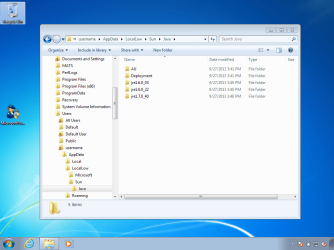
The MS FIXIT tool might indeed be the best tool for the OP to try. Those who obsess about the remaining files, will want to remove the files in the applicable Program Files folder(s) and this one:

MS-FIXIT2.png

Edit: there might be other files left in other places too. Re-installing and then uninstalling the same version might also work - if you can find the old version.
 
Last edited:

My Computer

Computer type
Laptop
Computer Manufacturer/Model Number
Employer provided Dell Latitude
OS
W7 Pro SP1 64bit
CPU
i7
Memory
8GB
Graphics Card(s)
Intel HD Graphics
Hard Drives
crappy SSD
Antivirus
Employer mandated Symantec Endpoint Protection
Browser
Pale Moon 64bit, IE11 64bit & Chrome 64bit

My Computer

Computer type
PC/Desktop
Computer Manufacturer/Model Number
HP (HP-P6212F)
OS
Microsoft Windows 7 Home Premium 64-bit 7601 Multiprocessor Free Service Pack 1
CPU
Pentium(R) Dual-Core CPU E5300 @ 2.60GHz
Motherboard
PEGATRON CORPORATION Benicia
Memory
6.00 GB
Graphics Card(s)
Intel(R) G33/G31 Express Chipset Family
Sound Card
Realtek High Definition Audio
Monitor(s) Displays
24'' HP WS LCD
Screen Resolution
1920 x 1080 x 32 bits (4294967296 colors) @ 60 Hz
Hard Drives
(1) ATA Hitachi HDT72106 SCSI Disk Device (2) Generic- Compact Flash USB Device (3) Generic- MS/MS-Pro USB Device (4) Generic- SD/MMC USB Device (5) Generic- SM/xD-Picture USB Device (6) Verbatim STORE N GO USB Device
Keyboard
Logitech G510s
Mouse
Logitech Trackball M570
Antivirus
Microsoft Security Essentials / Malwarebytes
Browser
IE / Firefox / Chrome
@Morningstar: thanks for the clarification (I was fairly certain that's what you menat, but best to be absolutely certain ;)

I still a bit confused.... is there still an issue or has this moved to the curious? Either way, Usernameissues presented a brute force method to remove the files. I would suggest a search of your comouter and rename of anything java or jre, but......

after renaming, run CCleaner registry -> and only fix java, jre references,backing up the entries offered BEFORE changing)

I guess I'm not much help here, so I'll back out.

Good luck, you have some excellent help.

Bill
 

My Computer

Computer type
Laptop
Computer Manufacturer/Model Number
HP Pavilion dv6-6c10us
OS
x64 (6.3.9600) Win8.1 Pro & soon dual boot x64 (6.1.7601) Win7_SP1 HomePrem
CPU
AMD A6-3420M APU with Radeon(tm) HD Graphics
Motherboard
Hewlett-Packard 1805
Memory
6.00 GB
Graphics Card(s)
AMD Radeon(TM) HD 6520G
Sound Card
(1) AMD High Definition Audio Device (2) IDT High Definiti
Monitor(s) Displays
HP W2072a 20" LCD (1600 x 900) @ 60 Hz
Screen Resolution
1366 x 768 x 32 bits (4294967296 colors) @ 60 Hz
Hard Drives
ST640LM0 00 HM641JI SATA Disk Device
Keyboard
Logitech k520 wireless KB
Mouse
Logitech m320 wireless mouse (bundled with KB)
Internet Speed
15/5 | 54 MB Wireless 'n'
Antivirus
Realtime: Defender or Avast | On-demand: Malwarebytes, ESET
Browser
IE 11 on Win8, IE 10 on win 7
Other Info
Media: [Gimp, Audacity, VLC] || Comm: [WEmail 2012, Skype] || Productivity: [OpenOffice,| Textpad] || Utils: [Sysinternals, cCleaner, Speccy, Defraggler]
Post #11 does seem to indicate that the problem is gone - but I would not trust the online scan from Secunia, hence my continued ramblings on the issue :-)
 

My Computer

Computer type
Laptop
Computer Manufacturer/Model Number
Employer provided Dell Latitude
OS
W7 Pro SP1 64bit
CPU
i7
Memory
8GB
Graphics Card(s)
Intel HD Graphics
Hard Drives
crappy SSD
Antivirus
Employer mandated Symantec Endpoint Protection
Browser
Pale Moon 64bit, IE11 64bit & Chrome 64bit
This topic is borne from a topic in windows update forum : http://www.sevenforums.com/windows-...i-really-need-all-these-updates-so-often.html - specifically, the last paragraph in post #2. I have had this machine for quite sometime and that thread's 'house-cleaning' message seemed reasonable to me. I do still consider myself a novice when it comes to 'the mechanics' of computer functions. My normal occupation is operating CAD/CAE s/w, i.e. I can pilot/drive this stuff way more competently than fix/program/maintain it. Which is why forums like these are so much appreciated and needed by me.

I appreciate all the assistance so far. However, upon surfing thru a few other topics on this site I seem to have run across a general 'attitude' that the 'need' for java is in question (e.g. http://www.sevenforums.com/software/110765-why-do-i-need-java.html). I have learned that if it is needed the machine will let me know. Therefore, I have decided to completely remove it from my machine. And when/if a message appears that I need it, to download it then. Since I have no idea when it is 'needed' it will be interesting to learn what operation I am performing when the 'need' for it arises.

So, I suppose I will now need help in what was earlier referenced as a brute-force removal (I did try the MS fixit tool, but the afore mentioned versions of java were not to be found in the list). I hope I will not go thru all this again when it comes time to tackle the 'update adobe flash' messages that seem to become more frequent as of late. Perhaps this too may be sent to oblivion along with java.
 

My Computer

Computer type
PC/Desktop
Computer Manufacturer/Model Number
HP (HP-P6212F)
OS
Microsoft Windows 7 Home Premium 64-bit 7601 Multiprocessor Free Service Pack 1
CPU
Pentium(R) Dual-Core CPU E5300 @ 2.60GHz
Motherboard
PEGATRON CORPORATION Benicia
Memory
6.00 GB
Graphics Card(s)
Intel(R) G33/G31 Express Chipset Family
Sound Card
Realtek High Definition Audio
Monitor(s) Displays
24'' HP WS LCD
Screen Resolution
1920 x 1080 x 32 bits (4294967296 colors) @ 60 Hz
Hard Drives
(1) ATA Hitachi HDT72106 SCSI Disk Device (2) Generic- Compact Flash USB Device (3) Generic- MS/MS-Pro USB Device (4) Generic- SD/MMC USB Device (5) Generic- SM/xD-Picture USB Device (6) Verbatim STORE N GO USB Device
Keyboard
Logitech G510s
Mouse
Logitech Trackball M570
Antivirus
Microsoft Security Essentials / Malwarebytes
Browser
IE / Firefox / Chrome
If the MS FIXIT tool did not find them, then one of the other tools removed them from the list of installed stuff. You probably don't have to do any more steps... but you can check each browser to see if some part of Java is still around. You can do that by visiting this link: How do I test whether Java is working on my computer?

I do suggest that people remove all versions of Java, but I worry that they will stumble across a website that is offering to install something other than Java.

You can rename or delete the folders that I mentioned above - or just leave them.
 

My Computer

Computer type
Laptop
Computer Manufacturer/Model Number
Employer provided Dell Latitude
OS
W7 Pro SP1 64bit
CPU
i7
Memory
8GB
Graphics Card(s)
Intel HD Graphics
Hard Drives
crappy SSD
Antivirus
Employer mandated Symantec Endpoint Protection
Browser
Pale Moon 64bit, IE11 64bit & Chrome 64bit
Back
Top