
Uninstalling Paid Software with Key Code

RealGem

New member
Member
VIP
Local time
10:46 AM
Messages
269
Location
UK
Hi,

I have never uninstalled paid software (that uses a long Activation code) before in order to use it on another computer, but that's what I want to do now.

I need to do it with Photoshop (from my old PC to my new one) and with MS Office (from my old laptop to my new one).

But what I don't understand is: How do these companies know that I have uninstalled it from the first computer?

Could they not just think I'm trying to have the software on several PCs?

(I know you're allowed MS Office on up to 3 devices, but it will be 3 in total when sorted).

I just want to uninstall everything properly, so I don't get in trouble or have any hassle.

Is the process straightforward?

thanks
 

My Computer

Computer type
PC/Desktop
Computer Manufacturer/Model Number
iBuild™ custom PC
OS
Windows 7 Home Premium 64 bit
CPU
Intel® Core™ i5 650 Dual Core 2x 3.2Ghz 4MB Cache
Motherboard
ASUS P7H55-M 6x Rear USB 2.0 2x Front
Memory
Samsung 4GB (2x2GB) DDR3 1333MHz
Graphics Card(s)
nvidia GT430 1GB Graphics Card
Sound Card
Built-in audio
Monitor(s) Displays
Videoseven CMC 17" AD
Screen Resolution
1280 x 1024
Hard Drives
250GB 7200RPM SATA II
Hitachi 1TB Serial ATA II 32MB cache
PSU
Corsair 500Watt PSU
Case
Gigabyte GZ-X2 Black ATX MIDI Tower Case
Cooling
Standard CPU Cooling Fan
Keyboard
Packard Bell 9205
Mouse
Microsoft IntelliMouse Optical
Internet Speed
Supposed to be 100mbps (Average: 54mbps!)
Other Info
Also Windows 7 64 Bit on my Acer i3 Laptop
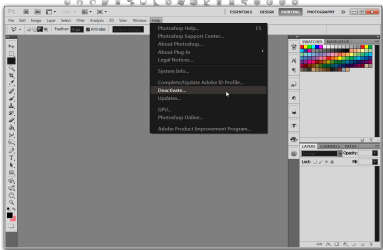
With Photoshop go to Help> Deactivate then uninstall
Not sure about MS Office.
Adobe Photoshop CS5.1 Extended.png

Some software calls home to check Activations
Jerry
 

My Computer

Computer type
Laptop
Computer Manufacturer/Model Number
Sager NP9170
OS
Win 7 Pro x64 / Win 10 Pro
CPU
Intel(R) Core(TM) i7-3630QM CPU @ 2.40GHz
Motherboard
CLEVO P170EM
Memory
12 GB
Graphics Card(s)
(1) Intel(R) HD Graphics 4000 (2) NVIDIA GeForce GTX 675M
Sound Card
(1) Realtek High Definition Audio (2) Intel(R) Display Aud
Monitor(s) Displays
17.3
Screen Resolution
1920x1080
Hard Drives
(1) Samsung 860 EVO 500GB(OS) (1) Samsung 860 EVO 500GB(Data)
Keyboard
Backlite
Antivirus
MSE, Malwarebytes Pro
Browser
Firefox
Other Info
DESKTOP: Custom-built.
OS: Win 10 Pro x64.
CASE: Rosewill R5.
CPU: Intel I5 4670K CPU @ 3.40GHz.
CPU COOLER: Cool Master Hyper 212 EVO.
MOTHERBOARD: Asus Z87-A.
MEMORY: Kingston HyperX 2x4 GB.
GPU: Nvidia Geforce 650 TI.
PSU: Corsair TX750.
DRIVES: (1) Samsung 840 120 GB SSD (2) Western Digital blue 500 GB 7200 RPM.
Thanks Bongo,

Sorry I already know how to uninstall the programs, I just want to know if the companies will definitely know I've uninstalled them, and not give me any hassle when I try to install the same Activation codes on my new PCs.

I had hours of trouble with Microsoft a few years ago when I needed a new motherboard and they thought I had a new computer. But in that case, I had not been able to uninstall the software first, so it wasn't exactly the same situation.

thanks
 

My Computer

Computer type
PC/Desktop
Computer Manufacturer/Model Number
iBuild™ custom PC
OS
Windows 7 Home Premium 64 bit
CPU
Intel® Core™ i5 650 Dual Core 2x 3.2Ghz 4MB Cache
Motherboard
ASUS P7H55-M 6x Rear USB 2.0 2x Front
Memory
Samsung 4GB (2x2GB) DDR3 1333MHz
Graphics Card(s)
nvidia GT430 1GB Graphics Card
Sound Card
Built-in audio
Monitor(s) Displays
Videoseven CMC 17" AD
Screen Resolution
1280 x 1024
Hard Drives
250GB 7200RPM SATA II
Hitachi 1TB Serial ATA II 32MB cache
PSU
Corsair 500Watt PSU
Case
Gigabyte GZ-X2 Black ATX MIDI Tower Case
Cooling
Standard CPU Cooling Fan
Keyboard
Packard Bell 9205
Mouse
Microsoft IntelliMouse Optical
Internet Speed
Supposed to be 100mbps (Average: 54mbps!)
Other Info
Also Windows 7 64 Bit on my Acer i3 Laptop
As I know, they dont care if you uninstalled or not. They will just check for teh license code when you are online. if they found two different machines running with the same code, the code will be blocked. Same for Office and Photoshop. But my knowledge might be incomplete.

None of those licenses are OEM, so you can use those on any computer, but not more than one at a time. And, I also guess that MS Office cannot be installed in three different machines with the same code, as same as you cannot unlock three cars with the same key.
 

My Computer

Computer type
PC/Desktop
Computer Manufacturer/Model Number
Self Assembled
OS
Microsoft Windows 10 Pro Insider Preview 64-bit
CPU
Intel(R) Core(TM) i3-4130 CPU @ 3.40GHz
Motherboard
Gigabyte Technology Co., Ltd. B85M-D3H
Memory
Corsair Vengence 4GB x2 (8.00GB Dual-Channel DDR3 @ 798MHz)
Graphics Card(s)
2047MB GeForce GTS 450 (ZOTAC International)
Sound Card
Onboard (Realtek High Definition Audio)
Monitor(s) Displays
LG Flatron E2040T
Screen Resolution
1600x900
Hard Drives
Western Digital 1 TB
Seagate 500 GB
PSU
Corsair VS550
Case
Cooler Master K380
Cooling
Cooler Master Seidon 120V Plus
Keyboard
Logitech MK260r
Mouse
Logitech MK260r
Internet Speed
PMPL Broadband
Antivirus
Windows Defender + MBAM
Browser
Firefox
Other Info
Dell Studio 15" Laptop
As I know, they dont care if you uninstalled or not. They will just check for teh license code when you are online. if they found two different machines running with the same code, the code will be blocked. Same for Office and Photoshop. But my knowledge might be incomplete.

None of those licenses are OEM, so you can use those on any computer, but not more than one at a time. And, I also guess that MS Office cannot be installed in three different machines with the same code, as same as you cannot unlock three cars with the same key.

Thanks, but I have MS Office on two devices now with the same code, and it says on the packaging it can be on 3 devices owned by the same person. So I'm certainly hoping that's the case.

The reason I made this thread is because I read about some different software that you have to uninstall it from one PC before installing it on another, to ensure licence codes are not abused.

So I thought it would be the same for these two programs.

The thing is, I just don't want the hassle I've had before. And in the case of Photoshop it'd actually be easier to just keep it on my old machine if I thought I could not use it on my new machine.
 

My Computer

Computer type
PC/Desktop
Computer Manufacturer/Model Number
iBuild™ custom PC
OS
Windows 7 Home Premium 64 bit
CPU
Intel® Core™ i5 650 Dual Core 2x 3.2Ghz 4MB Cache
Motherboard
ASUS P7H55-M 6x Rear USB 2.0 2x Front
Memory
Samsung 4GB (2x2GB) DDR3 1333MHz
Graphics Card(s)
nvidia GT430 1GB Graphics Card
Sound Card
Built-in audio
Monitor(s) Displays
Videoseven CMC 17" AD
Screen Resolution
1280 x 1024
Hard Drives
250GB 7200RPM SATA II
Hitachi 1TB Serial ATA II 32MB cache
PSU
Corsair 500Watt PSU
Case
Gigabyte GZ-X2 Black ATX MIDI Tower Case
Cooling
Standard CPU Cooling Fan
Keyboard
Packard Bell 9205
Mouse
Microsoft IntelliMouse Optical
Internet Speed
Supposed to be 100mbps (Average: 54mbps!)
Other Info
Also Windows 7 64 Bit on my Acer i3 Laptop
As I know, they dont care if you uninstalled or not. They will just check for teh license code when you are online. if they found two different machines running with the same code, the code will be blocked. Same for Office and Photoshop. But my knowledge might be incomplete.

None of those licenses are OEM, so you can use those on any computer, but not more than one at a time. And, I also guess that MS Office cannot be installed in three different machines with the same code, as same as you cannot unlock three cars with the same key.

Thanks, but I have MS Office on two devices now with the same code, and it says on the packaging it can be on 3 devices owned by the same person. So I'm certainly hoping that's the case.

The reason I made this thread is because I read about some different software that you have to uninstall it from one PC before installing it on another, to ensure licence codes are not abused.

So I thought it would be the same for these two programs.

The thing is, I just don't want the hassle I've had before. And in the case of Photoshop it'd actually be easier to just keep it on my old machine if I thought I could not use it on my new machine.

As others have remarked, Photoshop has an explicit deactivation. If you use that, the old copy won't run anymore, and you can activate Photoshop on a new machine automatically. It's very easy.

Microsoft products don't do that. I have Office 2010 Home & Student: it may be activated on as many as 3 machines at a time. If you've already used all 3 activations, you may have to activate a new installation by phone.
 

My Computer

Computer Manufacturer/Model Number
homegrown
OS
Windows 7 Pro X64 SP1
CPU
Intel Core I7-3930k
Motherboard
Asus P9X79 Pro
Memory
16 GB Gskill DDR3-2133
Graphics Card(s)
eVGA GTX680
Sound Card
Creative X-Fi Titanium
Monitor(s) Displays
As PA246Q
Screen Resolution
1920 X 1200
Hard Drives
Corsair Force GT, 120 GB
WDC 1.5TB Caviar Black
PSU
PCP&C Silencer 750 Crossfire
Case
Silverstone FT02
Cooling
Noctua NH-D14
Keyboard
cheap Logitech USB
Mouse
Microsoft Intellimouse Explorer (old optical) USB
Internet Speed
6Mb cable
Other Info
Pioneer BDR-205
Samsung SH-203B
Monsoon 5.1 speakers
As others have remarked, Photoshop has an explicit deactivation. If you use that, the old copy won't run anymore, and you can activate Photoshop on a new machine automatically. It's very easy.

Microsoft products don't do that. I have Office 2010 Home & Student: it may be activated on as many as 3 machines at a time. If you've already used all 3 activations, you may have to activate a new installation by phone.


Thanks bpbkn,

I have only used 2 Office installs, but I need to uninstall and re-install on two more devices, so it looks like I will have to call them.

thanks
 

My Computer

Computer type
PC/Desktop
Computer Manufacturer/Model Number
iBuild™ custom PC
OS
Windows 7 Home Premium 64 bit
CPU
Intel® Core™ i5 650 Dual Core 2x 3.2Ghz 4MB Cache
Motherboard
ASUS P7H55-M 6x Rear USB 2.0 2x Front
Memory
Samsung 4GB (2x2GB) DDR3 1333MHz
Graphics Card(s)
nvidia GT430 1GB Graphics Card
Sound Card
Built-in audio
Monitor(s) Displays
Videoseven CMC 17" AD
Screen Resolution
1280 x 1024
Hard Drives
250GB 7200RPM SATA II
Hitachi 1TB Serial ATA II 32MB cache
PSU
Corsair 500Watt PSU
Case
Gigabyte GZ-X2 Black ATX MIDI Tower Case
Cooling
Standard CPU Cooling Fan
Keyboard
Packard Bell 9205
Mouse
Microsoft IntelliMouse Optical
Internet Speed
Supposed to be 100mbps (Average: 54mbps!)
Other Info
Also Windows 7 64 Bit on my Acer i3 Laptop
Back
Top