Solved Unintentionally convert OS from basic to dynamic volume

AA light

New member
Power User
Local time
2:43 AM
Messages
54
Hello all,

I unintentionally convert OS basic drive to dynamic volume here is my current situation
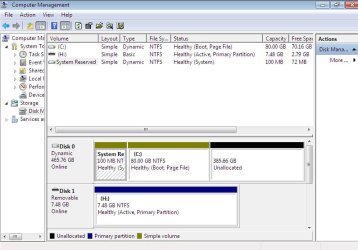
change dynamic OS.jpg

please suggest how to convert back to basic ( i prepare for dual boot); otherwise , if i reinstall will it change back to basic by default?

Please advise,
 

My Computer My Computer

At a glance

Windows 7 Ultimate 32 bit , Window 7Intel(R) Core(TM) i5 CPUM 430 @ 2.27GHz, Inte...2.00 GB,NVIDIA GeForce 310M
Computer type
PC/Desktop
Computer Manufacturer/Model Number
Acer Aspire 4740G , Acer Aspire4930
OS
Windows 7 Ultimate 32 bit , Window 7
CPU
Intel(R) Core(TM) i5 CPUM 430 @ 2.27GHz, Intel core duo pro
Motherboard
Acer Aspire 4740 Acer Aspire4930
Memory
2.00 GB,
Graphics Card(s)
NVIDIA GeForce 310M
Sound Card
(1) Realtek High Definition Audio (2) NVIDIA High Definiti
Monitor(s) Displays
Mobile PC Display
Screen Resolution
1366x768
Hard Drives
WDC WD5000BEVT-22A0RT0 ATA Device , 500 GB
Mouse
TECFON
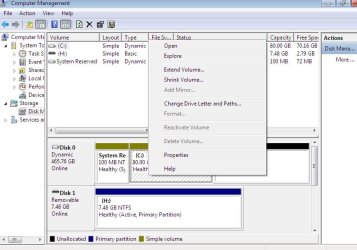
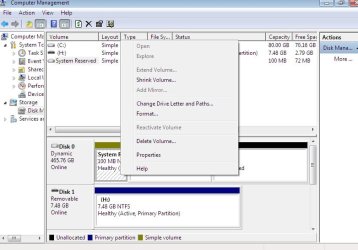
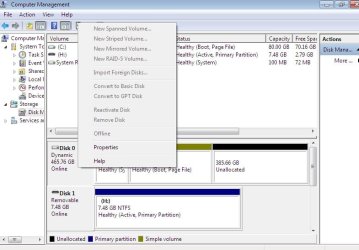
Thank you theog still be unable to change , please see in the picture. What should I do next?

unable to change back to basic.jpg syst reserved partion.jpg

disk 0 cant change.jpg
 

My Computer My Computer

At a glance

Windows 7 Ultimate 32 bit , Window 7Intel(R) Core(TM) i5 CPUM 430 @ 2.27GHz, Inte...2.00 GB,NVIDIA GeForce 310M
Computer type
PC/Desktop
Computer Manufacturer/Model Number
Acer Aspire 4740G , Acer Aspire4930
OS
Windows 7 Ultimate 32 bit , Window 7
CPU
Intel(R) Core(TM) i5 CPUM 430 @ 2.27GHz, Intel core duo pro
Motherboard
Acer Aspire 4740 Acer Aspire4930
Memory
2.00 GB,
Graphics Card(s)
NVIDIA GeForce 310M
Sound Card
(1) Realtek High Definition Audio (2) NVIDIA High Definiti
Monitor(s) Displays
Mobile PC Display
Screen Resolution
1366x768
Hard Drives
WDC WD5000BEVT-22A0RT0 ATA Device , 500 GB
Mouse
TECFON
How did you convert it in the first place? It won't even give me the option in disk management to convert my os partition to dynamic.:confused:
 

My Computer My Computer

At a glance

Windows 7 Ultimate x64I76 x 1.5V DDR3 DIMM sockets supporting up to 2...GeForce GTX 580
Computer Manufacturer/Model Number
Alienware
OS
Windows 7 Ultimate x64
CPU
I7
Motherboard
GA-X58-USB3
Memory
6 x 1.5V DDR3 DIMM sockets supporting up to 24 GB of system
Graphics Card(s)
GeForce GTX 580
Sound Card
Realtek ALC892 codec 2/4/5.1/7.1-channel
Monitor(s) Displays
NEC Display Solutions E321 Black 32"
Screen Resolution
1366 x 768
Hard Drives
OCZ Colossus LT Series OCZSSD2-1CLSLT1T 3.5" 1TB SATA II MLC Internal Solid State Drive
PSU
XFX Black Edition XPS-850W-BES 850W ATX12V
Case
Antec
Cooling
Zalman
Keyboard
Microsoft
Mouse
Microsoft
Did you look at option four?
 

My Computer My Computer

At a glance

ME/XP/Vista/Win7
OS
ME/XP/Vista/Win7
seth500 , it just an accident , I would just like to create several partitions (around 8) during installation but 4 primary is allowed. I just need 3 primary and 1 extend to create the left of local partitions. therefore, i did in disk manager yet it convert the forth " primary" to whole dynamic .

theog, i have already checked it , but


unable to change running OS for free.jpg

What should i do next ? In case of reinstallation , will it change back to basic by default during installation if the whole disk is deleted ?

Please suggest,

Thank you.


My Computer My Computer

At a glance

Windows 7 Ultimate 32 bit , Window 7Intel(R) Core(TM) i5 CPUM 430 @ 2.27GHz, Inte...2.00 GB,NVIDIA GeForce 310M
Computer type
PC/Desktop
Computer Manufacturer/Model Number
Acer Aspire 4740G , Acer Aspire4930
OS
Windows 7 Ultimate 32 bit , Window 7
CPU
Intel(R) Core(TM) i5 CPUM 430 @ 2.27GHz, Intel core duo pro
Motherboard
Acer Aspire 4740 Acer Aspire4930
Memory
2.00 GB,
Graphics Card(s)
NVIDIA GeForce 310M
Sound Card
(1) Realtek High Definition Audio (2) NVIDIA High Definiti
Monitor(s) Displays
Mobile PC Display
Screen Resolution
1366x768
Hard Drives
WDC WD5000BEVT-22A0RT0 ATA Device , 500 GB
Mouse
TECFON
Hello mate.


Running the clean command will convert back to Basic but at the same time all data on the HDD will be lost.


   Information

1) To rule out HDD Master Boot Record format errors, boot the Windows 7 installation media to diskpart and run the clean command, it takes only seconds to complete; once the clean finishes, exit diskpart and use the Windows 7 installer to create and format a single 100GB partition for the installation.

If that doesn't work, after another clean, use diskpart to create, format and mark Active a single 100GB partition to see if that works, use Step Two #2 in the SSD/HDD tutorial for reference.

:info:You can always extend the Windows partition to include the remaining unallocated space on the HDD / SSD or create additional Primary partitions or an Extended partition after the installation completes if you choose.

2) If you have ever had Linux installed to the HDD in any way, a simple clean command will not over-write the Grub boot-loader, you must use the full clean all command to completely over-write the Grub loader so Windows will install.


My Computer My Computer

At a glance

W 7 64-bit UltimateIntel Q9550 Yorkfield8GB Dominator 8500C5DATI : XFX 5870
Computer Manufacturer/Model Number
* BFK Customs *
OS
W 7 64-bit Ultimate
CPU
Intel Q9550 Yorkfield
Motherboard
ASUS P5Q Pro
Memory
8GB Dominator 8500C5D
Graphics Card(s)
ATI : XFX 5870
Sound Card
Realtek HD Audio 7-1
Monitor(s) Displays
1x 47" LCD HDMI & 3x 26" LCD HDMI
Screen Resolution
1920x1080P & 1920x1200
Hard Drives
1x 80GB Intel X25-M G2 SSD : 1x 500GB & 1x 640GB WD Caviar Black(s)
PSU
Corsair 620HX
Case
Cooler Master RC-690
Cooling
Tuniq Tower 120, 2x 140mm and 3x 120mm case fans
Keyboard
Microsoft 500
Mouse
Razer Diamondback 3G
Internet Speed
14 Mb/s
Other Info
1x Koutech 3Gb/s SATA HDD Hot Swap Rack
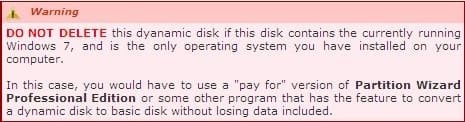
You can non-destructively convert the HD from Dynamic back to Basic using PW 4.2 boot disk as it is only a paid option in the new version.

partition wizard 4.2 free.zip - Windows Live

Burn to CD using ImgBurn at 4x speed.

Boot, click on HD, from Disk tab Convert Dynamic to Basic, OK, Apply.
 
@Greg, Thank you very much for the easiest and most favorable resolution. It does work.

@Bare Foot Kid, theog , thank you for good tutorial and link , i nearly take this route. :)

A little bit more inquiry, If I need one partition for reservation in case i need to expand window 7 or xp OS partition. Is it necessary that the reserved partition have to be "primary" or it is Ok to be local partition ?

Please kindly advise,

Thank you
 

My Computer My Computer

At a glance

Windows 7 Ultimate 32 bit , Window 7Intel(R) Core(TM) i5 CPUM 430 @ 2.27GHz, Inte...2.00 GB,NVIDIA GeForce 310M
Computer type
PC/Desktop
Computer Manufacturer/Model Number
Acer Aspire 4740G , Acer Aspire4930
OS
Windows 7 Ultimate 32 bit , Window 7
CPU
Intel(R) Core(TM) i5 CPUM 430 @ 2.27GHz, Intel core duo pro
Motherboard
Acer Aspire 4740 Acer Aspire4930
Memory
2.00 GB,
Graphics Card(s)
NVIDIA GeForce 310M
Sound Card
(1) Realtek High Definition Audio (2) NVIDIA High Definiti
Monitor(s) Displays
Mobile PC Display
Screen Resolution
1366x768
Hard Drives
WDC WD5000BEVT-22A0RT0 ATA Device , 500 GB
Mouse
TECFON
You can make the third partition Primary, but you'll need to make the fourth Logical using Partition Wizard CD in order to expand any further by adding Logical sub-partitions.

How is it you arrived at a Dynamic Disk when you only show two partitions. You must have had three at some point and were trying to make a fourth?
 
@ Greg, thank you for suggestion.

I created four primary partitions during second installation since on the first attempt that i followed the tutorial yet window 7 could not be able to shrunk to specific space (80 GB) . I thought that there would be any option selectable to change primary to logical drive during setup. Then after installation i tried to change the fourth primary to logical in disk management ;therefore, it ended up with four dynamic volumes , the snapshort was taken after i had already deleted two partitions .

To all , thank you for your kindness.
 

My Computer My Computer

At a glance

Windows 7 Ultimate 32 bit , Window 7Intel(R) Core(TM) i5 CPUM 430 @ 2.27GHz, Inte...2.00 GB,NVIDIA GeForce 310M
Computer type
PC/Desktop
Computer Manufacturer/Model Number
Acer Aspire 4740G , Acer Aspire4930
OS
Windows 7 Ultimate 32 bit , Window 7
CPU
Intel(R) Core(TM) i5 CPUM 430 @ 2.27GHz, Intel core duo pro
Motherboard
Acer Aspire 4740 Acer Aspire4930
Memory
2.00 GB,
Graphics Card(s)
NVIDIA GeForce 310M
Sound Card
(1) Realtek High Definition Audio (2) NVIDIA High Definiti
Monitor(s) Displays
Mobile PC Display
Screen Resolution
1366x768
Hard Drives
WDC WD5000BEVT-22A0RT0 ATA Device , 500 GB
Mouse
TECFON
To change a partition from Primary to Logical or vice versa, you would use Partition Wizard and not Disk Mgmt.

Glad to help.
 
Back
Top