Unknown device in USB controllers

I just reviewed the thread.

That is unusual for it to show up in USB if it's a PCI card. In this case, I don't really know what you can do.
If your chipset drivers are the latest, then probably nothing is my guess. (Maybe bios update?)

It's difficult to fix things like this if it's even possible, without physical access to the machine, unfortunately.

Tried the tv card in another pc and it works just fine.

In the other PC, does it show up in the Sound, Video and Game Controller section of the device manager when it works well?
 

My Computer

Computer Manufacturer/Model Number
self built
OS
7600.20510 x86
CPU
P4 550 3.4 GHz HT running at 3.5 GHz
Motherboard
MSI PM8M3-V (MS-7211 v1.x) Micro-ATX mainboard
Memory
OCZ 2 GB(2x1GB) DDR400mHz running @ 414 mHz
Graphics Card(s)
HIS Radeon HD 3850 IceQ 3 Turbo HDMI Dual DL-DVI AGP
Sound Card
MOTU Traveler firewire studio interface 192 kHz 24 bit
Monitor(s) Displays
22" widescreen Acer X223W LCD, 17" Compaq P75 CRT
Screen Resolution
1680x1050 and 1280x1024
Hard Drives
SATA I x2 WD, 400 GB and 120 GB, SATA 2 WD Caviar Black 1 TB
PSU
350W generic
Case
Cybertronpc, it glows blue
Cooling
stock cpu fan, Ice-Q 3 gpu and system, many case fans
Keyboard
Logitch Classical Keyboard 200
Mouse
Logitech Mediaplay cordless
Internet Speed
1792/448 kbits/sec
Other Info
SATA II PCI fake RAID adapter, 1 GB Readyboost, original ATI Remote Wonder (even works with WMC perfectly), Logitech Rumblepad 2 game controller x2
Hi torrentg. Yes the card works fine in my old machine and it appears in the sound video and game controller section. I appreciate it is almost impossible to fix something that you cant see or emulate but I appreciate all the time and effort that yourself and other members have spent attempting to find a solution.

I tried to change to card again last night to a different pci slot. The usb error has gone now but the card still can not be found. Just out of interest I was reading up the specs on the card and it appears that it is 2 usb digital tv card receivers soldered on to one pci card. Maybe thats why it shows up in the usb section eh?

Again, thanks for you help. I will let you know when I fond a solution. It's only a matter of time.:D
 

My Computer

Computer Manufacturer/Model Number
Home Build
OS
windows 7 home premium
CPU
Intel i7 920 D0
Motherboard
Gigabyte GA-EX58 UD5
Memory
6GB PATRIOT VIPER DDR3
Graphics Card(s)
GFORCE GTS 250
Monitor(s) Displays
22" WIDESCREEN
Hard Drives
CORSAIR 128GB SSD
PSU
COOLERMASTER 700 WATT
Case
ANTEC 1200
Cooling
TITAN FENRIR AIR COOLER
Maybe if you clean the slot on the motherboard after card is removed with compressed air or something, it will show up correctly. Worth a try.
 

My Computer

Computer Manufacturer/Model Number
self built
OS
7600.20510 x86
CPU
P4 550 3.4 GHz HT running at 3.5 GHz
Motherboard
MSI PM8M3-V (MS-7211 v1.x) Micro-ATX mainboard
Memory
OCZ 2 GB(2x1GB) DDR400mHz running @ 414 mHz
Graphics Card(s)
HIS Radeon HD 3850 IceQ 3 Turbo HDMI Dual DL-DVI AGP
Sound Card
MOTU Traveler firewire studio interface 192 kHz 24 bit
Monitor(s) Displays
22" widescreen Acer X223W LCD, 17" Compaq P75 CRT
Screen Resolution
1680x1050 and 1280x1024
Hard Drives
SATA I x2 WD, 400 GB and 120 GB, SATA 2 WD Caviar Black 1 TB
PSU
350W generic
Case
Cybertronpc, it glows blue
Cooling
stock cpu fan, Ice-Q 3 gpu and system, many case fans
Keyboard
Logitch Classical Keyboard 200
Mouse
Logitech Mediaplay cordless
Internet Speed
1792/448 kbits/sec
Other Info
SATA II PCI fake RAID adapter, 1 GB Readyboost, original ATI Remote Wonder (even works with WMC perfectly), Logitech Rumblepad 2 game controller x2
Sometimes these cards must not be introduced to the system before you load the drivers, the reason being the OS will attempt to implement the usage of incorrect generic drivers.

Not every piece of hardware works under W7 either.

Did you run the upgrade advisor with this card installed, before ploughing into the W7 install?
 

My Computer

Computer Manufacturer/Model Number
Custom built machine
OS
W7 x64
CPU
Intel Q9300 2.5Ghz Quad LGA775 (Would like Q9650)
Motherboard
Gigabyte GA-EP45T-UD3R (F6 Bios)
Memory
4Gb OCZ Gold 1,333Mhz
Graphics Card(s)
Palit HD4850 O/C Sonic 512Mb DDR3, Dual DViD's
Sound Card
Azalia to twin Samson 50w Studio Monitors
Monitor(s) Displays
Twin Dell (E-IPS) U2311H 23.6" Screens
Screen Resolution
1920 x 1080 @ 60Hz
Hard Drives
Crucial M4 SSD, archives on twin Western Digital Caviar Black WD2002FAEX, 2TB, 7200rpm HDD's, Samsung Ritemaster CD/DVD Burner...
PSU
OCZ 600w
Case
Lian-Li PC8 acoustifoamed' aluminium tower
Cooling
Scythe 140mm Zipang
Keyboard
Cherry PS/2 custom model
Mouse
Lenovo USB laser "Thinkpad" Mouse
Internet Speed
ADSL2+ @14Mbps downstream & Cat6 Gigabit Ethernet
Antivirus
NOD32
Browser
Opera
Other Info
Silicon Dust HD Homerun Dual FTA (Ethernet) TV Tuners, Dray Tek Vigor 2850Vn router and 8x HP Gigabit Switch. Lian-Li CR26 Card Reader, Canon MF4430 iSensys laser printer/scanner.
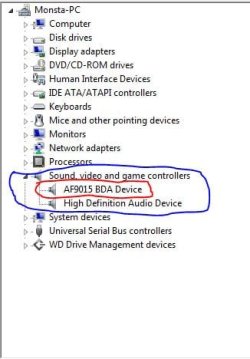
OK folks. Here's the deal. I took my pc along with the tv card back to the shop today and informed my friend who is the owner of the shop that the card may be faulty. He took the card and put it into his windows 7 home premium machine to try it. The card was picked up straight away as the correct card and asked for the driver. The driver was installed and hey presto, digital tv in full working order. I then tried to put it back into my machine and got the same old error. (unknown usb device) To be thorough I took an identicle card from the shelf and put that into my pc. This was the result....

Capture.JPG

I'm at a loss for words. My original card works in his pc with no problems. However it does not work in mine whatever I do. The identical card works in mine no problem. Don't understand how this is possible but hey, they new one works so he has swapped it for me. Just happy to have one that works.

Thanks for all the suggestions and help that has been offered by all the members here. Don't understand it. If anyone has any idea how this is possible please let me know.

Once again....thanks for all the help.


Monsta.
 

My Computer

Computer Manufacturer/Model Number
Home Build
OS
windows 7 home premium
CPU
Intel i7 920 D0
Motherboard
Gigabyte GA-EX58 UD5
Memory
6GB PATRIOT VIPER DDR3
Graphics Card(s)
GFORCE GTS 250
Monitor(s) Displays
22" WIDESCREEN
Hard Drives
CORSAIR 128GB SSD
PSU
COOLERMASTER 700 WATT
Case
ANTEC 1200
Cooling
TITAN FENRIR AIR COOLER
Glad you got it sorted out Monsta! I have seen some strange things in my 30 years working with computers, but that is one of the strangest set of circumstances I have ever seen. The only thing that I can think of, is maybe the first card was just a bit abnormal and wouldn't seat well in the pci slot with the combination of your motherboard and case. I have had that happen with a couple of old graphics cards, but they would just show up as unknown device.
 

My Computer

Computer Manufacturer/Model Number
Homebuilt
OS
Windows 7 Ultimate x86
CPU
AMD Phenom 9850 BLACK EDITION 2.5GHz
Motherboard
JetWay HA04-Extreme
Memory
Kingston HyperX 4GB (4 x 1GB) 240-Pin DDR2 SDRAM DDR2 1066
Graphics Card(s)
SAPPHIRE Toxic 100225TXSR Radeon HD 3870 512MB
Sound Card
Realtek onboard sound
Monitor(s) Displays
BenQ FP222WH Black 22" 5ms HDMI Widescreen LCD
Screen Resolution
1680 X 1050
Hard Drives
Seagate Barracuda 7200.10 ST3250410AS 250GB 7200 RPM
2 x Western Digital WD-800 80 Gig
PSU
Antec TPQ-850
Case
Lian Li PC-61
Cooling
Arctic Cooling Freezer 64 Pro PWN
Keyboard
Logitech G-11
Mouse
Logitch Wheel Mouse
Internet Speed
Cable
back to normal

Anyone who has prviously read this post is not going to believe this. I cant believe it myself.

The new tv card which has worked for the last few days has now got the same error that the first one had and no longer works.

:shock:

Any ideas anyone, PLEASE!!!:cry:
 

My Computer

Computer Manufacturer/Model Number
Home Build
OS
windows 7 home premium
CPU
Intel i7 920 D0
Motherboard
Gigabyte GA-EX58 UD5
Memory
6GB PATRIOT VIPER DDR3
Graphics Card(s)
GFORCE GTS 250
Monitor(s) Displays
22" WIDESCREEN
Hard Drives
CORSAIR 128GB SSD
PSU
COOLERMASTER 700 WATT
Case
ANTEC 1200
Cooling
TITAN FENRIR AIR COOLER
It's probably a bit late to reply now but, I've come accross this site, via google search regarding a very similar issue, same issue except with the Peak USB Dual Tuner Stick, im sure it'll help someone if not the OP as it seems to be an issue for quite a few people.

I went through device manager and found out where the driver that is already installed was, i did this by going to device manager and to the USB DVBT device and then i went into the properties by right clicking it and then clicking properties, then i clicked on the Driver tab and in there clicked Driver Details, in there it mentions the folder location of the current driver that is installed it was in folder "C:\Windows\System32\drivers", i then went to the location and Deleted the file "AF15BDA.sys", then i went to back to device manager and Uinstalled the related DVBT device to the driver, and then i ran Scan for Hardware Changes, it failed to find a driver, i then chose to manually install the driver and browsed for the inf file and it then installed correctly and now it works fine.

1. Find out the location the current driver that is installed for the device via device manager driver details for that device.
2. Go to the folder and delete that driver file.
3. Uninstall the DVBT device in device manager.
4. Scan for hardware changes.
5. Manually install the driver downloaded from the website for your device via Device Manager.

If it happens again after this, you just have to repeat the same process, it seems to be an issue with the way the driver is automatically installed either with the driver setup file from the driver from the peak site or with the way windows automatically installs drivers.

That worked for me, Good Luck to anyone else with this kind of issue!
 

My Computer

Computer Manufacturer/Model Number
Advent 7555GX Notebook
OS
Windows 7
CPU
Intel Core2 Quad Q9000 2.0ghz
Memory
4GB
Graphics Card(s)
Mobility Radeon 4850
Sound Card
Realtek Onboard
Monitor(s) Displays
17"
Hard Drives
WD Scorpio Blue WD5000BEVT 500GB
Mouse
Logitech G9x Laser Mouse
Internet Speed
Virgin Media 20MB Broadband
Other Info
Medion M9761 Notebook.

Processor: Core2Duo 1.66ghz,
Graphics:Nvidia 8600mGS
Ram: 4gb DDR2
HDD: 500gb Samsung HM500LI
Sorry to ressurect an old thread, but I'm having the exact same problem. Did you ever find a solution the second time round monsta?

In my case the card worked in the computer when I first upgraded to Win 7. Identified as an af9015 bda device, and i was able to install the original driver cd from there.

Then after a few days windows update decided it wanted to install a new driver for the card. I foolishly let it, and it then showed up in device manager as another brand of tv tuner (gold bda tuner dongle?????) or something vaguely similar. The card then wouldn't work - didn't pick up any channels, and only seemed to think it had one tuner.

I system restored to a point before the update, and the card then would only show up as an unknown device, and the drivers wont install as they say the hardware is not detected.

No amount of re-installing, blocking auto updates, playing with bios PnP settings, swearing, crying or shouting will now make it show up as anything other than a unknown device.

Anyone any ideas??

Thanks

Dan
 

My Computer

OS
Windows 7
Unfortunately I never did get the card to work so I gave up on it. Sorry I can't help.
 

My Computer

Computer Manufacturer/Model Number
Home Build
OS
windows 7 home premium
CPU
Intel i7 920 D0
Motherboard
Gigabyte GA-EX58 UD5
Memory
6GB PATRIOT VIPER DDR3
Graphics Card(s)
GFORCE GTS 250
Monitor(s) Displays
22" WIDESCREEN
Hard Drives
CORSAIR 128GB SSD
PSU
COOLERMASTER 700 WATT
Case
ANTEC 1200
Cooling
TITAN FENRIR AIR COOLER
Hi, I am having same issues with Peak DVB-T Digital USB Stick.

I have downloaded the Win7 drivers .exe file from Peak website (this one: http://www.peakhardware.com/DB/Download/dvb-t/Win%207/DVBT_w7.exe) but I receive same message as OP
View attachment 36657

This installer seems to load drivers for XP and Vista but does not seem to create any folders for Windows 7.
If anyone has successfully ran the driver pack perhaps they could confirm if it creates folder for the Win7 drivers? Or even better could upload the inf file somehow?

I just want to be able to watch the World Cup in the garden!!

Thanks if you can help!
 

My Computer

OS
Windows 7 Professional 64-bit
Just use the vista drivers,

IIRC it doesn't give a win 7 folder so you just use the ones in the vista folder.

I got mine working fine with that driver in the end. Still got the message you are getting but it does work if you point it to the inf file.

In case you dont know how to do that (because it confused me for ages) you want to find the device in device manager

right click and select update driver--> browse my computer for software --> let me pick from list.... --> click have disk --> then browse to the vista folder that was extracted when you tried to run the driver exe from the peak site.
 

My Computer

OS
Windows 7
Thanks for your reply.

Just tried the Vista (x86) drivers and I got an error message (I'm using Windows 7 64bit). I tried the file in the other x64 folder which seemed to load OK but still not finding any channels.

I emailed Peak and they stated that the model I was using was not compatible with W7 (Edit wrong model No.) however the seller has stated it is W7 compatible and I'm sure it actually had a W7 compatible label on the packaging (will check this tonight!).

I've tried the most of the different methods on this thread with no joy.
I am going to try and get it working on my old XP desktop to confirm it will work and take it from there
 
Last edited:

My Computer

OS
Windows 7 Professional 64-bit
I have the same problem

sorry to start this old thread up again but i hat the same problem. I've put the card in other pc's and of course it works fine!

Has anyone found a solution to this yet? I hope someone has! I take the card out and put it back in and that works but I don't want to be taking my computer to bits every other day.....
 

My Computer

OS
windows 7
Back
Top