
Hey guys,
I usually have my 'Network discovery and file sharing' turned off, however today I've turned it on and to my surprise I saw another router under "Network Infrastructure" listed next to my own. However, it's not showing up on the map under 'Network and Sharing Center'. I've seen other people on the net having another router but nothing conclusive.
What I'm wondering is if someone has connected to my antenna (by cable)? I don't have a clear visual from the outside to see if there are any (other) cables coming out of my antenna.
I'm slightly paranoid by now about that antenna, last year, a competing ISP installed their user's antenna on my strut (without even asking for my permission) and knocking my antenna off. So, hijacking my antenna's signal (if that's possible) would not surprise me.
So, am I paranoid or should I start tearing some new ones around the neighborhood?
I have a grid antenna on the roof of my building, cable going directly to my apartment, pppoe and then running into my router (Linksys WRT54GR). Running Win 7, Ultimate x64.
As you can see from the images below, it pops up sporadically into the Network folder, and I can also "interact" with it, meaning it is asking for a PIN.
Thanks in advance for the help.
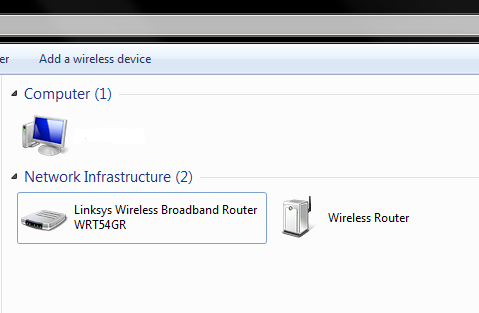
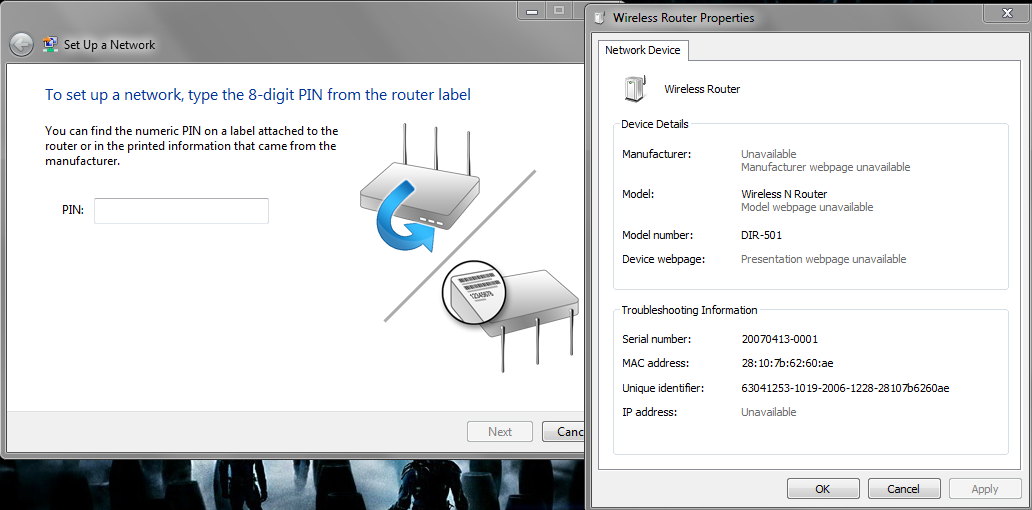
I usually have my 'Network discovery and file sharing' turned off, however today I've turned it on and to my surprise I saw another router under "Network Infrastructure" listed next to my own. However, it's not showing up on the map under 'Network and Sharing Center'. I've seen other people on the net having another router but nothing conclusive.
What I'm wondering is if someone has connected to my antenna (by cable)? I don't have a clear visual from the outside to see if there are any (other) cables coming out of my antenna.
I'm slightly paranoid by now about that antenna, last year, a competing ISP installed their user's antenna on my strut (without even asking for my permission) and knocking my antenna off. So, hijacking my antenna's signal (if that's possible) would not surprise me.
So, am I paranoid or should I start tearing some new ones around the neighborhood?
I have a grid antenna on the roof of my building, cable going directly to my apartment, pppoe and then running into my router (Linksys WRT54GR). Running Win 7, Ultimate x64.
As you can see from the images below, it pops up sporadically into the Network folder, and I can also "interact" with it, meaning it is asking for a PIN.
Thanks in advance for the help.
Last edited:
My Computer
- Computer Manufacturer/Model Number
- HP Pavilion dv7
- OS
- Windows 7 Ultimate x64


