
Solved Unknown software exception 0x40000015

blanchflower

New member
Member
Local time
4:51 AM
Messages
67
OK, my OS is Windows 7 64-bit. Recently when I started my computer, a message pops up which reads, "The exception unknown software exception (0x40000015) occured in the application at location 0x0029fa4d. Click OK to terminate the program."

The funny thing is, once I click OK, my laptop seems to be working fine. However this is an irritating pop up and does anyone here have any idea what this means? I seem to be getting this pop up when I removed a few toolbars from Internet Explorer. Before this, I had no problems whatsoever, so I suspect that this has got to do with my Internet Explorer.

Please advise! Thanks!

:rolleyes:
 

My Computer

Computer Manufacturer/Model Number
P-7805g Notebook Gateway FX
OS
Windows 7 Premium 64 bit
CPU
Intel Core 2 Duo processor P8700 2.53Ghz
Memory
4 GB DDR3 RAM
Graphics Card(s)
Nvidia GeForce 9800M GTS with 1 GB of DDR 3
OK, my OS is Windows 7 64-bit. Recently when I started my computer, a message pops up which reads, "The exception unknown software exception (0x40000015) occured in the application at location 0x0029fa4d. Click OK to terminate the program."

The funny thing is, once I click OK, my laptop seems to be working fine. However this is an irritating pop up and does anyone here have any idea what this means? I seem to be getting this pop up when I removed a few toolbars from Internet Explorer. Before this, I had no problems whatsoever, so I suspect that this has got to do with my Internet Explorer.

Please advise! Thanks!

:rolleyes:

The 0x40000015 error may be caused by windows system files damage. There can be many events which may have resulted in the system files errors. An incomplete installation, an incomplete uninstall, improper deletion of applications or hardware. It can also be caused if your computer is recovered from a virus or adware/spyware attack or by an improper shutdown of the computer. All the above activities may result in the deletion or corruption of the entries in the windows system files. This corrupted system file will lead to the missing and wrongly linked information and files needed for the proper working of the application.

Advanced Computer User Solution (manual update):
1) Start your computer and log on as an administrator.
2) Click the Start button then select All Programs, Accessories, System Tools, and then click System Restore.
3) In the new window, select "Restore my computer to an earlier time" option and then click Next.
4) Select the most recent system restore point from the "On this list, click a restore point" list, and then click Next.
5) Click Next on the confirmation window.
6) Restart the computer when the restoration is finished.

If the above doesn't solve the problem, use the instructions in the following link;

http://www.sevenforums.com/tutorials/433-disk-check.html

HTH
 

My Computer

Computer type
PC/Desktop
Computer Manufacturer/Model Number
Custom Built
OS
Windows 7 Professional x64
CPU
Intel i5 quad processor
Motherboard
DP67BG
Memory
16 GB
Graphics Card(s)
Radeon HD 5770
Sound Card
Realtek High Definition Audio
Monitor(s) Displays
Samsung SyncMaster
Screen Resolution
1920X1080
Hard Drives
WD 2TB (SATA Internal)
WD 1TB (USB External)
PSU
Corsair GS800
Case
Tower (Generic)
Cooling
3 Internal Fans
Keyboard
MS Wireless
Mouse
MS Optical Wired
Internet Speed
54 mbps
Antivirus
Emsisoft
Browser
IE-Version 9, Palemoon-Version 24.2.0
OK, I tried the above mentioned methods but it would not work. I still get the same error message. Is there any other way?

:confused:
 

My Computer

Computer Manufacturer/Model Number
P-7805g Notebook Gateway FX
OS
Windows 7 Premium 64 bit
CPU
Intel Core 2 Duo processor P8700 2.53Ghz
Memory
4 GB DDR3 RAM
Graphics Card(s)
Nvidia GeForce 9800M GTS with 1 GB of DDR 3
I think some files of you drivers are corrupted . Resulting to a minimum impact on your PC
 

My Computer

OS
Ultimate 32bit
Cooling
Electric Fan
Internet Speed
Slow as a TURTLE
OK, I tried the above mentioned methods but it would not work. I still get the same error message. Is there any other way?

:confused:

Try the following;

1. Click the Start Orb.
2. Type "msconfig" in the caption box without the quotes.
3. Select the "Startup" tab.
4. Select the "Disable All" in the lower right corner (see image).
5. Reboot.

Sys Config.jpg

Post back the results.
 

My Computer

Computer type
PC/Desktop
Computer Manufacturer/Model Number
Custom Built
OS
Windows 7 Professional x64
CPU
Intel i5 quad processor
Motherboard
DP67BG
Memory
16 GB
Graphics Card(s)
Radeon HD 5770
Sound Card
Realtek High Definition Audio
Monitor(s) Displays
Samsung SyncMaster
Screen Resolution
1920X1080
Hard Drives
WD 2TB (SATA Internal)
WD 1TB (USB External)
PSU
Corsair GS800
Case
Tower (Generic)
Cooling
3 Internal Fans
Keyboard
MS Wireless
Mouse
MS Optical Wired
Internet Speed
54 mbps
Antivirus
Emsisoft
Browser
IE-Version 9, Palemoon-Version 24.2.0
OK, I tried the above mentioned methods but it would not work. I still get the same error message. Is there any other way?

:confused:

Try the following;

1. Click the Start Orb.
2. Type "msconfig" in the caption box without the quotes.
3. Select the "Startup" tab.
4. Select the "Disable All" in the lower right corner (see image).
5. Reboot.

View attachment 244914

Post back the results.

OK, I tried this and I did NOT get the error message! So now what is the next step?

By the way, thank you so much for your kind help. You really made my day! You are a very helpful member of this forum.

:)
 

My Computer

Computer Manufacturer/Model Number
P-7805g Notebook Gateway FX
OS
Windows 7 Premium 64 bit
CPU
Intel Core 2 Duo processor P8700 2.53Ghz
Memory
4 GB DDR3 RAM
Graphics Card(s)
Nvidia GeForce 9800M GTS with 1 GB of DDR 3
OK, I tried the above mentioned methods but it would not work. I still get the same error message. Is there any other way?

:confused:

Try the following;

1. Click the Start Orb.
2. Type "msconfig" in the caption box without the quotes.
3. Select the "Startup" tab.
4. Select the "Disable All" in the lower right corner (see image).
5. Reboot.

View attachment 244914

Post back the results.

OK, I tried this and I did NOT get the error message! So now what is the next step?

By the way, thank you so much for your kind help. You really made my day! You are a very helpful member of this forum.

:)

Review the "Startup" list and see if there is an entry you recognize for a program that has been removed; ie, a program you uninstalled. If nothing looks out of place, add back just the Microsoft entries under the "Manufacturer" column, reboot and see if the message pops up.

Post back results.

HTH
 

My Computer

Computer type
PC/Desktop
Computer Manufacturer/Model Number
Custom Built
OS
Windows 7 Professional x64
CPU
Intel i5 quad processor
Motherboard
DP67BG
Memory
16 GB
Graphics Card(s)
Radeon HD 5770
Sound Card
Realtek High Definition Audio
Monitor(s) Displays
Samsung SyncMaster
Screen Resolution
1920X1080
Hard Drives
WD 2TB (SATA Internal)
WD 1TB (USB External)
PSU
Corsair GS800
Case
Tower (Generic)
Cooling
3 Internal Fans
Keyboard
MS Wireless
Mouse
MS Optical Wired
Internet Speed
54 mbps
Antivirus
Emsisoft
Browser
IE-Version 9, Palemoon-Version 24.2.0
OK, I added in these 2 Microsoft entries. They are Microsoft XBOX 360 accessories and Bing desktop. These are the 2 I can find. But when I try to restart the computer by closing my Firefox browser, I had to do a force restart. The message being 0x40000015 is not closed. So when I did a force restart, my laptop restarted and the message did NOT appear.

What is going on here?

Thanks!
 

My Computer

Computer Manufacturer/Model Number
P-7805g Notebook Gateway FX
OS
Windows 7 Premium 64 bit
CPU
Intel Core 2 Duo processor P8700 2.53Ghz
Memory
4 GB DDR3 RAM
Graphics Card(s)
Nvidia GeForce 9800M GTS with 1 GB of DDR 3
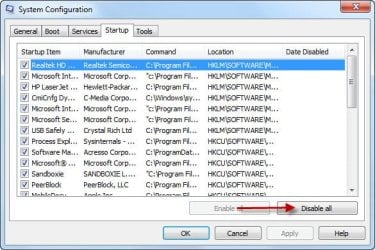
OK, I did a 2nd restart and this time, I did not have to force it. There was no error message when my laptop started. By the way, these are the programs in Start Up. They are:

Microsoft XBox 360 accessories (checked)
Bing desktop (checked)
Adobe Reader - unchecked
Updater (Manufacturer Ask) - I suspect that this is causing the problem - unchecked
Data Manager - unchecked
Google update -unchecked
Steam -unchecked
Java Platform -unchecked
 

My Computer

Computer Manufacturer/Model Number
P-7805g Notebook Gateway FX
OS
Windows 7 Premium 64 bit
CPU
Intel Core 2 Duo processor P8700 2.53Ghz
Memory
4 GB DDR3 RAM
Graphics Card(s)
Nvidia GeForce 9800M GTS with 1 GB of DDR 3
OK, I added in these 2 Microsoft entries. They are Microsoft XBOX 360 accessories and Bing desktop. These are the 2 I can find. But when I try to restart the computer by closing my Firefox browser, I had to do a force restart. The message being 0x40000015 is not closed. So when I did a force restart, my laptop restarted and the message did NOT appear.

What is going on here?

Thanks!

I am slightly confused; what do you mean by "when I try to restart the computer by closing my Firefox browser". You should exit the browser prior to shutting down to be sure no files are open which will cause a Windows' notice that the program is active and pause the process.
 

My Computer

Computer type
PC/Desktop
Computer Manufacturer/Model Number
Custom Built
OS
Windows 7 Professional x64
CPU
Intel i5 quad processor
Motherboard
DP67BG
Memory
16 GB
Graphics Card(s)
Radeon HD 5770
Sound Card
Realtek High Definition Audio
Monitor(s) Displays
Samsung SyncMaster
Screen Resolution
1920X1080
Hard Drives
WD 2TB (SATA Internal)
WD 1TB (USB External)
PSU
Corsair GS800
Case
Tower (Generic)
Cooling
3 Internal Fans
Keyboard
MS Wireless
Mouse
MS Optical Wired
Internet Speed
54 mbps
Antivirus
Emsisoft
Browser
IE-Version 9, Palemoon-Version 24.2.0
OK, I added in these 2 Microsoft entries. They are Microsoft XBOX 360 accessories and Bing desktop. These are the 2 I can find. But when I try to restart the computer by closing my Firefox browser, I had to do a force restart. The message being 0x40000015 is not closed. So when I did a force restart, my laptop restarted and the message did NOT appear.

What is going on here?

Thanks!

I am slightly confused; what do you mean by "when I try to restart the computer by closing my Firefox browser". You should exit the browser prior to shutting down to be sure no files are open which will cause a Windows' notice that the program is active and pause the process.

Yes, I did not exit my browser prior to shutting down at first. But when I retried a 2nd time, this time closing my browser, no such issues appeared.
 

My Computer

Computer Manufacturer/Model Number
P-7805g Notebook Gateway FX
OS
Windows 7 Premium 64 bit
CPU
Intel Core 2 Duo processor P8700 2.53Ghz
Memory
4 GB DDR3 RAM
Graphics Card(s)
Nvidia GeForce 9800M GTS with 1 GB of DDR 3
OK, I added in these 2 Microsoft entries. They are Microsoft XBOX 360 accessories and Bing desktop. These are the 2 I can find. But when I try to restart the computer by closing my Firefox browser, I had to do a force restart. The message being 0x40000015 is not closed. So when I did a force restart, my laptop restarted and the message did NOT appear.

What is going on here?

Thanks!

I am slightly confused; what do you mean by "when I try to restart the computer by closing my Firefox browser". You should exit the browser prior to shutting down to be sure no files are open which will cause a Windows' notice that the program is active and pause the process.

Yes, I did not exit my browser prior to shutting down at first. But when I retried a 2nd time, this time closing my browser, no such issues appeared.

Ok, so the MS entries are not causing the error message to appear, is that right?
 

My Computer

Computer type
PC/Desktop
Computer Manufacturer/Model Number
Custom Built
OS
Windows 7 Professional x64
CPU
Intel i5 quad processor
Motherboard
DP67BG
Memory
16 GB
Graphics Card(s)
Radeon HD 5770
Sound Card
Realtek High Definition Audio
Monitor(s) Displays
Samsung SyncMaster
Screen Resolution
1920X1080
Hard Drives
WD 2TB (SATA Internal)
WD 1TB (USB External)
PSU
Corsair GS800
Case
Tower (Generic)
Cooling
3 Internal Fans
Keyboard
MS Wireless
Mouse
MS Optical Wired
Internet Speed
54 mbps
Antivirus
Emsisoft
Browser
IE-Version 9, Palemoon-Version 24.2.0
I am slightly confused; what do you mean by "when I try to restart the computer by closing my Firefox browser". You should exit the browser prior to shutting down to be sure no files are open which will cause a Windows' notice that the program is active and pause the process.

Yes, I did not exit my browser prior to shutting down at first. But when I retried a 2nd time, this time closing my browser, no such issues appeared.

Ok, so the MS entries are not causing the error message to appear, is that right?

Yes.

:)
 

My Computer

Computer Manufacturer/Model Number
P-7805g Notebook Gateway FX
OS
Windows 7 Premium 64 bit
CPU
Intel Core 2 Duo processor P8700 2.53Ghz
Memory
4 GB DDR3 RAM
Graphics Card(s)
Nvidia GeForce 9800M GTS with 1 GB of DDR 3
OK, I did a 2nd restart and this time, I did not have to force it. There was no error message when my laptop started. By the way, these are the programs in Start Up. They are:

Microsoft XBox 360 accessories (checked)
Bing desktop (checked)
Adobe Reader - unchecked
Updater (Manufacturer Ask) - I suspect that this is causing the problem - unchecked
Data Manager - unchecked
Google update -unchecked
Steam -unchecked
Java Platform -unchecked

I believe you are correct about the "Updater" being the cause of the problem. Add back all the other entries and check the resultes.
 

My Computer

Computer type
PC/Desktop
Computer Manufacturer/Model Number
Custom Built
OS
Windows 7 Professional x64
CPU
Intel i5 quad processor
Motherboard
DP67BG
Memory
16 GB
Graphics Card(s)
Radeon HD 5770
Sound Card
Realtek High Definition Audio
Monitor(s) Displays
Samsung SyncMaster
Screen Resolution
1920X1080
Hard Drives
WD 2TB (SATA Internal)
WD 1TB (USB External)
PSU
Corsair GS800
Case
Tower (Generic)
Cooling
3 Internal Fans
Keyboard
MS Wireless
Mouse
MS Optical Wired
Internet Speed
54 mbps
Antivirus
Emsisoft
Browser
IE-Version 9, Palemoon-Version 24.2.0
OK, I did a 2nd restart and this time, I did not have to force it. There was no error message when my laptop started. By the way, these are the programs in Start Up. They are:

Microsoft XBox 360 accessories (checked)
Bing desktop (checked)
Adobe Reader - unchecked
Updater (Manufacturer Ask) - I suspect that this is causing the problem - unchecked
Data Manager - unchecked
Google update -unchecked
Steam -unchecked
Java Platform -unchecked

I believe you are correct about the "Updater" being the cause of the problem. Add back all the other entries and check the resultes.

No, we were both wrong. I added in all the entries except the updater and got the error message. I suspect that it is the data manager. I will try again and post back the results.
 

My Computer

Computer Manufacturer/Model Number
P-7805g Notebook Gateway FX
OS
Windows 7 Premium 64 bit
CPU
Intel Core 2 Duo processor P8700 2.53Ghz
Memory
4 GB DDR3 RAM
Graphics Card(s)
Nvidia GeForce 9800M GTS with 1 GB of DDR 3
OK this time, all the items were checked except for Data Manager (manufacturer Bandoo Media). When I restart my laptop. No error message appeared. So this program is the cause of the error message. Do you have any idea what is this? How do I uninstall it?

Thanks!
 
Last edited:

My Computer

Computer Manufacturer/Model Number
P-7805g Notebook Gateway FX
OS
Windows 7 Premium 64 bit
CPU
Intel Core 2 Duo processor P8700 2.53Ghz
Memory
4 GB DDR3 RAM
Graphics Card(s)
Nvidia GeForce 9800M GTS with 1 GB of DDR 3
OK this time, all the items were checked except for Data Manager (manufacturer Banddo Media). When I restart my laptop. No error message appeared. So this program is the cause of the error message. Do ou have any idea what is this? How do I uninstall it?

Thanks!

Data Manager is a 3rd party application which is not installed by Windows. I am not familiar with it from any personal experience. Removing the entry from "Startup" is not going to cause any harm to your computer, so you can leave it as is.

Do you recall installing any software recently which might have unkinowingly added the program? If that's not the case, you can try a search for "Data Manager" and check the results for any folders or files that may exist on your system. Personally, I use a 3rd party software for searching, called FileLocator, which I find superior to the built in Windows search feature. You can download the free version from the following site;

FileLocator Lite - Free File Searching Utility

I would suggest using it as an alternative to MS's search.
 

My Computer

Computer type
PC/Desktop
Computer Manufacturer/Model Number
Custom Built
OS
Windows 7 Professional x64
CPU
Intel i5 quad processor
Motherboard
DP67BG
Memory
16 GB
Graphics Card(s)
Radeon HD 5770
Sound Card
Realtek High Definition Audio
Monitor(s) Displays
Samsung SyncMaster
Screen Resolution
1920X1080
Hard Drives
WD 2TB (SATA Internal)
WD 1TB (USB External)
PSU
Corsair GS800
Case
Tower (Generic)
Cooling
3 Internal Fans
Keyboard
MS Wireless
Mouse
MS Optical Wired
Internet Speed
54 mbps
Antivirus
Emsisoft
Browser
IE-Version 9, Palemoon-Version 24.2.0
I did a google search on Data Manager and this is what I found.

The Data manager from Bandoo Media is a software used to inform you about the latest updates, if available for the softwares which are already installed on the computer. It can also be a threat in disguise.

So I guess that this program is malware. My Norton Anti-Virus failed to find anything.
 

My Computer

Computer Manufacturer/Model Number
P-7805g Notebook Gateway FX
OS
Windows 7 Premium 64 bit
CPU
Intel Core 2 Duo processor P8700 2.53Ghz
Memory
4 GB DDR3 RAM
Graphics Card(s)
Nvidia GeForce 9800M GTS with 1 GB of DDR 3
I did a google search on Data Manager and this is what I found.

The Data manager from Bandoo Media is a software used to inform you about the latest updates, if available for the softwares which are already installed on the computer. It can also be a threat in disguise.

So I guess that this program is malware. My Norton Anti-Virus failed to find anything.

Just an FYI; Norton is known as bloatware and a resource hog. I would look for a replacement.

The program may or may not be a threat. Have you checked the system with any anti-malware program? If not, that would be my suggestion as the next step in checking for an infection. Let me know.
 
Last edited:

My Computer

Computer type
PC/Desktop
Computer Manufacturer/Model Number
Custom Built
OS
Windows 7 Professional x64
CPU
Intel i5 quad processor
Motherboard
DP67BG
Memory
16 GB
Graphics Card(s)
Radeon HD 5770
Sound Card
Realtek High Definition Audio
Monitor(s) Displays
Samsung SyncMaster
Screen Resolution
1920X1080
Hard Drives
WD 2TB (SATA Internal)
WD 1TB (USB External)
PSU
Corsair GS800
Case
Tower (Generic)
Cooling
3 Internal Fans
Keyboard
MS Wireless
Mouse
MS Optical Wired
Internet Speed
54 mbps
Antivirus
Emsisoft
Browser
IE-Version 9, Palemoon-Version 24.2.0
Well, I downloaded Microsoft Safety Scanner and it is now scanning my laptop. Also, I managed to uninstall Bandoo. Then when I checked msconfig, it states that the manufacturer Data Manager is unknown now. Does this mean that it had been uninstalled completely from my OS?
 

My Computer

Computer Manufacturer/Model Number
P-7805g Notebook Gateway FX
OS
Windows 7 Premium 64 bit
CPU
Intel Core 2 Duo processor P8700 2.53Ghz
Memory
4 GB DDR3 RAM
Graphics Card(s)
Nvidia GeForce 9800M GTS with 1 GB of DDR 3
Back
Top