Unnecessary files creating in External HDD

nagubhai

New member
Local time
10:50 AM
Messages
6
Hello Guys,

I am having problem with my PC that unnecessary files are creating with some encrypted names. Below one of the files. I am keep deleting these files and those are creating again and again. I dont have any clue about this problem. Please help. :confused:

Ex: 962f2ccf7a871f1958931e3c9755b9

BR,
NG
 

My Computer My Computer

OS
Windows 7 Ultimate x86
Those are probably left over from an operating system update that did not clean up after itself.

You can just leave them.

If you cannot stand having them there, then let us know and we can help you delete them.
 

My Computer My Computer

Computer type
Laptop
Computer Manufacturer/Model Number
Employer provided Dell Latitude
OS
W7 Pro SP1 64bit
CPU
i7
Memory
8GB
Graphics Card(s)
Intel HD Graphics
Hard Drives
crappy SSD
Antivirus
Employer mandated Symantec Endpoint Protection
Browser
Pale Moon 64bit, IE11 64bit & Chrome 64bit
Every time i delete these files, after sometime they are coming again. Why is that?
 

My Computer My Computer

OS
Windows 7 Ultimate x86
What method are you using to find this file?
What were you doing when you first found this file or what ever it is.
There are many things in Windows 7 that will just come back after removal. It's designed that way.
 

My Computer My Computer

Computer type
PC/Desktop
Computer Manufacturer/Model Number
Home made Desktop
OS
Windows 10 Pro. 64/ version 1709 Windows 7 Pro/64
CPU
Intel i7-6800K @ 4.3
Motherboard
ASUS X-99 Deluxe II
Memory
Corsair Platinum 16 gig @2400
Graphics Card(s)
EVGA GTX 1070 OC
Monitor(s) Displays
Asus 27" LED LCD/VE278Q
Screen Resolution
1920-1080 or 1280-720 HDMI
Hard Drives
INTEL SSD 730-240 Gb Sata 3.0/
PSU
EVGA Platium 1200W
Case
Phanteks Luxe Tempered Glass 8 fans/ one radiator
Cooling
XSPC/ Water Cooled CPU
Keyboard
Das 4 Professional
Mouse
Logitech M705/MX Anywhere 2-S
Internet Speed
100 mbits
Antivirus
Microsoft Security Essentials/ Malwarebytes Premium 3.0/ SAS
Browser
I.E. 11 default/Firefox/ ISP Time Warner Cable/Spectrum
Other Info
LG BluRay Burner/
Sound system-KLipsch-THX/
Icy Dock ssd Hot Swap bays.
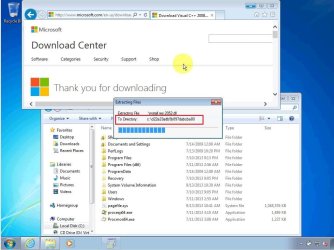
I'm pretty confident that these are simply temporary folders used to hold extracted files during an installation of software. There are several .NET updates that will never remove this temp folder on their own. These updates install okay, they just fail to clean up their temp folder. I see 4 or 5 of these temp folders on computers that I clean up. Sometimes you have to take ownership so that you can remove them..... or you can just leave these folders - they are not that big.

randomly named temp folders.jpg


As a side note, notice that this install also dumps junk in the root.
 

My Computer My Computer

Computer type
Laptop
Computer Manufacturer/Model Number
Employer provided Dell Latitude
OS
W7 Pro SP1 64bit
CPU
i7
Memory
8GB
Graphics Card(s)
Intel HD Graphics
Hard Drives
crappy SSD
Antivirus
Employer mandated Symantec Endpoint Protection
Browser
Pale Moon 64bit, IE11 64bit & Chrome 64bit
Back
Top