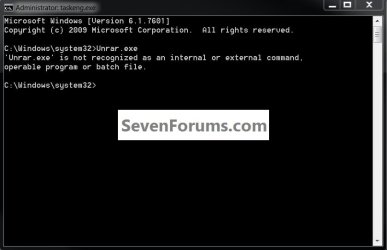
Unrar.exe Command line .Iso extract

Thorsummoner

New member
Local time
4:43 AM
Messages
8
Question
Using Winrar's Unrar.exe from the command line, how do i use the iso.fmt file to open extract an ISO's contetse to a folder. Simmilar to decompressing a .rar or a .zip archive.

Note: i only need to do this on one iso, i dont need some fance script example to open every iso in a folder or in a directory, i can handle that part.
Note: for bandwidth allocation purposes i do not want to use any additional software, my installation auitopmatior is already bulky enough.

Any help would be very appricated!
 
Last edited:

My Computer My Computer

Computer Manufacturer/Model Number
Sony Viao VGN-AR605E
OS
Win 7 86x
CPU
Intel(R) Core(TM)2 Duo CPU T7100 @ 1.80GHz
Memory
2 GB RAM
Graphics Card(s)
Nividia GeForce 8400 GT
Sound Card
Realtec
Monitor(s) Displays
17" Widescreen (1440 x 900*)
Hard Drives
141 GB........Total
79 GB........Free
Case
Standard Black w/ Silver Trim
Hello mate, there dosen't seem to be any such command!

click to enlarge
no.jpg
 

My Computer My Computer

Computer Manufacturer/Model Number
* BFK Customs *
OS
W 7 64-bit Ultimate
CPU
Intel Q9550 Yorkfield
Motherboard
ASUS P5Q Pro
Memory
8GB Dominator 8500C5D
Graphics Card(s)
ATI : XFX 5870
Sound Card
Realtek HD Audio 7-1
Monitor(s) Displays
1x 47" LCD HDMI & 3x 26" LCD HDMI
Screen Resolution
1920x1080P & 1920x1200
Hard Drives
1x 80GB Intel X25-M G2 SSD : 1x 500GB & 1x 640GB WD Caviar Black(s)
PSU
Corsair 620HX
Case
Cooler Master RC-690
Cooling
Tuniq Tower 120, 2x 140mm and 3x 120mm case fans
Keyboard
Microsoft 500
Mouse
Razer Diamondback 3G
Internet Speed
14 Mb/s
Other Info
1x Koutech 3Gb/s SATA HDD Hot Swap Rack
BFK: Unrar is part of a commercial program called winrar;
WinRAR is a powerful archive manager. It can backup your data and reduce the size of email attachments, decompress RAR, ZIP and other files downloaded from Internet and create new archives in RAR and ZIP file format. You can try WinRAR before buy, a trial version is available.

I assume that the poster has either the shareware or paid version.
The help on winrar is pretty good and helpful.
I could be wrong but I don't think that winrar will allow you to extract files from an .iso

Rich
 

My Computer My Computer

Computer type
Laptop
Computer Manufacturer/Model Number
Toshiba Laptop Qosimo X870
OS
Windows 7 Pro x64 SP1
CPU
Intel Core I7
Motherboard
Toshiba Qosmio
Memory
16 Gigs
Graphics Card(s)
NVIDIA GeForce GTX 670M
Monitor(s) Displays
17.7" laptop
Screen Resolution
1600 x 900
Hard Drives
256 Gig SanDisk SSD for C
256 Gig Intel SSD for D
Internet Speed
50/25 FIOS
Antivirus
Vipre (all you can eat for 10 machines)
Browser
IE and FF
Other Info
I have dos 6.22, wfwg 3.11, win98, 2000 and xp VHD's available for testing. MS's Virtual PC works great.
Hello Rich.


Thanks mate, I know of and have used (a little) the trial version of WinRAR, I wondered if that is the program the OP was referring to, though the use of "command-line" threw me; thanks for the information.
 

My Computer My Computer

Computer Manufacturer/Model Number
* BFK Customs *
OS
W 7 64-bit Ultimate
CPU
Intel Q9550 Yorkfield
Motherboard
ASUS P5Q Pro
Memory
8GB Dominator 8500C5D
Graphics Card(s)
ATI : XFX 5870
Sound Card
Realtek HD Audio 7-1
Monitor(s) Displays
1x 47" LCD HDMI & 3x 26" LCD HDMI
Screen Resolution
1920x1080P & 1920x1200
Hard Drives
1x 80GB Intel X25-M G2 SSD : 1x 500GB & 1x 640GB WD Caviar Black(s)
PSU
Corsair 620HX
Case
Cooler Master RC-690
Cooling
Tuniq Tower 120, 2x 140mm and 3x 120mm case fans
Keyboard
Microsoft 500
Mouse
Razer Diamondback 3G
Internet Speed
14 Mb/s
Other Info
1x Koutech 3Gb/s SATA HDD Hot Swap Rack
It will not extract the contents of .iso files.
 

My Computer My Computer

Computer type
PC/Desktop
Computer Manufacturer/Model Number
Dwarf Dwf/11/2012 r09/2013
OS
Windows 8.1 Pro RTM x64
CPU
Intel Core-i5-3570K 4-core @ 3.4GHz (Ivy Bridge) (OC 4.4GHz)
Motherboard
ASRock Z77 Extreme4-M
Memory
4 x 4GB DDR3-1600 Corsair Vengeance CMZ8GX3M2A1600C9B (16GB)
Graphics Card(s)
MSI GeForce GTX770 Gaming OC 2GB
Sound Card
Realtek High Definition on board solution (ALC 898)
Monitor(s) Displays
ViewSonic VA1912w Widescreen (VGA)
Screen Resolution
1440x900
Hard Drives
OCZ Agility 3 SSD 120GB SATA III x2 (RAID 0)
Samsung HD501LJ 500GB SATA II x2
Hitachi HDS721010CLA332 1TB SATA II
Iomega 1.5TB Ext USB 2.0
WD 2.0TB Ext USB 3.0
PSU
XFX Pro Series 850W Semi-Modular
Case
Gigabyte IF233
Cooling
1 x 120mm Front Inlet 1 x 120mm Rear Exhaust
Keyboard
Microsoft Comfort Curve Keyboard 3000 (USB)
Mouse
Microsoft Comfort Mouse 3000 for Business (USB)
Internet Speed
NetGear DG834Gv3 ADSL Modem/Router (Ethernet) ~4.0 Mb/s (O2)
Antivirus
Avast! 8.0.1497
Browser
IE 11
Other Info
Optical Drive: HL-DT-ST BD-RE BH10LS30 SATA Bluray
Lexmark S305 Printer/Scanner/Copier (USB)
WEI Score: 8.1/8.1/8.5/8.5/8.25
Asus Eee PC 1011PX Netbook (Windows 7 x86 Starter)

My Computer My Computer

Computer Manufacturer/Model Number
* BFK Customs *
OS
W 7 64-bit Ultimate
CPU
Intel Q9550 Yorkfield
Motherboard
ASUS P5Q Pro
Memory
8GB Dominator 8500C5D
Graphics Card(s)
ATI : XFX 5870
Sound Card
Realtek HD Audio 7-1
Monitor(s) Displays
1x 47" LCD HDMI & 3x 26" LCD HDMI
Screen Resolution
1920x1080P & 1920x1200
Hard Drives
1x 80GB Intel X25-M G2 SSD : 1x 500GB & 1x 640GB WD Caviar Black(s)
PSU
Corsair 620HX
Case
Cooler Master RC-690
Cooling
Tuniq Tower 120, 2x 140mm and 3x 120mm case fans
Keyboard
Microsoft 500
Mouse
Razer Diamondback 3G
Internet Speed
14 Mb/s
Other Info
1x Koutech 3Gb/s SATA HDD Hot Swap Rack

My Computer My Computer

Computer Manufacturer/Model Number
Custom Build
OS
Windows 7 Ultimate x64/Windows 8 Consumer Preview x64/Ubuntu 11.04
CPU
Intel Pentium Dual Core E6700 3.2GHz
Motherboard
ASUS P5G41T-M LX
Memory
Strontium 8192MB DDR3 1333Mhz
Graphics Card(s)
msi GeForce N560GTX-M2D1GD5 1GB
Sound Card
Realtek HD Audio
Monitor(s) Displays
CHIMEI CMV 221D 22"
Screen Resolution
1680x1050
Hard Drives
Seagate Barracuda LP Green 3.5'' 2TB Internal HDD 5900RPM + WD Elements Desktop 1TB External HDD 7200RPM
PSU
SHAW Viper-1500w Gaming PSU
Case
Black eMaxx ATX Mini Tower Case
Keyboard
Microsoft Wireless Keyboard 1000
Mouse
Microsoft Wireless Optical Mouse 2000
Internet Speed
100GB @ 4.76Mbps
Yep, exactly like i thought, thanks for reaffirming my understanding. Darn, i'm not looking foreword to learning 7z syntax. I was going to use 7z first because its open source, but wheni found that winrar could do .rar and .zip from the commandline so much easier i tryied to stick with it. I know the fullblown winrar.exe can do it, so it baffles me why this isn't supported from the commandline, like im gunna donate money to something that cant fully help me.

I found a commandline .iso mounter (named filedisk) but it requires a restart and the user to have one of 3 unique processor architextures, and my favorite alcohol52% dosent as far as i can find, support command line entries. Ive had poor experiances with poweriso and isomagic and i don't want to include anything i don't fully understand.

Also, the 'trial' version of winrar can be use free forever as far is i can see, except for a meaningless "buy here" popup on every launch of the full software, I just dont understand why the people who made winrar would leave it so useless from the commandline.

Thank You Everyone!
 

My Computer My Computer

Computer Manufacturer/Model Number
Sony Viao VGN-AR605E
OS
Win 7 86x
CPU
Intel(R) Core(TM)2 Duo CPU T7100 @ 1.80GHz
Memory
2 GB RAM
Graphics Card(s)
Nividia GeForce 8400 GT
Sound Card
Realtec
Monitor(s) Displays
17" Widescreen (1440 x 900*)
Hard Drives
141 GB........Total
79 GB........Free
Case
Standard Black w/ Silver Trim
Glad we could help in some way and thanks for the update.
 

My Computer My Computer

Computer Manufacturer/Model Number
* BFK Customs *
OS
W 7 64-bit Ultimate
CPU
Intel Q9550 Yorkfield
Motherboard
ASUS P5Q Pro
Memory
8GB Dominator 8500C5D
Graphics Card(s)
ATI : XFX 5870
Sound Card
Realtek HD Audio 7-1
Monitor(s) Displays
1x 47" LCD HDMI & 3x 26" LCD HDMI
Screen Resolution
1920x1080P & 1920x1200
Hard Drives
1x 80GB Intel X25-M G2 SSD : 1x 500GB & 1x 640GB WD Caviar Black(s)
PSU
Corsair 620HX
Case
Cooler Master RC-690
Cooling
Tuniq Tower 120, 2x 140mm and 3x 120mm case fans
Keyboard
Microsoft 500
Mouse
Razer Diamondback 3G
Internet Speed
14 Mb/s
Other Info
1x Koutech 3Gb/s SATA HDD Hot Swap Rack
Yeah 7z worked just fine, better than unrar, but gosh darn, the extracted iso installs allright, but dosent work with the mounted iso its been extracted from when mounted. So looks like I cant automate the process, so get to show off my html walkthrughs instead, its all good!
 

My Computer My Computer

Computer Manufacturer/Model Number
Sony Viao VGN-AR605E
OS
Win 7 86x
CPU
Intel(R) Core(TM)2 Duo CPU T7100 @ 1.80GHz
Memory
2 GB RAM
Graphics Card(s)
Nividia GeForce 8400 GT
Sound Card
Realtec
Monitor(s) Displays
17" Widescreen (1440 x 900*)
Hard Drives
141 GB........Total
79 GB........Free
Case
Standard Black w/ Silver Trim
Good to see you getting it sorted and thanks for the update.
 

My Computer My Computer

Computer Manufacturer/Model Number
* BFK Customs *
OS
W 7 64-bit Ultimate
CPU
Intel Q9550 Yorkfield
Motherboard
ASUS P5Q Pro
Memory
8GB Dominator 8500C5D
Graphics Card(s)
ATI : XFX 5870
Sound Card
Realtek HD Audio 7-1
Monitor(s) Displays
1x 47" LCD HDMI & 3x 26" LCD HDMI
Screen Resolution
1920x1080P & 1920x1200
Hard Drives
1x 80GB Intel X25-M G2 SSD : 1x 500GB & 1x 640GB WD Caviar Black(s)
PSU
Corsair 620HX
Case
Cooler Master RC-690
Cooling
Tuniq Tower 120, 2x 140mm and 3x 120mm case fans
Keyboard
Microsoft 500
Mouse
Razer Diamondback 3G
Internet Speed
14 Mb/s
Other Info
1x Koutech 3Gb/s SATA HDD Hot Swap Rack
Question
Using Winrar's Unrar.exe from the command line, how do i use the iso.fmt file to open extract an ISO's contetse to a folder. Simmilar to decompressing a .rar or a .zip archive.

Note: i only need to do this on one iso, i dont need some fance script example to open every iso in a folder or in a directory, i can handle that part.
Note: for bandwidth allocation purposes i do not want to use any additional software, my installation auitopmatior is already bulky enough.

Any help would be very appricated!


I know to unrar you can use
HTML:
unrar e c:\yourfile.rar
However for ISO i don't know if it will work. I personally keep getting error (file not a rar) Please have a look at this article. Using the WinRAR Command-line tools in Windows


However if you are looking to Extract a ISO file from a command line Please download piso.exe and poweriso.exe (Not the setup) It works perfect for me. I even add it to winrar and run it as a setup and it unzips perfectly. Extract iso file from command line
 
Last edited:

My Computer My Computer

Computer type
Laptop
Computer Manufacturer/Model Number
Dell
OS
windows 7 32bit
Memory
8
Hard Drives
250 SSD
Browser
Firefox
Sorry for re-posting. Couldn't find the edit button. i found a solution, Use winrar.exe not all the files you only need that one file.

Download winrar from WinRAR download and support: Download
Put only winrar.exe in same folder or in system32 and try one of these


Simple: Copy FileName.iso to Newfolder
WinRAR.exe x -ow "FileName.iso" "Newfolder/"


Finds all .ISO files and puts them in output folder
WinRAR.exe x -y -ow *.iso "Output folder/"
Run winrar x (extract from file) -y (say yes to everything) *.iso (Wild card = Find files ending .iso) Output folder

Finds ISO files and puts them in folder iso With Sub Directory Depending on the name of the ISO.
WinRAR.exe x -y -ow -ad *.iso *folder iso/


Finds ISO and puts them all in 1 directory. (If you use this all iso will be together in one folder

WinRAR.exe x -y -ow *.iso *.iso/


To find all the winrar commands go to c:\program files\winrar dir and find rar.txt
 

My Computer My Computer

Computer type
Laptop
Computer Manufacturer/Model Number
Dell
OS
windows 7 32bit
Memory
8
Hard Drives
250 SSD
Browser
Firefox
Back
Top