Unspecified device - MS Mouse

cb900f2

New member
Local time
5:49 AM
Messages
9
Hey guys.. Gotta say.. Really like Win7... With that being said.. I have a little bug with my MS wireless mouse..

Under the Device and Printers my MS mouse was found initially as win7 found it as "Microsoft wireless optical mouse 1.0a".. There was a update that MS sent via update and was to update device drivers, and now under the same D&P view, my mouse model has changed to "Microsoft Wireless Optical Mouse 5000" , but in the section below for "unspecified" I am getting the icon for "Microsoft Wireless Optical Mouse 1.0a"..

If I unplug my mouse form my box, both icons for the mouse disappear, and if I replug it back in, both of these icons re appear..

Any reason why the OS is finding the new driver and putting the old driver in the "unspecified" section?? and how do I either get rid or correct this issue??

I attached a screen shot

Thanks guys!
 

Attachments

  • Win7_Mouse Driver.png
    Win7_Mouse Driver.png
    72.7 KB · Views: 240

My Computer

OS
Vista
Go to Device Manager (not the Devices page in your pic), find the device, it should have a yellow sign with an exclanation mark, right-click it, click Uninstall.

It is safe to do this, if the device needs to be there it will reinstall. If the device does not need to be there it won't show up again.

I'm sure the reason both devices are listed is because they both have the same device ID. Just get rid of the one that has the exclamation mark.
 

My Computer

OS
XP SP3 32bit, Vista HP 64bit, Seven Pro 64bit
CPU
Q6600 G0 @ 3.2GHz
Motherboard
GA-P965-DS3
Memory
4Gb OCZ
Graphics Card(s)
nVidia GTX275 896Mb
Sound Card
X-Fi Fatal1ty Platinum
Monitor(s) Displays
Acer H243H
Screen Resolution
1920x1080
Hard Drives
Samsung 1Tb SATA2
MAXTOR 1Tb SATA2
MAXTOR 500Gb SATA2
MAXTOR 300Gb SATA2
PSU
Antec 650 Trio
Cooling
Zalman 9700
Keyboard
G15,G13
Mouse
MX518
Internet Speed
330Kbps down
Hi Bob... Thaks for the feedback.... I should have noted that in the device manger I am getting no conflicts or errors with the mouse driver..


Go to Device Manager (not the Devices page in your pic), find the device, it should have a yellow sign with an exclanation mark, right-click it, click Uninstall.

It is safe to do this, if the device needs to be there it will reinstall. If the device does not need to be there it won't show up again.

I'm sure the reason both devices are listed is because they both have the same device ID. Just get rid of the one that has the exclamation mark.
 
Last edited:

My Computer

OS
Vista
The "HID keyboard device" is NOT the same as the "HID mouse device".

According to your picture everything's fine. Don't remove anything!

Are you still getting the "unspecified" thing?

I have no idea where that is from or what to do about it.

If it were my computer I might look for a duplicate device in the HKLM/System/CurrentControlSet/Enum key. A duplicate device entry could be removed. Don't go poking around in the registry if you are not very familiar with registry editing, and in any case set a restore point before changing anything in the registry.
 

My Computer

OS
XP SP3 32bit, Vista HP 64bit, Seven Pro 64bit
CPU
Q6600 G0 @ 3.2GHz
Motherboard
GA-P965-DS3
Memory
4Gb OCZ
Graphics Card(s)
nVidia GTX275 896Mb
Sound Card
X-Fi Fatal1ty Platinum
Monitor(s) Displays
Acer H243H
Screen Resolution
1920x1080
Hard Drives
Samsung 1Tb SATA2
MAXTOR 1Tb SATA2
MAXTOR 500Gb SATA2
MAXTOR 300Gb SATA2
PSU
Antec 650 Trio
Cooling
Zalman 9700
Keyboard
G15,G13
Mouse
MX518
Internet Speed
330Kbps down
How about sharing your fix with the rest of the community?
 

My Computer

Computer type
PC/Desktop
Computer Manufacturer/Model Number
LENOVO K450 @3.0GHZ
OS
64-bit Windows 8.1 Pro
CPU
Core(TM) i5 CPU 4330 Haswell @ 3.20GHz
Motherboard
LENOVO
Memory
12.00 GB
Graphics Card(s)
Intel(R) HD Graphics
Sound Card
Intel HD integtrated
Monitor(s) Displays
HP 25' ISP Monitor
Screen Resolution
1900/1020
Hard Drives
(1) ST1000DM003-1CH162 (2) Generic STORAGE DEVICE USB Device (3) Generic STORAGE DEVICE USB Device
Internet Speed
100mb down/10mb up
Good point..

All I did was right click on the top mouse device on the top section of the devices => open properties => tabbed to hardware; double clicked on the HID-compliant mouse driver, then all of sudden the unspecific device went away


How about sharing your fix with the rest of the community?
 

My Computer

OS
Vista
After he double-clicked on the driver (and this goes for mouse or printer), you then need to select the properties button, driver tab and then uninstall button. This will remove the unspecified device from your system.
 

My Computer

OS
Windows 7 Professional x64
How to get rid of an unspecified device?

I had an old printer installed on an HP PC. It died. I bought a new printer. I installed the new printer according to the rules on HP's web site using an alternative driver. The installation seemed to go well. But as soon as I plug in the USB cable, an "Unspecified Device" with the name of the old printer shows up. And I can't print to anything. If I unplug the cable the unspecified device goes away but of course I can't print. I found the name of the old printer in Device Manager and uninstalled it. I plug the cable in and it's back, kind of like the monster in a horror movie. In Devices and Printers, when you click on a Device or Printer you get an option to Remove the Device, but not with unspecified devices. I've tried all the things I've found on the web, the old printer is still there.
 

My Computer

Computer Manufacturer/Model Number
HP Paviliona1440n
OS
Windows 7 Untimate
CPU
Intel 820
Motherboard
HP
Memory
1 GB
Graphics Card(s)
Nvidia 7300LE
Sound Card
?
Monitor(s) Displays
HP vs17e
Hard Drives
250 GB
Hey to all.

Just today had PROBLEM similar to original poster.

I purchased a RAPOO N1162 mouse. However, the model of the mouse is not important at all here.

Plugged it in expecting it to work straight away. Didn't. Stressed out. Not good.:eek:

At that time I had another mouse already installed (and of course it's drivers installed already on the system).
Installed as well were drivers for my Logitech Racing Wheel. These were under Human Interaction Devices in the Device Manager.
Lastly, (this would eventually be important later down the track) had a driver for MotionJoy installed. This had a "HID COMPLIANT-DEVICE" associated to it under Human Interaction Devices in the Device Manager as well.

Eventually took a second look at Device and Printers window.

Saw the new mouse (listed in Device and Printers) which for some reason had it had 2 entries on my device and printers window instead of 1 (HID COMPLIANT MOUSE & USB OPTICAL MOUSE (the second is the actual mouse device)). Both ended up in the "UNSPECIFIED" devices.

Suspicious. I noted that "HID COMPLIANT MOUSE" already appeared in Mouses (for my older mouse).

Smashed my head on the table for 2 hours. Tested the mouse on a Laptop installed with Windows 7 and it worked there. Confused and sad at this point. :confused:

Kept uninstalling and re-installing the mouse's drivers/functions (Both HID COMPLIANT-MOUSE and USB INPUT DEVICE) listed under Devices & Printers => {YOUR DEVICE} => Properties Popup (accessed via right click on device) => Hardware Tab => Device Functions. Didn't function at all. Light turned on. Windows even stated device drivers were installed correctly. Yeah right. Somethings up. :sarc:

Important. Noted that when windows did automatically install drivers for my new mouse, it was downloading 4 distinct drivers. 2 made sense. 2 made no sense (1 of these was to do with MotionJoy). Huh? :huh:

That's when after reading an above post about potential conflicts in Windows Devices, I thought I might be suffering the same issue.

Started to uninstall every device driver and device in DEVICE MANAGER marked as "HID COMPLIANT-MOUSE".

Key moment: (This is specific to my situation BUT IMPORTANT IN WHY I GOT MY MOUSE WORKING). Removed (what I assume to be connected to my Racing Wheel) Logitech_WmVirHid02, uninstalling the device and it's drivers and all. Removed Motion Joy device drivers as well.

Re-installed my new mouses device drivers 1 last time and BANG! Mouse now appeared correctly under devices.

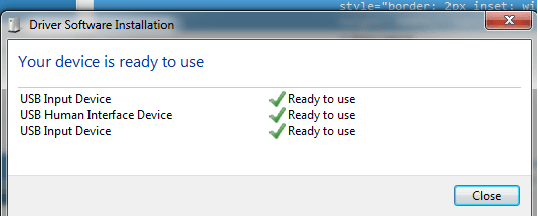
Screen shot of successful driver installation:

Untitled.png

State of play on Device & Printers after successful installation of Mouse:
screen shot 2.png

Not on the screen shot but still appearing in "UNSPECIFIED" is Logitech_WmVirHid02. But I am not fussed about it. Also note: HID COMPLIANT DEVICE and HID COMPLIANT MOUSE no longer appear as well under devices. That's what made me suspect it was conflicts causing my issue.

LESSON learned:

Have a restore point ready before any introduction of devices to your PC.
Check the drivers that Windows actually download. If you suspect 1 of them isn't for your device, it could be Windows messing up and downloading drivers for a conflicting device. Like in my case.
Don't stress like I did. Hard I know but it pays to get up and grab some tea/coffee or have a 10 minute break from a problem. Really gets the old noodle (brain I mean) clean and efficient for solving tasks.
Look for any suspicious devices noted on your Device & Printers. If your seeing a device that shouldn't be there, understand if it's drivers are connected with your new device.
Lastly, I don't know if I can blame Windows on this problem. I mismanaged my PC and it cost me. Still would love to understand how a conflict can result.

 

My Computer

Computer type
PC/Desktop
OS
Windows 7 (x64)
Back
Top