Unsupported 16-Bit Application

sufii

New member
Local time
9:17 AM
Messages
6
whenever I'm trying to run ipconfig in cmd in administrative mode or in general mode, getting error message in cmd like " This version of C:\Windows\system32\ipconfig.exe is not compatible with the vers
ion of Windows you're running. Check your computer's system information to see w
hether you need a x86 (32-bit) or x64 (64-bit) version of the program, and then
contact the software publisher."
I have attached the same. please hep me with that.
 

Attachments

  • unsuppoted 16bit Application.png
    unsuppoted 16bit Application.png
    62.5 KB · Views: 20

My Computer

Computer type
Laptop
Computer Manufacturer/Model Number
sony vaio
OS
Windows 7 Home Basic 64bit
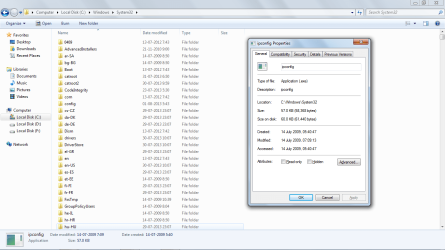
ipconfig.png
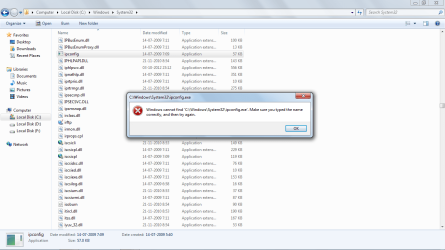
and when I'm trying to run ipconfig.exe file as administrator m getting below error message,
ipconfig1.png
and this windows 7 has got with the laptop and before i was able to run ipconfig in the same.
 

My Computer

Computer type
Laptop
Computer Manufacturer/Model Number
sony vaio
OS
Windows 7 Home Basic 64bit
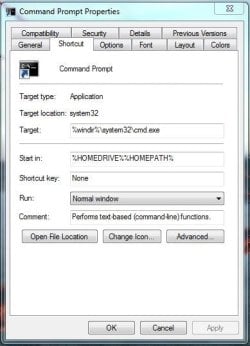
You've posted the wrong screenshot, please follow these steps:

  1. Start :orb:
  2. Type: cmd
  3. Right-Click > Properties
  4. Post a screenshot
 

My Computer

Computer type
Laptop
okay,
cmd.png
 

My Computer

Computer type
Laptop
Computer Manufacturer/Model Number
sony vaio
OS
Windows 7 Home Basic 64bit
the "SFC" Scan Results from the CBS.LOG
View attachment sfcdetails.txt

in the log, ipconfig.exe shows cannot repair member file [l:24{12}]"ipconfig.exe
 

My Computer

Computer type
Laptop
Computer Manufacturer/Model Number
sony vaio
OS
Windows 7 Home Basic 64bit
Code:
2013-07-31 08:12:57, Info                  CSI    000000ee [SR] Cannot repair member file [l:24{12}]"ipconfig.exe" of Microsoft-Windows-IPCONFIG, Version = 6.1.7600.16385, pA = PROCESSOR_ARCHITECTURE_AMD64 (9), Culture neutral, VersionScope = 1 nonSxS, PublicKeyToken = {l:8 b:31bf3856ad364e35}, Type neutral, TypeName neutral, PublicKey neutral in the store, hash mismatch
2013-07-31 08:13:07, Info                  CSI    000000f0 [SR] Cannot repair member file [l:24{12}]"ipconfig.exe" of Microsoft-Windows-IPCONFIG, Version = 6.1.7600.16385, pA = PROCESSOR_ARCHITECTURE_AMD64 (9), Culture neutral, VersionScope = 1 nonSxS, PublicKeyToken = {l:8 b:31bf3856ad364e35}, Type neutral, TypeName neutral, PublicKey neutral in the store, hash mismatch
2013-07-31 08:13:07, Info                  CSI    000000f1 [SR] This component was referenced by [l:202{101}]"Microsoft-Windows-Foundation-Package~31bf3856ad364e35~amd64~~6.1.7601.17514.WindowsFoundationDelivery"
2013-07-31 08:13:07, Info                  CSI    000000f4 [SR] Could not reproject corrupted file [ml:520{260},l:46{23}]"\??\C:\Windows\System32"\[l:24{12}]"ipconfig.exe"; source file in store is also corrupted

The file also seems to be corrupt in the store, I believe Windows won't be able to repair the file with the SFC command, but we have found the problem. There's also a few other files which seem to be corrupt.

I would try this - http://www.sevenforums.com/tutorials/3413-repair-install.html
 

My Computer

Computer type
Laptop
Windows 7 Direct Download Links
in windows 7 direct download link there is no option for windows home basic SP1 x64 which I am using. there are only for premium, professional and ultimate. so which one I have to download.
will it need product key after this installation. if need so which one I have to enter, the same which I have or else?
 

My Computer

Computer type
Laptop
Computer Manufacturer/Model Number
sony vaio
OS
Windows 7 Home Basic 64bit
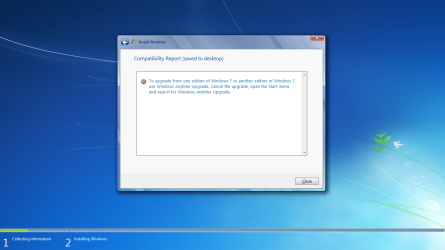
when I am installing it after below step
Step4.jpg

getting below error
windows installaion.png
 

My Computer

Computer type
Laptop
Computer Manufacturer/Model Number
sony vaio
OS
Windows 7 Home Basic 64bit
Back
Top