Unusable RAM

successgold

New member
Local time
5:46 PM
Messages
24
Hi,

I'm using 64 bit Windows 7 Ultimate. My motherboard is an ASRock G31M-GS R2.0. In the manual it says it can take up to 8GB (2 x 4GB) of DDR2 RAM. I recently purchased a set of 2 Kingston sticks of RAM of 4GB each. When I installed them and started up everything appears to work fine, but when I check my System Properties under "Installed memory (RAM)" it says "4.00 GB (3.19 GB usuable)". Please can someone tell me how to use the ful 8GB?

Thanks,
Joe
 

My Computer

Computer type
PC/Desktop
OS
Windows 7 Enterprise x64
CPU
Intel Core i7 i7-4790K CPU (Quad Core 4GHz, Socket H3 LGA-11
Motherboard
MSI Z97 PC MATE ATX LGA1150*
Memory
Team Vulcan 8GB (2 x 4GB) DDR3-1600
Graphics Card(s)
Gigabyte GeForce GTX 750 Ti 2GB WINDFORCE
Monitor(s) Displays
Cibox LW1922C
Hard Drives
1TB Western Digital Caviar Black
3TB Western Digital Caviar Green
2TB Seagate Barracuda
PSU
XFX TS 550W 80+ Gold Certified ATX
Case
NZXT Source 210 Elite (Black) ATX Mid Tower Case*
Antivirus
Microsoft Security Essentials
Browser
Google Chrome
Hello success mate some syte specs would be very helpful because all we know is you have Windows 7 as the OS so we don't know what we are working with
http://www.sevenforums.com/tutorials/180324-system-info-see-your-system-specs.html

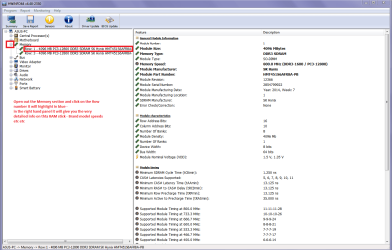
Now what I would like to see is that you use this ditty of mine and send a pic / snip of the RAM like mine I have attached.
Using HW Info
You can test the volts on the PSU with HW Info HWiNFO, HWiNFO32/64 - Download < download the right bit version and close the right hand window select Sensors and scroll down to the power section where you will see what the volts are doing see my pic.
The original right hand window shows the machine running and is handy for that but for looking at the components in some detail close it and use the main left hand side panel
FOR OTHER COMPONENTS
Open each small square with + in it on the section the components are in and then click on the individual component/s (it will highlight in blue) - in the right hand side will appear all sorts of details including brands speeds and other essential info that particular device. See pic for example.
Just use the latter part.

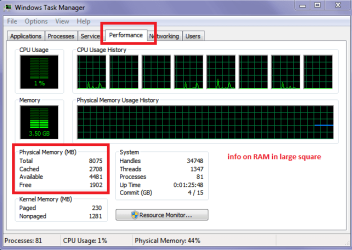
The other thing you can do is open the Task Manager > right click on the taskbar > Start task manager > in the windoe that opens click on Performance and see what is happening there.
 

Attachments

  • HW INFO RAM X.PNG
    HW INFO RAM X.PNG
    158.8 KB · Views: 6
  • TASK MANAGER.PNG
    TASK MANAGER.PNG
    40.8 KB · Views: 42

My Computer

Computer type
PC/Desktop
Computer Manufacturer/Model Number
Own build (new) Desk1 / Asus ROG Win 7 / Desk2 1st build
OS
Desk1 7 Home Prem / Desk2 10 Pro / Main lap Asus ROG 10 Pro 2 laptop Toshiba 7 Pro Asus P2520 7 & 10
CPU
Desk1 i5 3750K / Laptop i7 GTX 860M / Desk2 i5 2500
Motherboard
Desk1 Asus P877-V / Desk2 Gigabyte H67 UD3H / Laptop ?
Memory
Desk1 8GB (1866) / Desk2 16GB (1333) / Laptop 8Gb DDR3
Graphics Card(s)
Desk 1& 2NVidia GTX 650 & Laptops on board Intel
Sound Card
Desk 1 & 2 -XONAR DG Realtek High Def audio Laptop
Monitor(s) Displays
Desk 1 Benq HD 2450 / Desk2 Philips 24" / Laptop 17.5"
Screen Resolution
1920x1080 D1 & D2 & Laptop 1
Hard Drives
Desk1 Samsung 120GB 830 SSD
Asus ROG 256GB 850 Pro SSD
Desk2 Samsung 840 256 SSD
Toshiba 120GB EVO
PSU
Desk 1 Corsair HX 1050/ Laptop ? / Desk 2 Corsair HX 650
Case
Desk 1 Cooler HAF XM ? Toshiba laptop / Desk2 Coolermaster
Cooling
Fans on all Desk1 -2 Desk2 - all Coolermasters 5 Laptop ?
Keyboard
Desk 1 MS Sidewinder X6 Desk 2 MS Sidewinder X 4
Mouse
Desk 1&2 - Gigabyte MS 900 gamer - laptop - Logitec wireless
Internet Speed
ADSL2+
Other Info
One other Desktop (tester) and spare Toshba laptop both with SSD's
Running Kaspersky 2016 ISS on all machines config'd identically
Logitec audio stereo systems on each machine (x3)
Canon MG5250MFC
Router/modem TP-Link running WPA2SK
Most likely one of the sticks is not working - you either did not seat it properly in the slot or it's defective. Make sure both sticks are in (should hear the clicking sound). If after this it still shows 4GB, try starting the computer with just one of the sticks, if it boots fine, try the same with the other stick.
 

My Computer

Computer type
PC/Desktop
OS
Windows 7 Pro
Yes mate the doctor has a point there and why we need to see what those two suggestions I made come up with. If you like just the Task Manager one will show if the sticks are indeed installed. The other problem may be that one stick is cactus and not even going to function at all.
 

My Computer

Computer type
PC/Desktop
Computer Manufacturer/Model Number
Own build (new) Desk1 / Asus ROG Win 7 / Desk2 1st build
OS
Desk1 7 Home Prem / Desk2 10 Pro / Main lap Asus ROG 10 Pro 2 laptop Toshiba 7 Pro Asus P2520 7 & 10
CPU
Desk1 i5 3750K / Laptop i7 GTX 860M / Desk2 i5 2500
Motherboard
Desk1 Asus P877-V / Desk2 Gigabyte H67 UD3H / Laptop ?
Memory
Desk1 8GB (1866) / Desk2 16GB (1333) / Laptop 8Gb DDR3
Graphics Card(s)
Desk 1& 2NVidia GTX 650 & Laptops on board Intel
Sound Card
Desk 1 & 2 -XONAR DG Realtek High Def audio Laptop
Monitor(s) Displays
Desk 1 Benq HD 2450 / Desk2 Philips 24" / Laptop 17.5"
Screen Resolution
1920x1080 D1 & D2 & Laptop 1
Hard Drives
Desk1 Samsung 120GB 830 SSD
Asus ROG 256GB 850 Pro SSD
Desk2 Samsung 840 256 SSD
Toshiba 120GB EVO
PSU
Desk 1 Corsair HX 1050/ Laptop ? / Desk 2 Corsair HX 650
Case
Desk 1 Cooler HAF XM ? Toshiba laptop / Desk2 Coolermaster
Cooling
Fans on all Desk1 -2 Desk2 - all Coolermasters 5 Laptop ?
Keyboard
Desk 1 MS Sidewinder X6 Desk 2 MS Sidewinder X 4
Mouse
Desk 1&2 - Gigabyte MS 900 gamer - laptop - Logitec wireless
Internet Speed
ADSL2+
Other Info
One other Desktop (tester) and spare Toshba laptop both with SSD's
Running Kaspersky 2016 ISS on all machines config'd identically
Logitec audio stereo systems on each machine (x3)
Canon MG5250MFC
Router/modem TP-Link running WPA2SK
Well, I don't have your full sys specs, BUT, that motherboard has integrated graphics, audio, and network. Unless you have a dedicated graphics card, that "lost" memory most likely is used as graphics memory buy the integrated graphics controller. In that case, you might be able to adjust the video memory amount in bios. Other than that, you would need a dedicated card to have "all" of your memory. Please follow the suggestion by ICIT2LOL to post your FULL system specs. Hope this helps you. :)


No disrespect to the others who are helping, but I think the problem is as simple as I have stated. I usually start with the simple, kinda obvious, things first...then go from there.

Have a great day guys.
 

My Computer

Computer type
Laptop
Computer Manufacturer/Model Number
Dell Latitude E6410
OS
Windows 7 Home Premium (64 bit)
CPU
Intel I5 520m
Memory
8 GB
Graphics Card(s)
Intel integrated
Sound Card
IDT Digital Audio
Monitor(s) Displays
Dell ST2010
Screen Resolution
1600X900
Hard Drives
WD Scorpio Black 750GB
Keyboard
Microsoft Wireless Comfort Keyboard 5000
Mouse
Microsoft Wireless Mouse 5000
Internet Speed
350 mb/s down 12 mb/s up
Antivirus
NIS
Browser
Firefox
Other Info
Repaired trash lappy
Well, I don't have your full sys specs, BUT, that motherboard has integrated graphics, audio, and network. Unless you have a dedicated graphics card, that "lost" memory most likely is used as graphics memory buy the integrated graphics controller. In that case, you might be able to adjust the video memory amount in bios. Other than that, you would need a dedicated card to have "all" of your memory. Please follow the suggestion by ICIT2LOL to post your FULL system specs. Hope this helps you. :)


No disrespect to the others who are helping, but I think the problem is as simple as I have stated. I usually start with the simple, kinda obvious, things first...then go from there.

Have a great day guys.

No disrespect, but it would be a cold day in hell when a system will assign itself 4GB ram for integrated graphics... :rolleyes: The simplest and most obvious thing to do when missing half of a pair of RAM sticks is to check and see if you seated it correctly.
 

My Computer

Computer type
PC/Desktop
OS
Windows 7 Pro
Ok lets wait until the OP gets back to us because without those specs and what I asked for it we cannot do anything apsr from just second guessing. It could be a myriad of causes in any case.
 

My Computer

Computer type
PC/Desktop
Computer Manufacturer/Model Number
Own build (new) Desk1 / Asus ROG Win 7 / Desk2 1st build
OS
Desk1 7 Home Prem / Desk2 10 Pro / Main lap Asus ROG 10 Pro 2 laptop Toshiba 7 Pro Asus P2520 7 & 10
CPU
Desk1 i5 3750K / Laptop i7 GTX 860M / Desk2 i5 2500
Motherboard
Desk1 Asus P877-V / Desk2 Gigabyte H67 UD3H / Laptop ?
Memory
Desk1 8GB (1866) / Desk2 16GB (1333) / Laptop 8Gb DDR3
Graphics Card(s)
Desk 1& 2NVidia GTX 650 & Laptops on board Intel
Sound Card
Desk 1 & 2 -XONAR DG Realtek High Def audio Laptop
Monitor(s) Displays
Desk 1 Benq HD 2450 / Desk2 Philips 24" / Laptop 17.5"
Screen Resolution
1920x1080 D1 & D2 & Laptop 1
Hard Drives
Desk1 Samsung 120GB 830 SSD
Asus ROG 256GB 850 Pro SSD
Desk2 Samsung 840 256 SSD
Toshiba 120GB EVO
PSU
Desk 1 Corsair HX 1050/ Laptop ? / Desk 2 Corsair HX 650
Case
Desk 1 Cooler HAF XM ? Toshiba laptop / Desk2 Coolermaster
Cooling
Fans on all Desk1 -2 Desk2 - all Coolermasters 5 Laptop ?
Keyboard
Desk 1 MS Sidewinder X6 Desk 2 MS Sidewinder X 4
Mouse
Desk 1&2 - Gigabyte MS 900 gamer - laptop - Logitec wireless
Internet Speed
ADSL2+
Other Info
One other Desktop (tester) and spare Toshba laptop both with SSD's
Running Kaspersky 2016 ISS on all machines config'd identically
Logitec audio stereo systems on each machine (x3)
Canon MG5250MFC
Router/modem TP-Link running WPA2SK
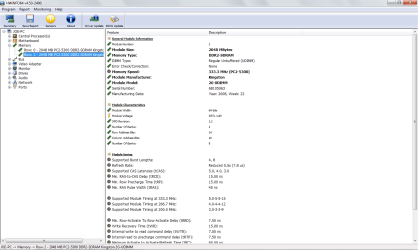
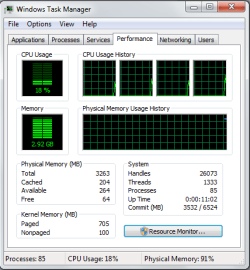
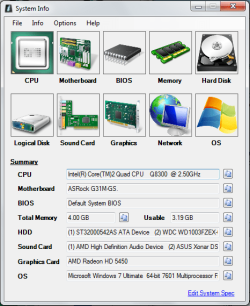
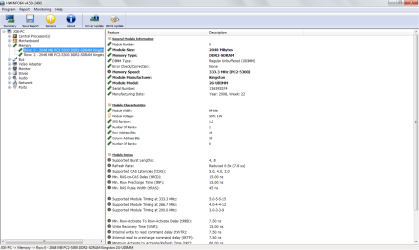
Thanks for the suggestions. I've tried reseating the RAM twice, but it hasn't made any difference. I've attached the screenshots.
 

Attachments

  • SystemInfo.png
    SystemInfo.png
    102.1 KB · Views: 35
  • HWiNFO.png
    HWiNFO.png
    108.7 KB · Views: 11
  • HWiNFO2.png
    HWiNFO2.png
    115.7 KB · Views: 7
  • WTM.png
    WTM.png
    32 KB · Views: 35

My Computer

Computer type
PC/Desktop
OS
Windows 7 Enterprise x64
CPU
Intel Core i7 i7-4790K CPU (Quad Core 4GHz, Socket H3 LGA-11
Motherboard
MSI Z97 PC MATE ATX LGA1150*
Memory
Team Vulcan 8GB (2 x 4GB) DDR3-1600
Graphics Card(s)
Gigabyte GeForce GTX 750 Ti 2GB WINDFORCE
Monitor(s) Displays
Cibox LW1922C
Hard Drives
1TB Western Digital Caviar Black
3TB Western Digital Caviar Green
2TB Seagate Barracuda
PSU
XFX TS 550W 80+ Gold Certified ATX
Case
NZXT Source 210 Elite (Black) ATX Mid Tower Case*
Antivirus
Microsoft Security Essentials
Browser
Google Chrome
Ok mate now check the labels on those RAM sticks because HW Info is telling us there is only 4GB onboard (2x2GB), if the seller sold you them - and I have to be honest I have not seen 4GB sticks of DDR2 - and ask for a refund as it clearly states what you have in those shots you have sent.

Now looking at the board it only has two RAM slots so I can only suggest you look around for sticks of a greater capacity but I am not so sure you will find any and is so they might be very expensive.
 

My Computer

Computer type
PC/Desktop
Computer Manufacturer/Model Number
Own build (new) Desk1 / Asus ROG Win 7 / Desk2 1st build
OS
Desk1 7 Home Prem / Desk2 10 Pro / Main lap Asus ROG 10 Pro 2 laptop Toshiba 7 Pro Asus P2520 7 & 10
CPU
Desk1 i5 3750K / Laptop i7 GTX 860M / Desk2 i5 2500
Motherboard
Desk1 Asus P877-V / Desk2 Gigabyte H67 UD3H / Laptop ?
Memory
Desk1 8GB (1866) / Desk2 16GB (1333) / Laptop 8Gb DDR3
Graphics Card(s)
Desk 1& 2NVidia GTX 650 & Laptops on board Intel
Sound Card
Desk 1 & 2 -XONAR DG Realtek High Def audio Laptop
Monitor(s) Displays
Desk 1 Benq HD 2450 / Desk2 Philips 24" / Laptop 17.5"
Screen Resolution
1920x1080 D1 & D2 & Laptop 1
Hard Drives
Desk1 Samsung 120GB 830 SSD
Asus ROG 256GB 850 Pro SSD
Desk2 Samsung 840 256 SSD
Toshiba 120GB EVO
PSU
Desk 1 Corsair HX 1050/ Laptop ? / Desk 2 Corsair HX 650
Case
Desk 1 Cooler HAF XM ? Toshiba laptop / Desk2 Coolermaster
Cooling
Fans on all Desk1 -2 Desk2 - all Coolermasters 5 Laptop ?
Keyboard
Desk 1 MS Sidewinder X6 Desk 2 MS Sidewinder X 4
Mouse
Desk 1&2 - Gigabyte MS 900 gamer - laptop - Logitec wireless
Internet Speed
ADSL2+
Other Info
One other Desktop (tester) and spare Toshba laptop both with SSD's
Running Kaspersky 2016 ISS on all machines config'd identically
Logitec audio stereo systems on each machine (x3)
Canon MG5250MFC
Router/modem TP-Link running WPA2SK
Here's what it says of the labels:

Kingston KVR KVR667D2N5K2/4G
99U5316-03.A00LF K1T OF 2 3563922-8416920
1.8V ASSY IN CHINA

Kingston KVR KVR667D2N5K2/4G
99U5316-03.A00LF K1T OF 2 3563922-8417004
1.8V ASSY IN CHINA
 

My Computer

Computer type
PC/Desktop
OS
Windows 7 Enterprise x64
CPU
Intel Core i7 i7-4790K CPU (Quad Core 4GHz, Socket H3 LGA-11
Motherboard
MSI Z97 PC MATE ATX LGA1150*
Memory
Team Vulcan 8GB (2 x 4GB) DDR3-1600
Graphics Card(s)
Gigabyte GeForce GTX 750 Ti 2GB WINDFORCE
Monitor(s) Displays
Cibox LW1922C
Hard Drives
1TB Western Digital Caviar Black
3TB Western Digital Caviar Green
2TB Seagate Barracuda
PSU
XFX TS 550W 80+ Gold Certified ATX
Case
NZXT Source 210 Elite (Black) ATX Mid Tower Case*
Antivirus
Microsoft Security Essentials
Browser
Google Chrome
Hmm this is a curly one mate the Google on that inf comes up with what you say the GB is and it isn't that expensive for example Kingston KVR667D2N5K2 4G DDR2 667 4GB Memory Kit 163120294107 | eBay

Now if the stick labels have not been tampered with then the machine is not seeing the amount of RAM they contain. Will have to do some more searching. Very strange.
 

My Computer

Computer type
PC/Desktop
Computer Manufacturer/Model Number
Own build (new) Desk1 / Asus ROG Win 7 / Desk2 1st build
OS
Desk1 7 Home Prem / Desk2 10 Pro / Main lap Asus ROG 10 Pro 2 laptop Toshiba 7 Pro Asus P2520 7 & 10
CPU
Desk1 i5 3750K / Laptop i7 GTX 860M / Desk2 i5 2500
Motherboard
Desk1 Asus P877-V / Desk2 Gigabyte H67 UD3H / Laptop ?
Memory
Desk1 8GB (1866) / Desk2 16GB (1333) / Laptop 8Gb DDR3
Graphics Card(s)
Desk 1& 2NVidia GTX 650 & Laptops on board Intel
Sound Card
Desk 1 & 2 -XONAR DG Realtek High Def audio Laptop
Monitor(s) Displays
Desk 1 Benq HD 2450 / Desk2 Philips 24" / Laptop 17.5"
Screen Resolution
1920x1080 D1 & D2 & Laptop 1
Hard Drives
Desk1 Samsung 120GB 830 SSD
Asus ROG 256GB 850 Pro SSD
Desk2 Samsung 840 256 SSD
Toshiba 120GB EVO
PSU
Desk 1 Corsair HX 1050/ Laptop ? / Desk 2 Corsair HX 650
Case
Desk 1 Cooler HAF XM ? Toshiba laptop / Desk2 Coolermaster
Cooling
Fans on all Desk1 -2 Desk2 - all Coolermasters 5 Laptop ?
Keyboard
Desk 1 MS Sidewinder X6 Desk 2 MS Sidewinder X 4
Mouse
Desk 1&2 - Gigabyte MS 900 gamer - laptop - Logitec wireless
Internet Speed
ADSL2+
Other Info
One other Desktop (tester) and spare Toshba laptop both with SSD's
Running Kaspersky 2016 ISS on all machines config'd identically
Logitec audio stereo systems on each machine (x3)
Canon MG5250MFC
Router/modem TP-Link running WPA2SK
4gig kit not 2 4 gig sticks.

Specifications
  • Mfr Part Number: KVR667D2N5K2/4G
  • Type: DDR2
  • Capacity: 4 GB (2x 2GB)
  • Speed: PC5400 667MHz
  • Size & Bit: 256M x 64
  • Pins: 240pin
  • ECC: No
  • Registered: No
  • CL5
  • Lifetime Warranty
 

My Computer

Computer type
PC/Desktop
OS
Windows 8.1 x64
Good find Porthos. That is the misunderstanding that is causing the confusion.
 

My Computer

Computer type
PC/Desktop
Computer Manufacturer/Model Number
Home made Desktop
OS
Windows 10 Pro. 64/ version 1709 Windows 7 Pro/64
CPU
Intel i7-6800K @ 4.3
Motherboard
ASUS X-99 Deluxe II
Memory
Corsair Platinum 16 gig @2400
Graphics Card(s)
EVGA GTX 1070 OC
Monitor(s) Displays
Asus 27" LED LCD/VE278Q
Screen Resolution
1920-1080 or 1280-720 HDMI
Hard Drives
INTEL SSD 730-240 Gb Sata 3.0/
PSU
EVGA Platium 1200W
Case
Phanteks Luxe Tempered Glass 8 fans/ one radiator
Cooling
XSPC/ Water Cooled CPU
Keyboard
Das 4 Professional
Mouse
Logitech M705/MX Anywhere 2-S
Internet Speed
100 mbits
Antivirus
Microsoft Security Essentials/ Malwarebytes Premium 3.0/ SAS
Browser
I.E. 11 default/Firefox/ ISP Time Warner Cable/Spectrum
Other Info
LG BluRay Burner/
Sound system-KLipsch-THX/
Icy Dock ssd Hot Swap bays.
2 x 4gb of DDR2 is not cheap 8gb of ddr2 is at least $150 which is why no one buys it. You can get a new motherboard that supports DDR3 with 8gb ram for less.......
 

My Computer

Computer type
PC/Desktop
Computer Manufacturer/Model Number
Bluethunder II
OS
Windows 7 x64 Ultimate and numerous virtual machines
CPU
AMD FX-8350 Vishera 32nm Technology @ 4.2 GHz default
Motherboard
ASUSTeK COMPUTER INC. SABERTOOTH 990FX R2.0 (Socket 942)
Memory
G Skill 32.0GB Dual-Channel DDR3 @ 1204MHz (11-13-13-31)
Graphics Card(s)
EVGA GeForce GTX 960 4GB Super SC ACX 2.0+ with Back Plate
Sound Card
Creative X-Fi Titanium HD Audiophile PCIe
Monitor(s) Displays
LG L227WTG x 3
Screen Resolution
1680 x 1050 16:10
Hard Drives
238GB Samsung850 PRO SATA Disk Device (SSD)
1863GB Seagate ST2000DM 001-1CH164 (SATA)
1397GB Seagate ST1500DL 003-9VT16L(SATA)
466GB Western Digital WDC WD50 03AZEX-00K1GA0 (SATA) x 2
932GB Seagate ST310005 28AS SATA Disk Device (SATA)
PSU
Enermax Revolution87+ 1000 Watts Gold Certified Power Supply
Case
Rocketfish Full Tower
Cooling
Cooler Master Hyper 212 EVO Push Pull 120mm Fans
Keyboard
Logitech K740
Mouse
Logitech G100S Laser LED + Logitech Gamepad F310
Internet Speed
500 mbs down and 30mbs up
Antivirus
Malwarebytes Pro & Avast and MSE on certain Virtual Machines
Browser
Firefox (Main) Chrome, Internet Explorer (Back Up)
Other Info
Logitech X 230 2.1 Stereo System and 5.1 Yamaha RX V2090
B&W DM6 Monitor Speakers + Center and Surround Speakers
Using Mouse Without Borders (Google it)
I agree with Indianatone but it still remains why the OP has labels showing 4GB RAM per each of those sticks and yet in reality there is only 4GB showing up in the machine?? It smells of rats and I think he has been had. There are plenty of DDR2 8GB sticks on EBay but of course you do run the risk of getting dodgy gear.

Again I think Indianatone has the right idea it may cost a bit more than just the motherboard but at least the machine will be "up to date" with some reasonably current specs.
 

My Computer

Computer type
PC/Desktop
Computer Manufacturer/Model Number
Own build (new) Desk1 / Asus ROG Win 7 / Desk2 1st build
OS
Desk1 7 Home Prem / Desk2 10 Pro / Main lap Asus ROG 10 Pro 2 laptop Toshiba 7 Pro Asus P2520 7 & 10
CPU
Desk1 i5 3750K / Laptop i7 GTX 860M / Desk2 i5 2500
Motherboard
Desk1 Asus P877-V / Desk2 Gigabyte H67 UD3H / Laptop ?
Memory
Desk1 8GB (1866) / Desk2 16GB (1333) / Laptop 8Gb DDR3
Graphics Card(s)
Desk 1& 2NVidia GTX 650 & Laptops on board Intel
Sound Card
Desk 1 & 2 -XONAR DG Realtek High Def audio Laptop
Monitor(s) Displays
Desk 1 Benq HD 2450 / Desk2 Philips 24" / Laptop 17.5"
Screen Resolution
1920x1080 D1 & D2 & Laptop 1
Hard Drives
Desk1 Samsung 120GB 830 SSD
Asus ROG 256GB 850 Pro SSD
Desk2 Samsung 840 256 SSD
Toshiba 120GB EVO
PSU
Desk 1 Corsair HX 1050/ Laptop ? / Desk 2 Corsair HX 650
Case
Desk 1 Cooler HAF XM ? Toshiba laptop / Desk2 Coolermaster
Cooling
Fans on all Desk1 -2 Desk2 - all Coolermasters 5 Laptop ?
Keyboard
Desk 1 MS Sidewinder X6 Desk 2 MS Sidewinder X 4
Mouse
Desk 1&2 - Gigabyte MS 900 gamer - laptop - Logitec wireless
Internet Speed
ADSL2+
Other Info
One other Desktop (tester) and spare Toshba laptop both with SSD's
Running Kaspersky 2016 ISS on all machines config'd identically
Logitec audio stereo systems on each machine (x3)
Canon MG5250MFC
Router/modem TP-Link running WPA2SK
Here's what it says of the labels:

Kingston KVR KVR667D2N5K2/4G
99U5316-03.A00LF K1T OF 2 3563922-8416920
1.8V ASSY IN CHINA

Kingston KVR KVR667D2N5K2/4G
99U5316-03.A00LF K1T OF 2 3563922-8417004
1.8V ASSY IN CHINA

The 4G in the KVR667D2N5K2/4G coincides to a 4 gig kit. Capacity: 4 GB (2x 2GB) The OP just misread the listing.

And yes 2x4 gigs is pricey

Amazon.com: Crucial 8GB Kit (4GBx2) DDR2 667MHz (PC2-5300) CL5 Unbuffered UDIMM 240-Pin Desktop Memory CT2KIT51264AA667: Electronics
 

My Computer

Computer type
PC/Desktop
OS
Windows 8.1 x64

My Computer

Computer type
PC/Desktop
Computer Manufacturer/Model Number
Home made Desktop
OS
Windows 10 Pro. 64/ version 1709 Windows 7 Pro/64
CPU
Intel i7-6800K @ 4.3
Motherboard
ASUS X-99 Deluxe II
Memory
Corsair Platinum 16 gig @2400
Graphics Card(s)
EVGA GTX 1070 OC
Monitor(s) Displays
Asus 27" LED LCD/VE278Q
Screen Resolution
1920-1080 or 1280-720 HDMI
Hard Drives
INTEL SSD 730-240 Gb Sata 3.0/
PSU
EVGA Platium 1200W
Case
Phanteks Luxe Tempered Glass 8 fans/ one radiator
Cooling
XSPC/ Water Cooled CPU
Keyboard
Das 4 Professional
Mouse
Logitech M705/MX Anywhere 2-S
Internet Speed
100 mbits
Antivirus
Microsoft Security Essentials/ Malwarebytes Premium 3.0/ SAS
Browser
I.E. 11 default/Firefox/ ISP Time Warner Cable/Spectrum
Other Info
LG BluRay Burner/
Sound system-KLipsch-THX/
Icy Dock ssd Hot Swap bays.
I know the OP bought what he thought was 4GB sticks but it still does not explain the discrepancy in what was posted in post #8 and then in post #10.

I know the RAM can be got but what the OP has is clearly labelled incorrectly either by a fault in it's manufacture or by illegal tampering. Or have I got something terribly wrong??
 

My Computer

Computer type
PC/Desktop
Computer Manufacturer/Model Number
Own build (new) Desk1 / Asus ROG Win 7 / Desk2 1st build
OS
Desk1 7 Home Prem / Desk2 10 Pro / Main lap Asus ROG 10 Pro 2 laptop Toshiba 7 Pro Asus P2520 7 & 10
CPU
Desk1 i5 3750K / Laptop i7 GTX 860M / Desk2 i5 2500
Motherboard
Desk1 Asus P877-V / Desk2 Gigabyte H67 UD3H / Laptop ?
Memory
Desk1 8GB (1866) / Desk2 16GB (1333) / Laptop 8Gb DDR3
Graphics Card(s)
Desk 1& 2NVidia GTX 650 & Laptops on board Intel
Sound Card
Desk 1 & 2 -XONAR DG Realtek High Def audio Laptop
Monitor(s) Displays
Desk 1 Benq HD 2450 / Desk2 Philips 24" / Laptop 17.5"
Screen Resolution
1920x1080 D1 & D2 & Laptop 1
Hard Drives
Desk1 Samsung 120GB 830 SSD
Asus ROG 256GB 850 Pro SSD
Desk2 Samsung 840 256 SSD
Toshiba 120GB EVO
PSU
Desk 1 Corsair HX 1050/ Laptop ? / Desk 2 Corsair HX 650
Case
Desk 1 Cooler HAF XM ? Toshiba laptop / Desk2 Coolermaster
Cooling
Fans on all Desk1 -2 Desk2 - all Coolermasters 5 Laptop ?
Keyboard
Desk 1 MS Sidewinder X6 Desk 2 MS Sidewinder X 4
Mouse
Desk 1&2 - Gigabyte MS 900 gamer - laptop - Logitec wireless
Internet Speed
ADSL2+
Other Info
One other Desktop (tester) and spare Toshba laptop both with SSD's
Running Kaspersky 2016 ISS on all machines config'd identically
Logitec audio stereo systems on each machine (x3)
Canon MG5250MFC
Router/modem TP-Link running WPA2SK
Or have I got something terribly wrong??

The sticks are labeled correctly. The were bought as a KIT. A 4 gig kit in which the package contains a matching PAIR of 2 gig sticks.
 

My Computer

Computer type
PC/Desktop
OS
Windows 8.1 x64
Last edited:

My Computer

Computer type
PC/Desktop
OS
Windows 7 Enterprise x64
CPU
Intel Core i7 i7-4790K CPU (Quad Core 4GHz, Socket H3 LGA-11
Motherboard
MSI Z97 PC MATE ATX LGA1150*
Memory
Team Vulcan 8GB (2 x 4GB) DDR3-1600
Graphics Card(s)
Gigabyte GeForce GTX 750 Ti 2GB WINDFORCE
Monitor(s) Displays
Cibox LW1922C
Hard Drives
1TB Western Digital Caviar Black
3TB Western Digital Caviar Green
2TB Seagate Barracuda
PSU
XFX TS 550W 80+ Gold Certified ATX
Case
NZXT Source 210 Elite (Black) ATX Mid Tower Case*
Antivirus
Microsoft Security Essentials
Browser
Google Chrome
Back
Top