Unusual network problem, local IP techs can't solve

Thor25

New member
Local time
1:06 PM
Messages
27
Hi all first post, hopefully someone here can help with this perplexing problem, I'm in Iceland and the local ISP's tech couldn't solve so I'm hoping someone here can.

The simplified version.

I have adsl through my ISP which provides both TV and internet. I am connected through their router, directly cat 5e through one switch which splits off to main floor cable box and then into the computer room.

Here's the interesting part, when connecting directly to my laptop I get a internet connection no problems. Take the same wire over to the desktop and nothing works, only rarely is it even able to do a ping or tracert.

At this point I figured a possible hardware issue, onboard ethernet. So I used a wireless NIC and then a normal expansion NIC with the same results. Figured at this point, likely motherboard problem. So at this point when I was about to buy a whole new mobo, I wen't to my brothers house with my desktop, hooked up the computer and bam the internet worked instantly with no problems.

So this is a very unusual one, I'm not a total noobie and have tried lots of fixes from these and other forums. The specific error message I get when using win7 diagnostic on the adapter is:

Ip config error: doesn't have a valid ip configuration

So the ultimate question is if the hardware is ok, why does my desktop refuse to work with the same connection that works perfectly on my laptop.

Thanks for any help, I'm at a loss and anxious to finally figure out what is going on here.:cry:
 

My Computer My Computer

OS
Win 7 Ultimate x64
CPU
AMD Phenom 9600 Quad core 2.3GHz
Motherboard
M3N72-D
Memory
8 gig ddr2 800mhz
Graphics Card(s)
Nvidia GeForce GTX 480
Sound Card
onboard
If you can post your ipconfig /all of the problem machine while it's connected that might help to figure out this problem.
 

My Computer My Computer

Computer type
PC/Desktop
Computer Manufacturer/Model Number
Home built
OS
Windows 7 Ult, Windows 8.1 Pro,
CPU
Q9650-4.275GHz, E8600 4.5GHz, E6750-3.8GHz
Motherboard
Evga 780i FTW
Memory
G.Skill PC2 9600 1200Mhz 5 5 5 15 2T
Graphics Card(s)
GTX480
Sound Card
Asus Xonar D2
Monitor(s) Displays
HannsG
Screen Resolution
1680X1050
Hard Drives
GSkill Phoenix Pro 120GB SSD
PSU
ThermalTake Toughpower 1000Watt modular
Case
ThermalTake XaserV
Cooling
Xigmatek S1283
Keyboard
Logitech G15
Mouse
Logitech G9
Internet Speed
T1
C:\Windows\system32>ipconfig /all

Windows IP Configuration

Host Name . . . . . . . . . . . . : Thor-PC
Primary Dns Suffix . . . . . . . :
Node Type . . . . . . . . . . . . : Hybrid
IP Routing Enabled. . . . . . . . : No
WINS Proxy Enabled. . . . . . . . : No

Ethernet adapter Local Area Connection:

Connection-specific DNS Suffix . :
Description . . . . . . . . . . . : NVIDIA nForce 10/100/1000 Mbps Ethernet #
2
Physical Address. . . . . . . . . : 00-24-8C-46-E9-80
DHCP Enabled. . . . . . . . . . . : Yes
Autoconfiguration Enabled . . . . : Yes
Autoconfiguration IPv4 Address. . : 169.254.143.165(Preferred)
Subnet Mask . . . . . . . . . . . : 255.255.0.0
Default Gateway . . . . . . . . . :
NetBIOS over Tcpip. . . . . . . . : Enabled

Tunnel adapter isatap.{4CF11DBD-26E1-4D09-A56C-49F76B895AD3}:

Media State . . . . . . . . . . . : Media disconnected
Connection-specific DNS Suffix . :
Description . . . . . . . . . . . : Microsoft ISATAP Adapter
Physical Address. . . . . . . . . : 00-00-00-00-00-00-00-E0
DHCP Enabled. . . . . . . . . . . : No
Autoconfiguration Enabled . . . . : Yes

Tunnel adapter Teredo Tunneling Pseudo-Interface:

Media State . . . . . . . . . . . : Media disconnected
Connection-specific DNS Suffix . :
Description . . . . . . . . . . . : Teredo Tunneling Pseudo-Interface
Physical Address. . . . . . . . . : 00-00-00-00-00-00-00-E0
DHCP Enabled. . . . . . . . . . . : No
Autoconfiguration Enabled . . . . : Yes
 

My Computer My Computer

OS
Win 7 Ultimate x64
CPU
AMD Phenom 9600 Quad core 2.3GHz
Motherboard
M3N72-D
Memory
8 gig ddr2 800mhz
Graphics Card(s)
Nvidia GeForce GTX 480
Sound Card
onboard
Btw removed the check for Ipv6 as part of the troubleshooting attempts with the tech from the ISP, in case you wanted me to turn that on for the ipconfig.
 

My Computer My Computer

OS
Win 7 Ultimate x64
CPU
AMD Phenom 9600 Quad core 2.3GHz
Motherboard
M3N72-D
Memory
8 gig ddr2 800mhz
Graphics Card(s)
Nvidia GeForce GTX 480
Sound Card
onboard
Can you repeat the command on your laptop so that we can compare the results.
 

My Computer My Computer

Computer type
PC/Desktop
Computer Manufacturer/Model Number
Dwarf Dwf/11/2012 r09/2013
OS
Windows 8.1 Pro RTM x64
CPU
Intel Core-i5-3570K 4-core @ 3.4GHz (Ivy Bridge) (OC 4.4GHz)
Motherboard
ASRock Z77 Extreme4-M
Memory
4 x 4GB DDR3-1600 Corsair Vengeance CMZ8GX3M2A1600C9B (16GB)
Graphics Card(s)
MSI GeForce GTX770 Gaming OC 2GB
Sound Card
Realtek High Definition on board solution (ALC 898)
Monitor(s) Displays
ViewSonic VA1912w Widescreen (VGA)
Screen Resolution
1440x900
Hard Drives
OCZ Agility 3 SSD 120GB SATA III x2 (RAID 0)
Samsung HD501LJ 500GB SATA II x2
Hitachi HDS721010CLA332 1TB SATA II
Iomega 1.5TB Ext USB 2.0
WD 2.0TB Ext USB 3.0
PSU
XFX Pro Series 850W Semi-Modular
Case
Gigabyte IF233
Cooling
1 x 120mm Front Inlet 1 x 120mm Rear Exhaust
Keyboard
Microsoft Comfort Curve Keyboard 3000 (USB)
Mouse
Microsoft Comfort Mouse 3000 for Business (USB)
Internet Speed
NetGear DG834Gv3 ADSL Modem/Router (Ethernet) ~4.0 Mb/s (O2)
Antivirus
Avast! 8.0.1497
Browser
IE 11
Other Info
Optical Drive: HL-DT-ST BD-RE BH10LS30 SATA Bluray
Lexmark S305 Printer/Scanner/Copier (USB)
WEI Score: 8.1/8.1/8.5/8.5/8.25
Asus Eee PC 1011PX Netbook (Windows 7 x86 Starter)
Microsoft Windows [Version 6.1.7600]
Copyright (c) 2009 Microsoft Corporation. All rights reserved.

C:\Windows\system32>ipconfig /all

Windows IP Configuration

Host Name . . . . . . . . . . . . : Thor-PC
Primary Dns Suffix . . . . . . . :
Node Type . . . . . . . . . . . . : Hybrid
IP Routing Enabled. . . . . . . . : No
WINS Proxy Enabled. . . . . . . . : No
DNS Suffix Search List. . . . . . : lan

Ethernet adapter Local Area Connection:

Connection-specific DNS Suffix . : lan
Description . . . . . . . . . . . : Marvell Yukon 88E8071 PCI-E Gigabit Ether
net Controller
Physical Address. . . . . . . . . : 00-1D-72-F1-28-6A
DHCP Enabled. . . . . . . . . . . : Yes
Autoconfiguration Enabled . . . . : Yes
Link-local IPv6 Address . . . . . : fe80::bd83:720f:f825:ca22%12(Preferred)
IPv4 Address. . . . . . . . . . . : 192.168.1.66(Preferred)
Subnet Mask . . . . . . . . . . . : 255.255.255.0
Lease Obtained. . . . . . . . . . : Saturday, October 02, 2010 4:31:45 PM
Lease Expires . . . . . . . . . . : Wednesday, October 06, 2010 7:13:37 PM
Default Gateway . . . . . . . . . : 192.168.1.254
DHCP Server . . . . . . . . . . . : 192.168.1.254
DHCPv6 IAID . . . . . . . . . . . : 268442994
DHCPv6 Client DUID. . . . . . . . : 00-01-00-01-13-D0-1B-ED-00-1D-72-F1-28-6A

DNS Servers . . . . . . . . . . . : 192.168.1.254
NetBIOS over Tcpip. . . . . . . . : Enabled

Wireless LAN adapter Wireless Network Connection:

Media State . . . . . . . . . . . : Media disconnected
Connection-specific DNS Suffix . : lan
Description . . . . . . . . . . . : Intel(R) WiFi Link 5100 AGN
Physical Address. . . . . . . . . : 00-21-6B-0C-75-AE
DHCP Enabled. . . . . . . . . . . : Yes
Autoconfiguration Enabled . . . . : Yes

Tunnel adapter isatap.lan:

Media State . . . . . . . . . . . : Media disconnected
Connection-specific DNS Suffix . : lan
Description . . . . . . . . . . . : Microsoft ISATAP Adapter
Physical Address. . . . . . . . . : 00-00-00-00-00-00-00-E0
DHCP Enabled. . . . . . . . . . . : No
Autoconfiguration Enabled . . . . : Yes

Tunnel adapter Teredo Tunneling Pseudo-Interface:

Connection-specific DNS Suffix . :
Description . . . . . . . . . . . : Teredo Tunneling Pseudo-Interface
Physical Address. . . . . . . . . : 00-00-00-00-00-00-00-E0
DHCP Enabled. . . . . . . . . . . : No
Autoconfiguration Enabled . . . . : Yes
IPv6 Address. . . . . . . . . . . : 2001:0:5ef5:79fd:382d:1f1b:6262:4b88(Pref
erred)
Link-local IPv6 Address . . . . . : fe80::382d:1f1b:6262:4b88%13(Preferred)
Default Gateway . . . . . . . . . : ::
NetBIOS over Tcpip. . . . . . . . : Disabled

C:\Windows\system32>
 

My Computer My Computer

OS
Win 7 Ultimate x64
CPU
AMD Phenom 9600 Quad core 2.3GHz
Motherboard
M3N72-D
Memory
8 gig ddr2 800mhz
Graphics Card(s)
Nvidia GeForce GTX 480
Sound Card
onboard
C:\Windows\system32>ipconfig /all

Windows IP Configuration

Host Name . . . . . . . . . . . . : Thor-PC
Primary Dns Suffix . . . . . . . :
Node Type . . . . . . . . . . . . : Hybrid
IP Routing Enabled. . . . . . . . : No
WINS Proxy Enabled. . . . . . . . : No

Ethernet adapter Local Area Connection:

Connection-specific DNS Suffix . :
Description . . . . . . . . . . . : NVIDIA nForce 10/100/1000 Mbps Ethernet #
2
Physical Address. . . . . . . . . : 00-24-8C-46-E9-80
DHCP Enabled. . . . . . . . . . . : Yes
Autoconfiguration Enabled . . . . : Yes
Autoconfiguration IPv4 Address. . : 169.254.143.165(Preferred)
Subnet Mask . . . . . . . . . . . : 255.255.0.0
Default Gateway . . . . . . . . . :
NetBIOS over Tcpip. . . . . . . . : Enabled

Tunnel adapter isatap.{4CF11DBD-26E1-4D09-A56C-49F76B895AD3}:

Media State . . . . . . . . . . . : Media disconnected
Connection-specific DNS Suffix . :
Description . . . . . . . . . . . : Microsoft ISATAP Adapter
Physical Address. . . . . . . . . : 00-00-00-00-00-00-00-E0
DHCP Enabled. . . . . . . . . . . : No
Autoconfiguration Enabled . . . . : Yes

Tunnel adapter Teredo Tunneling Pseudo-Interface:

Media State . . . . . . . . . . . : Media disconnected
Connection-specific DNS Suffix . :
Description . . . . . . . . . . . : Teredo Tunneling Pseudo-Interface
Physical Address. . . . . . . . . : 00-00-00-00-00-00-00-E0
DHCP Enabled. . . . . . . . . . . : No
Autoconfiguration Enabled . . . . : Yes

As it stands you aren't getting anything from your router here. Have you tried using the other eithernet connection on the back of the board? These Nvidia boards usually have two.

And yes you should re-enable IPv6.

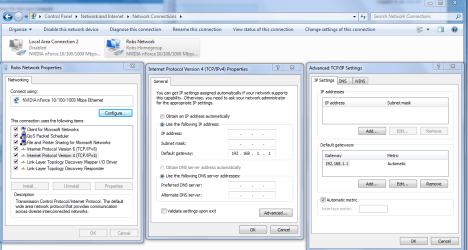
The second picture shows a working connection although your default gateway isn't normal, it should be something like 192.168.X.X depending on the type of router? Although in iceland using one of those combo router-modems this might be normal, not sure.

IPV4 properties manual default gateway entry.PNG

You might try entering the default gateway 192.168.1.254 manually into your IPv4 properties window.
 
Last edited by a moderator:

My Computer My Computer

Computer type
PC/Desktop
Computer Manufacturer/Model Number
Home built
OS
Windows 7 Ult, Windows 8.1 Pro,
CPU
Q9650-4.275GHz, E8600 4.5GHz, E6750-3.8GHz
Motherboard
Evga 780i FTW
Memory
G.Skill PC2 9600 1200Mhz 5 5 5 15 2T
Graphics Card(s)
GTX480
Sound Card
Asus Xonar D2
Monitor(s) Displays
HannsG
Screen Resolution
1680X1050
Hard Drives
GSkill Phoenix Pro 120GB SSD
PSU
ThermalTake Toughpower 1000Watt modular
Case
ThermalTake XaserV
Cooling
Xigmatek S1283
Keyboard
Logitech G15
Mouse
Logitech G9
Internet Speed
T1
I have currently disabled, the new NIC I bought to see if it was my onboard Lan. It was able to get a bit further by showing I was connected to the internet but not loading any pages. I'll try to recreate that again to get some more useful ipconfig all for you.
 

My Computer My Computer

OS
Win 7 Ultimate x64
CPU
AMD Phenom 9600 Quad core 2.3GHz
Motherboard
M3N72-D
Memory
8 gig ddr2 800mhz
Graphics Card(s)
Nvidia GeForce GTX 480
Sound Card
onboard
It might help to reset winsock and the TCP/IP stack.
Try running these commands at your command prompt run as admin.


netsh winsock reset catalog (reset winsock entries)
netsh int ip reset reset.log hit (reset TCP/IP stack)

Do you have anything from apple or adobe installed like iTunes or adobe photo suite?


My Computer My Computer

Computer type
PC/Desktop
Computer Manufacturer/Model Number
Home built
OS
Windows 7 Ult, Windows 8.1 Pro,
CPU
Q9650-4.275GHz, E8600 4.5GHz, E6750-3.8GHz
Motherboard
Evga 780i FTW
Memory
G.Skill PC2 9600 1200Mhz 5 5 5 15 2T
Graphics Card(s)
GTX480
Sound Card
Asus Xonar D2
Monitor(s) Displays
HannsG
Screen Resolution
1680X1050
Hard Drives
GSkill Phoenix Pro 120GB SSD
PSU
ThermalTake Toughpower 1000Watt modular
Case
ThermalTake XaserV
Cooling
Xigmatek S1283
Keyboard
Logitech G15
Mouse
Logitech G9
Internet Speed
T1
Currently on my trendnet nic, attempted the fix you suggested (which I think the tech tried) without any success. It just shows unidentified network and the red X to the internet.
 

My Computer My Computer

OS
Win 7 Ultimate x64
CPU
AMD Phenom 9600 Quad core 2.3GHz
Motherboard
M3N72-D
Memory
8 gig ddr2 800mhz
Graphics Card(s)
Nvidia GeForce GTX 480
Sound Card
onboard
No luck with the netsh commands, had tried that before but no luck, repeated it now with no luck as well.

I'm going to disable my expansion NIC and stay with the onboard during this troubleshoot for consistancy as it doesn't seem to be a hardware issue.
 

My Computer My Computer

OS
Win 7 Ultimate x64
CPU
AMD Phenom 9600 Quad core 2.3GHz
Motherboard
M3N72-D
Memory
8 gig ddr2 800mhz
Graphics Card(s)
Nvidia GeForce GTX 480
Sound Card
onboard
Found some settings and silly stuff I did (ping'ed myself) when I did once get the onboard lan to detect the network and seemingly look as if I was in working order. Maybe some of this can shed some light on things, or complicate things.

Tracing route to mbl.is [92.43.192.110]
over a maximum of 30 hops:

1 10 ms * * dsldevice.lan [192.168.1.254]
2 15 ms * * 157.157.255.114
3 * * * Request timed out.
4 * 15 ms * csn-198.simnet.is [157.157.115.198]
5 * 15 ms * neumann.mbl.is [92.43.192.110]
6 * * * Request timed out.
7 15 ms 15 ms * neumann.mbl.is [92.43.192.110]
8 15 ms 15 ms * neumann.mbl.is [92.43.192.110]
9 * * * Request timed out.
10 * * 15 ms neumann.mbl.is [92.43.192.110]

Trace complete.


Ethernet adapter Local Area Connection 2:

Connection-specific DNS Suffix . : lan
Link-local IPv6 Address . . . . . : fe80::2496:8041:4567:68da%17
IPv4 Address. . . . . . . . . . . : 192.168.1.71
Subnet Mask . . . . . . . . . . . : 255.255.255.0
Default Gateway . . . . . . . . . : 192.168.1.254

Tunnel adapter isatap.lan:

Media State . . . . . . . . . . . : Media disconnected
Connection-specific DNS Suffix . : lan

Tunnel adapter Teredo Tunneling Pseudo-Interface:

Connection-specific DNS Suffix . :
IPv6 Address. . . . . . . . . . . : 2001:0:5ef5:79fd:1c2c:2e1:3f57:feb8
Link-local IPv6 Address . . . . . : fe80::1c2c:2e1:3f57:feb8%11
Default Gateway . . . . . . . . . : ::

C:\Users\Thor>ping 192.168.1.71

Pinging 192.168.1.71 with 32 bytes of data:
Reply from 192.168.1.71: bytes=32 time<1ms TTL=128

Ping statistics for 192.168.1.71:
Packets: Sent = 4, Received = 4, Lost = 0 (0% loss),
Approximate round trip times in milli-seconds:
Minimum = 0ms, Maximum = 0ms, Average = 0ms

C:\Users\Thor>ping 192.168.0.1

Pinging 192.168.0.1 with 32 bytes of data:
Request timed out.
Request timed out.
Request timed out.
Request timed out.

Ping statistics for 192.168.0.1:
Packets: Sent = 4, Received = 0, Lost = 4 (100% loss),
 

My Computer My Computer

OS
Win 7 Ultimate x64
CPU
AMD Phenom 9600 Quad core 2.3GHz
Motherboard
M3N72-D
Memory
8 gig ddr2 800mhz
Graphics Card(s)
Nvidia GeForce GTX 480
Sound Card
onboard
Ethernet adapter Local Area Connection 2:

Connection-specific DNS Suffix . : lan
Link-local IPv6 Address . . . . . : fe80::2496:8041:4567:68da%17
IPv4 Address. . . . . . . . . . . : 192.168.1.71
Subnet Mask . . . . . . . . . . . : 255.255.255.0
Default Gateway . . . . . . . . . : 192.168.1.254

This is an improvment as it shows you being connected to the router. Do you have any type of A/V software installed or a third party firewall installed on this machine?
 

My Computer My Computer

Computer type
PC/Desktop
Computer Manufacturer/Model Number
Home built
OS
Windows 7 Ult, Windows 8.1 Pro,
CPU
Q9650-4.275GHz, E8600 4.5GHz, E6750-3.8GHz
Motherboard
Evga 780i FTW
Memory
G.Skill PC2 9600 1200Mhz 5 5 5 15 2T
Graphics Card(s)
GTX480
Sound Card
Asus Xonar D2
Monitor(s) Displays
HannsG
Screen Resolution
1680X1050
Hard Drives
GSkill Phoenix Pro 120GB SSD
PSU
ThermalTake Toughpower 1000Watt modular
Case
ThermalTake XaserV
Cooling
Xigmatek S1283
Keyboard
Logitech G15
Mouse
Logitech G9
Internet Speed
T1
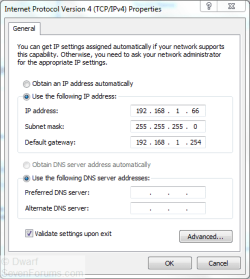
Try manually setting your configuration. With reference to the image that chev65 posted and the ipconfig information from you, the settings required are shown below.

Capture.PNG
 

My Computer My Computer

Computer type
PC/Desktop
Computer Manufacturer/Model Number
Dwarf Dwf/11/2012 r09/2013
OS
Windows 8.1 Pro RTM x64
CPU
Intel Core-i5-3570K 4-core @ 3.4GHz (Ivy Bridge) (OC 4.4GHz)
Motherboard
ASRock Z77 Extreme4-M
Memory
4 x 4GB DDR3-1600 Corsair Vengeance CMZ8GX3M2A1600C9B (16GB)
Graphics Card(s)
MSI GeForce GTX770 Gaming OC 2GB
Sound Card
Realtek High Definition on board solution (ALC 898)
Monitor(s) Displays
ViewSonic VA1912w Widescreen (VGA)
Screen Resolution
1440x900
Hard Drives
OCZ Agility 3 SSD 120GB SATA III x2 (RAID 0)
Samsung HD501LJ 500GB SATA II x2
Hitachi HDS721010CLA332 1TB SATA II
Iomega 1.5TB Ext USB 2.0
WD 2.0TB Ext USB 3.0
PSU
XFX Pro Series 850W Semi-Modular
Case
Gigabyte IF233
Cooling
1 x 120mm Front Inlet 1 x 120mm Rear Exhaust
Keyboard
Microsoft Comfort Curve Keyboard 3000 (USB)
Mouse
Microsoft Comfort Mouse 3000 for Business (USB)
Internet Speed
NetGear DG834Gv3 ADSL Modem/Router (Ethernet) ~4.0 Mb/s (O2)
Antivirus
Avast! 8.0.1497
Browser
IE 11
Other Info
Optical Drive: HL-DT-ST BD-RE BH10LS30 SATA Bluray
Lexmark S305 Printer/Scanner/Copier (USB)
WEI Score: 8.1/8.1/8.5/8.5/8.25
Asus Eee PC 1011PX Netbook (Windows 7 x86 Starter)
It looks like 192.168.71 is the current IP although at this point it's a static IP and shouldn't matter much.

The question is why isn't this machine picking up the DHCP assignment from the router.
 

My Computer My Computer

Computer type
PC/Desktop
Computer Manufacturer/Model Number
Home built
OS
Windows 7 Ult, Windows 8.1 Pro,
CPU
Q9650-4.275GHz, E8600 4.5GHz, E6750-3.8GHz
Motherboard
Evga 780i FTW
Memory
G.Skill PC2 9600 1200Mhz 5 5 5 15 2T
Graphics Card(s)
GTX480
Sound Card
Asus Xonar D2
Monitor(s) Displays
HannsG
Screen Resolution
1680X1050
Hard Drives
GSkill Phoenix Pro 120GB SSD
PSU
ThermalTake Toughpower 1000Watt modular
Case
ThermalTake XaserV
Cooling
Xigmatek S1283
Keyboard
Logitech G15
Mouse
Logitech G9
Internet Speed
T1
No luck on the static settings. The link I had which did connect to the router happened last week, have not been able to replicate that since.

This computer software wise is bare bones, fresh win7 ultimate and other than win firewall there is no other software, I even removed anti virus in case it was meddling somehow.

But yeah like you said why isn't this router able to communicate with the desktop, it works perfectly at another home and works perfectly here with my laptop.
 

My Computer My Computer

OS
Win 7 Ultimate x64
CPU
AMD Phenom 9600 Quad core 2.3GHz
Motherboard
M3N72-D
Memory
8 gig ddr2 800mhz
Graphics Card(s)
Nvidia GeForce GTX 480
Sound Card
onboard
Ok at least we have narrowed it down a bit. The only good ipconfig was from last week so the last ipconfig /all you posted was from then.

With these Nvidia chipsets they can go wacky at times and often they require a cmos clear in order to come back to life. I have the same chipset and have fixed problems like this a few times by just clearing the cmos. I'll assume that you are using the latest Nvidia chipset drivers.
Have you tried clearing the cmos yet?
 

My Computer My Computer

Computer type
PC/Desktop
Computer Manufacturer/Model Number
Home built
OS
Windows 7 Ult, Windows 8.1 Pro,
CPU
Q9650-4.275GHz, E8600 4.5GHz, E6750-3.8GHz
Motherboard
Evga 780i FTW
Memory
G.Skill PC2 9600 1200Mhz 5 5 5 15 2T
Graphics Card(s)
GTX480
Sound Card
Asus Xonar D2
Monitor(s) Displays
HannsG
Screen Resolution
1680X1050
Hard Drives
GSkill Phoenix Pro 120GB SSD
PSU
ThermalTake Toughpower 1000Watt modular
Case
ThermalTake XaserV
Cooling
Xigmatek S1283
Keyboard
Logitech G15
Mouse
Logitech G9
Internet Speed
T1
Ahh we might have something there, the cmos battery was recently replaced. I had also issues with adding new ram which a new battery in the cmos fixed.

Let me take the battery out and jumper it, is it good enough to jumper clear for a minute with the battery in and start up the comp again. Just making sure I'm doing it right.

I'll reconfirm my chipset drivers, quite confident they are the correct ones but at this point triple checking is needed.
 

My Computer My Computer

OS
Win 7 Ultimate x64
CPU
AMD Phenom 9600 Quad core 2.3GHz
Motherboard
M3N72-D
Memory
8 gig ddr2 800mhz
Graphics Card(s)
Nvidia GeForce GTX 480
Sound Card
onboard
Ok we might be getting somewhere now. If you remove the battery be sure and reset the bios time/date and make sure that other settings are correct.

You should only need to clear the cmos at this point but be sure and note any special settings or required settings like memory and other settings so you can set them back again.

Does this board have two eithernet inputs on the back of the board?
 

My Computer My Computer

Computer type
PC/Desktop
Computer Manufacturer/Model Number
Home built
OS
Windows 7 Ult, Windows 8.1 Pro,
CPU
Q9650-4.275GHz, E8600 4.5GHz, E6750-3.8GHz
Motherboard
Evga 780i FTW
Memory
G.Skill PC2 9600 1200Mhz 5 5 5 15 2T
Graphics Card(s)
GTX480
Sound Card
Asus Xonar D2
Monitor(s) Displays
HannsG
Screen Resolution
1680X1050
Hard Drives
GSkill Phoenix Pro 120GB SSD
PSU
ThermalTake Toughpower 1000Watt modular
Case
ThermalTake XaserV
Cooling
Xigmatek S1283
Keyboard
Logitech G15
Mouse
Logitech G9
Internet Speed
T1
cmos clear didn't work, didn't remove the battery however.

But I know the cmos did clear, had to fix some bios settings.

Checking out the drivers on the chipset now.
 

My Computer My Computer

OS
Win 7 Ultimate x64
CPU
AMD Phenom 9600 Quad core 2.3GHz
Motherboard
M3N72-D
Memory
8 gig ddr2 800mhz
Graphics Card(s)
Nvidia GeForce GTX 480
Sound Card
onboard
Back
Top