
Unusual shutdown at random interval

gabe22

New member
Local time
7:17 AM
Messages
146
Hi

My laptop Dell Studio XPS L502 i7 with following config:

Windows 7 Home Premium 64b (WEI Rating: 5.7)
Ram 8GB
Nvidia GeForce GT 540M
WD HDD 500GB
WD Portable 1TB


The issue is:
It shutsdown no error or anything, it just turns off, like for instance ... I'm doing something .. playing a game or watching something .. suddenly screen goes black and in 1/2sec .. it turns off.

Although after a few times I noticed this happens mostly when I play "Dota 2", personally with this laptops config I doubt that my system is unable to run the game and it did .. for years .. but recently this issue started.
And after one of this auto turn offs .. when starting laptop again .. I noticed something like "battery needs to be replaced .. " or similar message .. sorry I can't remember the exacty words.

Then I ran the battery life test using dell tools that came along with laptop, it shows battery at 49% ..

I'm wondering if this is actually battery related issue or something else?

Any help is much appreciated, thanks
(PS: I ran full system scan with avast latest, supertin anti-malware, malware bytes ... nothing detected)
 

My Computer My Computer

At a glance

Windows 7 Home Premium, Version 6.1 (Build 76...
OS
Windows 7 Home Premium, Version 6.1 (Build 7601: Service Pack 1)
the same problem happened on my computer!! Whenever I start it for a while, it will shutdown suddenly. Luckily, I got it fixed by reinstall the operating system, now it works fine.
 

My Computer My Computer

At a glance

Windows 7, 64 bit
Computer type
PC/Desktop
OS
Windows 7, 64 bit
Hi Gabe,

Firstly, open your computer without the battery, just the power supply plugged in. Observe if the shutting down issue still occurs.

Regards.
 

My Computer My Computer

At a glance

Windows 7 Pro 32bitDual Core
Computer type
PC/Desktop
Computer Manufacturer/Model Number
HP
OS
Windows 7 Pro 32bit
CPU
Dual Core
Antivirus
Trend Micro
By without battery do you mean to remove it from the laptop? or disable using some software or something ... ?
 

My Computer My Computer

At a glance

Windows 7 Home Premium, Version 6.1 (Build 76...
OS
Windows 7 Home Premium, Version 6.1 (Build 7601: Service Pack 1)
yeah, remove it from the laptop. but some laptop nowadays come with an internal battery which you cannot remove unless you open the case. i hope your laptop is not one of it.
 

My Computer My Computer

At a glance

Windows 7 Pro 32bitDual Core
Computer type
PC/Desktop
Computer Manufacturer/Model Number
HP
OS
Windows 7 Pro 32bit
CPU
Dual Core
Antivirus
Trend Micro
when was the last time you cleaned out the vents and fan area of the laptop? could be that it's over heating and shutting down.
 

My Computer My Computer

At a glance

win 10
Computer type
PC/Desktop
Computer Manufacturer/Model Number
dell xps 9000
OS
win 10
on a 2nd note .... perhaps you're right, i never cleaned it and its been i'm gonna clean tomorrow and post back results.
 

My Computer My Computer

At a glance

Windows 7 Home Premium, Version 6.1 (Build 76...
OS
Windows 7 Home Premium, Version 6.1 (Build 7601: Service Pack 1)
Ok keep us posted
 

My Computer My Computer

At a glance

win 10
Computer type
PC/Desktop
Computer Manufacturer/Model Number
dell xps 9000
OS
win 10
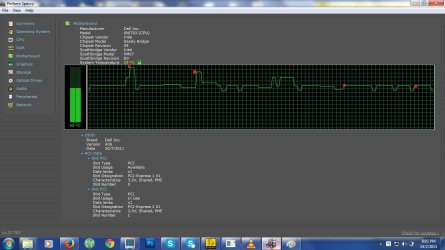
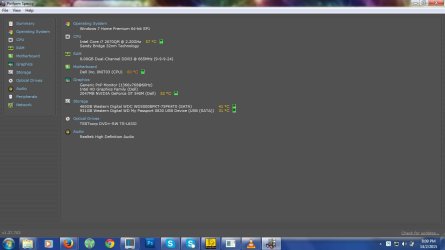
I cleaned up the vents etc .. and its still overheating and ... it causes freezes at random temperature ... screenshot attached with red marks(red marks=freeze)

This freezes last like 1sec but its quite annoying as it happens randomly but within every min or two.
Anyideas?

And CPU heat seems to be stay around 50-59 .. but motherboard it pretty stays above 65

Also I created a speccy snapshot taken right after freeze(in case it helps), here is the url: http://speccy.piriform.com/results/acXc44unnfux72WRJ3nRGAl
 

Attachments

  • ss1.jpg
    ss1.jpg
    111.1 KB · Views: 0
  • ss2.jpg
    ss2.jpg
    59.5 KB · Views: 0

My Computer My Computer

At a glance

Windows 7 Home Premium, Version 6.1 (Build 76...
OS
Windows 7 Home Premium, Version 6.1 (Build 7601: Service Pack 1)
This is rather strange .... I did some extensive research and found this article ... dell xps l502x freezes making buzzz sound while playing audio or video file - Laptop Audio Forum - Laptop - Dell Community

It seems those 2 software are the culprit, after uninstalling them this freeze issue stopped for now, I'll keep it under observation for next 24hours and see how it goes.

Now that one issue is probably resolved, anyone have an idea as to how can I keep my systems temperature down? Its quite jumpy ... even when using vlc player with 480p video .. and pretty much nothing else running .. CPU temp stays at around 59-75 C ...and motherboard about 65-90 C.
Any idea on keeping the temp under control .. atleast when not running games etc that requires high CPU/GPU process?
 

My Computer My Computer

At a glance

Windows 7 Home Premium, Version 6.1 (Build 76...
OS
Windows 7 Home Premium, Version 6.1 (Build 7601: Service Pack 1)
How old is this laptop? Maybe renewing the thermo paste will help
 

My Computer My Computer

At a glance

win 10
Computer type
PC/Desktop
Computer Manufacturer/Model Number
dell xps 9000
OS
win 10
Its about 3 years I think ...
 

My Computer My Computer

At a glance

Windows 7 Home Premium, Version 6.1 (Build 76...
OS
Windows 7 Home Premium, Version 6.1 (Build 7601: Service Pack 1)
Any idea what could be causing the auto instant shutdowns?
 

My Computer My Computer

At a glance

Windows 7 Home Premium, Version 6.1 (Build 76...
OS
Windows 7 Home Premium, Version 6.1 (Build 7601: Service Pack 1)
well could still be a heat problem. does it do the same thing when running on just battery? try brunning it with the battery removed from laptop.
 

My Computer My Computer

At a glance

win 10
Computer type
PC/Desktop
Computer Manufacturer/Model Number
dell xps 9000
OS
win 10
I tried that .. system seems to stay overheated with or w/o battery. Someone suggested it could be a motherboard issue? could it?
 

My Computer My Computer

At a glance

Windows 7 Home Premium, Version 6.1 (Build 76...
OS
Windows 7 Home Premium, Version 6.1 (Build 7601: Service Pack 1)
It possible you feel comfortable taking laptop apart to clean and reapply thermo paste
 

My Computer My Computer

At a glance

win 10
Computer type
PC/Desktop
Computer Manufacturer/Model Number
dell xps 9000
OS
win 10
ok I'll try that
 

My Computer My Computer

At a glance

Windows 7 Home Premium, Version 6.1 (Build 76...
OS
Windows 7 Home Premium, Version 6.1 (Build 7601: Service Pack 1)
I know its an old thread but the question is related to this one .. so I'm gonna ask here ... I was having random auto-shutdown issue with my dell laptop and it seems according to this article ... dell xps l502x freezes making buzzz sound while playing audio or video file - Laptop Audio - Laptop - Dell Community couple of dell software updates caused this issue and after removing them it was working fine but one of those software's are "My Dell" ... it can be used to monitor battery health, HDD,processor performance etc .. its quite helpful and I just noticed it was removed along with those updates.

Anyone know where do l get a previous version of this software? (like maybe 4/5 months back or perhaps years old version is fine .. as I only use it for checking purposes.
 

My Computer My Computer

At a glance

Windows 7 Home Premium, Version 6.1 (Build 76...
OS
Windows 7 Home Premium, Version 6.1 (Build 7601: Service Pack 1)
Back
Top