
Unwanted Network Activity - Constant Usage

Sanosuke

New member
Local time
3:51 PM
Messages
3
Hi everyone,

I'm posting because I have a strange problem with windows 7 in recent days. I have a NAS on my network (D-link 323) and recently windows is constantly transferring either to or from it. I'm not sure what's going on and the level of utilization seems to vary. I've included a screenshot of resource monitor which shows that it's a system process transferring to the NAS. Any ideas would be much appreciated because I'm not sure how to go about finding out what's causing this problem.

Thanks for your help!
Sano
 

Attachments
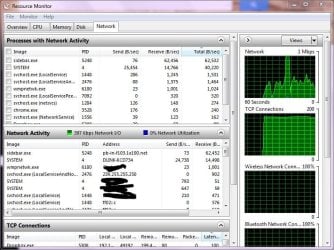
  • ResMon.JPG
    ResMon.JPG
    100.2 KB · Views: 100

My Computer

OS
Windows 7 32 bit
Sidebar.exe has to do with Windows' gadgets. Any gadgets running?
 

My Computer

Computer Manufacturer/Model Number
Mine
OS
Windows 7 Home Premium x64
CPU
AMD FX-8150
Motherboard
ASUS Sabertooth 990FX
Memory
Corsair Vengeance Dual-Channel 1866MHz 8GB (2x4GB)
Graphics Card(s)
x2 Galaxy GeForce GTX 560 2GB in SLI
Sound Card
(Onboard) Realtek ALC892
Monitor(s) Displays
Dynex 42 inch HDTV
Screen Resolution
1920x1080
Hard Drives
Seagate Barracuda 2TB (SATA);
My Book 300GB (USB);
My Book 3TB (USB)
PSU
Kingwin KX-1000
Case
Corsair Carbide 500R
Cooling
Corsair H100
Keyboard
Logitech Wireless Solar K750
Mouse
Logitech Wireless M305
Internet Speed
DSL (unsure of details)
Other Info
LiteOn iHBS212 Blu-Ray Writer (SATA)
hi,

Thanks for the reply. I have weather gadgets running, but they've been there for some time with no issue. The process which is creating the majority of the network traffic is the system process you can see in the screenshot which is transferring with my D-Link NAS. I expect occasional traffic from my gadgets as they need to update, but I'm not sure where the constant traffic to my nas is coming from. Whenever I'm away from my home network I don't have the problem, but as soon as I reconnect to the my home network windows starts transferring to and from my NAS like crazy.

Thanks for your help,
Sano
 

My Computer

OS
Windows 7 32 bit
In a situation like this where everything has been running sweet and you have not changed anything (at least I think this is the case ?), I would be checking you have not picked up any nasties e.g. malware, virus etc....

Just a suggestion.
 

My Computer

Computer Manufacturer/Model Number
HP Desktop Slimline
OS
Windows 7 Home Premium 64-bit
CPU
Athlon
Memory
3GB
Graphics Card(s)
Integrated
Monitor(s) Displays
HP 20" LCD
Hard Drives
500GB
Internet Speed
Slow
I've got AVG running and I think it's been doing a reasonable job of keeping anything odd at bay. I tried running a full system scan but AVG doesn't find anything so I'ms till not sure where to go from here. It's really odd that there would be constant talk between a system process and my NAS.... I just don't really understand it!
 

My Computer

OS
Windows 7 32 bit
You haven't set it up for backup or anything? Haven't set it up for a page file? I'm not familiar with those or networks really so I'll probably be of no help at this point, sorry.
 

My Computer

Computer Manufacturer/Model Number
Mine
OS
Windows 7 Home Premium x64
CPU
AMD FX-8150
Motherboard
ASUS Sabertooth 990FX
Memory
Corsair Vengeance Dual-Channel 1866MHz 8GB (2x4GB)
Graphics Card(s)
x2 Galaxy GeForce GTX 560 2GB in SLI
Sound Card
(Onboard) Realtek ALC892
Monitor(s) Displays
Dynex 42 inch HDTV
Screen Resolution
1920x1080
Hard Drives
Seagate Barracuda 2TB (SATA);
My Book 300GB (USB);
My Book 3TB (USB)
PSU
Kingwin KX-1000
Case
Corsair Carbide 500R
Cooling
Corsair H100
Keyboard
Logitech Wireless Solar K750
Mouse
Logitech Wireless M305
Internet Speed
DSL (unsure of details)
Other Info
LiteOn iHBS212 Blu-Ray Writer (SATA)
I've got AVG running and I think it's been doing a reasonable job of keeping anything odd at bay. I tried running a full system scan but AVG doesn't find anything so I'ms till not sure where to go from here. It's really odd that there would be constant talk between a system process and my NAS.... I just don't really understand it!


AVG is not so much recommended on this forum and i personally feel AVG doesn't catch many nasties.Better download free version of Malwarebytes : Malwarebytes Anti-Malware PRO removes malware including viruses, spyware, worms and trojans, plus it protects your computer and have a full scan of your system to rule out any viruses/trojans etc.
 

My Computer

Computer Manufacturer/Model Number
DELL
OS
Windows 8 Pro
CPU
intel i3 2.40 Ghz
Motherboard
DELL inc
Memory
6 GB RAM
Graphics Card(s)
Integrated Intel HD
Sound Card
Realtek high definition SRS surround sound
Screen Resolution
1366*768
Hard Drives
320 GB
Internet Speed
1Mbps
Back
Top