
Update available, fails upon updating

CowPieSoup

New member
Member
Local time
8:41 AM
Messages
28
I have Windows 7 Ultimate 64bit. I seem to have an update, but every time I attempt an install of the update, I am awarded with an error message. My PC proceeds to reboot, fail to update again, reboot, undo changes, and then finally boot to desktop. Here is a picture of the update in question.
 

My Computer My Computer

OS
Windows 7 Home Premium 64bit
CPU
Intel Core 2 Extreme Qx6700 ~3.2ghz
Motherboard
N/a
Memory
4gb Ram
Graphics Card(s)
Geforce 8800 Ultra
Sound Card
Xfi Soundblaster Titanium Fatal1ty Edition
Monitor(s) Displays
2x 1680x1050 Monitors
Hard Drives
1tb Seagate
500gb Seagate
320gb Samsung
Really? Nobody has ANY insight?
 

My Computer My Computer

OS
Windows 7 Home Premium 64bit
CPU
Intel Core 2 Extreme Qx6700 ~3.2ghz
Motherboard
N/a
Memory
4gb Ram
Graphics Card(s)
Geforce 8800 Ultra
Sound Card
Xfi Soundblaster Titanium Fatal1ty Edition
Monitor(s) Displays
2x 1680x1050 Monitors
Hard Drives
1tb Seagate
500gb Seagate
320gb Samsung
Have all of the important updates installed correctly? Also i've seen problems reported with windows update involving the time settings. Check if the bios and system date and time are in sync.
If it's not marked important ignore it.

Ken
 

My Computer My Computer

Computer Manufacturer/Model Number
Dell Optiplex 980
OS
Win7 x64 Ultimate SP1
CPU
Intel i7-2600
Memory
8 Gig
Graphics Card(s)
Geforce gt 520
Monitor(s) Displays
LG & Acer
Screen Resolution
1920x1080
Internet Speed
Fios 45/35
Other Info
Windows Home Server
It IS marked important. I would not be concerned if it weren't.

My BIOS and System clocks have been in sync for a while now, so I am not sure why they would all the sudden unsync. No, my motherboard battery is not dead. No, there weren't any storms recently that could surge the power.
 

My Computer My Computer

OS
Windows 7 Home Premium 64bit
CPU
Intel Core 2 Extreme Qx6700 ~3.2ghz
Motherboard
N/a
Memory
4gb Ram
Graphics Card(s)
Geforce 8800 Ultra
Sound Card
Xfi Soundblaster Titanium Fatal1ty Edition
Monitor(s) Displays
2x 1680x1050 Monitors
Hard Drives
1tb Seagate
500gb Seagate
320gb Samsung
Must be a conflict with another installed program. Seem to remember this happened to me a while back. Seemed to have installed the next time update ran on it's own. As long as everything else is functioning i'd take a wait and see approach.
 

My Computer My Computer

Computer Manufacturer/Model Number
Dell Optiplex 980
OS
Win7 x64 Ultimate SP1
CPU
Intel i7-2600
Memory
8 Gig
Graphics Card(s)
Geforce gt 520
Monitor(s) Displays
LG & Acer
Screen Resolution
1920x1080
Internet Speed
Fios 45/35
Other Info
Windows Home Server
I have Windows 7 Ultimate 64bit. I seem to have an update, but every time I attempt an install of the update, I am awarded with an error message. My PC proceeds to reboot, fail to update again, reboot, undo changes, and then finally boot to desktop. Here is a picture of the update in question.

First of all you didn't say what exactly error code & message you have.You can also try diagnose WU through build-in Troubleshooter

Control Panel>>Troubleshhoting>>System & Security>>Fix problems with Windows Update

You can also try install this hotfix manually from Microsoft Download Center http://support.microsoft.com/kb/974431 on clean boot How to perform a clean boot procedure to determine whether background programs are interfering with a game or a program that you currently use (read for Vista suggestions)

somebody says update Windows Update Agent http://download.windowsupdate.com/windowsupdate/redist/standalone/7.4.7600.226/windowsupdateagent30-x64.exe can fix it issue <-try this

If above don't help follow to below:

Run cmd.exe with administrative previlliges (right click on cmd.exe) as admin and type:

sfc /scannow

When it finish type in cmd.exe

findstr /c:"[SR]" %windir%\logs\cbs\cbs.log >%userprofile%\Desktop\sfcdetails.txt

on your desktop appear sfcdetails.txt

Download firegenul Altair Technologies Ltd.
place firegenul.exe in C:\Windows\System32 next again run cmd.exe with admin previlliges and type:

firegenul

Run also Readiness Tool Description of the System Update Readiness Tool for Windows Vista, for Windows Server 2008, and for Windows 7

This tool even if it don't solve issue automatically it create CheckSur.log file in C:\Windows\Logs\CBS folder

All files CheckSur.log,sfcdetails.txt,FiregenReport.htm pack all together to ZIP format and attache to post
 
Last edited:

My Computer My Computer

Computer Manufacturer/Model Number
Custom made
OS
Windows 7 Professional x64 PL
CPU
AMD Athlon 4450e
Motherboard
Giga-Byte GA-MA69G-S3H
Memory
GoodRam DDR2 2x2048MB (FSB 800MHz)
Graphics Card(s)
nVidia GeForce 9600GT (G94-300) 1024 MB
Monitor(s) Displays
SAMSUNG SyncMaster HS2P301688
Hard Drives
Seagate ST3750330AS 750GB
PSU
Corsair 550W
Cooling
AeroCool ExtremeEngine 3T
The System update readiness tool didn't work. It gave me an error message stating it was already installed when it wasn't.
 

Attachments

My Computer My Computer

OS
Windows 7 Home Premium 64bit
CPU
Intel Core 2 Extreme Qx6700 ~3.2ghz
Motherboard
N/a
Memory
4gb Ram
Graphics Card(s)
Geforce 8800 Ultra
Sound Card
Xfi Soundblaster Titanium Fatal1ty Edition
Monitor(s) Displays
2x 1680x1050 Monitors
Hard Drives
1tb Seagate
500gb Seagate
320gb Samsung
Your error code is 0xC004F050 as many other which looking on solution on MS Technet and of course many other forums.There is no credible solution for this and MS is still silent

I filtered your log View attachment Fixer.txt

and it say you have unable to repair following files:

C:\Windows\System32\spp\tokens\pkeyconfig\pkeyconfig.xrm-ms
C:\Windows\SysWOW64\en-US\iassdo.dll.mui
C:\Windows\System32\en-US\iassdo.dll.mui


//remeber iassdo.dll.mui from SYSWOW64 and iassdo.dll.mui from SYSTEM32 are different -not the same!
Two ways to fix

METHOD I
1.Takeownership of corrupted file and give Administrators group full control to them

//how to do that read Take Ownership of file - Vista Forums //

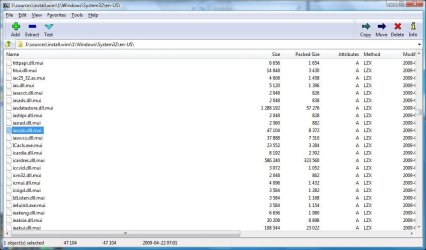
2.Extract from your Win7 DVD required files - exactly you have to extract from X:\Sources\Install.wim (where X -your DVD drive) to do that I suggest use 7-zip or WinRAR (image)

COF.jpg

and replace corrupted files

3.For sure restart computer and try again install hotfix

METHOD II http://www.sevenforums.com/tutorials/3413-repair-install.html
 

My Computer My Computer

Computer Manufacturer/Model Number
Custom made
OS
Windows 7 Professional x64 PL
CPU
AMD Athlon 4450e
Motherboard
Giga-Byte GA-MA69G-S3H
Memory
GoodRam DDR2 2x2048MB (FSB 800MHz)
Graphics Card(s)
nVidia GeForce 9600GT (G94-300) 1024 MB
Monitor(s) Displays
SAMSUNG SyncMaster HS2P301688
Hard Drives
Seagate ST3750330AS 750GB
PSU
Corsair 550W
Cooling
AeroCool ExtremeEngine 3T
Back
Top