Update error code 80072712

Earendil

New member
Local time
12:32 PM
Messages
11
Hi guys.
I had this problem in this particular PC for a couple of years now and just missed all the updates.., but now with the W10 comming I'd love to update it.. but it is failing in most of the old updates, so can't "reach" the W10 update..


1. Installed SURT,
2. SFC scan runs suspiciously fast.. it takes just a sec. and reports no problems... so might be fake OK.
3. Error code is 80072712
4. Log is bit too big (some cabs inside?) so I have uploaded it in dropbox:

https://www.dropbox.com/s/lzo0qdb36fb4t5e/CBS.zip?dl=0

I hope with your help I'll be able to update without reinstalling..
 

My Computer

Computer type
PC/Desktop
Computer Manufacturer/Model Number
built
OS
Windows 7 Professional 64 bit
CPU
Intel Core 2 Duo E8400 3000 Mhz
Memory
4 GB
Graphics Card(s)
GeForce 9600 GT
bump?!
 

My Computer

Computer type
PC/Desktop
Computer Manufacturer/Model Number
built
OS
Windows 7 Professional 64 bit
CPU
Intel Core 2 Duo E8400 3000 Mhz
Memory
4 GB
Graphics Card(s)
GeForce 9600 GT
Sorry - it's been kinda busy!

Doesn't look good :(
From the CheckSUR...
Code:
Checking Packages
(f)	CSI Unable to Query Store Version	0x00000002

From the CBS.log...
Code:
2015-07-30 10:57:19, Info                  CBS    Exec: Resolving Package: Package_1_for_KB2862330~31bf3856ad364e35~amd64~~6.1.2.0, Update: 2862330-1_neutral_LDR, PinDeployment: amd64_usb.inf_31bf3856ad364e35_6.1.7601.22526_none_299f212a3e35e893
2015-07-30 10:57:19, Info                  CSI    0000000d Performing 1 operations; 1 are not lock/unlock and follow:
  Stage (1): flags: 8 app: [usb.inf, Version = 6.1.7601.22526, pA = PROCESSOR_ARCHITECTURE_AMD64 (9), Culture neutral, VersionScope = 1 nonSxS, PublicKeyToken = {l:8 b:31bf3856ad364e35}, Type = [l:24{12}]"driverUpdate", TypeName neutral, PublicKey neutral]) comp: (null) man: @0x115b118
2015-07-30 10:57:19, Error                 CSI    0000000e@2015/7/30:07:57:19.851 (F) d:\win7sp1_gdr\base\wcp\componentstore\storelayout.cpp(11690): Store corruption detected in function ComponentStore::CRawStoreLayout::CheckFamilyIndexForDeadWinnerComponent expression: (null)
  MissingWinningComponentKey on resource [67]"amd64_usb.inf_31bf3856ad364e35_6.1.7601.17586_none_28d4bd852548d3f5"[gle=0x80004005]
2015-07-30 10:57:24, Error                 CSI    0000000f (F) STATUS_SXS_COMPONENT_STORE_CORRUPT #22137# from CCSDirectTransaction::OperateEnding at index 0 of 1 operations, disposition 0[gle=0xd015001a]
2015-07-30 10:57:24, Error                 CSI    00000010 (F) HRESULT_FROM_WIN32(14098) #21992# from Windows::ServicingAPI::CCSITransaction::ICSITransaction_PinDeployment(Flags = 0, a = usb.inf, Version = 6.1.7601.22526, pA = PROCESSOR_ARCHITECTURE_AMD64 (9), Culture neutral, VersionScope = 1 nonSxS, PublicKeyToken = {l:8 b:31bf3856ad364e35}, Type = [l:24{12}]"driverUpdate", TypeName neutral, PublicKey neutral, cb = (null), s = (null), rid = [77]"Package_1_for_KB2862330~31bf3856ad364e35~amd64~~6.1.2.0.2862330-1_neutral_LDR", rah = [1]"3", manpath = [154]"\\?\C:\Windows\SoftwareDistribution\Download\eae38647845ac30f6f78b1632e02724c\amd64_usb.inf_31bf3856ad364e35_6.1.7601.22526_none_299f212a3e35e893.manifest", catpath = (null), ed = 0, disp = 0)[gle=0x80073712]

I need to have a look at your COMPONENTS registry hive

Please copy the C:\Windows\System32\config\COMPONENTS file (no extension) to your desktop and then compress it - upload the compressed file to your favoured fileshare site (preferably Dropbox or OneDrive) and post a link.
 

My Computer

Computer type
Laptop
Computer Manufacturer/Model Number
Asus K52F or Lenovo B51-80
OS
Win 7 x64 Home Premium (and x86 VirtualBox VM)/Win10
CPU
i3 370M/i7 6500U
Motherboard
Asus/Lenovo
Memory
8GB - finally :)/8GB
Graphics Card(s)
it's an i3, dude!/dual Intel&nVidia
Sound Card
onboard
Monitor(s) Displays
15.6" built-in
Screen Resolution
1366x768/1920x1080
Hard Drives
750GB Seagate internal
Sundry external drives attached to other computers on the local network
1TB SSD on the Lenovo
PSU
n/a
Internet Speed
as much as I can get - usually on a dongle/phone, so <1MB/s
Antivirus
MSE/Defender
Browser
IE11/12/Edge/Chrome/FF(if I must)
From what I can see in the hive, I rather think you're going to have to reinstall - but we'll try this anyhow...

I've uploaded a file - aeraa.zip - to my OneDrive at Noel's OneDrive
Please download and save it to your desktop.
Right-click on the file and select Extract All, and save to the default destination (which should be a folder on the desktop)

Create a new System Restore point

Open an Elevated Command Prompt, and run the following commands.

Code:
IF EXIST C:\Windows\System32\config\COMPONENTS.OLD1 DEL C:\Windows\System32\config\COMPONENTS.OLD1
REN C:\Windows\System32\config\COMPONENTS COMPONENTS.OLD1
COPY "%userprofile%\desktop\aeraa\COMPONENTS" C:\Windows\System32\config
 
.

If you get an error with any command, STOP THERE - do not reboot! - post for instructions.

Assuming all commands go OK, reboot, and run another CheckSUR scan - post the new CheckSUR.log file.
 

My Computer

Computer type
Laptop
Computer Manufacturer/Model Number
Asus K52F or Lenovo B51-80
OS
Win 7 x64 Home Premium (and x86 VirtualBox VM)/Win10
CPU
i3 370M/i7 6500U
Motherboard
Asus/Lenovo
Memory
8GB - finally :)/8GB
Graphics Card(s)
it's an i3, dude!/dual Intel&nVidia
Sound Card
onboard
Monitor(s) Displays
15.6" built-in
Screen Resolution
1366x768/1920x1080
Hard Drives
750GB Seagate internal
Sundry external drives attached to other computers on the local network
1TB SSD on the Lenovo
PSU
n/a
Internet Speed
as much as I can get - usually on a dongle/phone, so <1MB/s
Antivirus
MSE/Defender
Browser
IE11/12/Edge/Chrome/FF(if I must)
Thx,

here are the new logs.
 

My Computer

Computer type
PC/Desktop
Computer Manufacturer/Model Number
built
OS
Windows 7 Professional 64 bit
CPU
Intel Core 2 Duo E8400 3000 Mhz
Memory
4 GB
Graphics Card(s)
GeForce 9600 GT
:confused: Hmm - still the same error!
OK - maybe I need to add another parameter to the brew...

I've uploaded a file - aerab.zip - to my OneDrive at Noel's OneDrive
Please download and save it to your desktop.
Right-click on the file and select Extract All, and save to the default destination (which should be a folder on the desktop)

Create a new System Restore point

Open an Elevated Command Prompt, and run the following commands.

Code:
IF EXIST C:\Windows\System32\config\COMPONENTS.OLD1 DEL C:\Windows\System32\config\COMPONENTS.OLD1
REN C:\Windows\System32\config\COMPONENTS COMPONENTS.OLD1
COPY "%userprofile%\desktop\aerab\COMPONENTS" C:\Windows\System32\config
 
.

If you get an error with any command, STOP THERE - do not reboot! - post for instructions.

Assuming all commands go OK, reboot, and run another CheckSUR scan - post the new CheckSUR.log file.
 

My Computer

Computer type
Laptop
Computer Manufacturer/Model Number
Asus K52F or Lenovo B51-80
OS
Win 7 x64 Home Premium (and x86 VirtualBox VM)/Win10
CPU
i3 370M/i7 6500U
Motherboard
Asus/Lenovo
Memory
8GB - finally :)/8GB
Graphics Card(s)
it's an i3, dude!/dual Intel&nVidia
Sound Card
onboard
Monitor(s) Displays
15.6" built-in
Screen Resolution
1366x768/1920x1080
Hard Drives
750GB Seagate internal
Sundry external drives attached to other computers on the local network
1TB SSD on the Lenovo
PSU
n/a
Internet Speed
as much as I can get - usually on a dongle/phone, so <1MB/s
Antivirus
MSE/Defender
Browser
IE11/12/Edge/Chrome/FF(if I must)
Here it is.
 

My Computer

Computer type
PC/Desktop
Computer Manufacturer/Model Number
built
OS
Windows 7 Professional 64 bit
CPU
Intel Core 2 Duo E8400 3000 Mhz
Memory
4 GB
Graphics Card(s)
GeForce 9600 GT
That seems to have done the trick - CheckSUR is happy, at least.

Does Windows Update work now?
 

My Computer

Computer type
Laptop
Computer Manufacturer/Model Number
Asus K52F or Lenovo B51-80
OS
Win 7 x64 Home Premium (and x86 VirtualBox VM)/Win10
CPU
i3 370M/i7 6500U
Motherboard
Asus/Lenovo
Memory
8GB - finally :)/8GB
Graphics Card(s)
it's an i3, dude!/dual Intel&nVidia
Sound Card
onboard
Monitor(s) Displays
15.6" built-in
Screen Resolution
1366x768/1920x1080
Hard Drives
750GB Seagate internal
Sundry external drives attached to other computers on the local network
1TB SSD on the Lenovo
PSU
n/a
Internet Speed
as much as I can get - usually on a dongle/phone, so <1MB/s
Antivirus
MSE/Defender
Browser
IE11/12/Edge/Chrome/FF(if I must)
It let me update a few more updates, but more still failed.

I'll try apply all updates and I'll let you know.
 

My Computer

Computer type
PC/Desktop
Computer Manufacturer/Model Number
built
OS
Windows 7 Professional 64 bit
CPU
Intel Core 2 Duo E8400 3000 Mhz
Memory
4 GB
Graphics Card(s)
GeForce 9600 GT
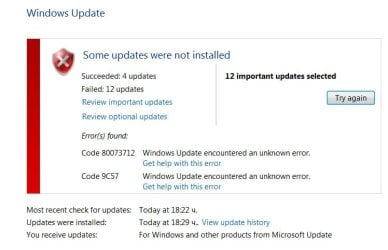
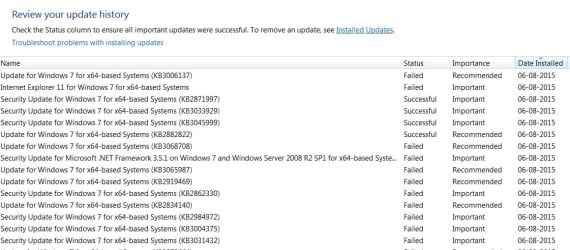
Nope,

attached are error codes and updates which failed.

rgds
 

Attachments

  • 1.jpg
    1.jpg
    35.9 KB · Views: 2
  • 2.jpg
    2.jpg
    90.2 KB · Views: 1

My Computer

Computer type
PC/Desktop
Computer Manufacturer/Model Number
built
OS
Windows 7 Professional 64 bit
CPU
Intel Core 2 Duo E8400 3000 Mhz
Memory
4 GB
Graphics Card(s)
GeForce 9600 GT
OK - please post a new set of logs after running SFC and CheckSUR again.
 

My Computer

Computer type
Laptop
Computer Manufacturer/Model Number
Asus K52F or Lenovo B51-80
OS
Win 7 x64 Home Premium (and x86 VirtualBox VM)/Win10
CPU
i3 370M/i7 6500U
Motherboard
Asus/Lenovo
Memory
8GB - finally :)/8GB
Graphics Card(s)
it's an i3, dude!/dual Intel&nVidia
Sound Card
onboard
Monitor(s) Displays
15.6" built-in
Screen Resolution
1366x768/1920x1080
Hard Drives
750GB Seagate internal
Sundry external drives attached to other computers on the local network
1TB SSD on the Lenovo
PSU
n/a
Internet Speed
as much as I can get - usually on a dongle/phone, so <1MB/s
Antivirus
MSE/Defender
Browser
IE11/12/Edge/Chrome/FF(if I must)
Here it is.
 

My Computer

Computer type
PC/Desktop
Computer Manufacturer/Model Number
built
OS
Windows 7 Professional 64 bit
CPU
Intel Core 2 Duo E8400 3000 Mhz
Memory
4 GB
Graphics Card(s)
GeForce 9600 GT
Some very strange results there -
The CheckSUR took only 39 seconds, and the SFC appears to have only 9 items, rather than the expected 1400 or so!

Please upload the latest COMPONENTS file, and I'll take another look at it.
 

My Computer

Computer type
Laptop
Computer Manufacturer/Model Number
Asus K52F or Lenovo B51-80
OS
Win 7 x64 Home Premium (and x86 VirtualBox VM)/Win10
CPU
i3 370M/i7 6500U
Motherboard
Asus/Lenovo
Memory
8GB - finally :)/8GB
Graphics Card(s)
it's an i3, dude!/dual Intel&nVidia
Sound Card
onboard
Monitor(s) Displays
15.6" built-in
Screen Resolution
1366x768/1920x1080
Hard Drives
750GB Seagate internal
Sundry external drives attached to other computers on the local network
1TB SSD on the Lenovo
PSU
n/a
Internet Speed
as much as I can get - usually on a dongle/phone, so <1MB/s
Antivirus
MSE/Defender
Browser
IE11/12/Edge/Chrome/FF(if I must)
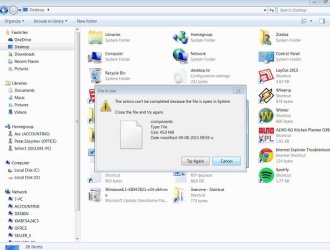
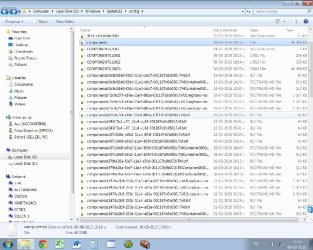
Now it does not allow me to either copy or zip it. It says it is open in system...

See attachments.

Should I try and copy it in safe mode? Or this indicates some other problem?
 

Attachments

  • 1.jpg
    1.jpg
    36.5 KB · Views: 4
  • 2.jpg
    2.jpg
    124.6 KB · Views: 0

My Computer

Computer type
PC/Desktop
Computer Manufacturer/Model Number
built
OS
Windows 7 Professional 64 bit
CPU
Intel Core 2 Duo E8400 3000 Mhz
Memory
4 GB
Graphics Card(s)
GeForce 9600 GT
Boot to Safe Mode, and do the copy there.
 

My Computer

Computer type
Laptop
Computer Manufacturer/Model Number
Asus K52F or Lenovo B51-80
OS
Win 7 x64 Home Premium (and x86 VirtualBox VM)/Win10
CPU
i3 370M/i7 6500U
Motherboard
Asus/Lenovo
Memory
8GB - finally :)/8GB
Graphics Card(s)
it's an i3, dude!/dual Intel&nVidia
Sound Card
onboard
Monitor(s) Displays
15.6" built-in
Screen Resolution
1366x768/1920x1080
Hard Drives
750GB Seagate internal
Sundry external drives attached to other computers on the local network
1TB SSD on the Lenovo
PSU
n/a
Internet Speed
as much as I can get - usually on a dongle/phone, so <1MB/s
Antivirus
MSE/Defender
Browser
IE11/12/Edge/Chrome/FF(if I must)
It's what I was afraid of - almost all of one major subkey is 'missing' - and my skills aren't up to finding the disjoint in the data to make it reappear (there's probably an illegal character in there that's blocking the registry from loading the rest of the file.

I can't see any other options now than either a repair install or a clean install :(
 

My Computer

Computer type
Laptop
Computer Manufacturer/Model Number
Asus K52F or Lenovo B51-80
OS
Win 7 x64 Home Premium (and x86 VirtualBox VM)/Win10
CPU
i3 370M/i7 6500U
Motherboard
Asus/Lenovo
Memory
8GB - finally :)/8GB
Graphics Card(s)
it's an i3, dude!/dual Intel&nVidia
Sound Card
onboard
Monitor(s) Displays
15.6" built-in
Screen Resolution
1366x768/1920x1080
Hard Drives
750GB Seagate internal
Sundry external drives attached to other computers on the local network
1TB SSD on the Lenovo
PSU
n/a
Internet Speed
as much as I can get - usually on a dongle/phone, so <1MB/s
Antivirus
MSE/Defender
Browser
IE11/12/Edge/Chrome/FF(if I must)
Thank you for trying !
 

My Computer

Computer type
PC/Desktop
Computer Manufacturer/Model Number
built
OS
Windows 7 Professional 64 bit
CPU
Intel Core 2 Duo E8400 3000 Mhz
Memory
4 GB
Graphics Card(s)
GeForce 9600 GT
Back
Top